
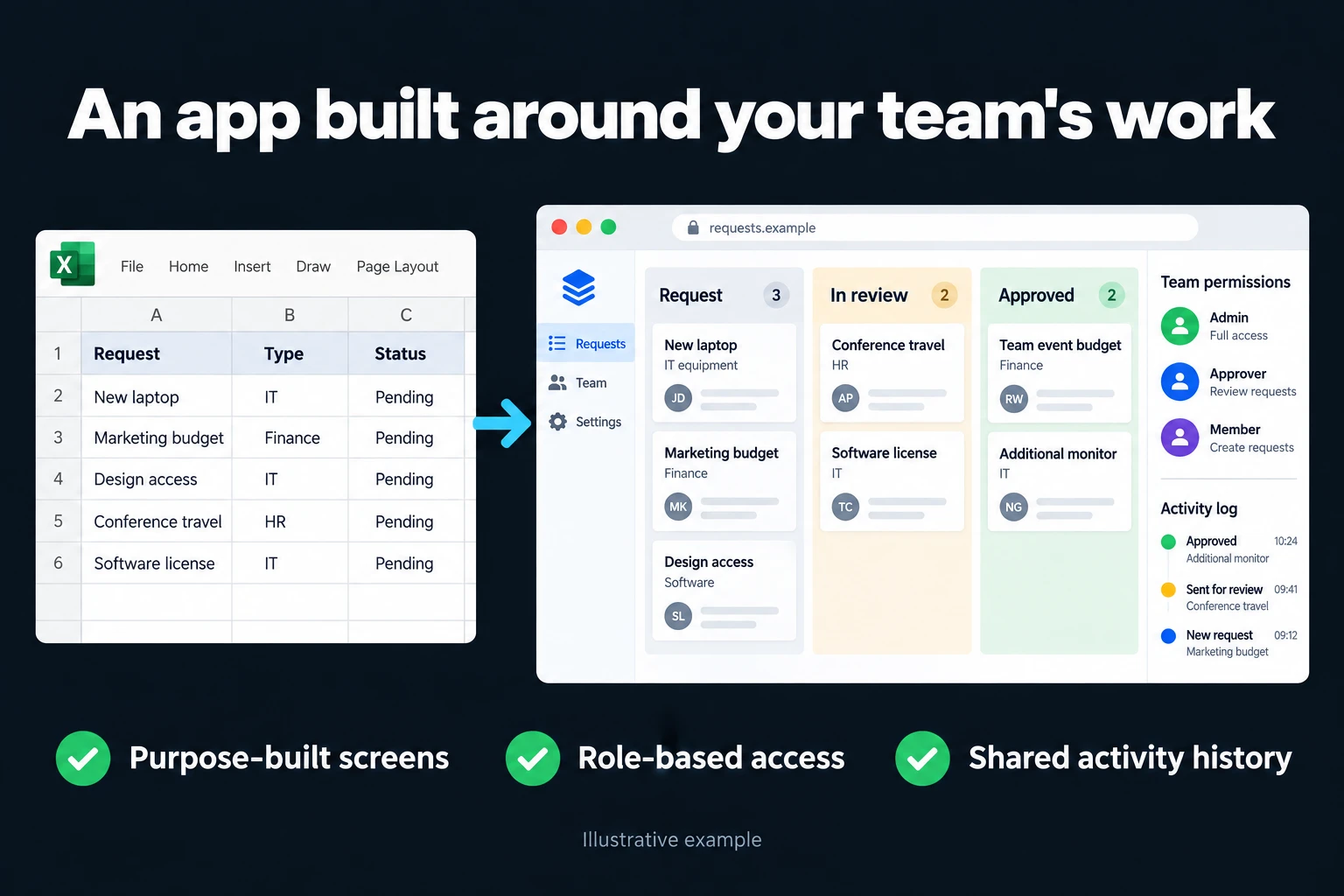
Move the Work You Run in Excel into a Web App Your Whole Team Uses
I turn work you run in Excel or Google Sheets into a custom web application your team uses together. The file stops travelling by email and WhatsApp. The app runs on a server and the records live in one database. Everyone logs in with their own account, sees and edits the fields that belong to their job, and every change is logged with who made it. It works in a browser on a phone or a laptop.
Below are the screens I can build this way, grouped by topic. Each one focuses on a single need; a real project usually combines several of them. I describe the overall process, the server setup and pricing on the Excel to web app page. You can start with the 5-hour package (TRY 10,000 + VAT); the other packages are at the bottom of the page.
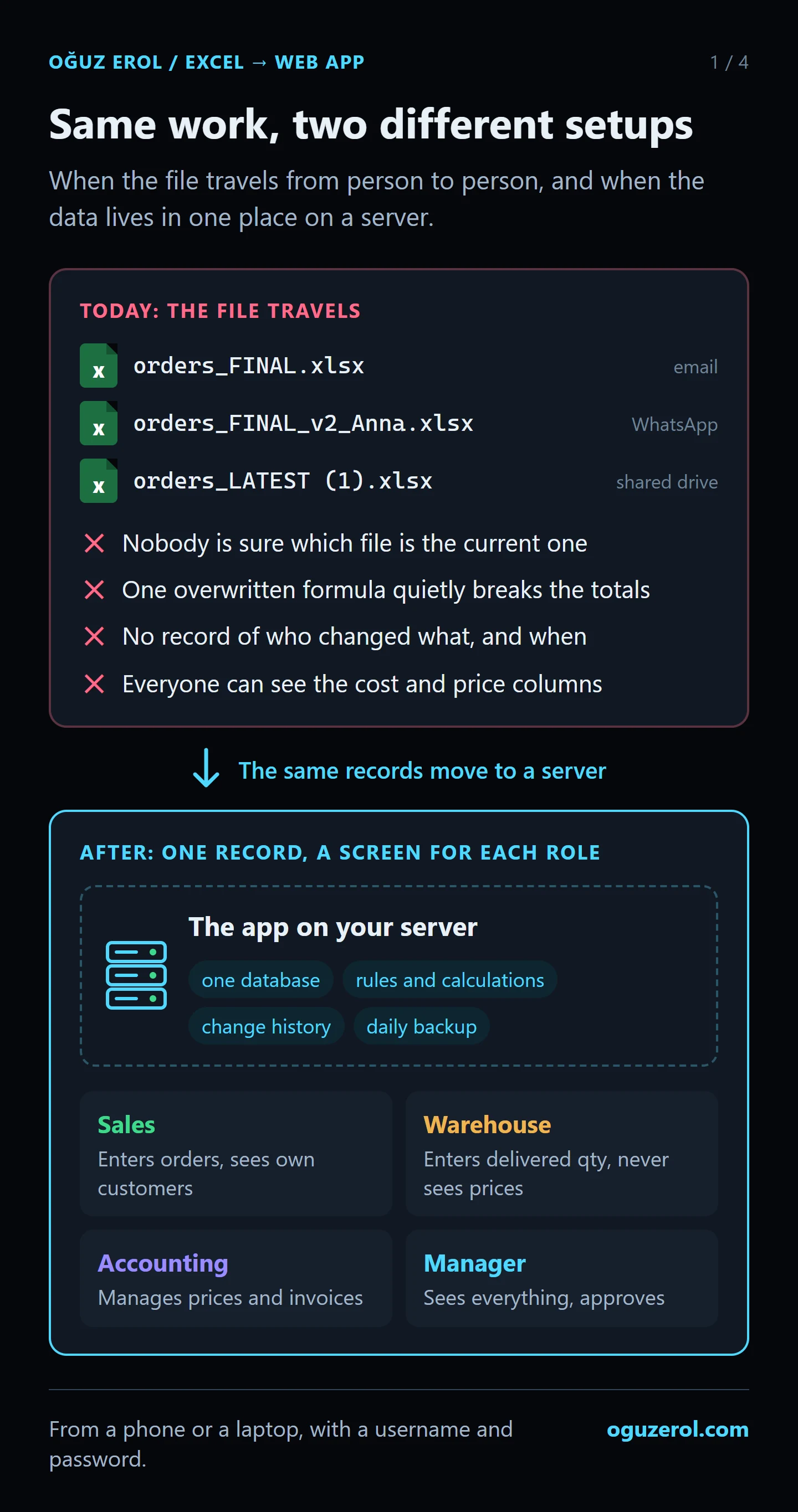
How we start your custom application
We first review your current spreadsheet and the task that needs the most attention. I identify who enters each piece of information, how calculations work and which steps require approval. The first version focuses on that core workflow, followed by feedback from the people who will use it. This gives us a practical starting point and a clear order for further features.
Mobile and desktop use, data migration, access permissions and update frequency are defined for your project. I can develop applications running on a VPS and connect them to other tools where data access is available. Hosting, maintenance and source-system access are considered at the start.
Could Excel or Google Sheets already meet the need?
Both tools support collaboration, calculations and validation. A custom application becomes worth considering when you need different record access for each user, a multi-step approval process or screens designed for particular roles. Improving the existing spreadsheet may also be the right solution.
Four guides that may help before you decide:
- How to share an Excel file with multiple users: when co-authoring is enough, and why the “file is locked” message appears.
- How to lock cells in Excel: the steps for protecting formulas, and where a lock stops being enough.
- AppSheet vs a custom web app: what building a no-code app on Google Sheets solves and what it doesn’t.
- Can you use Google Sheets or Excel as a database?: the difference, the limits and how to move.
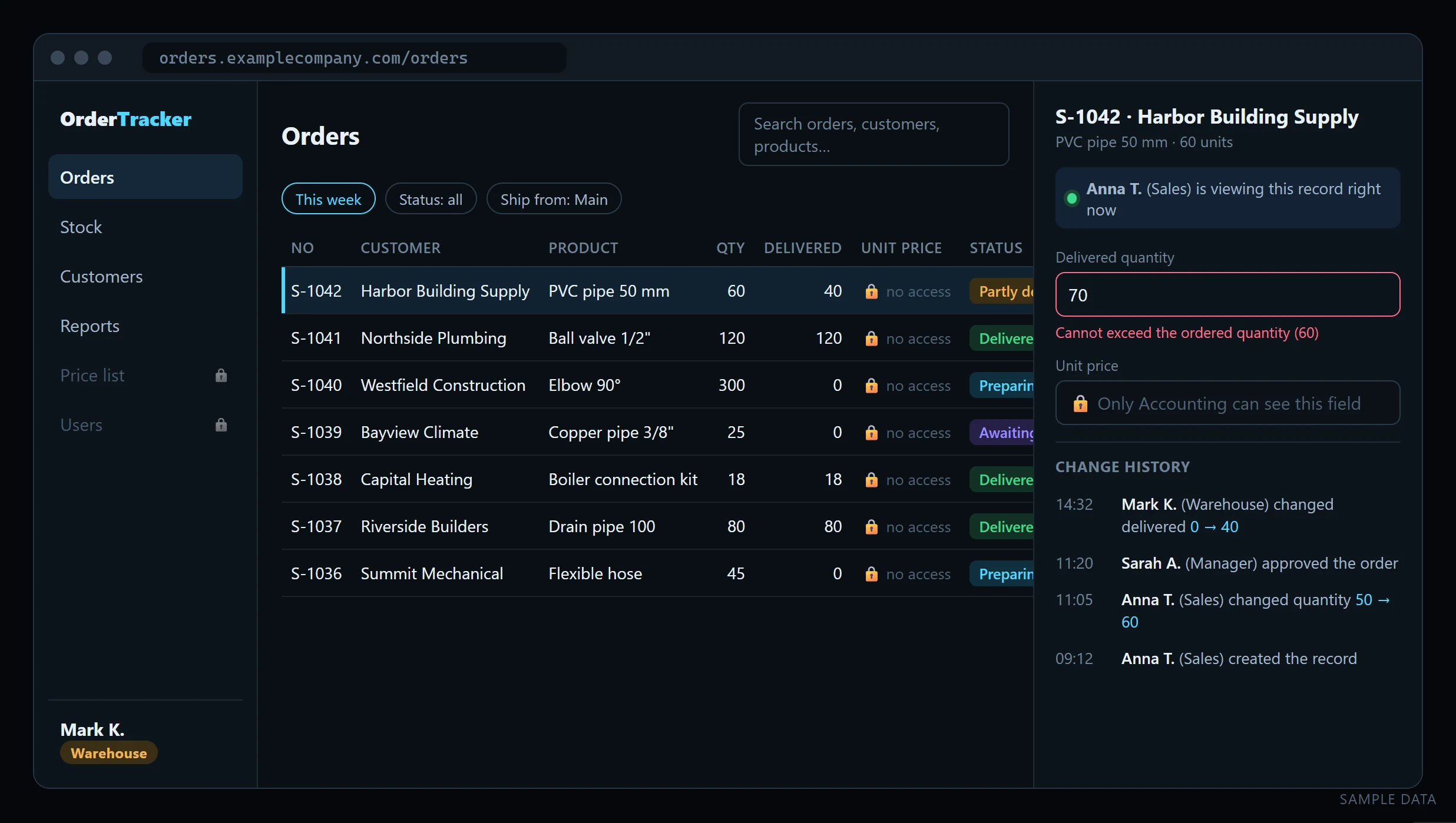
Find the workflow you need
User permissions and teamwork
- Excel Cell-Level Permissions Panel
- Assigned Records Tracking Portal
- Role-Based Screens for Sales and Operations
- Cost-Protected Quoting Portal
- Branch-Based Data Entry System
- Client Project Status Portal
- Supplier Delivery Date Portal
- Approved Record Change Control
- Record Change History
- Time-Limited External Team Access
Excel and Google Sheets forms
- Dependent Dropdown Custom Forms
- Product and Customer Autofill Form
- Price and Cost Calculation Screen
- Searchable Product Selection Screen
- Rules-Based Data Entry Form
- Searchable Form Records System
- Concurrent Data Entry App
- Controlled Excel Import Screen
- Mobile Alternative to an Excel Form
- PDF Documents from Form Records
Expenses, budgets and payments
- Mobile Employee Expense Entry
- Expense Permissions and Reporting Screen
- Employee Expense Approval Workflow
- Budget vs Actual Expense Dashboard
- Expense Receipt and Document Tracking
- Track Staff Advances and Reported Expenses Together
- See Each Project’s Costs Separately
- Remind the Right Person About Upcoming Payments
- Track Recurring Costs and Subscription Renewals
- Collect Daily Income and Expense Entries in One Place
Inventory, orders and quotes
- Move Stock In and Out to a Shared Team Screen
- Track Stock by Colour and Size Variant
- See Stock by Warehouse on One Screen
- Separate Reserved Stock from Available Quantity
- Make Low-Stock Purchasing Needs Visible
- Track Orders from Preparation to Delivery
- Let Dealers Submit Orders Through Their Own Portal
- Quote Screens That Calculate by Measurement and Option
- Track Quote Revisions and Customer Follow-Ups
- Compare Supplier Quotes on the Same Criteria
Operations and reporting
- Assign Work and See Pending Steps Together
- Track Service Requests from Opening to Completion
- Track Periodic Maintenance by Date, Asset and Owner
- Check Conflicts in Appointment and Resource Planning
- Bring Business Data from Different Files into One Dashboard
- Compare Branch Results Using the Same Definitions
- Custom Reporting Screens for Hotel Reservation Records
- From Excel to a Web App: Room Occupancy Page
- See How Ad Leads Progress to Quotes and Sales
- Build a Repeatable Monthly Reporting Workflow
- Connect Website Forms to Your Team’s Work Tracking Screen
Custom screens for forms, spreadsheets and integrations
These examples cover approval, missing documents, import errors and access rules as well as data entry. Each service page includes an illustrative screen; the actual features are developed within your agreed project scope.
From Google Forms to a custom app
- Custom Google Forms Alternative for Your Workflow
- Conditional Web Forms with Answer-Based Fields
- Order Forms with Repeatable Line Items
- Guest File Upload Forms for Customer Documents
- Save and Resume Application Forms
- Application Status Tracking Portal
- Capacity-Limited Event Registration Forms
- Conditional Email Notifications from Forms
Apps connected to Google Sheets
- A Central Data Portal Beyond IMPORTRANGE
- Filter-Based Reports for Google Sheets QUERY Users
- Multi-Select Forms with Related Records
- Google Sheets and Calendar Synchronisation
- Two-Way Data Sync with Google Sheets
- Threshold Alerts for Google Sheets Data
File imports and scheduled data
- Automatically Combine Excel Files into One App
- Scheduled API Data Imports with a Monitoring Screen
- Import Excel Attachments from Email
- Bank Transaction Matching and Reconciliation App
- Controlled Excel to SQL Database Migration
- Supplier XML Product and Stock Integration
- Power Query Refresh Status and Error Monitoring
Workflows connected to WhatsApp
- WhatsApp and Google Sheets Integration
- WhatsApp Multi-Agent Inbox and Assignment Panel
- WhatsApp Order Status Notifications
- Quote Request Forms Opened from WhatsApp
- Turn WhatsApp Messages into Assigned Tasks
- WhatsApp Opt-In and Preference Management
People and operations apps
- Employee Leave Tracking and Approval App
- Shift Scheduling and Conflict Checks
- Project Timesheet and Work Hours Tracking
- Asset Checkout and Custody Tracking App
- Production Work Orders and Stage Tracking
- Purchase Requisition and Budget Approval App
- Recruitment Applicant and Interview Tracking
- Customer Complaint and Resolution Tracking
- Field Inspection Forms with Photo Evidence
- Quality Inspection Measurements and Exceptions
- Lot and Serial Number Traceability App
- Contract Renewal and Owner Tracking App
- Barcode Inventory Counts and Variance Review
Four questions to ask whoever builds your application
When comparing proposals, clarify the following before comparing the price. Here is how I approach them.
Where is the data, and how can I take it with me? Records live in a database and can be exported to Excel or CSV. The server can be opened in your name. Agree the export, handover and source-code terms in writing before work starts.
What exactly belongs in the first version? I prefer one workflow that the team can use properly. Once people use it, we can choose the next improvement from actual needs.
What happens as users increase? Per-user subscriptions can change the cost of a ready-made product. I do not charge a per-user licence for the application I build; hosting, maintenance and any third-party services still need an agreed scope.
What if we need another field later? I work with hour packages. We agree what the change involves and its estimated time before starting.
What should you bring to the first discussion?
You do not need a technical specification. Bring:
- The file you use today, with confidential details removed or replaced by sample data.
- A rough description of who enters information and who approves it.
- The task that consumes the most time each week.
The application discussed here is an internal tool your team signs into to do work. A public website that introduces your business is a different scope.
Frequently Asked Questions
How quickly can you build a custom application?
I begin with the priority workflow and the screens it needs so I can aim for an initial working version quickly. Focusing on one workflow can reduce the time; a larger scope changes the schedule. User roles, calculations, migration and integrations affect the schedule. I share scope and timing after reviewing your current setup.
Do I have to move to an off-the-shelf product?
No. This service is custom application development. Where appropriate, the application can exchange data with your Excel or Google Sheets files. We can also consider an existing product if it already meets your needs.
Where does the app run, and who holds our data?
The app runs on a server (a VPS) and the records live in its database. The server can be opened in your company’s name. The data is yours, and you can export all of it to Excel or CSV at any time.
How many users can we add? Is there a per-user fee?
There is no per-user licence. The running cost is the server’s monthly fee plus upkeep; for a small or mid-sized team, adding users doesn’t change it.
How is the work priced?
I work remotely and bill hourly. I send the scope and an estimate in writing after I’ve seen your spreadsheet.
Let’s review your workflow
Tell me about your spreadsheet and what’s slowing you down via WhatsApp on +90 549 654 64 89 or the contact page, and we’ll plan the first version together. No presentation, no proposal deck; I look at it and tell you what can be built and how long it takes.
How do I work?
Work-hour packages
Tell me about your business and what you need on WhatsApp or by phone; we agree on a work block of somewhere between 5 and 40 hours and I start doing what is needed. What you get is not a calendar window — it is net working hours spent directly on your business. I can use 40 hours working three days straight, or deliberately spread it out and finish it over a year — whatever the work calls for. I do not spend my time estimating how long something will take, I spend it doing the work; every hour I spend leaves a lasting result in your business. We keep going for as long as you find it useful.
Why not monthly?
Is 40 hours a week?
On a fixed monthly fee both sides are watching the wrong thing: you watch a fixed cost, the other side watches how many more contracts like this they can line up. Working by the hour puts us both in front of the same thing — the real value of the work that got done. I know not having an upfront answer to "how much will this cost in total?" is the natural cost of this model. But instead of paying a fixed fee for months to a setup that is not producing results, you only pay for the qualified time spent on your work — and you see exactly where that time went, start to finish. That is why my clients keep coming back.