
Application Status Tracking Portal
After submitting an application, a customer should be able to understand what happens next. I build status portals where applicants see their own record, its current stage and any action required from them. Staff notes and customer-facing explanations are deliberately separated.
A label such as Missing is not enough on its own. The applicant needs to know which document is missing, why it is needed and where to provide it. The useful portal connects that explanation to a specific action on the existing application.
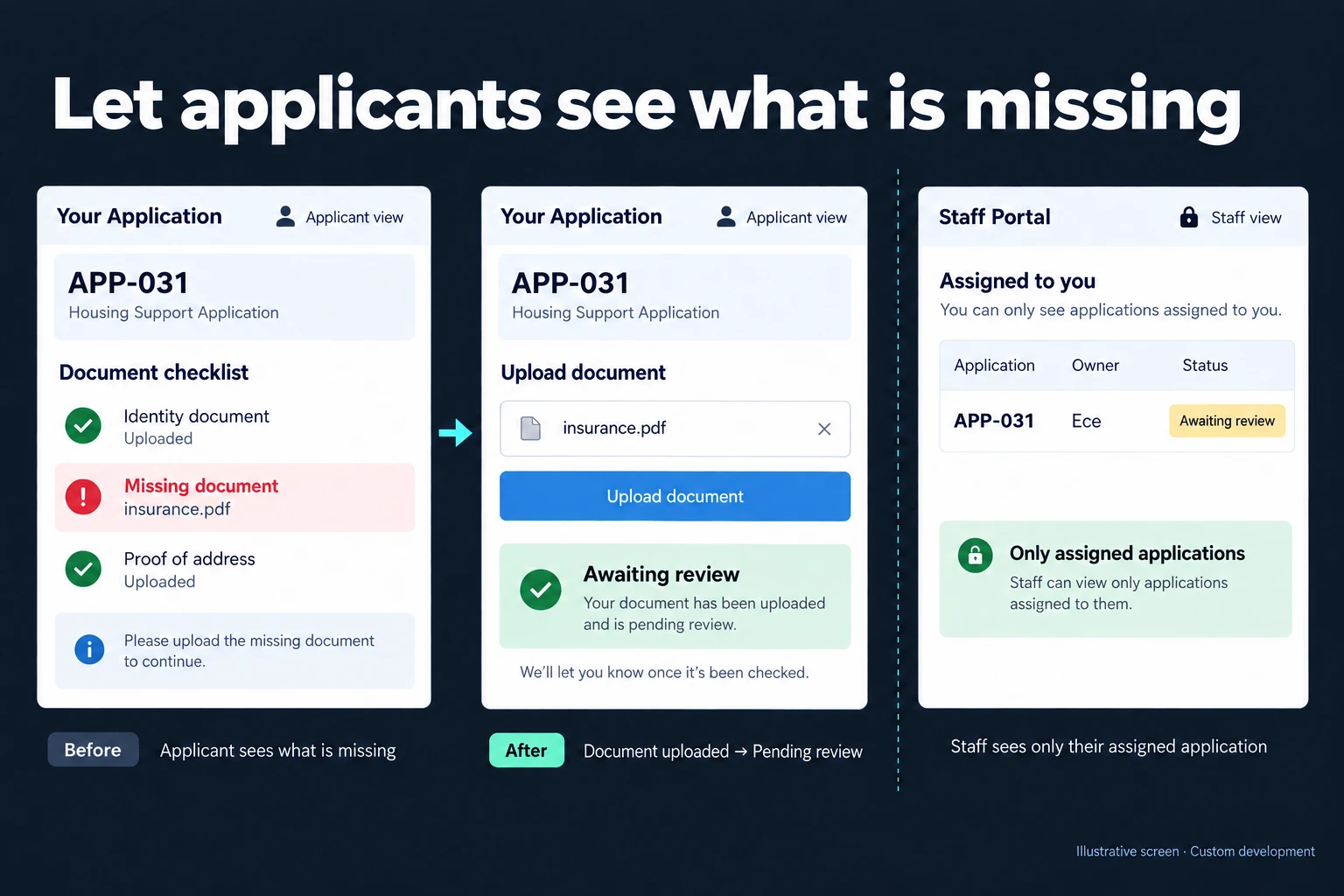
Example: resolving a missing file on APP-031
The illustration uses fictional application APP-031. Its missing item is insurance.pdf. The applicant selects Upload document, submits the file and sees Awaiting review. Completing an upload does not mean the document has been approved or the entire application accepted.
Ece’s staff view shows the same application assigned to her. The applicant receives only their own record, without a list of other applicants or Ece’s internal assessment notes. The identifiers and names are illustrative, not a claim about an existing customer installation.
Response editing and process tracking are different
Google Forms can allow respondents to edit a submitted response when the owner enables it. For a small workflow, reopening that response may be sufficient. A separate portal is not automatically necessary.
The case for a dedicated screen grows when the application moves through review, missing information, resubmission and a final decision, with different editing rights at each stage. A save-and-resume form deals with work before submission. This portal handles the ongoing process afterwards.
Make each correction change the right state
The reviewer records a specific reason when requesting a document. The applicant can be limited to replacing the requested file while previously accepted fields remain protected. Earlier document versions and decisions stay in the history, so a mistaken upload does not erase the evidence used for an earlier review.
If the applicant replaces a file while a reviewer is about to approve its previous version, the app checks that difference. The decision must refer to the current document. Similarly, two staff members entering conflicting decisions should not silently overwrite each other. Those rules are defined alongside the status names.
Notifications can point the applicant to the record without including sensitive details in the message. A reminder should stop when the missing item is submitted, while the staff review task remains open until someone actually evaluates it.
Access, delivery and maintenance
Knowing an application number alone is not treated as sufficient access. We choose a verified sign-in or an appropriate invitation flow, and check record permissions on every request. Testing includes attempts to change an address or document identifier to reach another record, not just checking that the visible list looks correct.
The scope covers status explanations, notifications, document retention and correction of a mistaken decision. A document upload screen and searchable record system can share the same application data. Adding a new status later requires reviewing how existing applications and messages should behave.
Frequently Asked Questions
Can applicants see all staff comments?
No. They receive the information deliberately made available to them. Internal assessment notes and the explanation sent to an applicant can be separate fields with different access rules.
Does uploading a document approve it automatically?
Not in this example. The application returns to the review queue. A file being present does not prove that its contents meet the requirement.
Discuss your workflow
Tell me which status questions your team answers repeatedly. We can define a customer view that explains progress and allows the right corrections without exposing the rest of the team’s work.
How do I work?
Work-hour packages
Tell me about your business and what you need on WhatsApp or by phone; we agree on a work block of somewhere between 5 and 40 hours and I start doing what is needed. What you get is not a calendar window — it is net working hours spent directly on your business. I can use 40 hours working three days straight, or deliberately spread it out and finish it over a year — whatever the work calls for. I do not spend my time estimating how long something will take, I spend it doing the work; every hour I spend leaves a lasting result in your business. We keep going for as long as you find it useful.
Why not monthly?
Is 40 hours a week?
On a fixed monthly fee both sides are watching the wrong thing: you watch a fixed cost, the other side watches how many more contracts like this they can line up. Working by the hour puts us both in front of the same thing — the real value of the work that got done. I know not having an upfront answer to "how much will this cost in total?" is the natural cost of this model. But instead of paying a fixed fee for months to a setup that is not producing results, you only pay for the qualified time spent on your work — and you see exactly where that time went, start to finish. That is why my clients keep coming back.