
Capacity-Limited Event Registration Forms
The number of submitted forms is not necessarily the number of confirmed participants. I build registration applications that distinguish an enquiry, a reserved place and a waitlist entry. The screen explains when a place is actually confirmed, rather than implying that opening a form guarantees availability.
This is more than closing a form after a response count is reached. Simultaneous submissions, cancellations, duplicate requests and waitlist invitations all affect the capacity calculation. Depending on the event, confirmation may also require payment or a staff decision.
Example: two requests for the final place
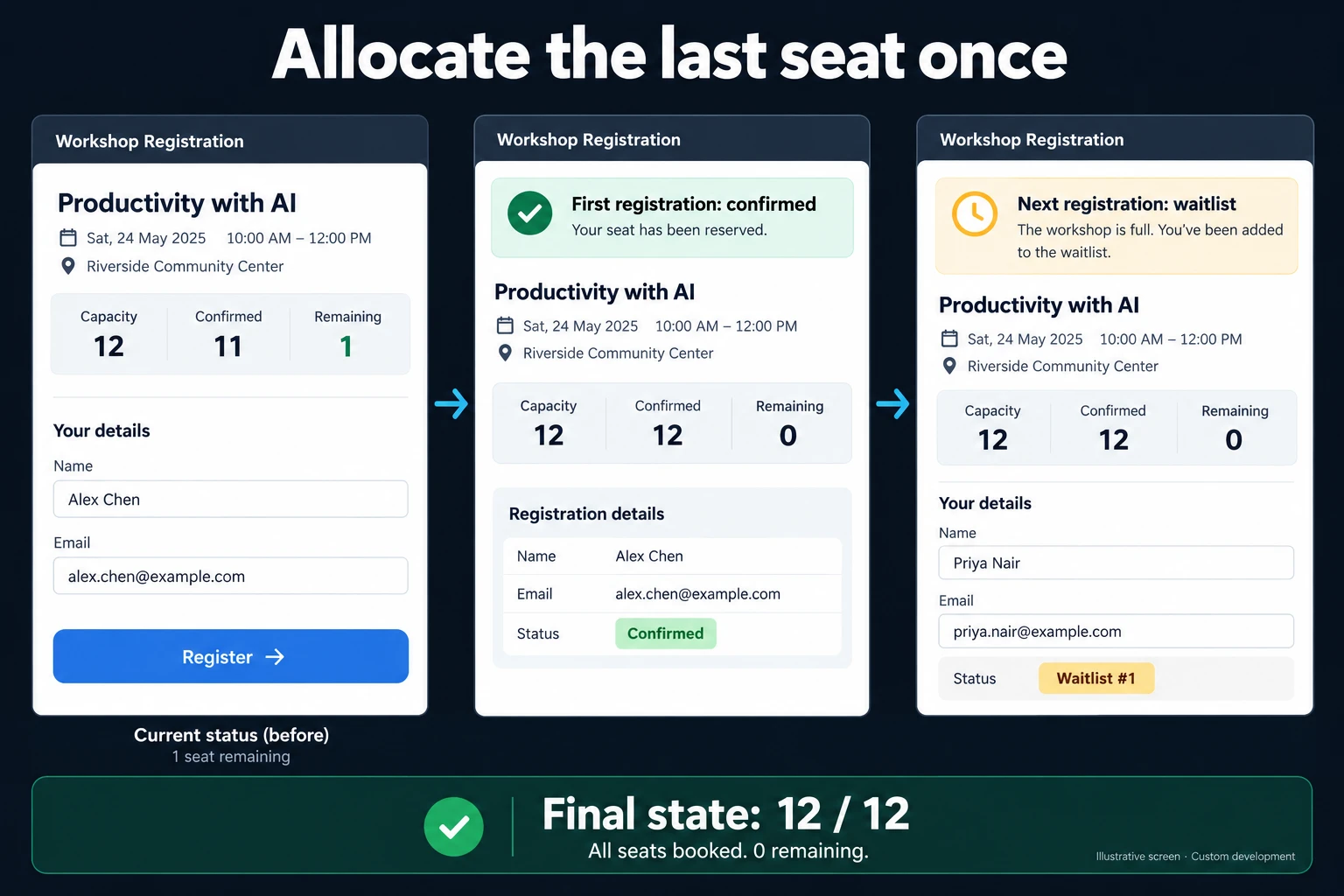
The fictional workshop in the illustration has capacity 12, 11 confirmed and 1 remaining. When two people request that final place, the first completed allocation is confirmed. The next request enters the waitlist. The final confirmed count is 12 / 12, with no place remaining.
Disabling a browser button is not enough to enforce this. Checking availability and allocating the place must happen together on the server. Otherwise, two browsers could both act on the same old “1 remaining” display. The result shown to the applicant follows the completed allocation, not the earlier screen estimate.
When an existing form is sufficient
Google Forms offers a close date and response-count limit. The same official page notes that responses arriving at exactly the same time can be accepted regardless of that limit. Closing a form after a count and safely allocating the final place under concurrent requests are therefore different requirements. A small event managed by one person may still work well with a form and spreadsheet. Suitable extensions or an established booking product are also worth considering.
A custom workflow is useful when you need concurrent confirmation, separate session capacities, temporary reservations and a repeatable waitlist process. If the event also depends on room or time availability, I connect it to resource scheduling. Capacity and calendar conflicts are related, but they are not the same check.
Cancellations and waitlist invitations
When someone cancels, we define who receives the next invitation and how long they have to accept. Sending an invitation does not automatically create a confirmed participant. An unanswered invitation can expire so the place becomes available again. Reusing the same invitation must not allocate a second place.
Duplicate applications can return the person to their existing registration using an appropriate identifier. A group booking checks the requested number of places together. If partial acceptance is allowed, the applicant sees that explicitly instead of discovering that only some participants have places.
Where payment is required, a pending payment may hold capacity for an agreed period. The expiry and payment result need to be reconciled so a late confirmation does not silently overbook the session.
Delivery and ongoing changes
I define the event, session, capacity and registration states before building the management screen. Testing includes simultaneous attempts at the last place, repeated submissions, cancellations and expired invitations. Reducing capacity after registrations exist should trigger a decision for staff, rather than deleting participants automatically.
Conditional questions can collect the right participant details. Longer applications may use draft saving. The operating plan also identifies the notification account, invitation deadlines and retention period after the event.
Frequently Asked Questions
Can I join the waitlist after seeing one available place?
Yes, another person may confirm that place first. The screen should explain the current outcome. A place is secured only after the server completes the allocation.
Is payment collection included?
It can be scoped separately. Payments, refunds and temporary reservations must be designed together; adding a form alone does not complete that process.
Discuss your workflow
Share your event capacity and confirmation rules. I can map a registration flow that distinguishes submitted applications from the places you can actually offer.
How do I work?
Work-hour packages
Tell me about your business and what you need on WhatsApp or by phone; we agree on a work block of somewhere between 5 and 40 hours and I start doing what is needed. What you get is not a calendar window — it is net working hours spent directly on your business. I can use 40 hours working three days straight, or deliberately spread it out and finish it over a year — whatever the work calls for. I do not spend my time estimating how long something will take, I spend it doing the work; every hour I spend leaves a lasting result in your business. We keep going for as long as you find it useful.
Why not monthly?
Is 40 hours a week?
On a fixed monthly fee both sides are watching the wrong thing: you watch a fixed cost, the other side watches how many more contracts like this they can line up. Working by the hour puts us both in front of the same thing — the real value of the work that got done. I know not having an upfront answer to "how much will this cost in total?" is the natural cost of this model. But instead of paying a fixed fee for months to a setup that is not producing results, you only pay for the qualified time spent on your work — and you see exactly where that time went, start to finish. That is why my clients keep coming back.