
WhatsApp and Google Sheets Integration
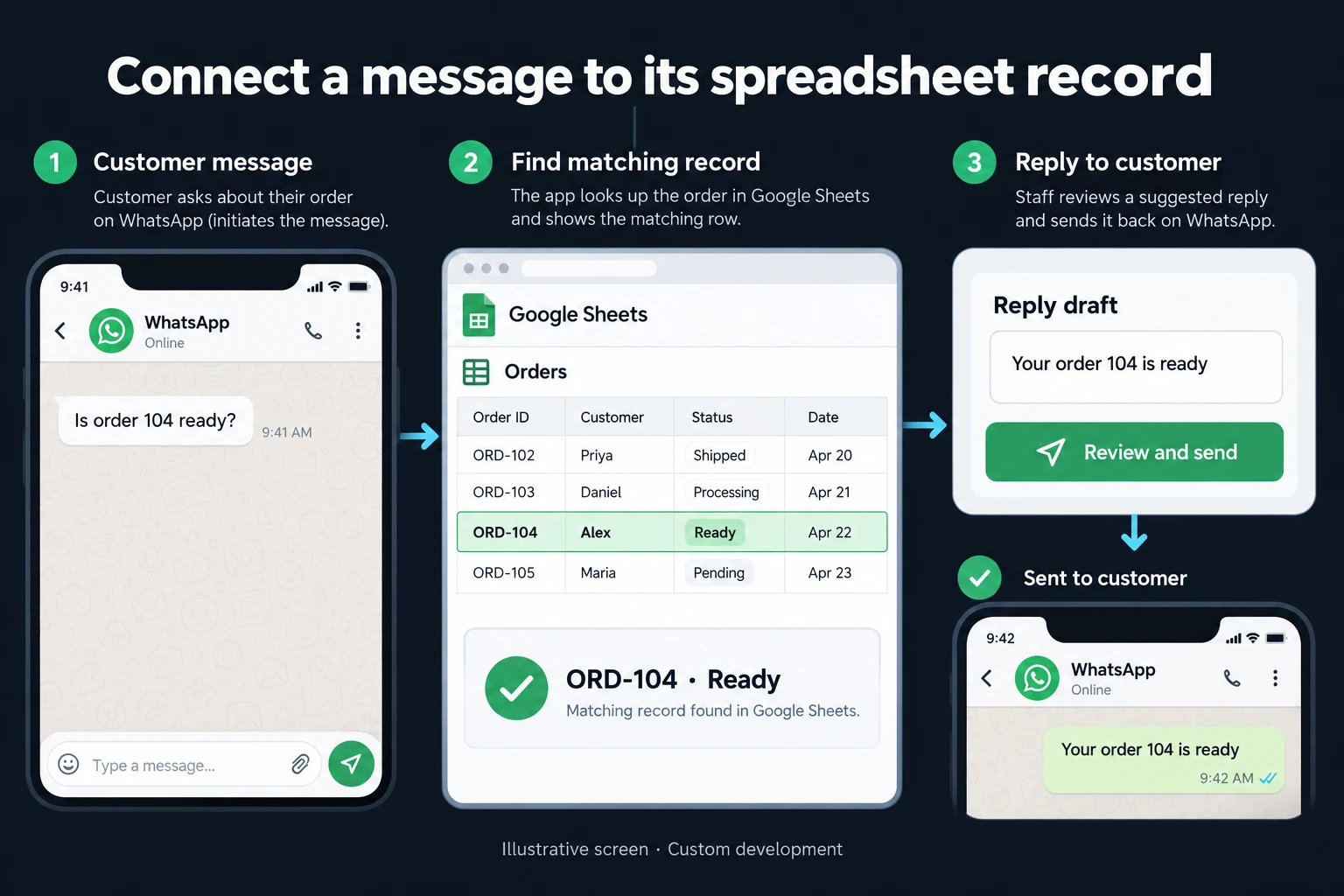
A customer asks about an order on WhatsApp. Someone opens Google Sheets, finds the row and copies its status into a reply. I connect these steps through an application that checks the relationship between the customer and the record before preparing an answer.
The useful part is not sending the whole spreadsheet into a conversation. It is presenting the relevant information from the correct record to the person handling the enquiry.
Example: is ORD-104 ready?
In the illustrative conversation, the customer asks, “Is order 104 ready?” The application finds ORD-104 in Google Sheets, where its status is Ready. It prepares “Your order 104 is ready” as a draft for a team member to review and send.
Knowing an order number does not establish the customer’s identity. If a telephone number matches several customer records, or the order belongs to someone else, the workflow pauses for review. An uncertain match should not expose another customer’s order information.
When a simpler connection is enough
For a small number of enquiries and an easy-to-search spreadsheet, manual checks can work well. An existing CRM with a suitable WhatsApp integration may already provide the required view. I check that option before proposing another application.
Custom development becomes useful when the sheet has business-specific fields, a customer has several open orders, or only selected statuses may be shared. Sheets can remain the data source. Moving the underlying process into a database is a separate spreadsheet-to-web-app project.
Messaging rules are part of the workflow
I use the official WhatsApp Business Platform or a supported provider connection. The business account and number setup must be confirmed before implementation.
The workflow includes recipient permission records, communication preferences and opt-out handling. Under the WhatsApp Business Messaging Policy, a customer message opens or renews the 24-hour service window. Approved templates are required outside that window.
The application checks eligibility when the reply is sent, not only when the draft is created. Having a telephone number in a sheet is not permission to send any message.
Handling changes between reading and replying
An order can change after a team member opens its draft. If ORD-104 moves to a different status, the application refreshes the data or warns the reviewer before sending the old answer.
If Sheets cannot be read, the screen displays the failure and last-read time. It must not guess that the order is ready. Defined field mappings also prevent a moved column from silently becoming the wrong customer-facing value.
Repeated delivery of the same incoming event must not create duplicate replies. Where several people handle conversations, a team assignment inbox can control response ownership.
Delivery and maintenance
I begin with one spreadsheet and one reply scenario. The scope identifies the readable fields, customer-matching rule, review step and failure handling. Test records can be used before any real customer conversation is involved.
The handover defines connection ownership, access renewal and message-record retention. Provider charges, additional templates and new spreadsheet connections are considered separately.
Frequently Asked Questions
Does every message have to receive an automatic reply?
No. The first version can simply find the record and prepare a reviewed draft. Automatic sending is enabled only for defined, tested cases.
Can replies update the spreadsheet too?
Yes, with explicit rules about which fields can change and who approves them. A free-text customer message should not silently overwrite an order status.
Discuss your workflow
Share a sample of the relevant columns and the question customers ask. We can define the first useful connection around that specific exchange.
How do I work?
Work-hour packages
Tell me about your business and what you need on WhatsApp or by phone; we agree on a work block of somewhere between 5 and 40 hours and I start doing what is needed. What you get is not a calendar window — it is net working hours spent directly on your business. I can use 40 hours working three days straight, or deliberately spread it out and finish it over a year — whatever the work calls for. I do not spend my time estimating how long something will take, I spend it doing the work; every hour I spend leaves a lasting result in your business. We keep going for as long as you find it useful.
Why not monthly?
Is 40 hours a week?
On a fixed monthly fee both sides are watching the wrong thing: you watch a fixed cost, the other side watches how many more contracts like this they can line up. Working by the hour puts us both in front of the same thing — the real value of the work that got done. I know not having an upfront answer to "how much will this cost in total?" is the natural cost of this model. But instead of paying a fixed fee for months to a setup that is not producing results, you only pay for the qualified time spent on your work — and you see exactly where that time went, start to finish. That is why my clients keep coming back.