
Custom Order Tracking Software: Stage, Owner and Delivery in One Record
If you’re looking for order tracking software, start with where your orders come from. If they come through an online shop and leave by courier, your shop platform’s order panel was built for exactly that; use it. But if orders arrive by phone, WhatsApp, through dealers or from an approved quote, and then go through stages such as preparation, waiting for missing items and partial delivery, handled by different people, off-the-shelf panels either don’t show that or try to squeeze you into their own way of working.
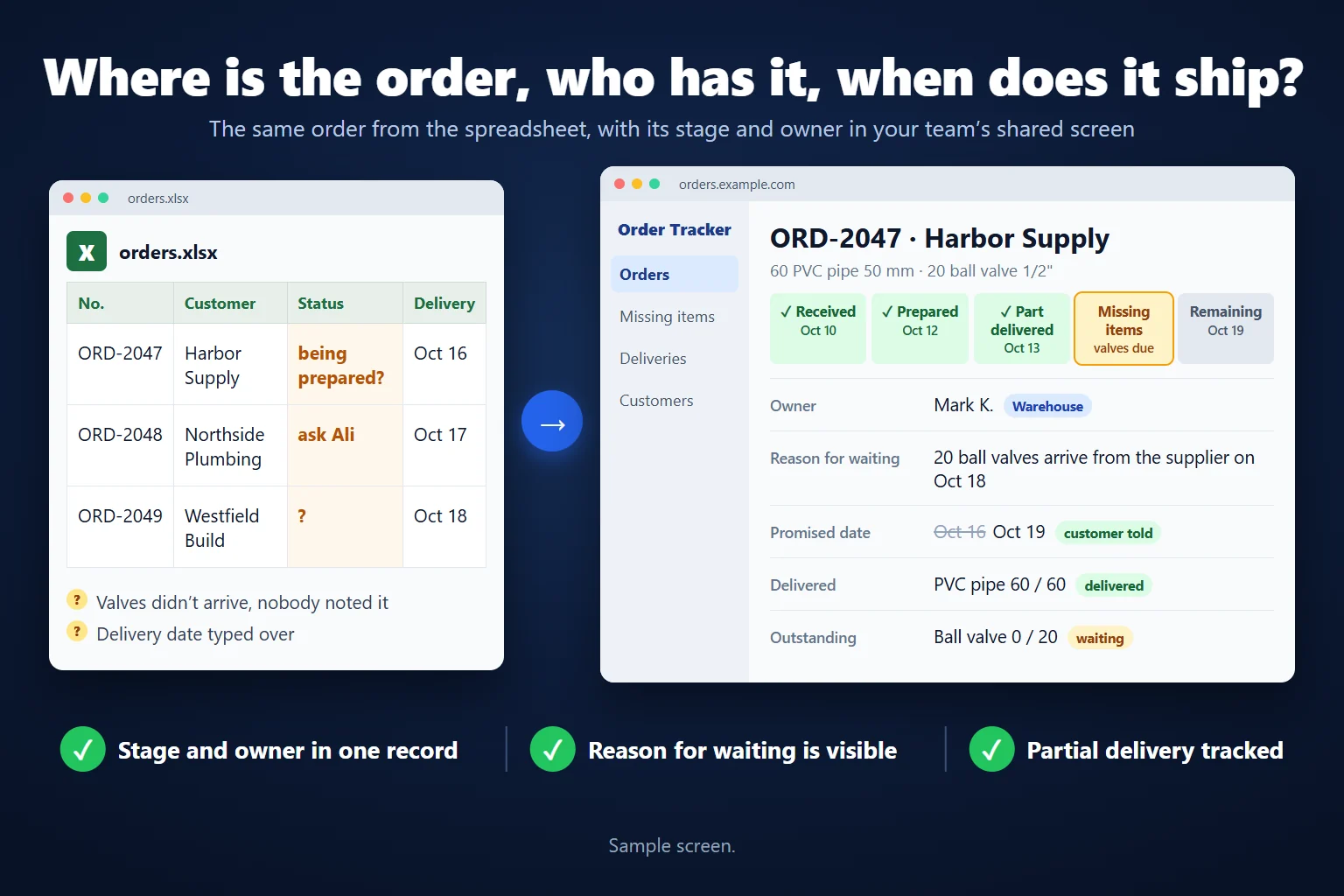
In that case I turn the order list you keep in Excel or Google Sheets into order tracking software your team uses together from phones and laptops. Which stage each order is at, who has it, why it’s waiting and what delivery date the customer was promised all live in one record.
Where order tracking in a spreadsheet breaks down
- “Is it being prepared?” gets asked every day. There’s a status column, but no record of who changed it or when; finding out means calling the warehouse.
- The reason for waiting lives in a note. “Valves out of stock, supplier on Thursday” is in one person’s head or a cell comment; sales doesn’t know what to tell the customer.
- When the promised date changes, the old one disappears. The new date is typed over the old; nobody can see how many times the customer has been told about a delay.
- A partial delivery doesn’t fit in one row. Part of the order has gone and part is waiting; the row can only say “delivered” or “waiting”.
- The same order sits in two people’s lists. Sales has one list and the warehouse another, and there’s an argument about which is right.
An order’s journey in the software
Stage names and order are set around your work. A typical flow looks like this:
- Received. Sales opens the order with the customer, line items, quantities and promised delivery date. Several items sit in one order.
- Being prepared. The warehouse or production takes the job; the owner’s name is visible on the record.
- Waiting for missing items. If an item is out, the order moves to this stage and can’t move without a reason: which product, how many, when it’s due.
- Partly delivered. Items that are ready go out; the rest are tracked separately. The order doesn’t look “closed”.
- Delivered. When the last item goes, the order closes, with who delivered it and when kept on record.
When the promised date changes, the previous date isn’t deleted; the new date, the reason and whether the customer was told are added as a line.
What goes into the software
- Your stages. Steps such as production, quality check, assembly and dispatch are added to match your work, with rules on who can move an order to each stage.
- Owner and handover. An order has a single current owner; when it’s handed over, the previous owner and a note stay on record.
- A link to stock. When an order is opened, items are reserved in stock, and a missing item automatically lands on the “missing items” list.
- Multi-line order entry. Add as many line items as you need to one order: repeating line item order form.
- Orders from dealers or customers. Dealers can get a screen to enter their own orders: dealer order entry portal.
- Status updates for customers. When the stage changes, the customer can get a WhatsApp message: WhatsApp order status notifications.
- Screens by role. Sales sees prices, the warehouse doesn’t; the manager sees every order and every late one.
- Export to Excel. Any list can be downloaded as an Excel file.
Off-the-shelf panel or custom software?
| Off-the-shelf order panel (e-commerce, accounting) | Custom order software for your business | |
|---|---|---|
| Best at | Online sales, courier shipping, invoicing | Phone, WhatsApp, dealer and quote orders; multi-stage preparation |
| Stages | As defined by the product | Built around your work |
| Missing items and partial delivery | Often limited | Tracked per line item |
| Cost model | Monthly subscription or per user | Build cost + server and upkeep; no per-user licence |
| Accounting and invoicing | Built into many products | Your accounting software stays; data can be exported to it |
| Where the data lives | On the vendor’s servers | On your server |
Custom software doesn’t replace your accounting or invoicing software. It keeps the movement of orders and your team’s work; official records stay in your accounting software.
If you’re setting up an order tracking spreadsheet
If you’re not at the software stage yet, a tidy order tracking spreadsheet is possible. The layout I recommend:
- Two tabs: “Orders” (one row per order) and “Line items” (one row per product, with the order number). Squeezing line items into the order row makes partial delivery impossible.
- Orders columns: Order no., Date, Customer, Stage, Owner, Reason for waiting, Promised date, Delivery date.
- Pick the stage from a dropdown: Data > Data Validation > List, so only “Received, Being prepared, Missing items, Partly delivered, Delivered” can be entered.
- Highlight late orders: Conditional Formatting > Use a formula:
=AND($G2<TODAY(),$D2<>"Delivered")(G is the promised date, D the stage).
That’s enough for one person or a small team. I show how I set up the same structure for stock in my Excel inventory tracking template, and where a spreadsheet starts acting as a database in can you use Google Sheets or Excel as a database?
How we start
The starting point is the order list you use today. Which stages there are, who changes what, which orders run late most often and why: I work these out from the list and a conversation with you. The first version is limited to the order list, the order card, assigning an owner and updating the stage. We try a real order from opening to delivery, including a step that goes backwards and a partial delivery. The stock link, customer notifications and dealer screen are added once the first version is proving useful. The server setup and overall process: turn Excel or Google Sheets into a multi-user web app.
Frequently Asked Questions
How does a partial delivery show up?
Delivered and outstanding parts are separated by line item and quantity. We agree with your team what has to happen for an order to count as complete; an order doesn’t close until its last item is delivered.
Can someone hand an order over to a colleague?
If they have permission, the owner can change. The handover date, previous owner and a short note are kept, so the new owner gets the context of the outstanding work.
We take orders on WhatsApp. How do they get into the software?
Whoever takes the order enters it through the form; if needed, a draft order can be created straight from the incoming WhatsApp message. When the stage changes, the customer can also be notified on WhatsApp.
Can customers see the status of their own order?
They can, but that’s a separate piece of scope: a status page for the customer or WhatsApp notifications. It isn’t needed in the first version for your team’s internal tracking.
Do we have to stop using our accounting software?
No. The order software doesn’t issue invoices or keep the official books. Your accounting software stays in place; if needed, order data is exported in a form it can take in.
How is the work priced?
I work remotely and bill hourly. I send the scope and an estimate in writing after I’ve seen your order list.
Discuss your workflow
Use the contact page to tell me briefly about the order list you use and the stage that causes the most trouble. Explore other examples of custom web apps for your team.
Related services
How do I work?
Work-hour packages
Tell me about your business and what you need on WhatsApp or by phone; we agree on a work block of somewhere between 5 and 40 hours and I start doing what is needed. What you get is not a calendar window — it is net working hours spent directly on your business. I can use 40 hours working three days straight, or deliberately spread it out and finish it over a year — whatever the work calls for. I do not spend my time estimating how long something will take, I spend it doing the work; every hour I spend leaves a lasting result in your business. We keep going for as long as you find it useful.
Why not monthly?
Is 40 hours a week?
On a fixed monthly fee both sides are watching the wrong thing: you watch a fixed cost, the other side watches how many more contracts like this they can line up. Working by the hour puts us both in front of the same thing — the real value of the work that got done. I know not having an upfront answer to "how much will this cost in total?" is the natural cost of this model. But instead of paying a fixed fee for months to a setup that is not producing results, you only pay for the qualified time spent on your work — and you see exactly where that time went, start to finish. That is why my clients keep coming back.