
Conditional Email Notifications from Forms
Sending every form response to the whole team can leave responsibility unclear. I build notification flows that select the recipient using the topic, branch or other relevant answers. The application keeps the request; the email tells the right person that there is work to do on that record.
The service includes more than writing an email template. It covers the routing rule, sending result, retry behaviour and what happens when responsibility changes. A message that cannot be found in someone’s inbox should not mean that the business request has disappeared.
Example: technical support and invoice routes
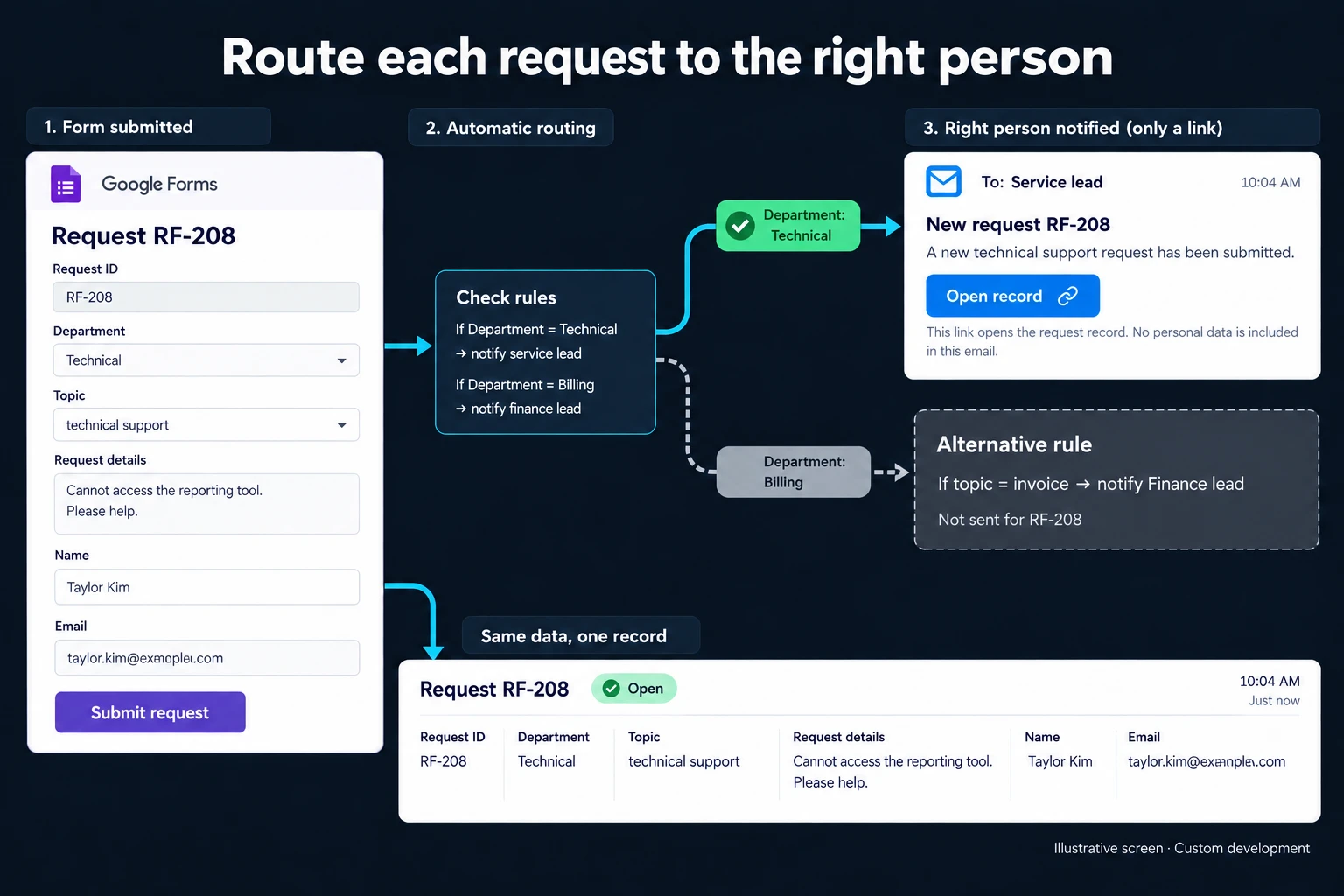
In the fictional illustration, request RF-208 with technical support selected is routed to the service lead. In the alternative invoice selection, the recipient is the finance lead. These are alternative routing conditions, not two conflicting topics on the same request.
The email can contain the request number and an Open record link. It does not need to copy every personal detail from the form. The authorised recipient opens the record to work on it. If another team should handle the enquiry, the owner and transfer reason change on that same request.
Existing tools may already be enough
Google Forms, Sheets, Apps Script and suitable extensions can support email workflows. Apps Script’s installable triggers provide one route. A single recipient and a few simple rules may fit the existing tools without requiring a new application.
A dedicated management screen becomes useful for many routing rules, different team permissions, failed-message handling or response-time tracking. Connecting a form to the work system creates the business record. This service focuses on getting its notification to the right person and making exceptions visible.
Deal with missing and changing recipients
A new branch may not yet have an assigned owner. Instead of silently dropping that request, I place it in a review queue. A temporary replacement can be defined for an absent team member. Routing uses an authorised recipient directory rather than trusting any email address entered by a respondent.
Network errors can make retrying necessary. Request and event identifiers distinguish another attempt at the same notification from a genuinely new status change. This helps prevent a repeated processing event from producing unnecessary duplicate messages.
The rules also need to state what happens if someone changes the topic after submission. A new owner may require a fresh notification, while the former owner should no longer receive reminders to complete that task.
Sent does not mean completed
An email accepted by a delivery service does not prove that the recipient read it or finished the work. Notification state and request state remain separate. Where acknowledgement is required, the employee claims or completes the task in the application. Reminders stop based on that action, not on an assumption about the inbox.
A team assignment screen can handle internal ownership. An application status portal can give the applicant their own view of progress.
Delivery includes recipient rules, templates, language choices, retry limits and the person notified about unresolved sending failures. We test both valid routes and missing matches. Maintenance ownership covers recipient changes when staff move between teams, as well as the account used to send messages.
Frequently Asked Questions
Can one response notify several people?
Yes. It is useful to separate the person responsible for action from colleagues receiving information. Sending to more people should not make the actual owner less clear.
Does a failed email lose the application?
No. The record and its notification are separate operations. A sending failure remains visible for retry or manual attention without deleting the underlying request.
Discuss your workflow
Share the form topics and your routing list. I can map the normal recipients and the exception paths into a notification workflow your team can operate.
How do I work?
Work-hour packages
Tell me about your business and what you need on WhatsApp or by phone; we agree on a work block of somewhere between 5 and 40 hours and I start doing what is needed. What you get is not a calendar window — it is net working hours spent directly on your business. I can use 40 hours working three days straight, or deliberately spread it out and finish it over a year — whatever the work calls for. I do not spend my time estimating how long something will take, I spend it doing the work; every hour I spend leaves a lasting result in your business. We keep going for as long as you find it useful.
Why not monthly?
Is 40 hours a week?
On a fixed monthly fee both sides are watching the wrong thing: you watch a fixed cost, the other side watches how many more contracts like this they can line up. Working by the hour puts us both in front of the same thing — the real value of the work that got done. I know not having an upfront answer to "how much will this cost in total?" is the natural cost of this model. But instead of paying a fixed fee for months to a setup that is not producing results, you only pay for the qualified time spent on your work — and you see exactly where that time went, start to finish. That is why my clients keep coming back.