
Google Sheets Multiple Users and Concurrent Data Entry: Filters, Deleted Rows and Protection
When several people write to one Google Sheet, lost rows and duplicate records come from three behaviours, not headcount: a shared filter someone leaves on hides rows from everyone, so people re-enter records they think are gone; a deleted row may not show up in cell edit history; and quantities typed as text drop out of totals. The fix is built inside Sheets: new records through Google Forms, later updates in protected ranges owned by one role each, data validation on quantity and part code, and a COUNTIF flag for duplicates. When different people must see different rows, a spreadsheet is no longer enough; that is where a role-based web application starts.
What actually happens when several people edit at once?
Changes appear on everyone’s screen at once; some actions affect the whole file, not just their author.
User and cell limits. According to Google, a file can be edited on up to 100 open tabs or devices at once; above that, only the owner and some editors can edit. A file can be shared with up to 600 individual email addresses (Google Help, sharing files, read 16 October 2026). The cell limit is 20 million cells or 100 MB (Google Drive Help, same date); the example sheet below adds roughly 42,900 cells a year.
Two people typing into the same cell. I found no Google page stating which value remains when two people change one cell in the same second (16 October 2026), so give every column one writer.
Inserting, deleting and sorting rows. Google notes that added or deleted rows and columns may not show up in cell edit history. Row numbers shift too: “row 214” becomes a different record once a row above it is deleted, so use a fixed record ID. Sorting from the Data menu also affects everyone’s screen; Google does not state this, it is my inference because sorting changes the file’s row order. Sort inside a filter view instead.
Shared filter versus filter view. Both start from the same icon, with very different results:
| Shared filter | Filter view | |
|---|---|---|
| Who is affected | Everyone with access sees it | Applies only to your view |
| Who can change it | Anyone with edit permission | Editors save and name it |
| Sharing | Already applied for everyone | Copy and send the view’s link |
| View-only users | See the filter, cannot change it | Can open a temporary view that is not saved |
Source: Google’s sort and filter page, read 16 October 2026. Open a filter view with Data > Create filter view and keep it with Save View at the top right. If someone left a shared filter on, anyone with edit permission can clear it with Data > Remove filter.
What version history and cell history do not show
Neither version history nor cell edit history is an audit log. According to Google’s activity and changes page (read 16 October 2026):
- Show edit history on a cell may miss added or deleted rows and columns, format changes, changes made by formulas, and changes made before a past version was restored.
- Revisions may occasionally be merged.
- Restoring an earlier version clears the cell-by-cell history for changes made before the restore; Google suggests making a copy instead if you need that history.
Example week: ten people, one service sheet, three incidents
The company, people and figures below are fictional.
A company that services industrial compressors has ten people writing to one Google Sheet: six field technicians (Can, Deniz, Emre, Hakan, Kerem, Ozan), two planners (Ece, Murat), Bora in the stockroom and Selin, who handles invoicing. The “Service log” tab has 11 columns: record ID, date, customer, machine serial number, technician, job type, hours, part code, quantity, status and invoiced. It starts the week with 212 older rows. Technicians open 15 new records a day between them, 75 over five working days. Everyone is an editor; nothing is validated or protected.
Incident 1: a shared filter and duplicate records
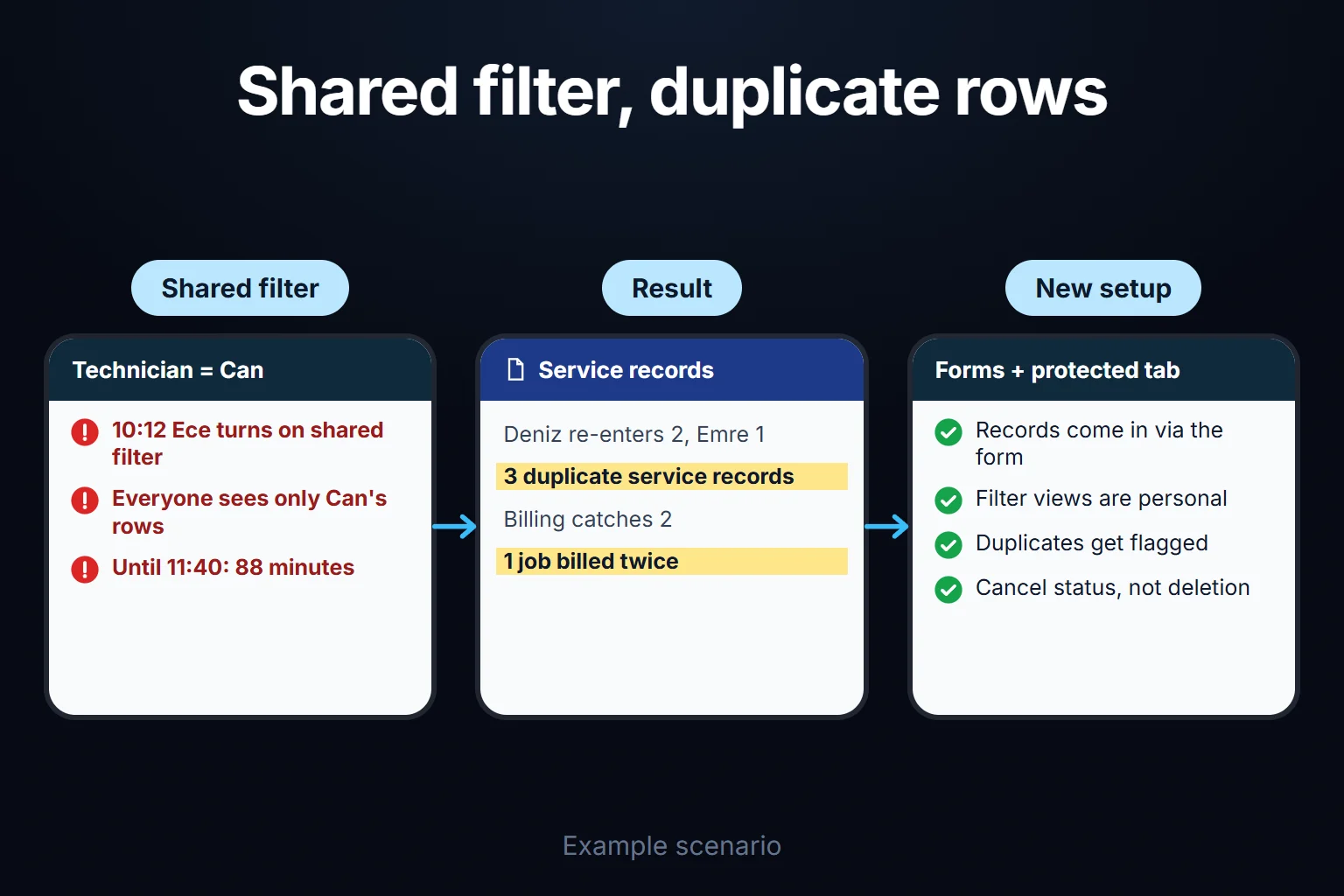
On day 2 at 10:12, Ece filters the technician column to “Can” before calling Can, using the shared filter instead of a filter view, and leaves it on until 11:40: 88 minutes. Everyone who opens the file sees only Can’s rows. Deniz and Emre cannot find the records they entered that morning, assume they were deleted and re-enter them: two from Deniz, one from Emre, 3 duplicate records.
On day 5 Selin catches 2 of them with a “same machine serial, same day” check. One slips through: a customer is invoiced twice for the same 3.5 hours of labour and needs a credit note.
What would have prevented it: filter views for planners, new records via a form, and a duplicate flag on serial plus date.
Incident 2: 14 deleted rows and the restore trap
On day 3 at 16:30, Murat deletes 14 rows to “clean up completed jobs”. Four are completed but not yet invoiced: 2.5 + 4 + 1.5 + 3, a total of 11 hours of labour. The deletion does not appear in cell edit history. The gap surfaces on day 5, when Selin compares timesheet hours with the hours in the sheet.
The nearest version before the deletion is from day 3 at 16:25. Restoring it would also undo: 2 records and 1 update entered on day 3 after 16:25, 30 new records from days 4 and 5, and 23 status and part updates, 56 changes in total. Instead, Selin and Murat copy the old version and paste the four rows back; it takes 95 minutes. Without the timesheet check, four jobs would have gone uninvoiced.
What would have prevented it: a rule that rows are never deleted. Status becomes “Cancelled”, with a reason.
Incident 3: “2 pcs” breaks the total
The FLT-200 air filter is used on 11 visits. Eight rows hold the quantity as a number, three as text: “2 pcs”, “two”, “3 units”. The SUM on Bora’s stock tab skips text and shows weekly usage of 11; real usage is 18, so 7 units go uncounted. The shelf started with 20 and the reorder point is 8. The sheet says 9 are left, so no order goes out; in reality 2 remain. The following week a technician leaves without a spare air filter, the air filter is not replaced and a second visit is needed.
What would have prevented it: validation that accepts numbers only, plus part codes picked from a list.
By the end of the week 78 rows were added (75 real records and 3 duplicates) and 14 deleted, leaving 276. None of the incidents came from headcount; all three came from everyone being able to edit everything.
Decision table: shared sheet, Forms or an application?
| Route | Fits when | Solves | Does not solve |
|---|---|---|---|
| Shared sheet, everyone edits | 2–4 people who know every column | No setup | Shared filters, deletions, free text: all three incidents |
| Forms + response sheet | Records are only added: service, visits, counts | Searching for own rows, free text, time and email | Fields updated later |
| Protected entry tab | Different roles update the same row | Writing into others’ columns, fixed options | Free-form new entries, deletions |
| Forms + protected tab (my recommendation) | 8–12 people; opened in the field, updated in the office | All three incidents; duplicates flagged with COUNTIF | Per-person row visibility |
| Role-based web application | Per-person rows and an audit trail needed | Visibility, cancel instead of delete, who-and-when | Needs building and maintenance |
For the example company I recommend the fourth row. An application becomes necessary only when one of the four questions further down gets a “yes”.
How to recover a deleted row safely
The safe way to recover a deleted row is not to restore the old version but to copy it and paste only the missing rows back into the live sheet. A restore also undoes every change made after that version; in the example, 56 changes.
If the deletion just happened, the person who deleted should first try Ctrl+Z (Cmd+Z on a Mac). If that does not bring it back:
- Open version history from the File menu and find the version before the deletion. The exact minute may not exist, since Google occasionally merges revisions; pick the nearest earlier one. Later records are not in the copy but remain in the live sheet.
- Do not restore it; choose Make a copy from that version’s menu.
- Copy the live sheet’s record ID column into a new tab (“Current”) in the copy. On the old tab, enter
=COUNTIF(Current!A:A,A2)=0in an empty column and fill down: rows showing TRUE are the deleted records, all 14 in the example. Only the 4 uninvoiced rows went back in the example because invoicing was urgent. I recommend restoring all 14 with status “Archived”: the deletion broke the rule, and closed records still need a trail for disputes or warranty. - Paste those rows at the bottom of the live sheet; check that no record ID appears twice and that validation and formula columns are intact.
- Delete the copy afterwards or restrict it; it holds all customer data.
Without a record ID, step 3 becomes guesswork.
The right setup: separate data entry from the sheet
Safe concurrent data entry in Google Sheets means people edit only their own fields, not the whole sheet. I recommend six layers; you do not need all of them at once.
1. New records come in through Google Forms
If records are only ever added (service reports, visits, counts), Google Forms is the cleanest route: a technician submits from a phone, the response lands as a new row, and nobody searches anyone else’s rows. Per the Apps Script documentation, every response carries a submission timestamp, and with email collection on, the respondent’s email is stored too (FormResponse, read 16 October 2026).
For email collection choose Verified, which collects the respondent’s Google Account email; with Responder input people type an address, which proves nothing (Google Workspace, create a form).
A form only adds records: keep status, parts and invoicing on a separate “Updates” tab, not in the response tab. The setup:
- Column A, record ID: a planner finds the response with a filter view (technician, day) and pastes its record ID, or picks it from a Dropdown (from a range) pointing at the response tab’s ID column (Google Help, data validation).
- Columns B–D, pulled from the response: customer, serial, technician. With the ID in column A and customer in column C of the response tab:
=XLOOKUP($A2,Responses!$A:$A,Responses!$C:$C,""). Read-only. - Columns E–G, updates: status, waiting for parts, invoiced, each protected for its owner as in layer 2.
- Check on the response tab:
=COUNTIF(Updates!A:A,A2)=0filled down shows TRUE for responses not yet picked up.
Because each typed update sits next to its own record ID, rows do not drift as responses grow. Syntax: Google’s XLOOKUP page. I have not tested this setup; try a few rows first. Form-to-sheet settings are in the Sheets data entry form guide.
How is the record ID generated? The simplest script-free key is the form’s own timestamp: recorded to the second, never typed and unaffected by sorting. It fails only when two responses arrive in the same second, rare in a ten-person team but possible, so keep the COUNTIF flag on that column too (my assessment). A ROW()-based formula is not an ID, because it changes when rows are deleted or sorted. A readable incrementing number such as “SRV-0215” needs an Apps Script script, written by a colleague who knows Apps Script or by a developer.
2. When existing rows are updated: a protected entry tab
When a record moves through a lifecycle (open → waiting for parts → completed → invoiced), different people change different columns. Assign each group of columns to its owners: Data > Protect sheets and ranges > Add a sheet or range > Range, select it, then Set permissions > Restrict who can edit this range > Custom, tick the people and click Done. In the example: quantity and part code for technicians, status for planning, invoiced for Selin, record ID for the file owner only.
Google’s protection page states three limits (read 16 October 2026):
- Protection should not be used as a security measure. Anyone with access can print, copy or export; even a viewer can make a copy. Protection limits editing, not viewing.
- Show a warning when editing this range does not block editing; it only asks for confirmation.
- Hiding a sheet is not protecting it. All editors can unhide it and viewers can still access its content.
3. Data validation: no free text
This layer prevents incident 3: Data > Data validation > Add rule. Put a rule on quantity, part code and status (dropdowns for part code and status) and choose to reject invalid input. Google says a non-matching dropdown entry is rejected by default; choosing Show a warning under Advanced options lets the invalid value in (Google Help, data validation). Every rule offers the same choice (Apps Script, DataValidationBuilder). A warning still lets “2 pcs” in. I found no Google statement on pasted values; test pasting from another account.
4. Flag or reject duplicate records
You either flag a duplicate after it is entered or reject it on entry. To flag: Format > Conditional formatting, rule Custom formula is. Google’s own example for duplicate values in one column is =COUNTIF($A$1:$A$100,A1)>1 (Google Help, conditional formatting, read 16 October 2026).
In the example, a duplicate means “same machine serial, same day”. With serial in column D and date in column B, a rule applied to A2:K is =COUNTIFS($D:$D,$D2,$B:$B,$B2)>1 and colours both rows. To reject on entry, the same logic can go into a data validation custom formula rule as =COUNTIFS($D:$D,$D2,$B:$B,$B2)=1, set to reject. I have not tested these two COUNTIFS rules in my own sheet; try them on a few rows first.
Flag first: a machine can genuinely get two visits in one day. I found no Forms rule that checks against rows already in the sheet.
5. Who and when: timestamp and email
Form rows arrive with time and, if Verified is on, email; directly edited rows need an Apps Script stamp. The user’s email may be blank in a simple onEdit(e) trigger outside one Google Workspace domain, so with personal Gmail accounts “last edited by” cannot be trusted (Apps Script, Session, read 16 October 2026). Create the trigger from an account that does not belong to one person, because installable triggers always run under their creator’s account (Apps Script, installable triggers).
6. A team rule: filter views, no deleting
Write it down: filter and sort only in filter views; never delete rows, set status to “Cancelled” with a reason; one writer per column. When someone leaves, remove them from the file’s sharing and from the form’s collaborators separately; copies they made earlier cannot be taken back.
What Google Sheets cannot do
Google Sheets cannot show different rows to different people, because sharing works at file level: anyone who can open the file sees every row. There is no setting for “each rep sees only their own customers”.
One script-fed file per person works for six people, not twenty. How branch-level visibility is built into an application is covered in the branch-based data entry system page.
Where does a multi-user web application start?
The trigger is not user count but a rule Sheets cannot enforce:
- Should each person see only their own rows? If yes, there is no answer inside the spreadsheet.
- Should approved or invoiced records become unchangeable? A per-row, status-based lock cannot be built in Sheets; protection works per column or range.
- Must every change be kept row by row, with who and when, undeletable? Version history does not provide this.
- Can two people overwrite each other’s edits to one record? A save from an older screen must not silently undo a newer change.
A “yes” to either of the first two is reason enough. Four “no” answers: stay in Sheets.
In an application these rules are enforced on entry. For the example company that could mean a phone entry screen with part codes from a list and numbers-only quantity; a “this record may already exist” warning for the same serial on the same day; cancellation with a reason instead of deletion; and a check before saving whether the record changed in between.
Roles in short: technicians see only their own records, the stockroom does not see customer notes, only invoicing sets the invoiced flag. These screens can be built to fit the need, and the scope is written down in the first step. AI can suggest a part code from a technician’s note for confirmation, set up so that no row reaches the model without passing the permission filter.
How it starts, and who owns the data and code
In the first step we look at your sheet, its column owners, recent losses and what Sheets alone can solve. If an application is needed, roles, screens and first-version scope are settled in this step. The most common mistake I see in automation projects is starting with the most complex process, so the first version usually starts with one entry screen and one role.
The application runs on a virtual private server (VPS) that can be opened in your company’s name. The data is yours, and you can export it to Excel or CSV at any time. For small and medium-sized teams there is no per-user licence; the cost is the server and maintenance. The source code sits in a repository you can access, with run instructions, a dependency list and known limitations. Sign-in and migration of the current sheet are discussed in the same step.
Send a copy of your sheet with customer names masked, noting who writes which column, through the contact page.
Frequently Asked Questions
What happens to existing rows when I switch to Google Forms?
They stay where they are. In practice, form responses land on a separate tab in the spreadsheet; Google does not state this on the pages I read, so this is my observation and worth checking in your own file. You need a summary tab combining old records and new responses under one record ID scheme. According to Google, if you unlink the form, new responses stop going to the spreadsheet but existing data remains intact (Google Help).
How do I prevent duplicate records?
Remove the cause first: people re-enter records they cannot find, so ban shared filters and move new entries into a form. Define a duplicate (serial plus date here), flag it with conditional formatting and reject only if a genuine second entry is impossible.
Can the same setup be built in Excel?
Partly. According to Microsoft, co-authoring needs a Microsoft 365 subscription and a file in OneDrive or SharePoint Online; for the same cell, the last saved change generally wins, with some exceptions (Microsoft Support, co-authoring, read 16 October 2026). Sheet View is the counterpart of a filter view. Details are in the guide to sharing an Excel file with multiple users.
How do I work?
Work-hour packages
Tell me about your business and what you need on WhatsApp or by phone; we agree on a work block of somewhere between 5 and 40 hours and I start doing what is needed. What you get is not a calendar window — it is net working hours spent directly on your business. I can use 40 hours working three days straight, or deliberately spread it out and finish it over a year — whatever the work calls for. I do not spend my time estimating how long something will take, I spend it doing the work; every hour I spend leaves a lasting result in your business. We keep going for as long as you find it useful.
Why not monthly?
Is 40 hours a week?
On a fixed monthly fee both sides are watching the wrong thing: you watch a fixed cost, the other side watches how many more contracts like this they can line up. Working by the hour puts us both in front of the same thing — the real value of the work that got done. I know not having an upfront answer to "how much will this cost in total?" is the natural cost of this model. But instead of paying a fixed fee for months to a setup that is not producing results, you only pay for the qualified time spent on your work — and you see exactly where that time went, start to finish. That is why my clients keep coming back.