
Can You Use Google Sheets or Excel as a Database?
The short answer: for a list one person keeps and updates now and then, yes; for business records that several people write to at the same time, no. Excel and Google Sheets were designed for calculations. A database is designed to protect records: it rejects data that breaks the rules, keeps each fact in one place, stops two people’s simultaneous changes from overwriting each other, and enforces who can see what by itself.
In this article I explain the difference between a spreadsheet and a database, both tools’ limits in numbers, how to tell when a sheet has started acting as a database, and how the move is done. I also covered the topic in a short video: stop using Excel and Sheets as a database.
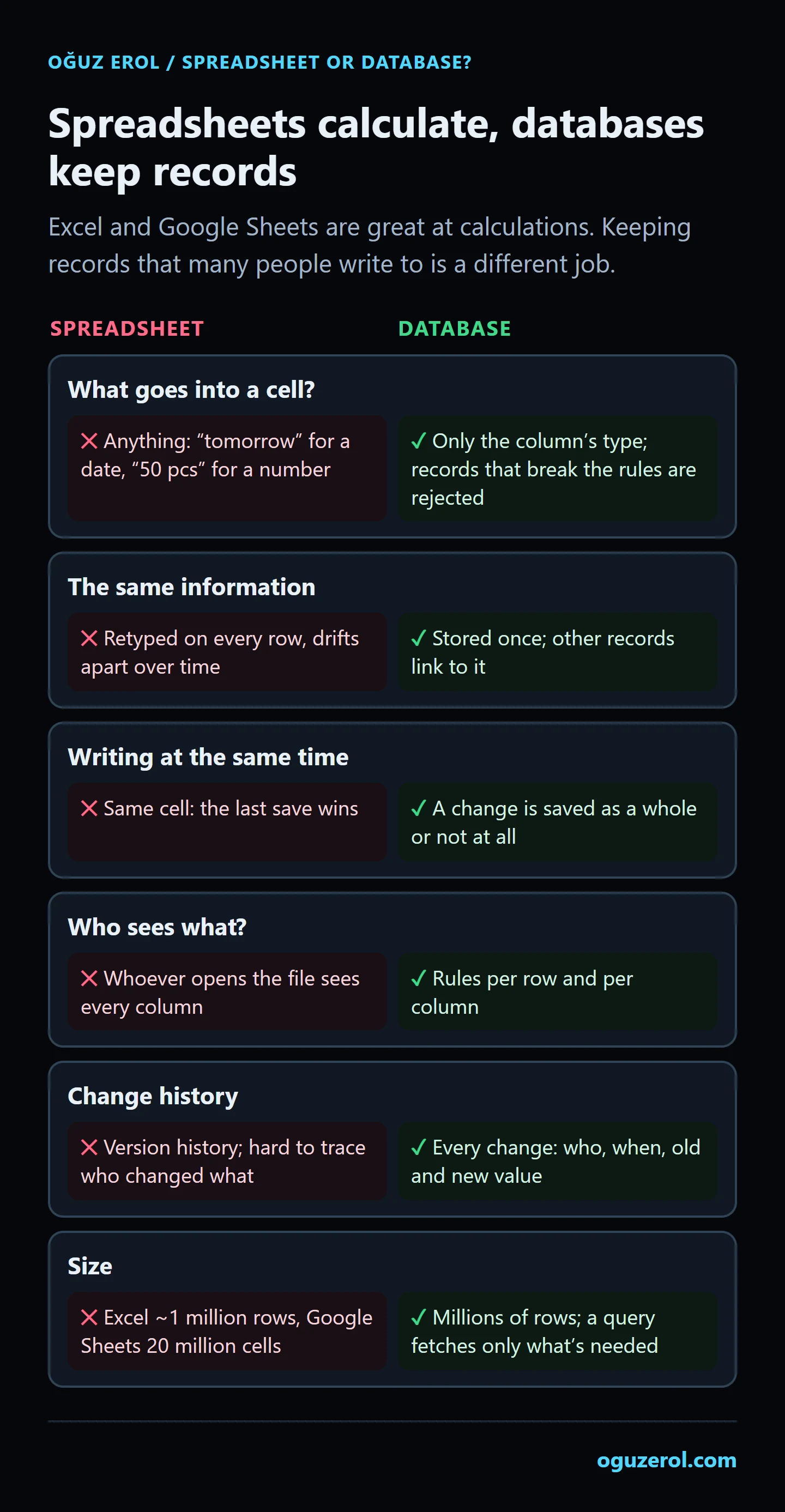
What is a database, and how is it different from a spreadsheet?
A database is a system that stores records under rules defined in advance. On the surface it’s tables too: rows and columns. The difference is that a spreadsheet leaves everything open to you, while a database enforces the rules itself:
- Every column has a type. You can’t type “tomorrow” into a date column or “50 pcs” into a number column. A field marked required can’t be left empty.
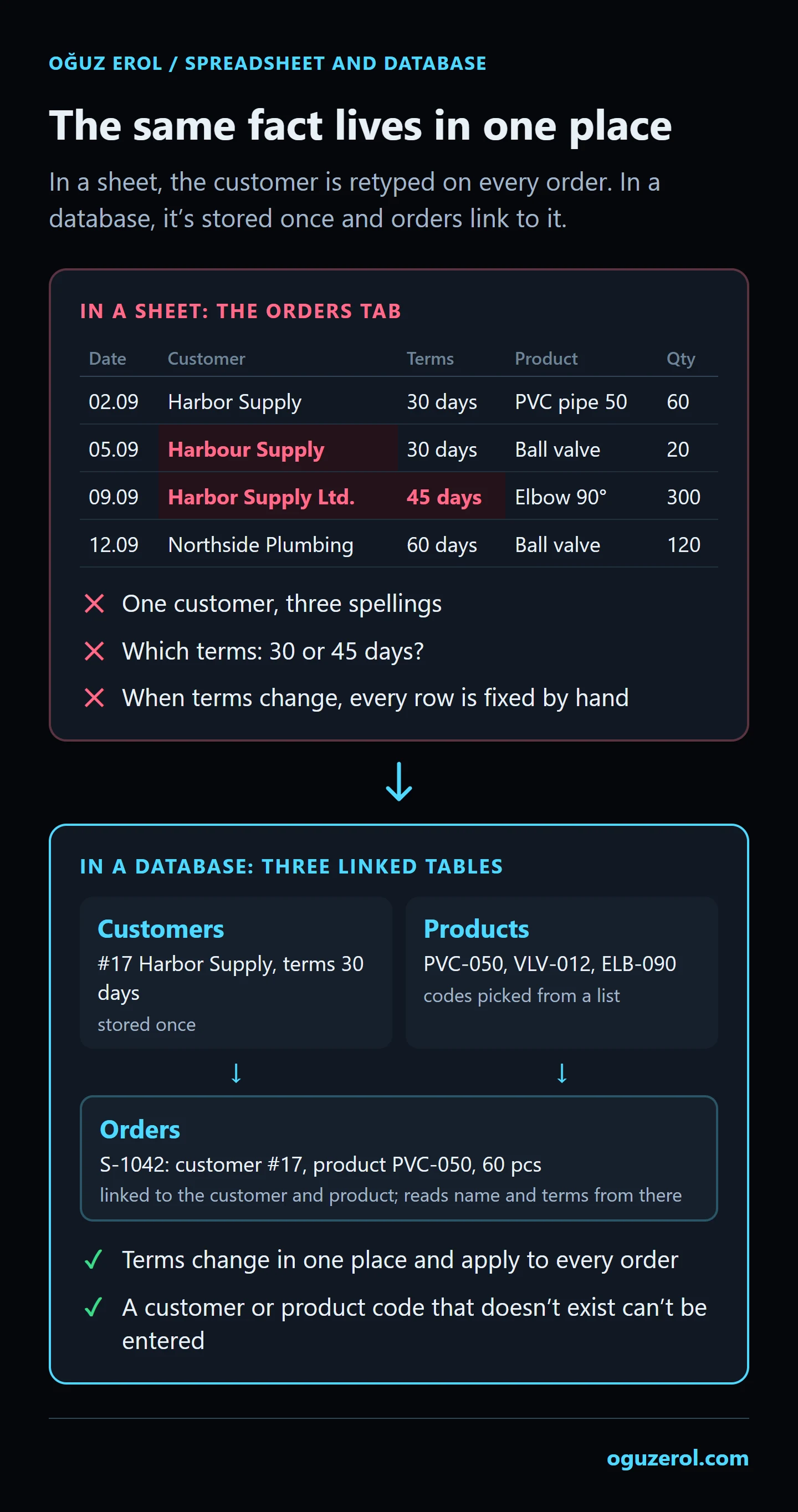
- Each fact is stored once. A customer lives once in the customers table; orders link to it by a number. When the customer’s payment terms change, they change in one place.
- Links are protected. You can’t create an order for a customer number that doesn’t exist, and a customer with orders can’t be silently deleted.
- Several steps are saved as one transaction. “Save the order and deduct the stock” happens either completely or not at all; nothing is left half written.
- It enforces permissions itself. The rule for who can see which rows and columns lives in the database.
Is your spreadsheet already acting as a database?
In many businesses a spreadsheet turns into a database without anyone calling it that. If three of these apply to you, that’s what has happened:
- Tabs are linked with VLOOKUP or XLOOKUP. Names come from the “Customers” tab and prices from the “Products” tab. That’s a database relationship built by hand.
- There’s a manually typed ID column. Someone increments the order number or customer code by looking at the previous row.
- Dropdowns stand in for rules. Data validation says “only these values”, but pasting a value can get around it.
- Status is kept in colours. Yellow means “waiting”, green means “done”; you can filter by colour but not calculate with it, and nobody knows who coloured it.
- Several people write at the same time. Sales, warehouse and accounting all enter data into the same file from different columns.
- A form or script adds rows. Google Forms, Apps Script or an automation tool fills in rows; the sheet has become an app’s back end.
The limits, in numbers
| Excel | Google Sheets | |
|---|---|---|
| Size of a file | 1,048,576 rows × 16,384 columns per worksheet (Microsoft) | 20 million cells or 100 MB (Google) |
| Editing at the same time | Co-authoring in Microsoft 365; on the same cell, the last save wins | Up to 100 open tabs or devices at once (Google) |
| Reading and writing from outside | — | Sheets API: 300 read requests per minute per project, 60 per minute per user; writes have their own, identical quota (Google) |
| Automation | — | Apps Script: 6 minutes per execution; total trigger runtime 90 minutes a day on a Gmail account, 6 hours on Workspace (Google) |
The Google Sheets cell limit went from 10 million to 20 million in September 2026 and is still rolling out gradually to some Workspace accounts. Microsoft’s own page also says Excel is optimised for data analysis rather than serving as a database management system, and that because it doesn’t support relational data, it can’t support referential integrity either (Microsoft Support).
Most businesses never get near these limits. The trouble starts long before them: as nested formulas grow, the file slows down, a change on one tab quietly produces a wrong result on another, and when two people change the same record, one change disappears.
Five things a database does that a spreadsheet doesn’t
- It rejects records that break the rules. In a database, rules like “this field can’t be empty”, “quantity must be above zero” and “this code can’t repeat” live in the column itself (PostgreSQL constraints). Data validation in a spreadsheet is a warning: Microsoft’s own page says that when data is copied or filled, the validation messages don’t appear (Microsoft Support), so a pasted value can get around the rule.
- It protects links. An order is linked to a record in the customers table; you can’t place an order for a customer that doesn’t exist, or delete a customer who has orders.
- It saves all or nothing. Saving the order and deducting the stock are written as one transaction; even if the power goes out halfway, no half-written record is left (PostgreSQL transactions).
- It queues people writing at the same time. While hundreds of users enter records at once, each works on a consistent view of the data (concurrency control). The app can detect two people trying to change the same record and warn the second one.
- It grants permissions per row. A rule like “a sales rep sees only their own customers” can be defined inside the database (row security policies). Even if a screen has a bug, the database won’t hand over a row the user isn’t allowed to see. The panel I built for a hotel group keeps its permissions this way.
Why do “free tool chains” break?
Using Google Sheets as the back end of a website or app is a commonly suggested route: a form adds a row, an automation tool reads it, a script sends an email. It works for a few days. Then one of these happens:
- The per-minute quota runs out. The Google Sheets API allows 300 read requests per minute per project and 60 per user; anything above that is rejected with a “too many requests” error and has to be retried after a wait (Google). On a site where every visitor reads the sheet, that limit fills up quickly. On the same page, Google says it plans to start charging for quota overages in 2026.
- Scripts hit time limits. Apps Script can’t run longer than 6 minutes per execution, or more than 90 minutes of total trigger time a day on a Gmail account (Google). As rows pile up, the same script starts stopping halfway one day.
- The chain hangs on one person’s account. Installable triggers always run under the account of the person who created them (Google). When that person leaves and their account is closed, the automation stops too.
- When a column moves, the wrong data is read. If someone inserts a column or renames a header, an automation that reads columns by position quietly starts reading a different column; it doesn’t error, it produces wrong results.
In this setup the sheet is forced to act as both a database and an integration layer, and it hits limits it wasn’t designed for on both counts.
When should you stay in a spreadsheet?
- When one person keeps the sheet and the number of records is small.
- When the work is a calculation or an analysis: a budget, a scenario, a one-off comparison.
- When data is pulled from another system to be reviewed for a report.
Businesses that move to a database don’t drop Excel either: records are kept in the database, and the list needed for analysis is downloaded to Excel. That’s the right arrangement.
How do you move from a spreadsheet to a database?
- Tabs become tables. Customers, products, orders and movements become separate tables.
- Repeated information moves to its own table. The customer name and terms typed on every row move to the customers table; the order keeps only the customer number.
- Dropdowns become links. Fixed values such as a “status” list or a “warehouse” list live in their own table.
- Formulas become rules or calculated fields. “Total = quantity × price” becomes a calculation nobody can overwrite.
- Old data is cleaned on the way in. Duplicates like “Harbor Supply” and “Harbour Supply” are merged at this stage, and broken rows are listed separately.
- Both run side by side for a while. The app and the sheet are used together until they produce the same results.
There are three kinds of option: desktop databases such as Microsoft Access, no-code tools that connect to a sheet such as AppSheet, or a custom web app that runs on a server and that your team uses in a browser. I build the last kind: I read your spreadsheet and turn it into an app on PostgreSQL with user logins, permissions per person and a change log. The process and a sample screen: turn Excel or Google Sheets into a multi-user web app.
Frequently Asked Questions
Is Excel a database?
No. Excel is a spreadsheet; it can store data, but it doesn’t enforce column types, links, simultaneous writes or user permissions the way a database does. In small lists kept by one person you won’t feel the difference; you feel it once several people start writing to the same records.
How many rows can Excel hold?
An Excel worksheet holds up to 1,048,576 rows and 16,384 columns (Microsoft Support). In practice the file starts to slow down well before that, as formulas and links grow.
What is the Google Sheets row limit?
In Google Sheets the limit is on cells, not rows: a file can have up to 20 million cells or 100 MB (Google Support). In a sheet with 20 columns, that’s about 1 million rows. The limit went from 10 million to 20 million cells in September 2026.
Can I use Google Sheets as a database for a website or app?
For a low-traffic, one-way job (collecting form responses, for example), yes. For work where several people update the same records and you need permissions and a change history, it isn’t a good fit; it runs into Google’s own quotas and limits and doesn’t grant permissions per row.
Access or Excel?
Access is a real database: typed columns, relationships and forms. But it’s a desktop application; it wasn’t designed for phone use or for many users working together over the internet. If your team works from different places and from phones, a web app that opens in a browser is the better fit.
If I move to a database, do I have to stop using Excel?
No. Records are kept in the database, any list you need is downloaded as an Excel file, and analysis carries on in Excel. The one thing that has to stop is typing the same information into both the sheet and the system by hand.