
Production Work Orders and Stage Tracking
Marking a work order In progress does not show which station is waiting or how many units remain there. I build production screens that follow the stages used by your workshop, keeping quantities, owners and waiting reasons attached to the same work order.
The focus is the production process before customer delivery. A sales order can be linked, but completed production does not automatically mean the order has shipped.
Example: WO-104 is waiting in assembly
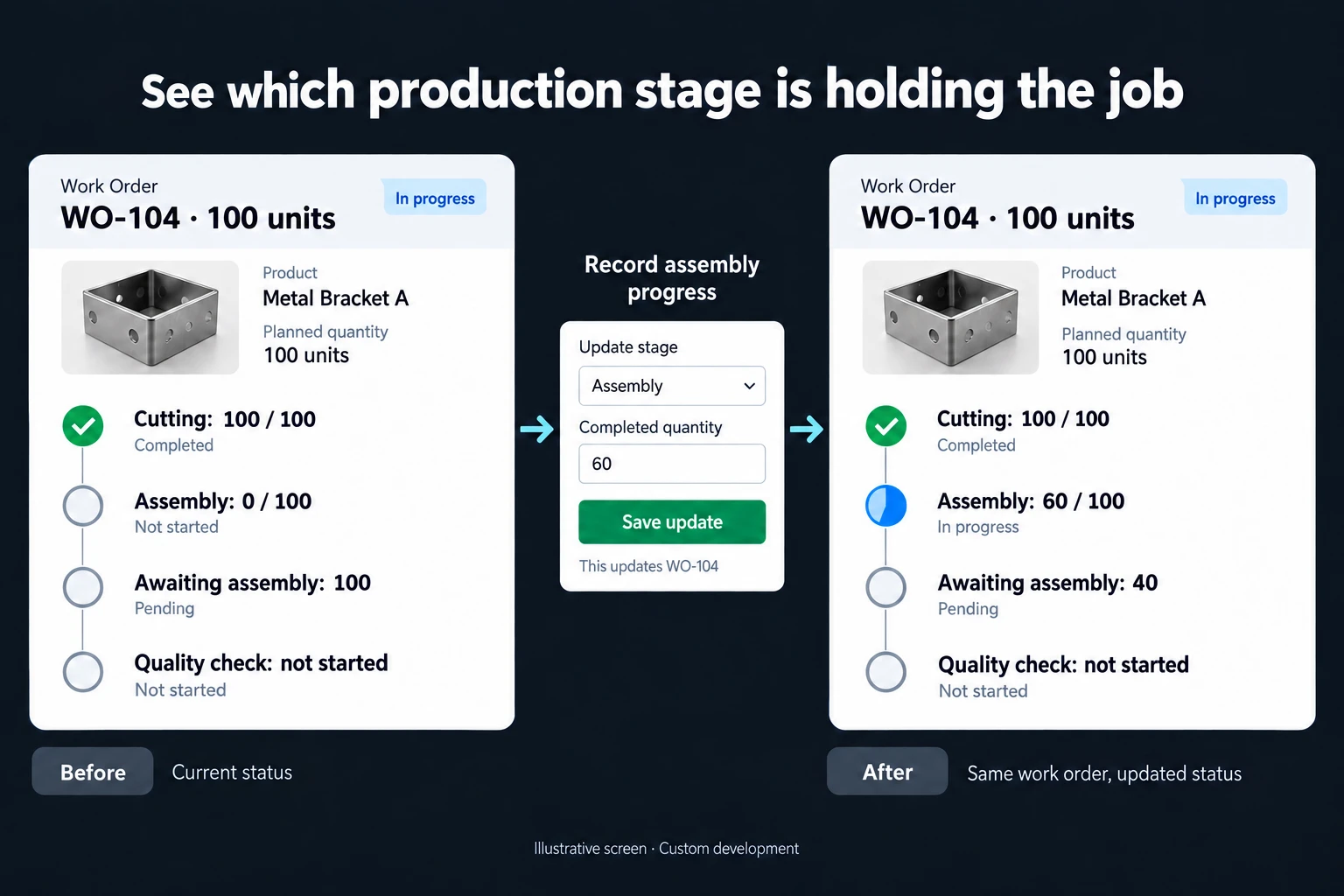
In the illustrative screen, work order WO-104 covers 100 units. Cutting is complete at 100/100. Assembly has reached 60/100, with 40 units still awaiting assembly. Quality inspection has not started.
These stage counts must not be added to claim that 160 units have been produced. They describe the progress of the same 100 units through different stations.
The 60 assembled units and 40 waiting units account for the work order’s planned quantity. Nothing is described as having passed quality inspection before that inspection takes place.
When an existing production tool is enough
An ERP or established production-tracking product may already provide the necessary work-order and station controls. A spreadsheet may be sufficient for a small number of orders managed by one person.
A custom application is useful when products follow different routes, partial transfers matter or station staff need a limited working view. It can connect to order preparation and delivery tracking while keeping production movements distinct.
Quantity and transition rules
For each station, I define what input, completed and transferred quantities mean. Scrap and rework are recorded separately rather than hidden inside accepted output.
If a unit returns for rework, it must not be counted as a new finished unit a second time. Partial transfers are possible, but their quantities and destination stage must be explicit.
For WO-104, completed assembly units can enter inspection while the remaining 40 still wait for assembly. Each movement remains tied to the appropriate part of the work order.
If two operators submit the same action, the application checks the work-order and operation identifiers to prevent duplicate movements. Transfers beyond the available quantity require review. Authorised corrections preserve their reason rather than silently erasing earlier activity.
Station screens and delivery scope
A first version can include work-order creation, station lists, quantity entry and a pending-work view. Operators do not need access to unrelated customer pricing. Managers can open a waiting stage to see whether it needs material, a decision or another operation.
Where inspection controls the next transition, quality records can be connected. Lot or serial traceability is another explicit scope item; it is not claimed merely because a stage list exists.
I begin with one product family and a representative order. Tests include partial completion, rework, excessive quantities and simultaneous submissions. The handover explains how route or unit changes affect existing work orders.
Frequently Asked Questions
Must every product follow the same route?
No. Routes can differ by product group. Skipping a stage requires an agreed permission and reason rather than an unrestricted operator choice.
Does station progress change inventory automatically?
Only where inventory movements and their approval rules are included. Stage progress and stock receipt do not have to be treated as the same event.
Discuss your workflow
Describe the steps one product follows through your workshop. We can define a first screen that keeps the work order and its quantities consistent from stage to stage.
How do I work?
Work-hour packages
Tell me about your business and what you need on WhatsApp or by phone; we agree on a work block of somewhere between 5 and 40 hours and I start doing what is needed. What you get is not a calendar window — it is net working hours spent directly on your business. I can use 40 hours working three days straight, or deliberately spread it out and finish it over a year — whatever the work calls for. I do not spend my time estimating how long something will take, I spend it doing the work; every hour I spend leaves a lasting result in your business. We keep going for as long as you find it useful.
Why not monthly?
Is 40 hours a week?
On a fixed monthly fee both sides are watching the wrong thing: you watch a fixed cost, the other side watches how many more contracts like this they can line up. Working by the hour puts us both in front of the same thing — the real value of the work that got done. I know not having an upfront answer to "how much will this cost in total?" is the natural cost of this model. But instead of paying a fixed fee for months to a setup that is not producing results, you only pay for the qualified time spent on your work — and you see exactly where that time went, start to finish. That is why my clients keep coming back.