
Project Timesheet and Work Hours Tracking
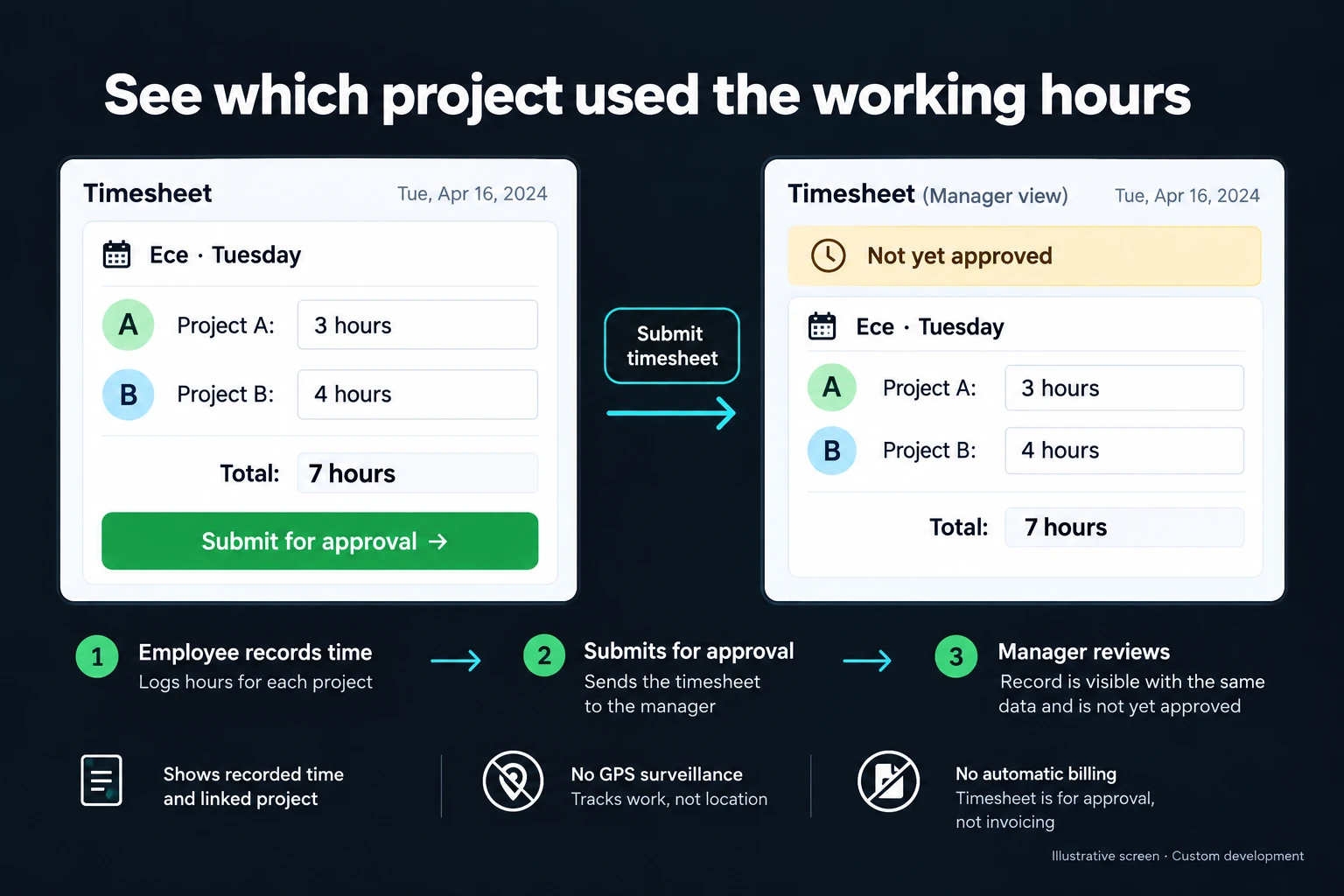
A daily total of seven hours does not explain which projects used that time. I build timesheet screens that record the employee, date, project and approval state. Staff enter their work; the responsible manager reviews missing information or conflicting entries.
Recording time does not automatically make it billable or determine how it belongs in payroll. Those decisions use separate rules and permissions.
Example: Ece’s Tuesday
In the illustrative record, Ece enters three hours for Project A and four hours for Project B. Tuesday’s total is seven hours. The entries have been submitted, but they are not yet approved.
A manager’s report therefore keeps those seven pending hours separate from approved totals. Where needed, each entry also requires a task description or a work-order reference.
Selecting a project record instead of typing its name prevents several spellings of the same project from becoming separate reporting categories. Later corrections retain the previous value and the reason for the change.
When a spreadsheet is enough
A well-maintained Excel timesheet can be sufficient for a small team with one reviewer. An existing time-tracking product may already provide project assignment, approvals and exports.
Custom development is useful when employees should only see their own entries, different managers approve different projects or time records must link to operational work orders. Role-based screens can keep entry and management views connected to the same underlying records.
Make the calculation rules explicit
If staff enter start and end times, the workflow defines breaks, overnight work and time zones. If they enter durations directly, it defines the unit and permitted precision. Decimal hours and hours-and-minutes displays must not be confused.
Overlapping intervals on two projects can be held for review. Your policy determines whether that represents a mistake or a legitimate shared activity. Repeating the same submission is checked separately to avoid duplicate entries.
Approved time cannot be silently edited by every user. A correction may require another review. If a closed period changes after export, the report version needs to remain identifiable. Approved-record change controls can enforce that boundary.
Reports and exports
Employee, project and period totals use a consistent approval basis. Pending, rejected and approved time remain distinguishable. Closing a project can prevent new entries without deleting its history.
The first delivery can include daily entry, a manager queue, project reporting and an agreed export format. If billable time is included, the scope specifies who can change it. Entering hours does not itself issue an invoice or initiate payment.
I begin with a representative reporting period and its calculation rules. Tests cover duplicate entries, overlaps, corrections after approval and period closure. The handover explains how new projects are added and how records remain accessible when an employee leaves.
Frequently Asked Questions
Can staff enter time on their phones?
Yes, a mobile entry screen can be included. Offline drafts require a separate design and are not assumed to work automatically.
Does the system need to monitor employees continuously?
No. Self-entered work and duration records may be sufficient. Location tracking and screen monitoring are not necessary parts of this timesheet scope.
Discuss your workflow
Share your current timesheet and explain who approves its report. We can define the first version around clear project totals and visible approval states.
How do I work?
Work-hour packages
Tell me about your business and what you need on WhatsApp or by phone; we agree on a work block of somewhere between 5 and 40 hours and I start doing what is needed. What you get is not a calendar window — it is net working hours spent directly on your business. I can use 40 hours working three days straight, or deliberately spread it out and finish it over a year — whatever the work calls for. I do not spend my time estimating how long something will take, I spend it doing the work; every hour I spend leaves a lasting result in your business. We keep going for as long as you find it useful.
Why not monthly?
Is 40 hours a week?
On a fixed monthly fee both sides are watching the wrong thing: you watch a fixed cost, the other side watches how many more contracts like this they can line up. Working by the hour puts us both in front of the same thing — the real value of the work that got done. I know not having an upfront answer to "how much will this cost in total?" is the natural cost of this model. But instead of paying a fixed fee for months to a setup that is not producing results, you only pay for the qualified time spent on your work — and you see exactly where that time went, start to finish. That is why my clients keep coming back.