
Barcode Inventory Counts and Variance Review
Counting a product and correcting its recorded stock are different actions. I build a barcode-based count screen where staff identify the item, enter the physical quantity and submit any variance for review. The recorded stock changes only through the agreed approval step.
This workflow does not replace everyday receipts or sales movements. It manages a count session for a defined warehouse, shelf or product group, retaining who counted each quantity and when.
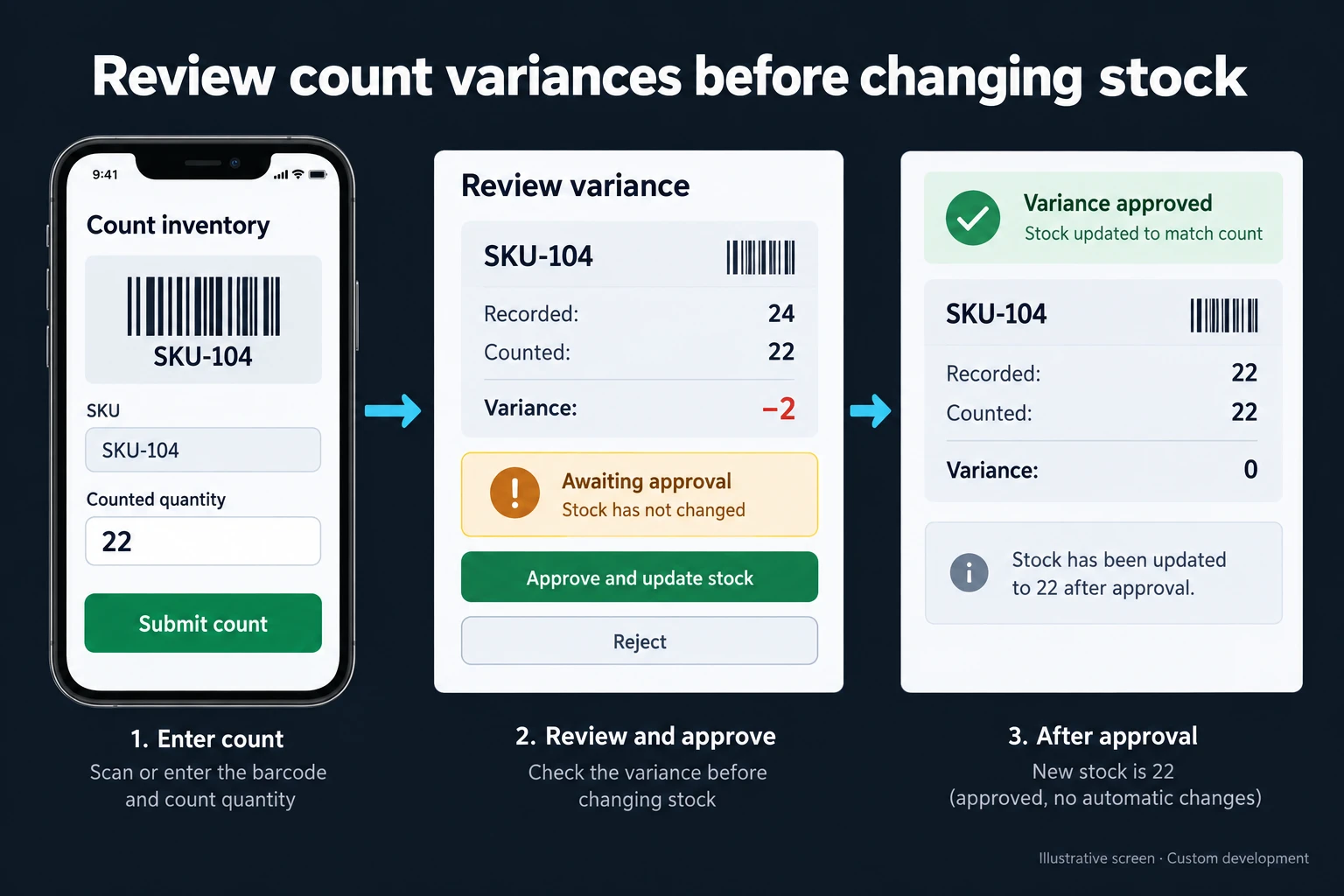
Example: The system shows 24, the shelf has 22
The illustration is fictional. Product SKU-104 has a recorded quantity of 24 and a counted quantity of 22. The variance is 22 − 24 = −2. The screen says awaiting approval, so recorded stock remains 24 at this stage. The physical count is not silently written over the existing stock field.
An authorised reviewer can inspect the variance, request another count or approve an adjustment with a reason. If approved, the example stock becomes 22 through a linked minus-two count adjustment. The initial count and the post-approval result are clearly identified as different states.
Account for movements during the count
Receipts and shipments can happen between starting a count and reviewing it. Ignoring those movements can create a misleading variance. Depending on the operation, we can define a movement pause for the counted area, use a recorded snapshot or account for intervening movements explicitly.
Scanning a barcode again could mean adding one unit or reopening the item’s count screen. Those are different behaviours, chosen according to the device and method. Carton and individual-unit barcodes need explicit units and conversions. An unknown code goes to review rather than automatically creating a new product.
When existing tools are sufficient
A well-organised spreadsheet may suit a small warehouse counted by one person. If your stock system already supports count sessions and variance approval, using it may be preferable. A custom application is useful when mobile entry, several shelf teams and specific approval rules need to work together. Camera or scanner compatibility is tested on the intended devices.
Making the scope testable
I start with a de-identified example of your current file or screen and the roles of the people using it. The written scope defines where each field comes from, who can change it and where the result goes. I test the 24-versus-22 example, an intervening shipment and a repeated barcode scan. Recorded stock must remain unchanged before approval, including after a page reload.
The scope also covers exports, the backup approach and who handles failures. We review the first version against one real workflow before planning further connections.
Frequently Asked Questions
Can a phone camera scan the barcode?
It can be supported after checking the target phone, browser and barcode format. Manual code search can provide a fallback. I do not assume that every device reads every label equally well.
Are two people’s counts automatically added together?
No. Dividing different shelves between people is different from recounting the same stock. The session rules determine whether counts are combined or compared, preventing an accidental double count.
What happens if someone enters the wrong quantity?
Before approval, a reasoned correction or recount can be allowed. A change after approval needs its own record so the original count and resulting stock adjustment remain traceable.
Discuss your workflow
For a related workflow, see Lot and Serial Number Traceability App. Explore custom web applications for your team or contact me with an example of the process you want to improve.
How do I work?
Work-hour packages
Tell me about your business and what you need on WhatsApp or by phone; we agree on a work block of somewhere between 5 and 40 hours and I start doing what is needed. What you get is not a calendar window — it is net working hours spent directly on your business. I can use 40 hours working three days straight, or deliberately spread it out and finish it over a year — whatever the work calls for. I do not spend my time estimating how long something will take, I spend it doing the work; every hour I spend leaves a lasting result in your business. We keep going for as long as you find it useful.
Why not monthly?
Is 40 hours a week?
On a fixed monthly fee both sides are watching the wrong thing: you watch a fixed cost, the other side watches how many more contracts like this they can line up. Working by the hour puts us both in front of the same thing — the real value of the work that got done. I know not having an upfront answer to "how much will this cost in total?" is the natural cost of this model. But instead of paying a fixed fee for months to a setup that is not producing results, you only pay for the qualified time spent on your work — and you see exactly where that time went, start to finish. That is why my clients keep coming back.