
Google Sheets Threshold Alerts and Email Notifications
To learn that a Google Sheets value crossed a threshold, Sheets’ own menus offer three routes, and an Apps Script opened from the Extensions menu is the fourth; if the alert also needs a record afterwards, a custom application is the fifth. Conditional formatting colours the cell but tells nobody who has not opened the file. Notification settings emails only you, per change or as a digest, with no thresholds. Conditional notifications email when a chosen column changes, on some work and school accounts; they ignore data imported from other files, and Google does not say whether formula results count. If your account has them, try them first. For stock, maintenance counters or budget ratios calculated by formula, the route I recommend is an Apps Script that runs every hour. The hard part is not sending the email but stopping the same warning from repeating.
Example: a 140-item spare-parts store over 30 days
The example is fictional; figures come from a Python simulation described at the end. A machine builder’s maintenance store keeps 140 spare-part lines in Google Sheets. Each line has a minimum; current stock is a formula over goods-in and goods-out movements. At the minimum, the storekeeper and purchasing want an email.
Over 30 days, 85 of the 140 lines reached their minimum at least once, 111 purchase orders were raised, and stock moved from above the minimum to at or below it 131 times. Some drops were not real needs: a returned unused part lifted stock by one, and the next issue dropped it again. I counted the 30 days under four notification rules (table in section 4).
1. Conditional formatting: visible, but silent
Conditional formatting colours rows that cross the threshold and notifies nobody. In Format > Conditional formatting, choose Custom formula is and, with current stock in column C and the minimum in D, enter =$C2<=$D2 to turn every row at or below its minimum red. Google’s conditional formatting page says custom formulas refer directly to cells on the same sheet; another sheet needs INDIRECT.
If someone checks the sheet every morning, this is the cheapest solution. The inventory tracking template guide shows how to calculate stock from movements; the layout also opens in Google Sheets.
2. When do Google Sheets’ built-in notifications send email?
Neither of Google Sheets’ two built-in email notifications was designed for thresholds.
Notification settings (Tools > Notification settings > Edit notifications) emails when “Any changes are made” or “A user submits a form”, “right away” or as a “daily digest”. Google’s notifications page says it works only for yourself and skips your own edits; a busy store gets an email per movement or a digest.
Conditional notifications (Tools > Conditional notifications) come closer: you pick the column to watch, optionally use Add condition, and type recipients or point to a column of addresses. Google’s conditional notifications page lists these limits:
- Only certain work or school accounts have it.
- Emails may not be immediate, and several changes may be consolidated into one.
- Recipients must be individual Gmail or Workspace addresses; no group, Outlook or Yahoo addresses.
- Format changes, external data from Connected Sheets or other files such as IMPORTRANGE, and volatile functions such as TODAY() changing while the file is closed may not trigger it.
- Emails go on behalf of whoever created or last edited the rule; trigger history is kept for 30 days.
Two questions stay open. Current stock is a formula fed by another tab, and Google does not say whether a changing formula result triggers a notification; the feature appears built around edited values (my inference). The only condition example matches exact text, with no numeric “less than or equal to”. A helper column, =IF($C2<=$D2,"ORDER","") in column F matched against ORDER, still watches a formula result. Test on a copy with one movement; if the email arrives and batching is acceptable, you need no code.
3. An hourly threshold check with Apps Script
An Apps Script on an hourly time-driven trigger reads the sheet as it stands and compares the threshold itself, however the value changed. Google’s triggers page says onEdit runs when a user changes a cell value and that scripts and API requests do not fire triggers; a recalculating formula is not a user edit (my inference). A time-driven trigger waits for the clock.
It expects a Stock tab with A Code, B Part, C Current stock, D Minimum, E Alert, data from row 2. The script writes column E: blank means no alert sent, a timestamp shows when one went out. A faulty row gets a “not a number” note on its E cell, keeping any timestamp. Rows without a code are skipped.
// Untested: try it on a copy, with your own address as recipient.
var SHEET = 'Stock';  // A Code | B Part | C Current stock | D Minimum | E Alert
var RECIPIENTS = 'stores@example.com,purchasing@example.com';
var QUIET_START = 20, QUIET_END = 7;  // no email between 20:00 and 07:00
var NOT_NUMBER = 'not a number';

function checkStock() {
  var sheet = SpreadsheetApp.getActive().getSheetByName(SHEET);
  if (!sheet) throw new Error('Sheet not found: ' + SHEET);
  var last = sheet.getLastRow();
  if (last < 2) return;
  var data = sheet.getRange(2, 1, last - 1, 5).getValues();
  var notes = sheet.getRange(2, 5, last - 1, 1).getNotes();
  var hour = Number(Utilities.formatDate(new Date(), Session.getScriptTimeZone(), 'H'));
  var quiet = hour >= QUIET_START || hour < QUIET_END;
  var fresh = [], faulty = [];
  data.forEach(function (r, i) {
    var stock = r[2], min = r[3], flag = r[4];
    if (r[0] === '') return;
    if (typeof stock !== 'number' || typeof min !== 'number') {
      if (notes[i][0] !== NOT_NUMBER && !quiet) faulty.push(i);
      return;
    }
    if (notes[i][0] === NOT_NUMBER) sheet.getRange(i + 2, 5).setNote('');
    var band = Math.max(2, Math.ceil(min * 0.2));
    if (flag !== '' && stock >= min + band) {
      sheet.getRange(i + 2, 5).clearContent();  // flag clears only at minimum + band
    } else if (flag === '' && stock <= min && !quiet) {
      fresh.push(i);
    }
  });
  if (fresh.length === 0 && faulty.length === 0) return;
  if (MailApp.getRemainingDailyQuota() < RECIPIENTS.split(',').length) {
    throw new Error('Daily email quota is too low for this send');
  }
  var lines = fresh.map(function (i) {
    return data[i][0] + ' ' + data[i][1] + ': stock ' + data[i][2] + ', minimum ' + data[i][3];
  }).concat(faulty.map(function (i) {
    return data[i][0] + ': stock or minimum is not a number, please check';
  }));
  MailApp.sendEmail(RECIPIENTS, 'Stock: ' + fresh.length + ' lines at minimum, ' +
    faulty.length + ' faulty rows', lines.join('\n'));
  var now = new Date();
  fresh.forEach(function (i) { sheet.getRange(i + 2, 5).setValue(now); });
  faulty.forEach(function (i) { sheet.getRange(i + 2, 5).setNote(NOT_NUMBER); });
}

function installTrigger() {
  ScriptApp.newTrigger('checkStock').timeBased().everyHours(1).create();
}
Three deliberate choices:
- A non-number is not skipped silently. Numbers pasted from an ERP or CSV can arrive as text. A blank stock or minimum cell also counts as faulty. Such a row is reported once and noted on its E cell; once fixed, the note clears, and because E’s timestamp stayed, no second email goes out.
- Email first, flag second. If sending fails, no flag is written and the line is retried next hour.
- One email per run. All lines reaching their minimum in the same hour share one message. Before sending,
MailApp.getRemainingDailyQuota()checks the recipients left for today (MailApp reference); if too few remain, the script throws.
When sorting, include column E.
Setup, testing and the trigger’s account
Paste the script into the editor under the sheet’s Extensions > Apps Script menu and save. The first run opens a permission dialog; Google says unverified scripts may show a warning that the app is unverified (authorization).
To test, put only your own address in RECIPIENTS, then run checkStock by hand. Two traps: between 20:00 and 07:00 quiet hours block the email (set QUIET_START = 24, QUIET_END = 0 while testing, then restore), and the first run sends every line currently at its minimum in one email.
Then run installTrigger once. Google’s installable triggers page says it runs under its creator’s account: emails come from that address and the quota is that account’s; alerts stopping when it closes is my inference. I recommend a permanent account that owns the process. Each run of installTrigger adds a trigger; on the editor’s Triggers page, check there is one row for checkStock and delete any extra. Google’s ClockTriggerBuilder reference says the minute is random when nearMinute is not set; that an hourly run lands between 10:00 and 11:00 is my inference.
Quotas and the failure summary
Google’s Apps Script quotas page (31 October 2026) sets the daily MailApp recipient limit at 100 for consumer accounts and 1,500 for Google Workspace, total trigger runtime at 90 minutes and 6 hours a day, and a single execution at 6 minutes. Quotas may change without notice and count recipients: one email to two people uses two.
In the example store this bites: emailing on every check, the busiest day would bring 673 emails, 1,346 recipients with two each, over the consumer limit on 29 of 30 days. This page’s script sends 82 emails in 30 days, 164 recipients.
When the script fails (renamed tab, spent quota, revoked permission), Google says Apps Script sends a “Summary of failures for Apps Script” email whose frequency is adjustable. Google does not name the recipient; I assume it goes to the trigger’s creator. An alert script that quietly stopped is more dangerous than none, because everyone assumes it works.
4. How should you design the threshold?
Absolute or ratio; floor or ceiling? Spare parts suit an absolute floor (“sensors at 5”); budgets and maintenance suit a ratio ceiling: “spend at 90 percent of budget”, “hour meter at 90 percent of the service interval”. Calculate the ratio in a helper column. For a ceiling, two comparisons change: the condition becomes value >= threshold, the reset value <= threshold - band, with the band in percentage points (for example 0.05) and no Math.max(2, …). I tried a short series: 0.86 → 0.91 → 0.89 → 0.92 → 0.84 → 0.93 with a threshold of 0.90 produced 2 emails with a 0.05 band and 3 without.
Repeat emails: a “sent” column is not enough. If the column E flag clears as soon as stock rises above the minimum, repeats return. In the example, sensor YP-0009 has a minimum of 5:
- Day 11, 20:00: stock drops to 5, an email goes out.
- Midnight: an unused sensor is returned; stock is 6 and the flag clears.
- Day 12, 08:00: stock drops to 5 again, a second email.
- Day 13 it rises to 6; day 14 at 09:00 it is back at 5, a third email.
- Day 15 the order arrives and stock becomes 15.
The order was raised at the first email; the other two were needless. Over 30 days, 19 such repeats went out across 18 lines.
Hysteresis: separate the threshold that opens the alert from the one that resets it (my recommendation). The alert opens at the minimum, but the flag clears only at “minimum + band”. My starting suggestion: 2 units or 20 percent of the minimum, whichever is larger. For YP-0009 the band is 2, so the flag clears at 7, and stock moving between 5 and 6 sends nothing. Tune the band to your consumption; too wide a band silences a genuine second drop. Nineteen emails a month mean nothing to the quota; in my view the gain is less noise, since a third alert for the same line teaches readers to stop trusting alerts.
| Rule | Emails in 30 days | What happens |
|---|---|---|
| Every check, every line at its minimum | 13,890 | Exceeds the consumer quota |
| “Sent” column, cleared above the minimum | 131 | 19 needless repeats across 18 lines |
| Hysteresis: flag cleared at minimum + band | 112 | Repeats disappear |
| This page’s script: hysteresis + quiet hours + one summary | 82 | 110 line alerts, at most 4 lines per email |
The script has 110 alerts, not 112: of two overnight drops, one recovered above the minimum by 07:00 and the other fell on the period’s last night.
Who receives it? A recipient column per item group sends the maintenance supervisor only that line’s parts; the short script would then need to group lines by recipient.
Quiet hours. Under the hysteresis rule, 39 of 112 alerts fell between 20:00 and 07:00. The script neither flags nor emails in quiet hours; if stock is still low at the first morning run, the alert goes then. For parts that would stop a production line, my suggestion is a “critical” column whose lines skip the quiet-hours check.
Which route when?
| Route | When | Limit |
|---|---|---|
| Conditional formatting | Someone opens the sheet daily | Invisible unless the file is opened |
| Notification settings | You personally follow others’ edits | Only for you; no thresholds |
| Conditional notifications | Work or school account, manually edited column | Not other files’ data; formulas unclear; may be delayed |
| Apps Script, hourly trigger | Formula values, repeat and quiet-hour rules | Runs as its creator; 100 / 1,500 recipients a day |
| Web application | Ownership, closure and history must be recorded | Written scope, server and maintenance |
5. Where does a web application start?
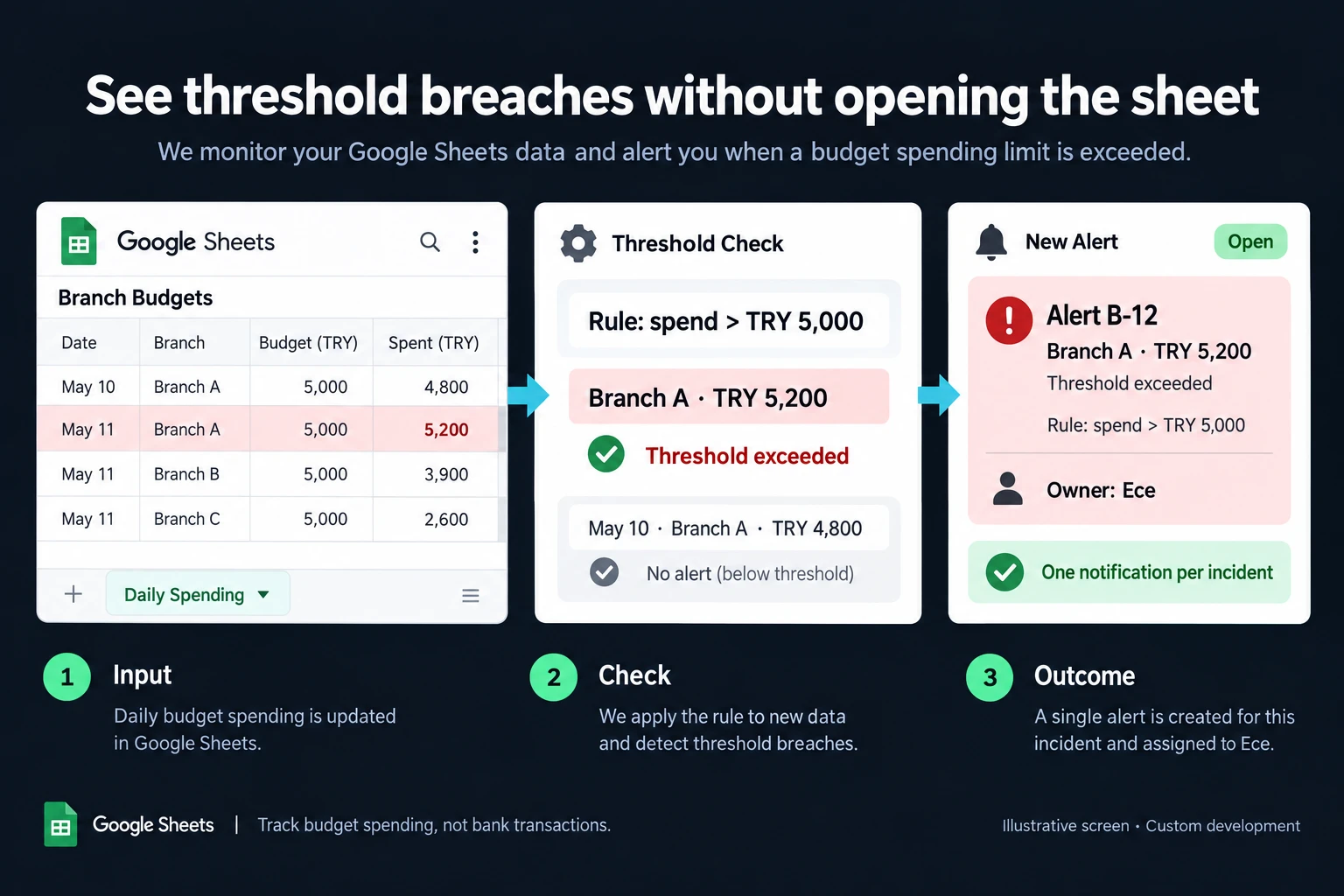
Once you need a record of who did what after the email, a sheet and a script fall short: an email is a reminder, not a record. If a missed alert means an order placed a day late, the script is enough; that is my recommendation for the example store. If it means a stopped line, a skipped service or an unapproved overrun, each alert needs a record: who saw it, who took it on, why it closed, how often the line dropped. Owner and order columns can be added, but Sheets shares per file, and while protected ranges restrict editing, a separate owner per row is manual work.
Scope that can be developed for the example store:
- Role-based recipients: the maintenance supervisor sees that line’s sensors, purchasing sees all 140 lines; alerts go to the item group’s owner, or a deputy during absence.
- Approved closure: the YP-0009 alert closes only with a purchase order number or a written reason; who closed it and when stays on record.
- History and order status: how often each line hit its minimum, how long until the alert was taken on, whether an order is open; orders kept in an ERP can come in through its export. For a line that drops as often as YP-0009, AI can suggest a new minimum from consumption history; an authorised person approves it.
This can be built to your needs, and the scope is set out in writing at the first step, where we also choose the notification channel (email or another) together. The application runs on a virtual private server (VPS) that can be opened in your company’s name; the data is yours, exportable to Excel or CSV at any time. For small and mid-sized teams there are no per-user licences; the cost is the server plus maintenance. The source code sits in a repository you can access, with run instructions, a dependency list and known limitations. An example that also covers purchasing is the minimum stock and purchasing tracking app; the general approach is on custom web apps for your team.
Send your sheet’s column headings, and who needs to know when which value crosses its threshold, via the contact page.
What I could not verify
Sources read on 31 October 2026; the simulation covers 140 lines, 30 days, hourly checks, returns and lead times of 3 to 10 days. Still open:
- Whether conditional notifications fire on a formula result in the same file, and whether they offer a numeric condition such as “less than or equal to”.
- Who receives the failure summary: Google does not name the recipient; the trigger’s creator is my inference.
- How long one run takes on 140 rows; I expect it far below the 90-minute daily limit but did not measure it.
- Whether a group address counts as one recipient or one per member in the MailApp quota.
- Menu names (Extensions > Apps Script, Triggers) come from Google’s documentation, unchecked in the interface.
- Time zones: Google says
Session.getScriptTimeZone()returns the script’s time zone, while the spreadsheet has a separate one that may differ (Session reference). Quiet hours follow the script’s; check both.
Frequently Asked Questions
Can the alert go to a chat app instead of email?
Apps Script can call a chat tool’s incoming webhook with UrlFetchApp, under its own quota rather than MailApp’s. Guard the webhook address like a password: anyone who sees it in the script can post to the channel. I have not tested this; check your tool’s documentation.
Who should be able to change minimum values?
Few people. Put the minimum column in a protected range. Someone setting a minimum to zero silences that line’s alert until stock runs out completely, and nobody notices.
Should alerts go out at weekends and on holidays?
Utilities.formatDate(new Date(), Session.getScriptTimeZone(), 'u') returns the weekday from 1 (Monday) to 7 (Sunday); Google’s Utilities reference points to the Java SimpleDateFormat specification, and I have not tested it. If it is 6 or 7, set quiet to true; with no flags set, the alert goes out on the first working morning if stock is still low.
How do I work?
Work-hour packages
Tell me about your business and what you need on WhatsApp or by phone; we agree on a work block of somewhere between 5 and 40 hours and I start doing what is needed. What you get is not a calendar window — it is net working hours spent directly on your business. I can use 40 hours working three days straight, or deliberately spread it out and finish it over a year — whatever the work calls for. I do not spend my time estimating how long something will take, I spend it doing the work; every hour I spend leaves a lasting result in your business. We keep going for as long as you find it useful.
Why not monthly?
Is 40 hours a week?
On a fixed monthly fee both sides are watching the wrong thing: you watch a fixed cost, the other side watches how many more contracts like this they can line up. Working by the hour puts us both in front of the same thing — the real value of the work that got done. I know not having an upfront answer to "how much will this cost in total?" is the natural cost of this model. But instead of paying a fixed fee for months to a setup that is not producing results, you only pay for the qualified time spent on your work — and you see exactly where that time went, start to finish. That is why my clients keep coming back.