
Scheduled API Data Import: Marketplace and Shipping Data in One Place
If you download reports from two marketplace dashboards and a carrier dashboard every morning and paste them into one spreadsheet, an app can do that job: it connects to each API at a set time and shows what arrived and what did not. The real risk is not a failed run. It is a run that reports “success” while data is missing or doubled. In the fictional month below, a simple script using the same window but with no record key and no line count would have closed the month at 6,261 order lines. The correct figure is 5,428. The gap is +833: 918 surplus lines covering 85 that never arrived.
A scheduled API data import app pulls data from one or more external systems (marketplace orders and stock, shipment status, exchange rates, payment provider reports) at a planned time each day, recognises every record by a key, logs every run and fills in missing days. An API is an agreed way for two systems to exchange data, if the source permits it. I build this as a custom web app.
Would anyone notice a short day, or a report pasted twice? If you check data monthly, or have one source and one user, see the Power Query section. This page covers one-way scheduled pulls; a Sheet and an app updating each other is covered under Google Sheets two-way sync.
How does the app work?
The app requests a time window page by page, checks each line against its key, writes it and logs the outcome. Five terms:
- Pull job: one source, one data set, one time. Example: “08:00, Marketplace A, order lines.”
- Pull window: the time range one run requests, here the previous day with a two-hour overlap.
- Record key: the fields that identify a line: source + order number + order line number.
- Run log: a permanent entry per attempt: start, received, written, skipped, error.
- Day status: one label per source per data day: complete, missing, under review, failed or no publication.
Each incoming line is new (key not found), updated (key found, value changed, say a cancellation), skipped (key found, value identical) or under review (cannot be written, say an unknown product code). “Written” means new plus updated. A run checks itself: if the four classes do not add up to lines received, it does not count as successful.
Sample month: three sources, 30 days
Sample data, fictional. A company distributes home and kitchen products, sells on two marketplaces and ships through one carrier. Until now, three dashboard reports were pasted into one spreadsheet daily. The app went live this month:
| job | time | source | pulls |
|---|---|---|---|
| Marketplace A orders | 08:00 | marketplace API | order lines changed the previous day |
| Marketplace B orders | 08:10 | marketplace API | order lines changed the previous day |
| Shipment status | 08:20 | carrier API | latest status of open shipments |
Order jobs pull the previous day (the “data day”); data is due by 09:30, when operations opens the report.
What happened:
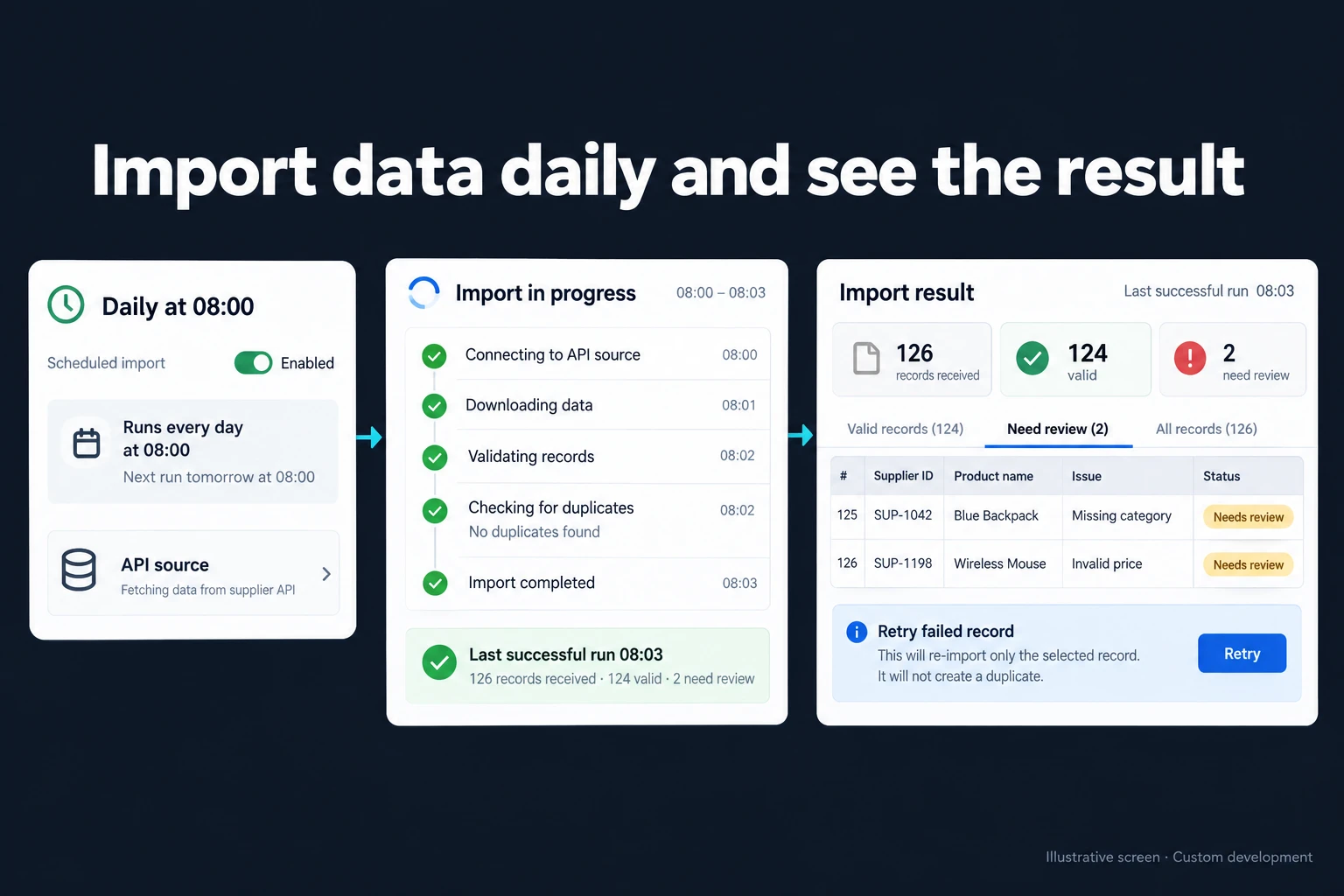
- Data day 3, the morning in the image. Marketplace A ran 08:00–08:03: 126 lines, 113 new, 5 updated, 6 skipped, 2 under review, so 124 valid (written or already held). “Last successful run 08:03” does not mean the two were written; the review count stays on screen.
- Data day 9, a promotion on Marketplace B. 412 order lines in 9 pages of 50. The first attempt lost its connection on page 7 after writing 300 lines. The second, two minutes later, got “too many requests” with a 120-second wait. After the longer, scheduled four-minute wait, the third attempt pulled the window again: 412 received, 300 skipped by key, 112 written.
- Data days 16 and 17, Marketplace A. A new source API version had dropped “pending” orders from its default filter. No error, but 84 lines instead of 128 and 80 instead of 121: 66% and 64% of each day’s previous 14-day average (127.9 and 124.5). The volume rule, which sends a day to “under review” below half the previous 14 days’ average (my starting value, tuned per source), did not fire. The AI’s summaries on the 17th and 18th noted that “pending” lines, averaging 45 a day, had not arrived.
- Day 24, shipments. The 08:20 run hit an authorisation error: the carrier key had expired. Not temporary, so no retry; an alert went at 08:21. The key was renewed at 10:05; the day was “failed” until the 10:12 rerun, then “complete”. At 09:30 the report opened with order data and a shipment banner: “failed, last updated yesterday 08:20”.
Month-end run log:
| Marketplace A | Marketplace B | |
|---|---|---|
| pull attempts | 31 | 32 |
| lines received, all attempts | 3,891 | 2,619 |
| new | 3,391 | 2,006 |
| updated | 141 | 130 |
| skipped, already held | 343 | 468 |
| under review, resolved in the month | 16 | 15 |
| month-end order lines | 3,407 | 2,021 |
Month-end order lines are new lines plus those written after review (3,391 + 16 on A); updated and skipped lines never open a new line.
The decision at month end
The finance manager compared the figures with each marketplace’s monthly order report: A 3,407, B 2,021. Zero difference; the month closed. The comparison uses the report’s basis: creation date, cancellations included. The app pulls by last-modified time but counts each line in its creation month, so an order cancelled the following month stays put. An order created before go-live that arrives with a change goes to its own creation month. Whether the report gives a line count, I check in the first step.
Had the month been pulled by a script using the same window but no record key (writing every incoming line as new and restarting interrupted runs):
| order lines | |
|---|---|
| correct month-end | 5,428 |
| repeated through the overlap window | +347 |
| updated orders added as a second line | +271 |
| interrupted run repeated | +300 |
| silently never arrived | −85 |
| simple script’s total | 6,261 |
That is +833, or 15.3%. Whoever is hunting a surplus will usually not think to ask whether a day is missing, so the 85 lines vanish. The promotion day alone would show 712 lines instead of 412, 72.8% too many.
My suggested closing rule: every data day “complete”, review queue empty, zero difference against the source’s report. Otherwise the month stays open and the gap is traced day by day. Afterwards, a day with no “pending” lines counts as missing, and source release notes are tracked.
How should the pull window and retries be set up?
A wrong window lets a run finish cleanly with data missing. I start by pulling by last-modified time, since a creation-time pull never sees an order cancelled three days later. The window covers the previous day plus a two-hour overlap, so changes the source records a few minutes late are not lost at the boundary; the key skips the repeats (179 lines on A, 168 on B). The window uses the source’s time zone, often UTC.
Errors need opposite responses:
| error | examples | response, my starting point |
|---|---|---|
| temporary | timeout, dropped connection, server error, “too many requests” | up to four retries at 2, 4, 8 and 16 minutes |
| permanent | access denied, expired key, invalid request, removed field | no retry, alert immediately |
If the source states a wait time, the longer of that wait and the next scheduled wait applies.
Resuming mid-window is tempting, but with position-numbered pages, new orders shift lines, so one appears twice or not at all. I prefer to pull the window again and let the key skip what is held. If the source provides a continuation cursor (a code it returns for requesting the next page) that has not expired, the job resumes from it.
What happens if the same record arrives twice?
A repeated record never creates a second line: with its key already present, it is skipped or its changed fields are updated. This is idempotent loading: run once or ten times, same result. So the promotion day’s 300 lines were written once. The rules I suggest:
- The key comes from the source’s permanent identifier, order and line number; never file name, pull time or row position.
- The source name leads the key. Marketplaces number independently: A’s order 10045 and B’s order 10045 are different lines.
- Same key, new value: overwrite, but keep the old value and the run that changed it.
- A record deleted at the source is flagged, not deleted. What deletion means is agreed from the source’s documentation.
- A cancelled or returned line is not deleted; its status is updated. It still counts as a line, which is why it matches a “cancellations included” report.
A total count reported by the source is logged and checked against lines received.
Why do the source’s rate limit and paging matter?
Almost every API caps requests and pages large results. The standard “too many requests” code is 429, and the response may say how long to wait in a Retry-After line (RFC 6585, section 4), given as seconds or a date (RFC 9110, section 10.2.3). I read both on 16 October 2026.
I pull Google Ads reports with my own Python script against the Google Ads API. I do not quote marketplace or carrier limits; they differ and change. In the first step I read them from the source’s documentation and date them in the scope. Suggested rules:
- Space requests below the limit. Two jobs on one source share it and run in sequence.
- Flag a run “suspect” if its last page is full and there is no continuation cursor. Ending on exactly 50 lines with a page size of 50 may mean the cursor was not read.
If a pull fails, who finds out and how?
The job owner and a backup are notified (plus the technical administrator for permanent errors) with the cause in plain words and the last successful run. We choose the channel together in the first step.
- Permanent error: immediately (08:21 in the sample).
- Temporary error: only when the last retry fails or the day is not “complete” by 09:30.
- Suspect result: volume rule, full last page or an approved anomaly note; the day stays “under review”.
- Never ran: the sneakiest case, since a stopped scheduler raises no error. A separate check at, say, 08:40 alerts if any job has no run log entry that morning.
How is a missing day filled in?
By rerunning the same job with a past window; the key skips held lines. The days 16–17 re-pull brought 249 lines: 164 held, 85 written.
Day status shows what needs filling: complete, missing, under review, failed and no publication. A source with no weekend exchange rates needs “no publication” on Saturdays, or Monday brings a false alarm. Suggested rules:
- The operations specialist re-pulls open-month days; closed months need finance approval, and changes go to a “post-close changes” list.
- Re-pulls work only within the period the source makes available, which varies by API; beyond it, a dashboard file goes through a controlled import.
Where are API keys and passwords kept?
Keys and source accounts are opened in your company’s name and kept outside the code, in separate server configuration. I do not build setups that run through my own account; then the connection would not really be yours.
- Keys never go into code, spreadsheets or screens. Nobody can read a stored key in the app; the technical administrator can enter a new one but not view the old.
- Read-only keys where offered: a job pulling orders should not be able to change them.
- Key changes are logged without the value: who, when, which source.
- Known expiry dates trigger a reminder, which would have prevented the carrier delay.
Since order data holds personal data, key protection is part of the security the GDPR requires (Regulation (EU) 2016/679, Article 32).
Who does what? Roles and audit trail
Nobody approves their own closed-day re-pull request.
- Operations specialist (job owner): checks the run log, resolves review lines and shipment issues, re-pulls days, decides on anomaly notes.
- Finance specialist: closes the month, signs off the comparison with source reports, approves closed-day re-pulls.
- Rule owner (operations manager): changes pull times, windows, thresholds and the 09:30 deadline; each change is a new rule version.
- Technical administrator (named in the first step): renews keys, pauses or reruns jobs, adapts to source changes.
- Report users, management, auditors: view only.
Customer names, addresses and phones appear only on the operations specialist’s screen.
The audit trail is a permanent entry for every run and manual action: who, when, under which rule version, for what reason. The days 16–17 re-pull links to the anomaly note the operations specialist approved.
What does AI do, and where does it stop?
AI suggests here; it does not decide. Pulling, key checks, the volume rule and retries are plain rules. AI helps in three places:
- Anomaly suggestions. Each morning the model compares the run log and line distribution (status, product group) with earlier days and writes a note. It first flagged missing “pending” lines on the 17th, when data day 16 was pulled. The operations specialist chose “watch”, then approved the note on the 18th; days 16 and 17 became “missing” and the re-pull finished at 14:00. The model never marks a day missing or starts a re-pull itself.
- Plain-language errors, such as “the key may have expired”, with keys and account details masked first.
- Catalogue matches for day 3’s two new codes; once approved, the match is stored and the model is not called for that code again.
“Pending is zero” could have been a rule nobody thought of; now it is one. AI earns its place where no rule exists yet.
No line reaches the model without passing the permission filter. Anomaly notes get counts and distributions only; catalogue suggestions get product code and name. Customer names, addresses and phones never go to the model, in line with GDPR data minimisation (Article 5(1)(c)).
In Turkey, KVKK (Law No. 6698) sets the same principles in Article 4(2)(ç) and the security duty in Article 12(1); sending personal data to an AI service abroad falls under Article 9 (as amended by Article 34 of Law No. 7499), which this design avoids. I read the current text on mevzuat.gov.tr on 15 October 2026. I do not give legal advice; the first step lists in writing which fields reach the model.
When Excel Power Query or a one-off download is enough
Power Query can connect to an API and refresh at intervals. From official documentation, read on 16 October 2026:
Where it works:
- The Web connector in Excel offers a “Web API” credential type for API keys and supports request headers (Microsoft Learn).
- Connection properties include “Refresh every n minutes” and “Refresh data when opening the file” (Microsoft Support).
- An Apps Script time-driven trigger runs a Google Sheets script daily; failures are emailed, not shown on screen (Google).
Where it stops:
- Paging is usually hand-written. Microsoft’s connector development tutorial says paging differs from API to API and most connectors need custom logic; Power Query handles paging itself only in connectors built on OData.Feed (Microsoft Learn, TripPin 5 - Paging).
- Refresh runs inside Excel. My inference, not Microsoft’s wording: if the file is not open at 08:00, nothing runs.
- No run log. My assessment: each refresh rebuilds the table, so “how many came yesterday, which day is missing” has no answer.
- Apps Script timing and runtime are limited. A 09:00 trigger runs at a time Google picks between 09:00 and 10:00, then keeps. One execution runs at most 6 minutes, and Google says quotas can change without notice (Google).
If you check data monthly, or have one source and one user who checks it every morning, I would not recommend this app: a dashboard download, Power Query or Apps Script will do.
How do we start, and who owns the data and code?
In the first step we review the reports you download, the spreadsheet you merge them into and the sources’ API documentation. The output puts in writing the jobs, windows, keys, error and alert rules, roles, first-version scope and estimated timeline. I do not automate the most complex process first, so the first version covers one source, usually the busiest marketplace; the order and timing of the rest is set in writing in the first step. Earlier months’ spreadsheet can be loaded once as history, or re-pulled if the source allows; that scope is also set in writing.
The app runs on a server (a VPS) that can be opened in your company’s name. The data is yours, exportable as Excel or CSV at any time. In a small or mid-sized team there is no per-user licence; the cost is the server’s monthly fee plus maintenance. The full source code sits in a repository you can access, with run instructions, a dependency list and known limitations. Keys and source accounts are opened in your name. Because order data includes personal data, I assess access, security, hosting and maintenance separately at the start.
What if the source changes its API? The run log and day status show it the same morning, and past data stays intact. Who adapts the job, and how fast, is set in writing in the first step.
Send a few recent reports, customer names masked, through the contact page. We start from which sources have an API and how you notice a missing day today.
Frequently Asked Questions
What if the source has no API?
I first look at the source’s authorised file export. Regular files go through the controlled Excel import screen with row checks, duplicate protection and rollback. If the information only exists on a web page, the approach in importing website data into Excel is considered. I do not promise automatic pulls before the access method is confirmed.
If the source can push changes instantly, do we still need a morning pull?
Instant notifications (webhooks) are fast but can be missed: if the receiver is down or the source does not resend, the line never arrives. Even with webhooks, a morning check pull makes anything missed visible in the day status. Which to use depends on what the source offers and is decided in the first step.
I already use marketplace integration software. Why a separate app?
If your integration software gives you the report you need, you do not need a separate app. The line is crossed when a source outside it (a carrier, exchange rates, a payment report) must sit in the same table, and when you need a logged answer to “how many lines came yesterday, which day is missing, was a line counted twice”. Whether the integration software offers an API, I check in the first step.
How do I work?
Work-hour packages
Tell me about your business and what you need on WhatsApp or by phone; we agree on a work block of somewhere between 5 and 40 hours and I start doing what is needed. What you get is not a calendar window — it is net working hours spent directly on your business. I can use 40 hours working three days straight, or deliberately spread it out and finish it over a year — whatever the work calls for. I do not spend my time estimating how long something will take, I spend it doing the work; every hour I spend leaves a lasting result in your business. We keep going for as long as you find it useful.
Why not monthly?
Is 40 hours a week?
On a fixed monthly fee both sides are watching the wrong thing: you watch a fixed cost, the other side watches how many more contracts like this they can line up. Working by the hour puts us both in front of the same thing — the real value of the work that got done. I know not having an upfront answer to "how much will this cost in total?" is the natural cost of this model. But instead of paying a fixed fee for months to a setup that is not producing results, you only pay for the qualified time spent on your work — and you see exactly where that time went, start to finish. That is why my clients keep coming back.