
Automatic Power Query Refresh and Error Monitoring
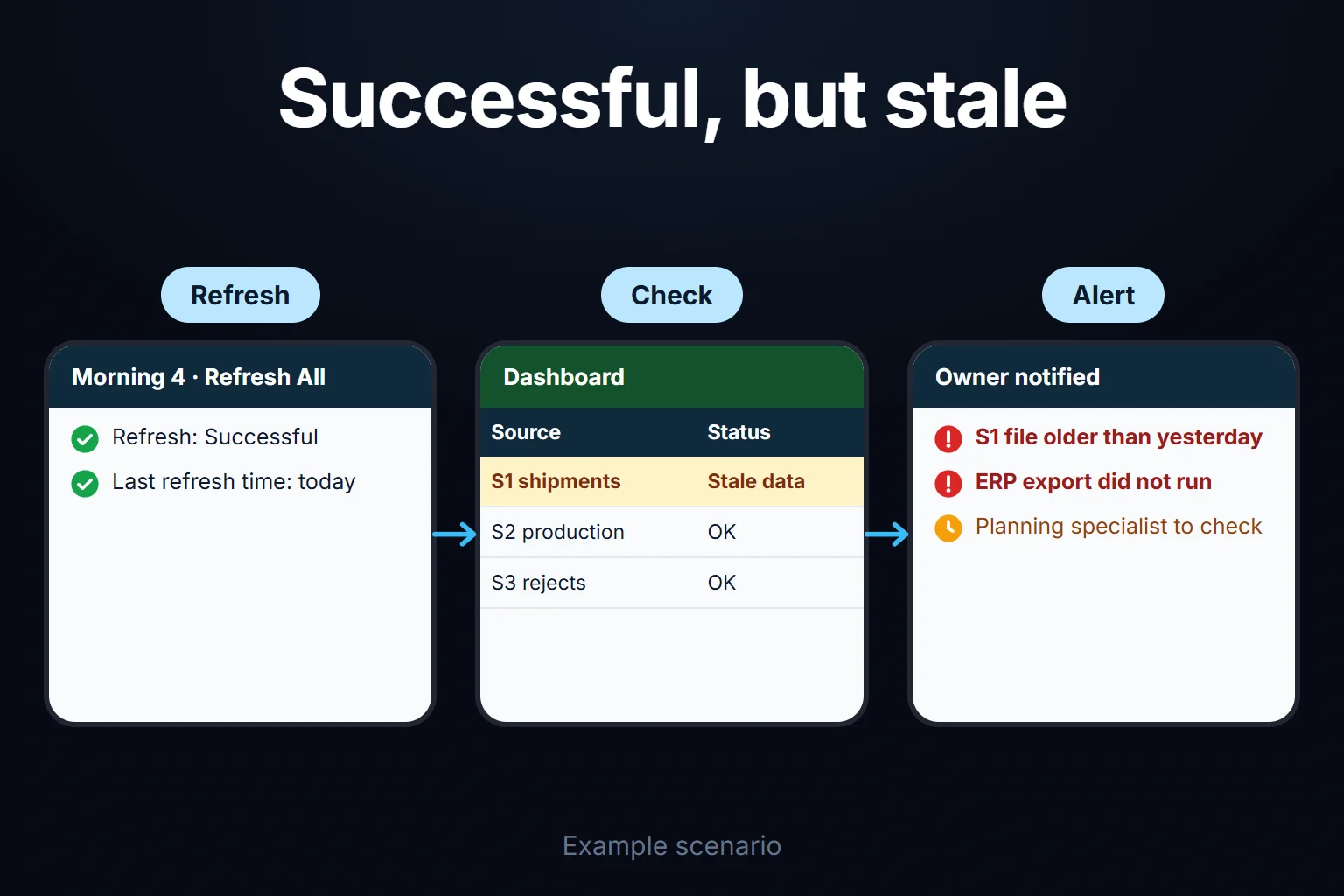
Excel refreshes a Power Query query on its own in three ways: when the workbook opens, every N minutes while it is open, and through a macro that triggers Refresh All. All three need desktop Excel running. With the workbook closed, two routes remain: Power BI scheduled refresh (which refreshes the Power BI model, not the Excel file) and Task Scheduler opening Excel to run a macro (Microsoft does not recommend unattended, non-interactive Office automation). Do not rely on Office Scripts in Power Automate: according to Microsoft, most data does not refresh that way. The costliest failure is the one that reports success while loading stale or incomplete data.
Looking for an error message? See the error table.
I read every Microsoft source here on 16 October 2026. I have not run the M code or formula in Excel; I tested their logic with sample data in a Python script.
Example: a three-source daily report, four failures in 22 working days
The company and all figures below are fictional; a script checks their consistency.
At a metal parts manufacturer, a planner opens the daily report in desktop Excel at 08:30. It refreshes on open from three sources, is saved to SharePoint, and six managers read it in the browser:
- S1: the ERP’s nightly shipping CSV on a network folder (121–161 rows a day)
- S2: production records in a SQL Server view (301–339 rows a day)
- S3: a hand-kept reject list in SharePoint (22–29 rows a day)
One “last refreshed” cell sits at the top, showing the DateTime.LocalNow() result of a separate small query.
| Failure | What the refresh said | Mornings with wrong data | How it was noticed |
|---|---|---|---|
| Mornings 4–6: the ERP export job did not run, the S1 file was not updated | Success | 3 | The sales manager asked why shipments were unchanged |
| Morning 9: an ERP update renamed “Quantity” in S1 to “Shipped Quantity” | Error: column not found | 1 | The planner saw it at 08:30 and fixed the step by noon |
| Mornings 12–17: a new technician typed reject counts like “8 pcs”; an old “Remove Errors” step deleted those rows | Success | 6 | The quality manager compared the weekly reject report |
| Mornings 19–20: the S2 SQL password expired; the colleague covering for the planner closed the credentials prompt and saved | Asked for credentials, cancelled | 2 | When the planner returned |
On 12 of 22 working days the report showed wrong or stale data as current: 9 mornings from the two failures that reported success, 3 from the two loud ones.
The silent failures looked plausible: on mornings 4–6 the report showed 18,726 units shipped against a true 19,091. In the third, 61 of 151 reject rows (40%) were deleted, so the report showed 801 rejects instead of 1,284 and a 0.80% scrap rate instead of 1.28%. The timestamp moved forward every morning, so nothing looked stale.
The first step is not new software but a check sheet with one status row per source.
Refresh options in desktop Excel and their limits
Three settings and one command control desktop refresh, all needing the workbook open. The settings are under Data > Queries & Connections > Connections tab > right-click the query > Properties > Usage; menu paths can vary by version (Microsoft Support).
- Refresh data when opening the file. Needs connections enabled from the Trust Center bar or a trusted location. It runs under the opener’s credentials; the fourth failure came from this.
- Refresh every … minutes. Excel runs the timer, so my reading is that nothing triggers it with the file closed; Microsoft does not say.
- Enable background refresh. Connection types that load into the Data Model cannot run in the background.
Workbook.RefreshAllrefreshes background-enabled objects in the background (Microsoft Learn); I infer that a macro can then save before the refresh finishes, so in macro setups I turn it off. - Refresh All (Ctrl+Alt+F5) or the selected query (Alt+F5).
Refresh Preview in the Power Query Editor updates only the editor’s cache.
What refreshes in Excel for the web?
Excel for the web refreshes manually; Microsoft describes no scheduled browser refresh (Microsoft Support). Browser-refreshable sources and the Data Model limit are covered in the Excel dashboard guide. One addition: local and network folder paths are not on Microsoft’s supported list (Microsoft Support), so my reading is that a CSV on a \\server\... path, like S1, cannot refresh from the browser; I have not tested it.
Refreshing with the workbook closed: two routes and a misconception
The documented route is Power BI scheduled refresh; Task Scheduler with a macro works but, in my view, falls in what Microsoft does not recommend. The misconception: Power Automate with Office Scripts does this job.
Power Automate and Office Scripts: most data does not refresh
Microsoft says Office Scripts cannot refresh most data when run in Power Automate. refreshAllDataConnections only refreshes Power BI sources; for others it returns successfully and does nothing (Microsoft Learn). The page does not name Power Query; treating Power Query connections as “non-Power BI sources” in that scope is my inference. Running scripts in flows needs a Microsoft 365 business licence, with 1,600 Run script calls per user per day and a 120-second timeout (Microsoft Learn).
Power BI scheduled refresh and the gateway
You publish the Excel Data Model as a Power BI semantic model or rebuild the queries in Power BI Desktop; refresh for uploaded local workbooks is no longer supported (Microsoft Learn). From Microsoft’s pages on scheduled refresh and data refresh:
- Licence: a free user can schedule refresh only in My workspace; sharing with the team requires a Pro or Premium Per User (PPU) licence (Microsoft Learn).
- Frequency: up to 8 scheduled refreshes a day on Pro, 48 on PPU, Premium or Fabric capacity.
- Gateway: network files and on-premises SQL Server need an on-premises data gateway installed and running; for a file on a local or company drive, that computer must be on.
- Failures: emails go to the model owner by default. The schedule is disabled after four consecutive failures or an error such as expired credentials, and pauses after two months without report views.
Power BI refreshes its own model, not the Excel file in SharePoint; the team reads the report there.
Task Scheduler and a macro
Task Scheduler opens Excel each morning; a macro in a separate trigger workbook (not in the report, where it would run for anyone opening it) opens the report, refreshes, saves and closes.
Microsoft does not recommend unattended, non-interactive Office automation: Office may deadlock, waits on dialogs and needs a user identity (Microsoft Learn). In my view, a task that runs with a user signed in but nobody watching falls in that scope. I use it only as a logged stopgap. I give no macro sample: I have not tested one against unattended credential or privacy prompts.
Power Automate desktop flows can also open Excel and run a macro (Microsoft Learn); I found no direct Power Query refresh action, so it is the same macro route.
Which route when?
| Situation | Route | Watch out for |
|---|---|---|
| One report, its owner opens it every morning | Refresh on open + check sheet | Nothing refreshes while the owner is away |
| Sources in SharePoint or SQL, team reads in the browser | Manual browser refresh + check sheet | Data Model and gateway sources do not refresh |
| Daily at a fixed time, file closed | Power BI scheduled refresh | The model refreshes, not the Excel file; the gateway computer stays on |
| No Power BI, stopgap needed | Task Scheduler + trigger workbook | Not recommended by Microsoft; an open dialog stops the run |
Common refresh errors and how to harden the query
A step-level error stops the query from loading; a cell-level error lets it load and marks the cell as Error, so the refresh looks successful. The full message appears in the Power Query Editor: the failing step shows a yellow pane with reason, message and detail (Microsoft Learn). Double-click “Retrieving Data” on the status bar to follow a running refresh. Microsoft does not document how the Queries & Connections pane flags failures; I refresh queries there one by one.
| Error | How it shows up | Hardening |
|---|---|---|
| Column not found | The column 'Quantity' of the table wasn't found; no load | Select only needed columns, limit the type step to them |
| Table or sheet not found | The key didn't match any rows in the table; table renamed or no read permission (Microsoft Learn) | Agree the table name with its owner, keep it in a parameter |
| Path or file name changed | DataSource.NotFound | One path parameter, newest file from the folder |
| Expired credentials | Prompt or access error | Record owner and change date; read-only account |
| Privacy levels (Formula.Firewall) | references other queries or steps | Separate source access from combining |
| Data type error | Error in the cell, query still loads | Route bad rows to a table and track the count |
| Timeout | Step-level error past the default | Filter by date at the source |
The example’s reject query selects its table by name (Item = "Rejects"), so a rename triggers the second error.
Fewer steps that depend on column names
The automatic “Changed Type” step names every source column, so renaming a column the report never uses still stops the query. I select only the columns the report uses and type only those:
let
    Source   = Csv.Document(File.Contents(ShippingFile), [Delimiter = ",", Encoding = 65001]),
    Headers  = Table.PromoteHeaders(Source, [PromoteAllScalars = true]),
    Selected = Table.SelectColumns(Headers, {"Ship Date", "Item Code", "Quantity"}),
    Typed    = Table.TransformColumnTypes(Selected,
                 {{"Ship Date", type date}, {"Quantity", Int64.Type}}, "en-GB")
in
    Typed
Passing MissingField.UseNull to Table.SelectColumns turns a missing column into an empty one instead of an error (Microsoft Learn). Use it only where you track empty values. For a known rename, give Table.RenameColumns the pair {"Shipped Quantity", "Quantity"} with MissingField.Ignore.
One path parameter and the data date
I keep the folder path in a parameter (Home > Manage Parameters) and stamp the newest CSV’s modified date, the raw material for catching the first failure:
let
    Files   = Folder.Files(ShippingFolder),
    Csvs    = Table.SelectRows(Files, each [Extension] = ".csv"),
    Newest  = Table.First(Table.Sort(Csvs, {{"Date modified", Order.Descending}})),
    Content = Csv.Document(Newest[Content], [Delimiter = ",", Encoding = 65001]),
    Rows    = Table.PromoteHeaders(Content, [PromoteAllScalars = true]),
    Stamped = Table.AddColumn(Rows, "File Date", each Newest[#"Date modified"], type datetime)
in
    Stamped
The file date says when the file was written; as the data date I use the latest Ship Date.
Routing bad rows to a table with try … otherwise
The third failure came from an old “Remove Errors” step that deletes rows without a trace. I convert with try … otherwise instead and keep the typed text visible (Microsoft Learn):
// Reject_Raw (not loaded; two queries reference it)
let
    Source = Excel.Workbook(Web.Contents(RejectFile), null, true){[Item = "Rejects", Kind = "Table"]}[Data],
    Num    = Table.AddColumn(Source, "Reject Num",
               each try Number.From([Reject Count], "en-GB") otherwise null, type nullable number)
in
    Num

// Reject_Clean:  Table.SelectRows(Reject_Raw, each [Reject Num] <> null)
// Reject_Errors: Table.SelectRows(Reject_Raw, each [Reject Num] = null and [Reject Count] <> null)
Reject_Errors loads to its own sheet; the technician sees “8 pcs” as typed, and the row drops off once corrected.
Credentials, privacy levels and timeouts
Credentials. Data > Get Data > Data Source Settings > Edit Permissions > Credentials > Edit; Clear Permissions deletes the stored credential (Microsoft Learn). I note the credential owner and change date under the check sheet.
Privacy levels. A Formula.Firewall error means a step references another query while accessing a source, or that privacy levels cannot be combined; combine the steps in one query or separate source access from combining (Microsoft Learn). Microsoft’s security guidance advises against ignoring privacy levels (Microsoft Learn). Power BI Desktop relaxed the restriction for compatible levels in its July 2026 version (Microsoft Learn); I found no such change documented for Excel.
Timeouts. Web.Contents defaults to 100 seconds (Microsoft Learn) and the Sql.Database command timeout to ten minutes (Microsoft Learn). Filter by date first, then set [CommandTimeout = #duration(0, 0, 20, 0)] if needed.
Monitoring the refresh: last success, data date, row count
A successful refresh does not prove the data is current, so per source I track last success, data date, loaded and bad rows, and expected range.
The dashboard guide’s “last data pull” line suffices for one query, not several: the example’s timestamp came from a separate query that always succeeded. Put the timestamp in a query that references the data; a step error prevents loading, and my reading is that the sheet keeps the old rows and timestamp, so it ages with its source. One check query per source:
// Shipping_Check (one row, loaded to its own table)
let
    Data = Shipping,
    Row  = #table(
             {"Source", "Last Refresh", "Data Date", "Rows", "Total"},
             {{"S1 ERP shipping", DateTime.LocalNow(), List.Max(Data[Ship Date]),
               Table.RowCount(Data), List.Sum(Data[Quantity])}})
in
    Row
S2 and S3 get the same kind of query; S3’s Rows and Total count Reject_Clean, plus an “Error Rows” column, Table.RowCount(Reject_Errors). I never merge the three: when one source fails, the merged query fails whole and cannot say which source broke.
On the Status sheet, rows 2–4 hold one source each. A source, B last refresh, C data date, D rows and I total come from the check tables. E is error rows: the Error Rows column for S3, 0 for S1 and S2. F and G are the expected lower and upper bounds, H the status. I type F and G by hand as 70% and 130% of last month’s daily average (a starting point); Power Query keeps no refresh history for a rolling average. H2:
=IF(B2<TODAY(),"Not refreshed",IF(E2>0,"Error rows",IF(C2<WORKDAY(TODAY(),-1),"Stale data",IF(OR(D2<F2,D2>G2),"Out of range","OK"))))Give WORKDAY a holiday list as its third argument; where semicolons are the separator, swap the commas.
I tested the formula’s logic in the script with the same month: morning 4 gave S1 “Stale data”, morning 9 S1 “Not refreshed”, morning 12 S3 “Error rows”, morning 19 S2 “Not refreshed”. Each failure stayed flagged throughout, with no false alarm on the ten clean mornings. The “Not refreshed” results on mornings 9 and 19 rest on the inference that a step error leaves the old rows in place; trigger an error deliberately in your own file once to check.
A range check alone is not enough. With “Remove Errors” in place and only row counts checked, the S3 band would be 17.5–32.5 rows (last month’s average: 25). The six mornings loaded 11, 18, 16, 12, 20 and 13 rows; mornings 13 and 16 would show “OK”. The error table catches all six.
Data identical to the previous morning is a warning too, but yesterday’s value must be stored somewhere. Power Query does not keep it, so each evening you paste the Status D and I values into columns B and C of a “Log” sheet (same row order), by hand or with a small macro. Next morning, =AND(D2=Log!B2,I2=Log!C2) in J2 returns TRUE when the data matches yesterday. In the script this caught S1 on mornings 4–6 and 9 and S2 on 19–20, never on clean days. Keeping this log by hand is the first sign of the “history is needed” signal below.
Who gets alerted, and when?
Closed Excel notifies no one; alerts come from Power BI’s failure email or from a Power Automate flow that reads the Status table with the Excel Online (Business) “List rows present in a table” action. If a status is not “OK” or Last Refresh is older than today, it emails the owner and a backup; scheduled at 09:00, it also catches a morning when nobody opened the file. Connector limits: files up to 25 MB, 256 rows returned by default, and write access needed even for reading (Microsoft Learn). Power Automate uses UTC while DateTime.LocalNow() is local time (Microsoft Learn), so convert before the “older than today” comparison.
Where a web application starts to make sense
When the same monitoring repeats daily across several sources and people, you have reached Excel’s limit. The signs I look for:
- The refresh depends on one person and stops when that person is away.
- History is needed: yesterday’s row count has no home in Power Query; hence the hand-kept band and log.
- Someone else owns the bad row: the technician should see it, and it should leave the queue once fixed.
- An audit trail is required: who retried, saw the alert, corrected the row.
A web application can include scheduled imports, an import log, owner error queues and role-based screens as needed; first-version scope is set in writing in the first step. The business rule can be set to apply as data is entered: if a reject count accepts only numbers, the third failure is prevented at the source.
With one report, one owner and sources in SharePoint or SQL, I would not recommend building this; a check sheet and a flow are enough. The most common mistake I see in automation work is choosing the most complex process first, so I limit a first version to one source: here, the hand-entered reject list.
It runs on a server (VPS) that can be opened in your company’s name; the data is yours, exportable to Excel or CSV any time. A small or mid-sized team pays no per-user licence, only server and maintenance. The source code sits in your repository with run instructions, dependencies and known limitations. Overview: custom web apps for your team.
A first step for your report
Send me the report’s sources, where each lives, and the failures you noticed last month. In the output of the first step, I set out in writing which failures a check sheet can handle and which need an application.
Frequently Asked Questions
Is it safe to save the connection password in the workbook?
Passwords saved in connection properties are not encrypted and not recommended (Microsoft Support). Credentials kept in Power Query’s Data Source Settings are stored encrypted, separately from the data model (Microsoft Learn). For a shared report I use per-user Data Source Settings and a separate read-only database account.
Can I keep some queries out of Refresh All?
You can clear “Refresh this connection on Refresh All” under Properties > Usage. Microsoft describes its effect only for the Power Pivot window: there, Refresh All reports “Cancelled” for such a connection because Excel did not send the request, probably because refresh is disabled on it. I have not tested whether a worksheet Power Query query shows the same message. I mark such a source “manual” on the check sheet, or it shows “Not refreshed” daily.
I use Excel on a Mac. Does this page apply?
Partly. Power Query is in Microsoft 365 Excel for Mac, not Excel 2016 or 2019 for Mac. Refreshable sources include text, CSV, XLSX, JSON and XML files, SQL Server, OData and SharePoint (Microsoft Support). Privacy levels are not yet supported on the Mac (Microsoft Learn). Office Scripts run in Excel for Mac.
How do I work?
Work-hour packages
Tell me about your business and what you need on WhatsApp or by phone; we agree on a work block of somewhere between 5 and 40 hours and I start doing what is needed. What you get is not a calendar window — it is net working hours spent directly on your business. I can use 40 hours working three days straight, or deliberately spread it out and finish it over a year — whatever the work calls for. I do not spend my time estimating how long something will take, I spend it doing the work; every hour I spend leaves a lasting result in your business. We keep going for as long as you find it useful.
Why not monthly?
Is 40 hours a week?
On a fixed monthly fee both sides are watching the wrong thing: you watch a fixed cost, the other side watches how many more contracts like this they can line up. Working by the hour puts us both in front of the same thing — the real value of the work that got done. I know not having an upfront answer to "how much will this cost in total?" is the natural cost of this model. But instead of paying a fixed fee for months to a setup that is not producing results, you only pay for the qualified time spent on your work — and you see exactly where that time went, start to finish. That is why my clients keep coming back.