
Dependent Dropdowns Don't Scale in a Spreadsheet: I Build the Form Your Team Enters Data In
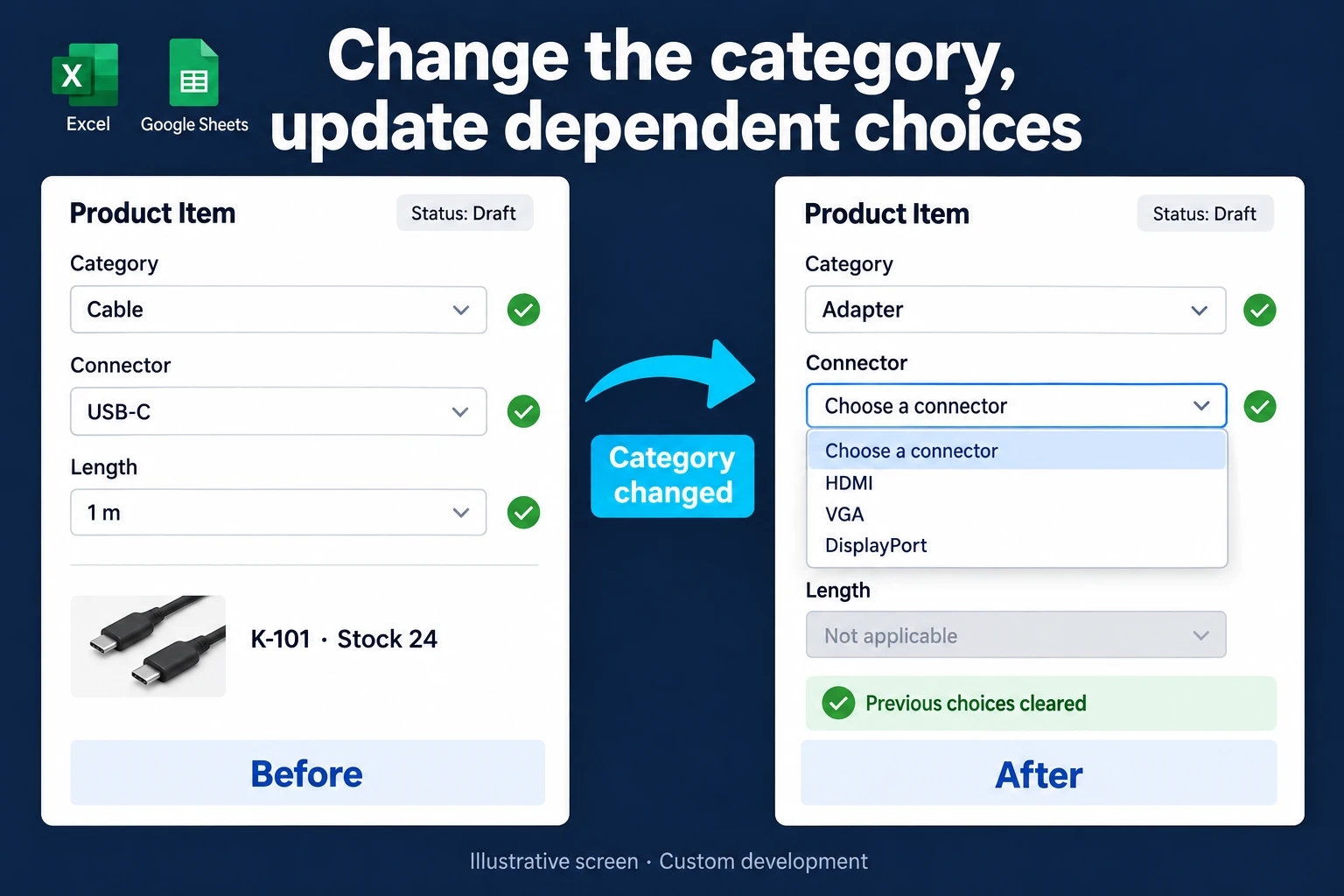
A dependent dropdown narrows the next set of choices using an earlier selection. Choosing Cable might reveal connector types; choosing USB-C then reveals compatible lengths. You can build linked choices in Excel or Google Sheets. But once a team enters data every day and the catalogue is long, the spreadsheet starts to crack. For the spreadsheet setup, follow the Excel dependent-dropdown guide.
I turn those choices into a custom web form that also follows customer access, stock, pricing and record status. The point isn’t a nicer dropdown: the options stay consistent with each other, an invalid product combination is blocked when the record is saved, and it’s clear who is allowed to change the catalogue.
A shared database, user accounts and a management panel
This workflow deserves a web application your team can enter data into safely and you can manage. Categories, products and dimensions are related records in a shared database. Each person signs in with their own account: sales creates orders while a catalogue manager maintains options. I enforce record viewing and editing permissions on the server.
For a long list, I provide name or code search, category filters and clear product details. Invalid combinations, required fields and duplicate-record rules are checked when saving. Managers update catalogue options in a panel; the agreed scope distinguishes configurable rules from new behaviour that requires development.
This is practical, and it does not have to require a large software budget. We can start with the selection screen, database and user roles, then add stock, pricing and approval in stages. Development, migration, hosting, backups and maintenance are explained alongside the first-version scope.
Follow one selection through the catalogue
This is an illustrative catalogue, not a claim about a completed client project.
| Step | Selection | What becomes available |
|---|---|---|
| Category | Cable | Connector types assigned to cables |
| Connector | USB-C | Lengths available for that connector |
| Length | 1 m | SKU K-101, available stock 24 |
| Category changes | Adapter | The previous connector and length are cleared |
After switching to Adapter, the old “1 m” value must not remain hidden in the submitted record. The interface asks for a valid new selection. The server also checks the relationship when saving; disabling a product while a form is open should produce a useful correction message rather than an invalid order.
Showing available stock does not reserve it. If several customers can select the same item, the point at which an order allocates stock must be defined separately. I can connect the form to reserved stock tracking where that is part of the workflow.
Why a dependent dropdown can produce invalid combinations
If you want to build the spreadsheet version yourself, start with the dependent-dropdown guide. If the list already exists but wrong combinations appear, check these four routes.
The parent changes while the child stays. Select Cable and USB-C two metres, then change the category to Adapter. A dependent list does not itself clear the old child value. An event macro can reset it; an additional consistency check can flag it.
Someone pastes another cell. A normal paste may replace validation settings. Even where the rule remains, a copied value can bypass the warning that applies to typing.
The error style is Warning or Information. These styles allow users to continue with a value outside the list. Use Stop when direct entry must be rejected.
A category name changes. A design based on named ranges and text-derived references can break when names contain spaces or are changed. The remedy depends on how the list was built.
In a custom form, we can specify that changing a parent clears the child, that the server checks the combination again on save, and that products are linked by stable identifiers. These are acceptance criteria to test, rather than assumptions about the screen.
Checked 24 October 2026: Microsoft’s data-validation guidance explains the limits around copying and changed referenced cells.
When spreadsheet validation is sufficient
A small internal catalogue, shared by people who can all see the same choices, may work well with source lists and data validation. Google Sheets supports dropdowns from ranges and multiple selections. AppSheet also supports dependent dropdowns. A dropdown alone is not a reason to commission custom software.
A dedicated form becomes useful when the same screen must handle customer-specific catalogues, measurements allowed for a particular model, mobile entry, or editing rules tied to an order’s status. If a list contains too many items to scan, a searchable product selector may serve users better than another long dropdown.
Catalogue ownership and historical records
I keep categories, products and options as related records. An authorised catalogue manager can maintain choices while sales staff use those choices without changing the catalogue. Stable product identifiers keep older orders connected to the correct item when its display name changes.
Deactivating an option is different from removing it from historical orders. The design needs an explicit rule for existing drafts as well: allow the previous selection, request a replacement, or send the record for review. That decision comes from how your business handles discontinued products.
To scope the first version, I review your catalogue, a few valid and invalid combinations, pricing inputs and user roles. Where the selections affect a calculation, a price and cost screen can be part of the same flow. Imports, hosting, backups and ongoing catalogue maintenance belong in the agreed scope.
Frequently Asked Questions
Can the catalogue stay in Excel or Google Sheets?
It can be imported initially or synchronised on an agreed schedule. Each field needs a defined owner so the spreadsheet and application do not overwrite each other’s changes.
Is a dependent dropdown the same as conditional logic?
A dependent dropdown narrows the options in a field. Conditional logic reveals or changes fields and sections based on answers. Both can work together; the conditional web form example explains the second pattern.
Can customers see only products available to them?
Yes, when the application and data access enforce that rule. Hiding choices in the interface is insufficient: requests for an unauthorised product identifier must also be rejected.
Why does Excel keep the old child selection?
Changing the parent does not automatically erase the existing child cell. An event macro can clear it, or an additional check can flag a combination that is no longer valid.
Discuss your workflow
Tell me about your product list and the order of selections via WhatsApp on +90 549 654 64 89 or the contact page, and we’ll scope the form. You can also explore the wider spreadsheet-to-web-app process.
Scope of the custom application
This service covers custom catalogue selection governed by user access and order status. For a spreadsheet setup, see Excel dependent dropdowns or Sheets dependent dropdowns. In a custom form, I check the product relationship again when saving; a choice once displayed is not permanent permission.
How do I work?
Work-hour packages
Tell me about your business and what you need on WhatsApp or by phone; we agree on a work block of somewhere between 5 and 40 hours and I start doing what is needed. What you get is not a calendar window — it is net working hours spent directly on your business. I can use 40 hours working three days straight, or deliberately spread it out and finish it over a year — whatever the work calls for. I do not spend my time estimating how long something will take, I spend it doing the work; every hour I spend leaves a lasting result in your business. We keep going for as long as you find it useful.
Why not monthly?
Is 40 hours a week?
On a fixed monthly fee both sides are watching the wrong thing: you watch a fixed cost, the other side watches how many more contracts like this they can line up. Working by the hour puts us both in front of the same thing — the real value of the work that got done. I know not having an upfront answer to "how much will this cost in total?" is the natural cost of this model. But instead of paying a fixed fee for months to a setup that is not producing results, you only pay for the qualified time spent on your work — and you see exactly where that time went, start to finish. That is why my clients keep coming back.