
AppSheet Pricing, Limits and When a Custom Web App Fits Better
AppSheet is Google’s no-code app builder. You connect a Google Sheet (or an Excel file, AppSheet’s own database, or SQL on some plans) as the data source, and AppSheet turns it into an app that runs on phones and in the browser. Google bought AppSheet in 2020. If your company is on one of the Google Workspace Business plans, an AppSheet Core licence is already included at no extra cost.
I turn the work businesses run in Excel and Google Sheets into custom web apps that run on a server. So in a sense AppSheet is my competitor, and for some jobs I still recommend it. In this article I cover how it works, its pricing as of October 2026 and where it gets stuck, based on Google’s own documentation.
How AppSheet works
An AppSheet app is built on “tables”, and tables are usually tied to a spreadsheet. Screens, forms, rules and automations are defined through settings instead of code. Roughly, the architecture looks like this (Google, AppSheet FAQ):
- Your data stays in your sheet. AppSheet doesn’t copy your Google Sheets or Excel data to its own servers; changes pass through its cloud service and are written back to your sheet. The exception is AppSheet’s own database, whose data lives in AppSheet.
- A copy is kept on the device. When the app opens, a local copy of the data comes down to the device and changes go back during a “sync”. That’s why it can work offline.
- It’s cloud-only. It can’t be installed on a server inside your company.
- On mobile it runs inside a shared app. Your app isn’t published to the store on its own; people install the “AppSheet” app and open yours inside it. It also works in a browser.
You can also start from a description: you write what you need and AppSheet builds a draft. Shaping that draft around real work is still a setting-by-setting job.
AppSheet pricing (October 2026)
According to the official pricing page (about.appsheet.com/pricing, read on 1 October 2026), per user per month:
| Plan | Price | Key difference |
|---|---|---|
| Free (prototyping) | $0 | All features to try, up to 10 test users (the app creator counts) |
| Starter | $5 | Basic apps and automation; no security filters or role management |
| Core | $10 | Security filters, user management with roles, on-device data encryption |
| Enterprise Plus | $20 | SQL, BigQuery and Salesforce connectors, governance, longer audit history |
| Publisher Pro | $50 per app | Public apps; no sign-in and no security filters |
Three rules matter for understanding the price (Google, choosing a subscription):
- Licences are counted by unique users. If one app has 10 users and another has 5 different users, you need 15 licences.
- The app creator’s plan decides what each user needs. If an app was built on Enterprise Plus, every user needs an Enterprise Plus-level licence too. Because sources such as MySQL, PostgreSQL, SQL Server or BigQuery are only available on Enterprise Plus, adding a single SQL table to an app can move every user to $20.
- If you have Google Workspace, Core is already included. On Business Starter, Standard and Plus, as well as Enterprise, Education, Frontline and Nonprofit editions, users on a verified domain get AppSheet Core at no extra cost (Google Workspace admin documentation).
Monthly cost of the AppSheet licence alone:
| Users | Starter | Core | Enterprise Plus | Core via Workspace |
|---|---|---|---|---|
| 10 | $50 | $100 | $200 | No extra cost |
| 25 | $125 | $250 | $500 | No extra cost |
So for a company already on Workspace, the real question isn’t “how much does AppSheet cost?” but “does our work fit within its limits?”
What AppSheet is good at
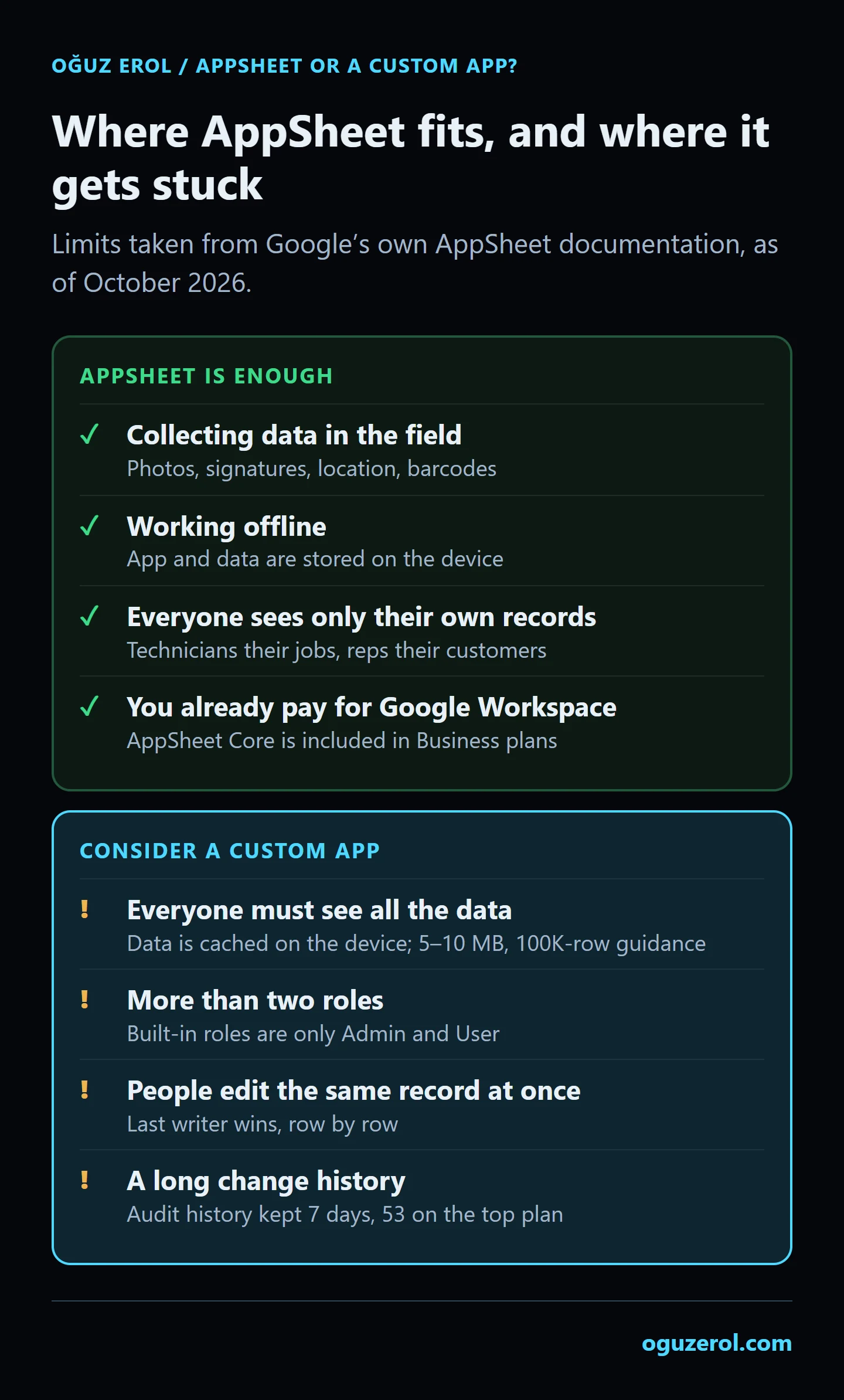
- Collecting data in the field. Photos, signatures, location and barcode scanning come built in. Service forms, site inspections and delivery notes are quick to build.
- Working offline. The app and its data are stored on the device, so records can be entered where the signal is weak.
- Apps where everyone sees only their own records. If a technician sees only their jobs and a sales rep only their customers, the app can grow using security filters.
- Teams already paying for Google Workspace. There’s no licence cost to add.
- Quick experiments. You can build a prototype and let your team try it with up to 10 test users without paying.
Where AppSheet gets stuck
Every point in this section is written in Google’s own AppSheet documentation:
- All the data comes down to the device. An app’s data shouldn’t exceed 5 or 10 MB compressed, and for a spreadsheet the guidance is to stay under 100K rows and 1,000 columns (source). For apps where everyone needs to see all the data, Google is explicit that AppSheet doesn’t work effectively (source). Company-wide sales reports, inventory and customer balances are exactly that kind of data.
- Only two built-in roles. A user’s role can be “Admin” or “User”, and roles can’t be added or removed (source). Different rights for sales, warehouse, accounting and management are built by hand with expressions; for very different classes of user, Google suggests building separate apps.
- Security filters aren’t a complete security solution. Security filters are available on Core and above, and Google itself says they limit data access but aren’t a complete security solution. With spreadsheet sources, the whole sheet is first pulled to the AppSheet server and the filter is applied after that (source). A “slice”, the view filter, downloads the data to the device anyway.
- When people edit the same record at once, the last writer wins. Changes are handled row by row; if two people change the same row at almost the same time, the later change is the one that stays (source). In stock deductions or bookings, that means silent data loss.
- The change history is short. Audit history is kept for 53 days on Enterprise Plus and 7 days on other plans (source).
- It doesn’t run on your own domain. Apps open on appsheet.com; apps that require sign-in can only be embedded in Google Sites, and custom domains aren’t supported (source).
- Choosing a data location needs the top plan. A data location such as the EU region can only be selected by Workspace organisations on Enterprise Plus (source).
- Two Excel details. Only
.xlsxis supported as an Excel source (not.xlsor.xlsm), and if someone has the file open for editing in Office 365, AppSheet can’t write to it (source).
Alternatives people compare it with
- Glide split into two products in 2026. The new GlideOS is priced by credits and team members, with plans from $25 a month; the older Glide Classic Business plan is $199 a month billed annually with 30 users included (Glide pricing). Many comparison articles still quote pre-split prices.
- Microsoft Power Apps Premium is $20 per user per month, paid yearly (Microsoft pricing). Some Microsoft 365 licences include limited Power Apps rights for Microsoft 365 data only.
Like AppSheet, both are per-user or per-plan subscriptions built on the vendor’s platform. The alternative of a different kind is a custom web app.
AppSheet or a custom web app?
| AppSheet | Custom web app | |
|---|---|---|
| First version | Hours to days | Days to a few weeks |
| Licence | Monthly per user (Core included in Workspace) | No per-user licence |
| Other costs | Your build time | Build cost + server and upkeep |
| Roles and permissions | Admin/User plus hand-built expressions | Any roles and field-level detail, enforced in the database |
| Data size | Data is cached on the device, 5–10 MB limit | Queries run on the server; only the needed rows reach the device |
| Same record edited at once | Last writer wins | Conflict rules designed around your work |
| Change history | 7 days (53 on Enterprise Plus) | Unlimited, in your own database |
| Address and look | appsheet.com, limited styling | Your own domain, your own screen design |
| Where the data lives | In your sheet or database | On your server |
My recommendation: if you’re on Workspace and your work matches the “good at” list above, build a prototype in AppSheet first. If you’re dealing with an operations sheet everyone needs to see in full, more than two roles, an approval step, or a team writing to the same records at the same time, patching those with expressions in AppSheet eventually costs more than a custom app.
How I build a custom app, the server setup and a sample screen are on the Excel to web app page. If you’re thinking of turning a spreadsheet into an app yourself, the steps are in building an app from Excel with AI.
Frequently Asked Questions
Is AppSheet free?
You can build and test an app without paying, with all features available for up to 10 test users. To open the app to real users you need a paid plan. If your company uses Google Workspace Business Starter, Standard or Plus, AppSheet Core is included in your plan at no extra cost.
How much does AppSheet cost for 10 users?
For the licence alone: $50 a month on Starter, $100 on Core and $200 on Enterprise Plus. If you’re already on a Google Workspace Business plan, Core costs nothing extra. Your build time and upkeep come on top in every case.
Where does AppSheet store my data?
Your data stays in the source you connect: Google Sheets, Excel or your database. AppSheet keeps the app definition and sign-in details in its own cloud. If you use AppSheet’s own database, that data lives in AppSheet.
Does AppSheet work with Excel?
Yes. .xlsx files in OneDrive, SharePoint, Dropbox or Box can be connected. .xls and .xlsm aren’t supported. If the file is open for editing by someone in Office 365, AppSheet can’t write to it at that moment.
What is a good AppSheet alternative?
If you want another no-code tool, Glide and Microsoft Power Apps are the usual comparisons, both on subscriptions. If your app needs many roles, an approval step, long change history or company-wide data everyone sees, a custom web app on your own server is the other kind of alternative.
Is it hard to move from AppSheet to a custom app?
Moving the data isn’t hard, because it already lives in your sheet or database. Screens, rules and automations live in AppSheet’s settings, so they are rebuilt. An app that has been used in AppSheet for a while is actually a good starting point for writing the specification of a custom app.