
Google Sheets IMPORTRANGE and a Central Data Portal
IMPORTRANGE can connect separate Google Sheets files. As those links grow, a different question becomes important: which sources are current, which failed to update and whether the displayed total uses incomplete data. I build central data portals around that operational need.
The service is not simply a more attractive total on a dashboard. Each source has a visible last successful import, expected data and error state. Staff can trace a result to its source. Where required, branch or customer views receive only the records that their users are authorised to see.
Example: two branches and a visible data time
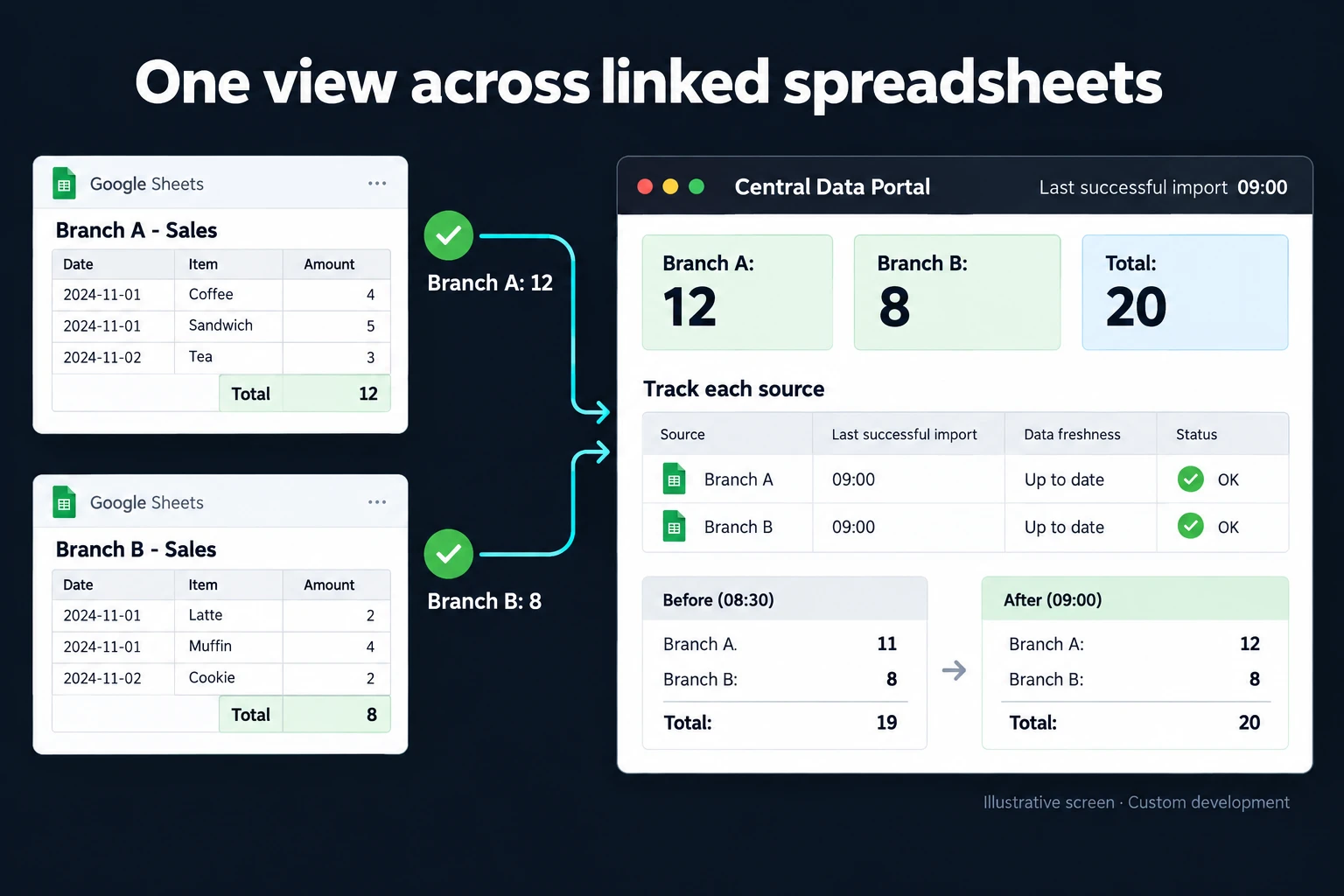
The fictional illustration contains 12 sales records from Branch A and 8 from Branch B. The combined view shows 20. Its Last successful import 09:00 label prevents the reader from assuming that the number is continuously live. The sources are tracked separately.
If the next Branch B import fails, the previous eight records might remain available with an explicit stale-data warning. Alternatively, the application can wait until all required sources are ready before publishing a new total. We choose the behaviour around how the report is used. Neither approach should present an old source as newly refreshed.
When to keep IMPORTRANGE
A small number of files with shared access may work well with the formula. Google’s IMPORTRANGE documentation explains its connection permissions and chained-source behaviour. The fact that a workflow uses formulas is not, by itself, a reason to replace it. First check that source access is authorised, reduce unnecessarily large ranges and shorten chains of linked files. Google documents hourly update checks while the document is open and delays across chained sources; the formula is not a guaranteed real-time feed.
Sharing scope needs separate attention. Editors of a destination file that has been granted access can use IMPORTRANGE to retrieve other parts of the source. That is different from an application permission designed to expose only a particular customer’s records. An assigned-records portal requires the appropriate access controls around both the application and its source.
Confirm that the sources count the same thing
Branch A and Branch B must agree on what a sales record means. We document whether cancelled orders count, whether the date is an order date or delivery date, and which currency applies. If an order occurs in two sources, a record identifier prevents the combined total from counting it twice.
A changed column name or data type should produce an observable import issue. Invalid records can go to review rather than quietly turning a file into an empty result. Those checks give a branch comparison report a sounder basis for interpretation.
Delivery and continuing operation
I inventory source files, account ownership and shared fields first. We then define import frequency, publication rules for incomplete sources and the person responsible for failures. Testing deliberately delays a source, repeats records and changes a column to verify the expected response.
A successful import and an attempted import remain distinct. Results can feed an operations dashboard, while a filter-based reporting screen lets colleagues use the information without editing formulas. The maintenance plan covers access renewal when ownership changes and retention of previous data.
Frequently Asked Questions
Can the source data stay in Google Sheets?
Yes, where it remains suitable. Moving the user interface into an application does not require moving every source to another database immediately.
Will the totals always be live?
No. Freshness depends on the integration method and schedule. The panel shows the last successful data time. A more immediate requirement needs separate assessment of source capacity and operating cost.
Discuss your workflow
Share examples of your linked files and the totals people use. I can assess whether to retain the formula setup or add the source controls that would make a central portal worthwhile.
How do I work?
Work-hour packages
Tell me about your business and what you need on WhatsApp or by phone; we agree on a work block of somewhere between 5 and 40 hours and I start doing what is needed. What you get is not a calendar window — it is net working hours spent directly on your business. I can use 40 hours working three days straight, or deliberately spread it out and finish it over a year — whatever the work calls for. I do not spend my time estimating how long something will take, I spend it doing the work; every hour I spend leaves a lasting result in your business. We keep going for as long as you find it useful.
Why not monthly?
Is 40 hours a week?
On a fixed monthly fee both sides are watching the wrong thing: you watch a fixed cost, the other side watches how many more contracts like this they can line up. Working by the hour puts us both in front of the same thing — the real value of the work that got done. I know not having an upfront answer to "how much will this cost in total?" is the natural cost of this model. But instead of paying a fixed fee for months to a setup that is not producing results, you only pay for the qualified time spent on your work — and you see exactly where that time went, start to finish. That is why my clients keep coming back.