
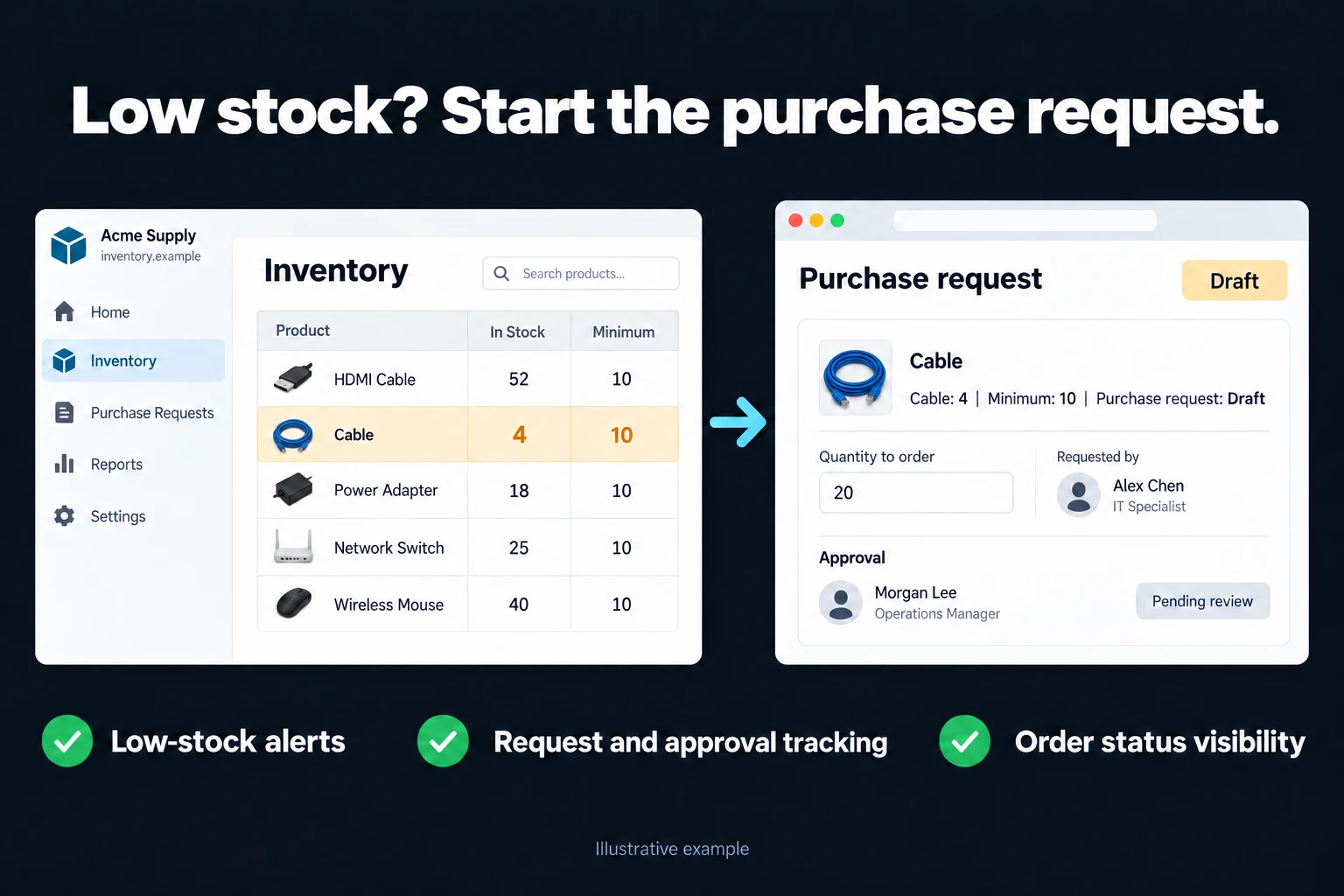
Make Low-Stock Purchasing Needs Visible
If you notice a shortage only when the next customer order arrives, stock checks need a clearer place in your workflow. I build custom screens that compare the quantities in Excel and Google Sheets with product-specific thresholds, showing warehouse staff what is low and purchasing colleagues what is already being handled.
Turn an alert into a tracked purchasing need
Each product has an agreed minimum level. When stock falls below it, the item appears in a needs list. The purchasing owner records whether it is under review, ordered or waiting. Incoming supply is shown separately from stock on hand. If a request is already open, later alerts point to that request so repeated warnings do not automatically create duplicate purchases.
Compare the threshold with the right quantity
A low-stock list and purchasing status make a focused first version that can be tried quickly. We agree whether the threshold uses physical stock or the amount left after order allocations. Reviewing real consumption and lead times helps set useful levels. If notifications are needed, their frequency is controlled rather than emailing the team after every stock movement.
Are minimum level, reorder point and target stock the same?
I would not collapse these into one low-stock field. A minimum level is a lower threshold to monitor; a reorder point concerns when to start replenishment; a target is the quantity to replenish towards. If your operation only needs one threshold, we can start simply. Different purposes need separate definitions.
Illustrative scenario: A production material is below its threshold but has an open purchase order. The panel shows incoming quantity and due date instead of immediately creating another order. If that date has passed, the existence of an order does not resolve the shortage risk; it becomes a purchasing follow-up.
| Panel field | Why it matters |
|---|---|
| Product, warehouse and unit | Avoids mixing locations or cartons with individual units |
| Available quantity | Accounts for allocations and blocked goods |
| Threshold and target | Separates the alert condition from replenishment quantity |
| Open order and expected date | Shows incoming supply and highlights overdue delivery |
| Owner and latest action | Makes responsibility for the outstanding need visible |
Who turns an alert into a purchasing request?
Warehouse staff record quantities and count differences. Purchasing checks open orders, suppliers and packaging units. An authorised manager changes thresholds or approves orders. An automated alert does not mean an order has been sent to a supplier.
A proposed order quantity considers the target, available stock and qualifying incoming supply together. Pack sizes, minimum order quantities and budget constraints should have visible explanations. If lead time or consumption history is unknown, the app should not invent a value and present it as established fact.
How could notifications and AI help?
I would keep an open alert record instead of sending another email on every refresh. We define which status changes, late deliveries or overdue actions trigger a notification. Failed delivery of a notification stays visible and does not close the underlying need.
Optional AI can summarise delayed-supply notes or draft follow-up text for purchasing staff. Threshold changes, order approval and sending to suppliers remain under human control. Generating text is not demand forecasting; forecasting requires its own data and validation.
What examples would we use for acceptance?
- Check the difference between stock exactly at the threshold and below it.
- Trigger another alert while a request is open and confirm it does not create a duplicate purchase.
- Compare partial receipts, cancelled supply and late deliveries in the needs list.
- Test rejection of unauthorised threshold edits and inspect the before/after record for authorised changes.
I would start with your product and warehouse list, units, open purchasing records and existing thresholds. A regularly checked spreadsheet may be enough and can be improved first. An app becomes more useful when several owners handle the same needs and lose track of which requests are already in progress.
Frequently Asked Questions
Should every product use the same minimum?
No. Consumption, lead time and business priority differ, so thresholds can vary and be maintained by an authorised person.
Does an incoming order close the alert?
Incoming goods are not yet available stock. We show the purchasing need and expected supply together, then define when an alert is considered resolved.
Discuss your workflow
Describe your workflow on the contact page.
Related services
How do I work?
Work-hour packages
Tell me about your business and what you need on WhatsApp or by phone; we agree on a work block of somewhere between 5 and 40 hours and I start doing what is needed. What you get is not a calendar window — it is net working hours spent directly on your business. I can use 40 hours working three days straight, or deliberately spread it out and finish it over a year — whatever the work calls for. I do not spend my time estimating how long something will take, I spend it doing the work; every hour I spend leaves a lasting result in your business. We keep going for as long as you find it useful.
Why not monthly?
Is 40 hours a week?
On a fixed monthly fee both sides are watching the wrong thing: you watch a fixed cost, the other side watches how many more contracts like this they can line up. Working by the hour puts us both in front of the same thing — the real value of the work that got done. I know not having an upfront answer to "how much will this cost in total?" is the natural cost of this model. But instead of paying a fixed fee for months to a setup that is not producing results, you only pay for the qualified time spent on your work — and you see exactly where that time went, start to finish. That is why my clients keep coming back.