
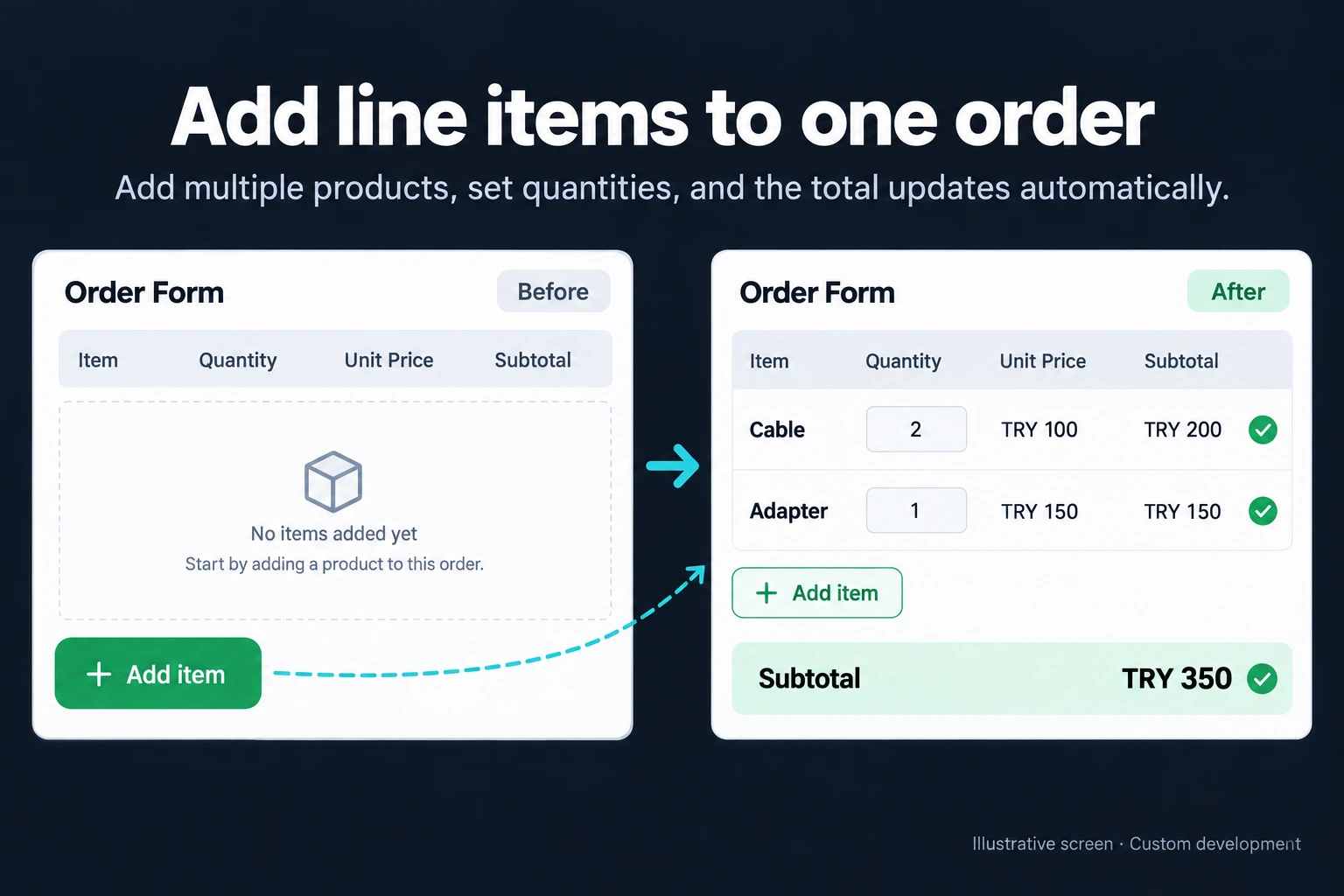
Repeating Line Item Order Forms: Order Header, Line Table and Unit Checks
Squeeze an order with a variable number of items into one form response with “Item 1 … Item 10” columns and three things happen: half the response sheet is empty cells, an order with an 11th item splits across two responses, and since fields for items 2 to 10 cannot be required in flat slots, rows appear with a code but no unit. The right structure is two tables: the details written once per order (customer, date, delivery address, salesperson) live in an order header, and every product sits on its own row in a line table. If you stay with a form, reshape the report into this structure; the Power Query steps are below.
This page is for order desk and sales operations staff who collect orders from field sales and dealers through Google Forms, an Excel template or WhatsApp. Catalogues, discounts and credit limits are on the dealer order entry portal page.
Where does the “Item 1 … Item 10” layout break down?
A form with fixed item slots breaks down because it forces every order into a row of the same width: the item count varies, the response row does not. Four problems follow:
- Empty columns. If each slot asks three questions (code, quantity, unit), ten slots make 30 columns; a two-item order leaves 24 empty.
- The 11th item does not fit. The salesperson opens a second response; only a note, not always written, says the two rows are one order.
- Required fields within an item are weak. In flat slots, items 2 to 10 are optional, so nothing stops a code without a unit. If you branch to sections with an “Another item?” question (Google: go to section based on answer), each section’s fields can be required; but you duplicate a section per item and the ceiling stays fixed.
- Product codes are typed by hand. Thousands of products are impractical in a dropdown, so codes go into a short answer and “CV-M1O-30” (letter O, not zero) is recorded instead of “CV-M10-30”.
I could not find a Google Forms feature that lets respondents add rows or sections themselves. Google’s help on editing a form describes the owner duplicating a section in advance (More > Duplicate section); you still fix the number of slots (Google: edit your form). In the Forms API, grid rows are also defined by the owner, with no respondent-added row item type I could find (Google Forms API).
Example: an industrial hardware wholesaler, 318 orders in 345 responses
The company and all figures are fictional; a Python script checked every number.
A wholesaler of industrial fasteners and hardware takes orders from field sales and dealers through Google Forms with 10 item slots; each asks for product code (short answer), quantity and unit (each, box, carton). One month brings 318 orders:
| items per order | orders |
|---|---|
| 1–3 | 121 |
| 4–6 | 97 |
| 7–10 | 73 |
| 11–20 | 27 |
Total: 1,684 items. The 27 orders with more than 10 items were split in two, so the sheet holds 345 responses; 8 split orders were picked as two separate orders and shipped twice. Of the 10,350 cells in the item fields, 5,327 (51%) are empty. The “Item 10” columns are filled in only 42 of 345 responses.
Item by item, the order desk finds:
| problem | items | example |
|---|---|---|
| Code not in the list | 38 | CV-M1O-30 |
| Unit left blank | 29 | SM-M10, 4, no unit |
| Unit the product is not sold in | 17 | “2 cartons” of a wall plug with no carton pack |
| Not a selling multiple | 52 | 350 of a bolt sold in boxes of 100 |
| Below the minimum | 11 | 250 of an anchor with a minimum of 1 carton (500) |
Wrong units total 46 items; quantities that miss the multiple or the minimum total 63. The 147 problem items are spread over 132 of the 318 orders, so about two orders in five need a call. One type no formula catches: a salesperson who means “4 boxes” but picks “4 cartons” orders 4,000 instead of 400, and both values are valid.
How do the order header and the line table split?
Details written once per order and details repeated for each product go into two tables linked by the order number; one row is one item.
| table | fields | rule |
|---|---|---|
| Order header | Order no, customer, date, delivery address, salesperson, status, revision | One row per order |
| Lines | Order no, line no, product code, quantity entered, unit entered, quantity in each, status | One row per item; any number |
A 2-item order is 2 rows, a 20-item order 20 rows; no empty columns, no split orders. I recommend storing the quantity with its entry unit plus its conversion to units: the warehouse works in units, and what the salesperson typed stays on record.
Which checks apply on each line at entry?
A line should be saved only if its product comes from the list, its unit is defined for that product and its quantity in units meets the selling multiple and minimum. In the application to be built, these checks run during entry:
- Products are searched from the list. Typing a code, name or size lists matches; a code not in the list cannot be entered.
- Units narrow by product. A product not sold by the carton offers no “carton”. Box and carton quantities come from the product record and the line shows the conversion: “4 cartons = 4,000 each”.
- Multiples and minimums prompt a suggestion. Typing 350 for a product sold in boxes of 100 suggests “300 or 400”; a quantity below the minimum needs a written reason.
- Unusual quantities ask for confirmation. A quantity well above the customer’s earlier orders of that product (4 cartons instead of 4 boxes) asks for confirmation. We set the threshold from your data; it will not catch every mistake.
- Stock and price are shown for information. Stock and price are read from the ERP or your price list; no price is typed on the line, and the server recalculates at save.
AI can turn a WhatsApp message such as “4 boxes of the M10 30 bolts, 2 cartons of nuts” into draft lines that pass the same checks; a phrase that matches several codes or none is flagged, not turned into a line, and the order desk approves the order.
How do you turn existing responses into a line table in Excel?
In Power Query, the wide response sheet becomes one row per item by unpivoting, then pivoting the field column without aggregation. Download the responses as an Excel file and:
- Name item questions like “Item 3 - qty”; the separator eases the later split. Add a row number column.
- Select the header columns (row no, salesperson, customer, address) and run Unpivot Other Columns. Microsoft says the result is two columns, Attribute (old column name) and Value (Microsoft: unpivot columns). In Microsoft’s
Table.Unpivotexample, null cells produce no rows, so empty slots drop out. - Split Attribute by ” - ”: “Item 3” becomes the line number, “qty” the field.
- Pivot the field column with Value as values and choose Don’t Aggregate under advanced options (Microsoft: pivot columns). Each item becomes one row. Microsoft notes this option errors when an intersection holds more than one value, which is why the row number is needed.
In the example, step 2 returns 5,023 rows (1,684 items × 3 fields, minus 29 blank unit cells); after the pivot, 1,684 item rows remain, blank-unit items included as rows with an empty unit. The response count is still 345: you merge the 27 split orders by customer, date and note.
In the line table, let the columns be A order no, B product code, C quantity, D unit; on a Products sheet, A code, B units per box, C units per carton, D selling multiple (units), E minimum (units). B or C stays blank if the product is not sold in that unit. Enter 1 as the selling multiple for products without one; a blank gives #DIV/0! in MOD. E2 gives the quantity in units, F2 the check:
=IF(D2="each",C2,IF(D2="box",C2*VLOOKUP(B2,Products!A:E,2,FALSE),C2*VLOOKUP(B2,Products!A:E,3,FALSE)))
=IF(ISNA(MATCH(B2,Products!A:A,0)),"No code",IF(D2="","No unit",IF(E2=0,"Unit not sold",IF(E2<VLOOKUP(B2,Products!A:E,5,FALSE),"Below minimum",IF(MOD(E2,VLOOKUP(B2,Products!A:E,4,FALSE))<>0,"Not a multiple","OK")))))
VLOOKUP returns 0 for a blank cell, so an unsold unit gives 0 units and column F catches it; a quantity of 0 or blank is also labelled “Unit not sold”. Across the example’s 1,684 rows the result is 1,537 OK, 38 No code, 29 No unit, 17 Unit not sold, 52 Not a multiple and 11 Below minimum. “4 cartons instead of 4 boxes” still shows OK.
All these functions exist in Excel 2016 and 2019; according to a Microsoft Hadoop connection guide, Power Query is built in from Excel 2016 and an add-in in 2010 and 2013 (Microsoft Learn).
How do you keep a trail when an order changes?
When a submitted order changes, lines are not deleted and rewritten; the change becomes a new revision and a removed line becomes “cancelled”. In the example month 41 orders changed after submission: quantity in 23, items added to 11, removed from 7. These edits overwrote cells, so nobody can see what a line was before.
For order SP-1146 with 14 lines, revision 2 looks like this:
- Line 7: 400 → 600 each; the old value stays in revision 1.
- Line 15 is added.
- Line 3 is cancelled; the row is not deleted and is not sent to the warehouse.
- Every change records who made it and when.
The line table then has 15 rows and 14 active lines. In the application to be built, the warehouse sees only the latest revision. Which status locks the lines (such as an issued delivery note) is agreed in writing at the first step.
Where is a form or Excel template enough, and where does an application start?
If orders are mostly a few items, the product list is short and salespeople know the codes, keep the form or Excel template; I would not recommend an application.
| route | when | limit |
|---|---|---|
| Form with fixed slots | Few items, short product list | Split orders, no required fields per item |
| Form + Power Query + check column | Reports needed per item | Errors are seen after the order is in |
| ERP order screen | Field sales and dealers can reach it | Screens and rules as far as that software goes |
| Application to be built | Many items, unit and multiple rules, revisions | Written scope, server, maintenance |
For the example company, 132 of 318 orders needing a call and 8 double shipments a month justify moving the checks to entry; a handful of problem orders would not.
The order and line screen in the application to be built
In the application to be built for the example wholesaler, salespeople and dealers order from a phone: header first (customer, delivery address), then as many rows as needed with Add item. It can be built to your needs, and the scope is set in writing at the first step. What can be included:
- Line checks using units, pack quantities, multiples and minimums from the product record.
- Draft, submitted, revised and cancelled statuses with a trail of every change.
- Transfer of lines to the ERP or a picking list, in a format your ERP accepts; picking and shipping are covered under order preparation and delivery tracking.
- Moving existing form responses into the line table.
The application runs on a virtual private server (VPS) that can be opened in your company’s name. The data is yours, and you can take it as Excel or CSV at any time. In small and mid-sized teams there are no per-user licences; the cost is the server and maintenance. The source code sits in a repository you can access, with run instructions, a dependency list and known limitations. How I work in general: custom web apps for your team.
The first meeting is paid. Bring one month of order responses and the unit columns of your product list, and we start with the line rules; write through the contact page.
Points I have not verified
- Beyond Google’s help and API pages, I did not assess add-ons or other form tools for repeating rows; I did not test section branching in a live form.
- Command names come from Microsoft’s documentation; your Excel version’s menus may differ, and I did not test Excel 2016 or 2019.
- That blank cells produce no rows rests on Microsoft’s
Table.Unpivotexample; I did not test cells where a formula returns empty text. - I did not run the formulas in a real Excel file; their logic was tested in the Python script.
- I read the sources on 2026-11-01.
Frequently Asked Questions
Our ERP has an order screen; do we still need this application?
Often not, if field sales and dealers can enter orders in the ERP. The application is an entry layer for people without ERP access or ordering from a phone; lines go to the ERP after the checks.
Can our old form responses move to the new structure?
Yes. The reshape above separates old responses into headers and lines. Merging split orders and matching unlisted codes to products are reviewed by hand, as a separate step in the migration plan.
What is the maximum number of lines per order?
There are no fixed slots; we set the limit from your longest normal order and a screen that reads well on a phone. I do not promise unlimited lines, because screen and save times are tested against that limit.
How do I work?
Work-hour packages
Tell me about your business and what you need on WhatsApp or by phone; we agree on a work block of somewhere between 5 and 40 hours and I start doing what is needed. What you get is not a calendar window — it is net working hours spent directly on your business. I can use 40 hours working three days straight, or deliberately spread it out and finish it over a year — whatever the work calls for. I do not spend my time estimating how long something will take, I spend it doing the work; every hour I spend leaves a lasting result in your business. We keep going for as long as you find it useful.
Why not monthly?
Is 40 hours a week?
On a fixed monthly fee both sides are watching the wrong thing: you watch a fixed cost, the other side watches how many more contracts like this they can line up. Working by the hour puts us both in front of the same thing — the real value of the work that got done. I know not having an upfront answer to "how much will this cost in total?" is the natural cost of this model. But instead of paying a fixed fee for months to a setup that is not producing results, you only pay for the qualified time spent on your work — and you see exactly where that time went, start to finish. That is why my clients keep coming back.