
What Is Obsidian? A Realistic Look at Second Brain and AI
Obsidian is a note-taking app that keeps your notes on your own computer or phone as plain Markdown files. You link notes together by typing [[note name]] inside a note, and the app shows you which notes connect to which. It is free for personal and commercial use (as of October 2026, per the official pricing page), and you do not need an account to use it.
If you were looking for the volcanic glass (obsidian the stone), this page is not about that; it is about the note-taking app.
Installing the app does not automatically give you a “second brain.” Let me set realistic expectations about AI in particular: a note archive does not mean a model will always remember you or correctly understand all your notes. What Obsidian is worth depends less on how many notes you collect than on what you can do with them.
How does Obsidian work? Vaults and Markdown
An Obsidian vault is a folder on your computer. Notes sit in that folder as plain-text files with the .md extension. Markdown uses simple marks to format things like headings and lists. Even if you delete Obsidian, you can open these files in another text editor. Obsidian’s explanation of how it stores data describes this setup.
This portability does not mean every feature works the same way in another app. Obsidian-specific links or views created by plugins may need adapting in another tool. The basic note text remains yours.
Obsidian is available on Windows, macOS and Linux, and on iOS and Android (download page, October 2026).
Your first day: from install to your first link
You do not need an elaborate system. Five steps are enough:
- Download and open Obsidian. Choose Create new vault: type a name and pick the folder where it will live. If you already have a folder of Markdown notes, Open folder as vault opens it as a vault (creating a vault).
- Write your first note about a real piece of work you are doing, with the name of that work as the title.
- Inside the note, type another note’s name in double square brackets:
[[Meeting 12 October]]. If that note does not exist yet, clicking the link creates it (link syntax). - A few days later, go back to that work and see whether your notes lead you to the reasoning behind a decision.
- Only after the above has proved useful, try plugins, themes and graph view.
What can you use it for?
You can link notes to one another. Link a project note to a meeting record, then use backlinks to see which notes refer to it. This can make it easier to trace sources and the reasoning behind decisions.
You can explore your archive with search and graph view. The graph shows connections between notes. A line on the graph does not prove that a connection is correct or meaningful; you still need to judge that from the note itself.
You can change how you work with plugins. You can add task tracking, citation management, and different views. But plugins you install without a clear need can also create another system to learn and maintain.
What does “second brain” mean, and what should it not promise?
A second brain is a name for a personal information system that you keep for later use. It is not a software feature or a copy of the human mind. Obsidian is one tool you can choose to put this approach into practice.
Tiago Forte’s Building a Second Brain guide describes collecting, organizing, distilling, and turning information into output. The method itself is therefore about more than collecting things. My concern is when it turns into an expectation that “if I save everything, the system will think for me when I need it.”
Saving an article is not the same as learning from it. Summarizing a meeting does not ensure that its decisions get carried out. If it is unclear when you will reopen a note, what you will use it for, or how you will update it when it becomes outdated, your archive grows while your work stays the same.
A 2025 case study of researchers who use Obsidian found that the ways people plan to retrieve information influence how they organize their notes. It is useful for understanding the experience of a particular group of users; it is not an experiment proving that everyone becomes more productive or that connecting AI leads to success.
How useful is Obsidian for AI?
Plain-text files can be read by AI tools that have appropriate access. But it helps to keep three separate tasks in mind: storing information, finding relevant information, and producing a correct answer from it. Obsidian provides a structure for the first task; the quality of the other two depends on how you set up your workflow.
Storing notes is not the same as teaching a model permanently
Adding a file to a chat or giving a tool access to a folder does not mean the model will remember that information in every future conversation. The system must find and read the relevant file again, or use a separate memory mechanism.
Giving it the whole vault does not mean giving it the right context
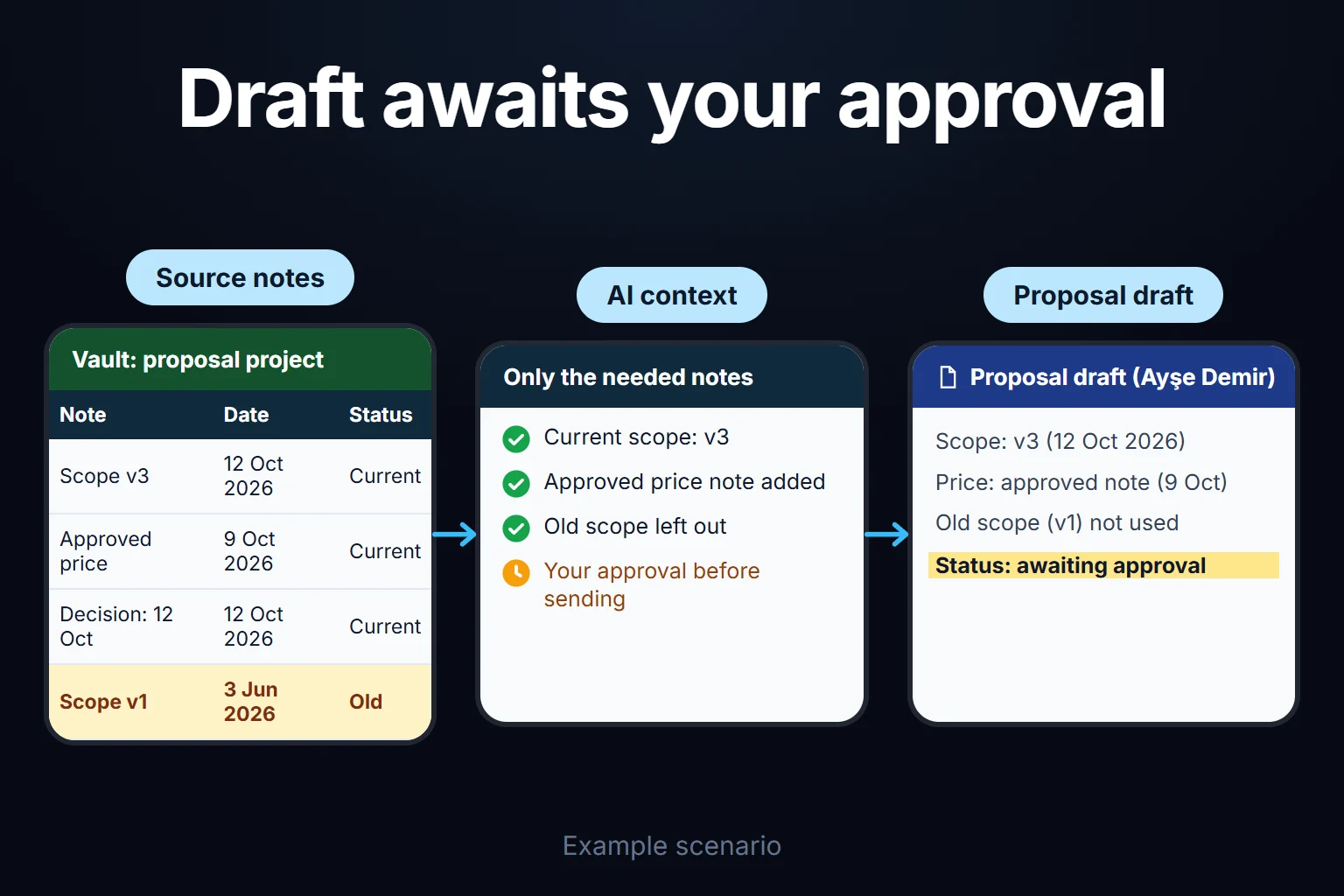
Old decisions, duplicate notes, and unrelated quotes can make an answer harder to produce. Anthropic’s article on context engineering for AI agents explains why it matters to choose what information goes into a limited context and to consult files when needed. It also describes how structured notes can help maintain continuity on long tasks. So the takeaway is not “notes are useless”; the right note needs to be read at the right time.
A link graph is not a memory that AI automatically understands
Linking two notes in Obsidian does not guarantee that your AI tool will follow that link. The tool needs access to the files, the ability to interpret the links, and a way to bring relevant content into its answer. RAG — finding information in documents and answering from it is one way to do this. For a simple task, having a tool read a few files directly may be enough; you do not need to build a separate search system for every archive.
For example, when preparing a proposal, I would give AI the current scope, the approved price, and the source of the latest decision instead of years of meeting notes. These files could be in an Obsidian vault or in the project’s own folder. I recommend identifying the information you need and its current source first, then choosing the app.
Is Obsidian right for you?
It fits if you write regularly, return to research notes, or keep the reasoning behind decisions. Local files, links, and search support those habits.
It is unnecessary if you only keep a to-do list, take an occasional single note, or just want AI to read a few documents. A tidy folder and a text editor are enough there. I do not recommend switching apps just to say you have built a “second brain.”
If you also need it on your phone, think about sync from the start: the vault is a folder on your computer and does not reach your phone by itself (see below).
Do not use the number of notes or graph connections as your measure of success. Pick one real task, keep its current information, decisions and sources together, and then ask: Did these notes help me answer a question, finish a task, or avoid repeating a mistake?
Cost, sync, and privacy
According to the official pricing page (as of October 2026), the app is free for personal and commercial use. There is an optional commercial license for organizations (USD 50 per user per year). Sync, which keeps notes in step across devices, is USD 4 a month billed annually or USD 5 billed monthly. Publish, which puts notes on the web, is USD 8 a month per site billed annually or USD 10 billed monthly. Prices can change, so check the page before buying.
Working on your device does not mean all your data stays there in every setup. If you use a cloud sync service or an AI plugin that sends data to an external model, notes may leave your device. Read Obsidian’s explanation of community plugins and the data-handling terms of the tool you choose.
Do not assume that putting a vault in any cloud folder will work smoothly on every device; pick a sync method that suits yours. Also, files stored on your device are not automatically backed up.
Frequently Asked Questions
Is Obsidian an AI app?
No. Its main purpose is to write, store, and connect notes. You can connect it to AI tools, but opening a vault does not create AI memory by itself.
Do I need Obsidian to build a second brain?
No. If your goal is to find and use the information you need, a well-organized project folder or another note-taking app may be enough.
Is Obsidian free, and does it work offline?
The core app is free, and you can read and edit local notes without an internet connection. Cloud sync (Sync) and external AI services have their own connection and pricing terms.
Will giving my notes to AI make its answers correct?
No. An incorrect or outdated note may be used in an answer, or the relevant document may not be found at all. For important claims, check which source the AI relied on and verify it yourself.
Can I move my notes to another app?
Your basic notes are Markdown files and can be opened in another text editor. Plugin-specific features and some link formats may need to be adapted separately.
Should I switch from Notion to Obsidian?
Start by identifying the problem you want to solve. If local files and linked notes matter to you, try Obsidian with a small project. If your current setup works, you do not need to move just for the promise of a second brain.