
How to Connect AI to WhatsApp
There is no single switch for adding AI to WhatsApp; there are three routes. The first is the assistant Meta offers inside the WhatsApp Business app. The second is your own connection through the WhatsApp Business Platform (Cloud API). The third is a developer route where an AI agent does the API setup for you. If you want customer questions answered with your own business data and your own rules, you usually need the second one. The API carries the messages; you connect the AI model, the information source and the handover to staff separately.
If you want me to implement the complete solution, see my WhatsApp Business API setup and automation service. Below I explain which route suits whom and what to settle before you commit.
Three routes: which one fits?
| Route | What it does | Who it suits | Watch out for |
|---|---|---|---|
| Built-in assistant (Meta Business Agent) | An assistant offered by Meta, opened from the WhatsApp Business app | A small business that wants to try it without code | Availability may depend on country and plan; check whether it appears in your account |
| API + your own workflow | Messages reach your software; a model and your business rules prepare the reply | A business whose bot must read live records such as prices, appointments or stock | Needs setup and maintenance |
| Developer route (WhatsApp Business Tools MCP) | An agent such as Claude, Cursor, Codex or ChatGPT sets up the account, number and templates for you | A developer who will set up the API | Meta says this release is for development and testing, not high-volume production sending |
WhatsApp’s business site lists Meta Business Agent under the Business app and says one token-based charge covers message delivery and AI agent usage. I could not tell from that page which countries and plans have it. The conditions for the developer route are in Meta’s 15 September 2026 announcement: Business Verification, a payment method, signed terms of service and a phone number that can receive a verification code.
WhatsApp Business app or API?
The app is enough for everyday messaging and built-in tools such as greeting messages. API access becomes relevant when your software needs to process a message, retrieve a customer record or initiate a controlled transaction. App features and account eligibility change over time; I avoid blanket claims that the app supports only one person or has no AI features.
You can reach the API through direct developer access or through a solution provider; an intermediary is not mandatory for every setup. Your existing number, business account and the features you need decide this. See Meta’s official integration options and developer getting-started guide.
Does Meta’s AI rule affect you?
Clause 4.7 of Meta’s WhatsApp Business Platform terms bars providers of large language models and general-purpose AI assistants from using the platform directly or indirectly. According to TechCrunch, Meta said the rule does not cover businesses that use AI to serve their own customers, and gave a travel company’s customer-service bot as the example (report; the rule took effect on 15 January 2026). In practice, a bot that answers questions about your products, bookings or orders is not the target; setting up a number that chats about anything, like a general ChatGPT, is. The terms were last updated on 23 September 2026, so read the text yourself before a commercial setup.
How does a message become a reply?
- Receive the message. The WhatsApp event reaches the application’s endpoint. Its origin is verified and duplicate processing is prevented.
- Identify the request. Separate information questions, record lookups and transaction requests. Ask the customer for missing dates or product details.
- Read an authorised source. Opening hours come from approved content; current prices, appointments and stock come from the relevant system. Private records require identity and access checks.
- Prepare the response. The model explains the retrieved information while following the business’s language, length and permission rules.
- Check the outcome. Transactions require separate permission and approval. A failed operation must not be described as successful.
- Reply or hand over. Track delivery status and pause automated replies when a staff member takes over.
Not every step requires AI. Fixed menus, notifications and checks follow explicit rules. A model helps where a request is written freely or the answer needs to be phrased.
The 24-hour reply window
When a customer messages you, a 24-hour customer service window opens, and each new customer message restarts it. While it is open you can reply in free text with no prior approval. After it closes, or when you are the one writing first, you need a template message approved by Meta (Meta documentation, as of October 2026). For an AI setup this means: if the bot tries to answer yesterday’s question in free text after the window has closed, the message will not go out. The workflow has to know the window has closed and either switch to a template or leave the conversation to staff.
Where does the AI get business information?
Uploading a document is different from connecting to a live system. Slowly changing information such as product descriptions can use a versioned knowledge source. Today’s room price or the last available appointment needs a current record lookup. When the source is unavailable, the workflow says so and escalates where needed.
Each source needs an owner and an update method: who changes the price, when does the document expire, and which record wins if two disagree? Record the source version so you can investigate an incorrect answer. Private system records and credentials do not belong in customer-facing responses.
A concrete example: a hotel rate enquiry
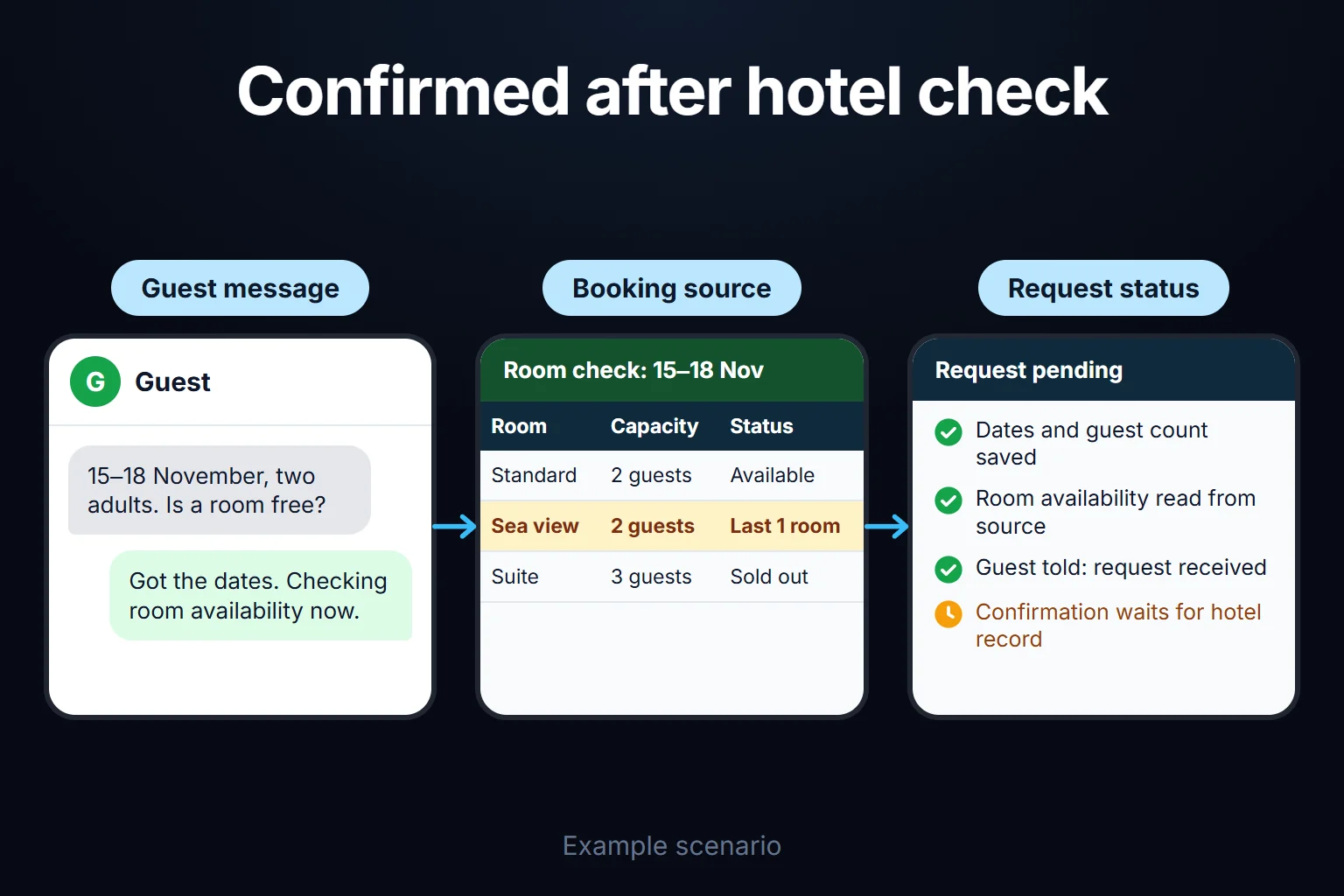
When a guest writes “15–18 November, two adults”, the model can extract those details. Room availability and prices must come from the booking source. “Yes” may create a request; definitive confirmation requires a verified hotel record. On the hotel WhatsApp automation page, you can try illustrative pricing, sold-out and connection-failure scenarios.
What does it cost and how long does it take?
API messaging, model usage, the inbox, hosting and development are separate cost components. According to Meta’s pricing page (as of October 2026), you pay when a message is delivered, by recipient and message category (marketing, utility, authentication, service), and service replies you send inside the 24-hour window after a customer writes are free. Rates vary by market, so check the current table when you prepare a proposal. I do not give a fixed timeline: the number’s registration, the required approvals and access to the connected software decide it.
Before accepting a setup, try a question without a source, an invalid date, a repeated message, a connection failure and human handover. A well-written sentence alone does not prove the workflow operates correctly.
I am Oğuz Erol, and I updated this guide on 13 October 2026 using experience with my own API number and the linked official sources. For the wider picture across channels, see my AI automation guide.
Frequently Asked Questions
Is a solution provider mandatory for connecting AI to WhatsApp?
No. Direct API access and provider-based integration are both options. The choice depends on your technical capacity, account eligibility and tools such as your shared inbox.
Can I connect my own ChatGPT or Claude to my number to answer customers?
As a bot that answers your own business’s customers, yes; what Meta prohibits is AI companies distributing general-purpose assistants through WhatsApp. I recommend that the model take its answers from an authorised source and that you define the handover.
Can AI decide prices or confirm bookings on its own?
In the workflows I build, changing information comes from an authorised source. The model explains the answer; it cannot invent an unsupported price or present an unverified record as a confirmed booking.
Can a staff member take over a conversation?
Yes. Handover is defined in the shared inbox. Automated replies must stop when staff start writing, with a clear rule for resuming them.