
How to Build an AI Agent Without Code
Yes, you can build a working AI agent without writing code, but first let’s name it correctly. Most of what you build without code is, in the distinction from Anthropic’s “Building effective agents” post, a workflow, not an agent: an LLM and tools run through a predefined path. An agent is a system where the LLM directs its own steps and tool use (Anthropic). For most jobs a fixed-path workflow is more predictable and cheaper, so check first whether you need an agent at all.
There are three routes: visual flow tools (n8n, Make, Zapier), a persistent assistant from one set of instructions (Claude Projects, a custom GPT), and tools that build an app with an interface (like Base44). Which fits your job is below. This post is part of the AI Automation Guide series; if the word “agent” isn’t clear, start with What Is an AI Agent.
Which route for which job?
| Route | How it works | Suited for | Difficulty |
|---|---|---|---|
| Visual flow tool (n8n, Make, Zapier) | You connect boxes into a “when this happens, do this” flow; no code, but you design the logic | Repetitive jobs connecting several apps: email, summary, message; form, CRM, WhatsApp | Medium |
| Claude Projects / custom GPT | You upload an instruction text and, if needed, files; the assistant works from that instruction | Jobs that stay in one chat screen and don’t connect to outside systems: text, summaries, classification | Low |
| App-building tool (like Base44) | You describe what you want in plain sentences and the tool produces an app with an interface and database | A small app that needs its own screens, login and database | Medium-high |
If a job can be handled by chatting (summarizing a report, drafting text), Claude Projects or a custom GPT is enough; I covered the setup in How to Build Your Own Custom GPT. If you need to connect several apps, like pulling data from Gmail and writing it to a CRM, move to a flow tool. If you want something with its own screens, look at an app-building tool.
Some figures as of October 2026 (n8n and Base44 prices are the annual-billing prices; check their pages for current plans):
- n8n: On the cloud, billed annually, Starter is 20 euros per month (2,500 executions) and Pro is 50 euros per month (10,000 executions). An execution is one run of a whole workflow; the number of steps doesn’t change the count. A free Community Edition you install on your own server is on GitHub; installing it takes technical knowledge (n8n pricing).
- Base44: The free plan is 25 message credits per month and 5 apps; Starter is 16 dollars per month (100 credits). Base44 describes itself as a tool that builds apps and websites; its page doesn’t say it builds agents, so it helps when your agent needs an interface and a database around it (Base44 pricing).
- Claude Projects: On Claude’s free plan you can have up to 5 projects (Claude pricing).
For Zapier and Make plans, see their own pricing pages; I didn’t want to write numbers that go stale.
Example: a flow that summarizes your email every morning
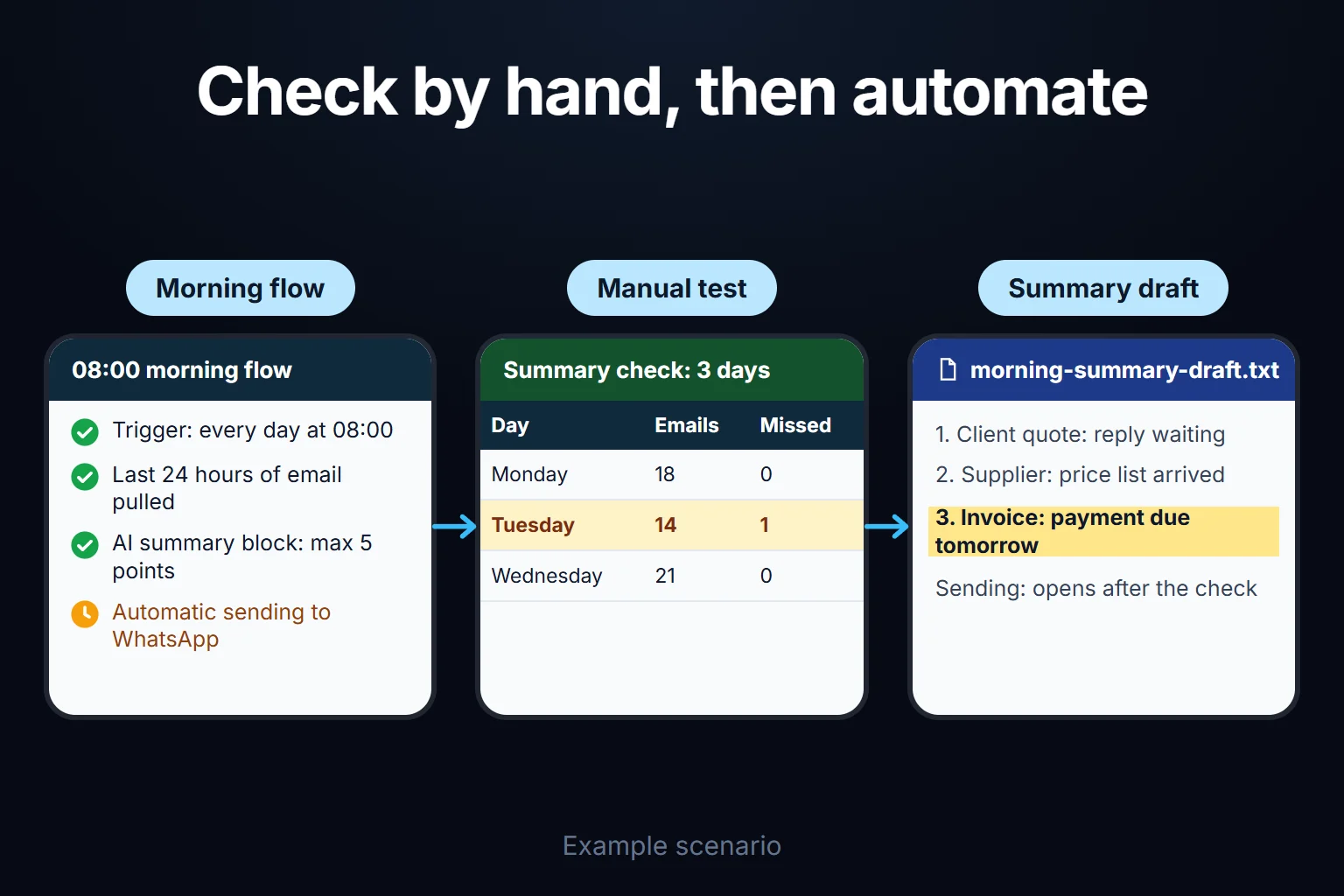
Instead of reading your inbox one by one, a flow that produces a 5-point summary. By the distinction above this is a workflow: the path is fixed, and the AI only writes the summary.
- Pick a tool. n8n (on your own server or in the cloud), Zapier or Make. All three have a ready-made Gmail connection and a block that connects to an AI model.
- Build the flow. Trigger: every day at 08:00. Then a block that pulls the last 24 hours of email, then an AI text block. Example prompt: “Summarize these emails by sender and topic, one sentence each. Maximum 5 bullet points.” A final block sends the output to WhatsApp, Slack or your own email.
- Run it by hand for a few days and check the output. If it skips an important email or summarizes an irrelevant one, narrow the prompt (“only summarize these senders”). When a few days look right, turn on the automatic trigger.
My estimate for the time (not measured): half an hour to an hour if you know the tool, half a day if it’s your first time. Also note that you are sending your inbox to a third-party AI service; pay attention to which account is connected with what permission, which I covered in Is Giving an AI Agent Account Access Safe.
Where do you hit the wall?
- Nested conditions. Rules like “if A and B do this, otherwise check these three conditions” quickly become unreadable in a visual flow. Past a point, code is simpler than the flow.
- A system with no ready connector. If your CRM or internal system isn’t in the tool’s block list, you need a code block that connects to the API; “no-code” partly turns back into code.
- Error handling. Think ahead about what happens when an API is briefly down. Most tools have a basic “retry” option; complex cases like partial success need code.
- Volume. Summarizing 20 emails a day and processing 20,000 records a day are not the same cost equation. With pricing tied to execution counts, the bill grows with volume.
- Personal and financial data. Don’t leave where the data goes and how long it is stored to a tool’s defaults.
- Silent errors. If the model gives a wrong or incomplete summary it doesn’t warn you. That is why the test step above isn’t skipped.
If one of these applies, you need a developer. But dropping the no-code tool isn’t required; usually the body of the flow stays no-code and the one stuck point is handed to a small piece of code.
You can ask me for this
From deciding which type fits your job, through setup, to adding code at the point where a no-code flow gets stuck: typically a 2-hour to 2-week engagement, remote and billed hourly. For the scope see Your Own AI Assistant, or write to me directly.
Frequently Asked Questions
Is an agent I build without code reliable?
It depends on what the flow can do, not on the tool. A flow that only summarizes or drafts is low risk; one that writes to a CRM or triggers payments needs far more care. I cover what to check about permissions in the access post above.
Which should I choose among n8n, Zapier and Make?
If you’re trying a single simple flow, start with the one whose cloud setup is ready and whose interface is simplest. If you will run several flows regularly, work out per-execution pricing against your own volume; if you install n8n on your own server the plan fee disappears, but setup, updates and backups become yours.
How will I know if the agent gives a wrong result?
It won’t warn you. So check the output by eye in the first days, put a human approval on the last step for important jobs, and keep a record of how many times the flow ran and what it produced.