
How Do AI Agents Work? Same Model, Different Results
On YouTube
It's not the model — same AI, completely different results
Two people use the same AI model. One just chats with it; the other gets the job done. What makes the difference isn't the model — it's the setup built around it.
Full description
We walk through it with one kitchen analogy, and name the technical term at every step:
- Model = the chef
- Workflow = a fixed sequence written in advance
- Agent = looks at the result and picks the next step itself
- Tool = check prices, fill the cart, place the order
- MCP = the shared standard for connecting to tools (not a tool itself)
- Knowledge = the cookbook · Memory = its own notes
- Multi-agent = helpers that split the work, at a coordination cost
- Approval gate = the point where it stops and asks you
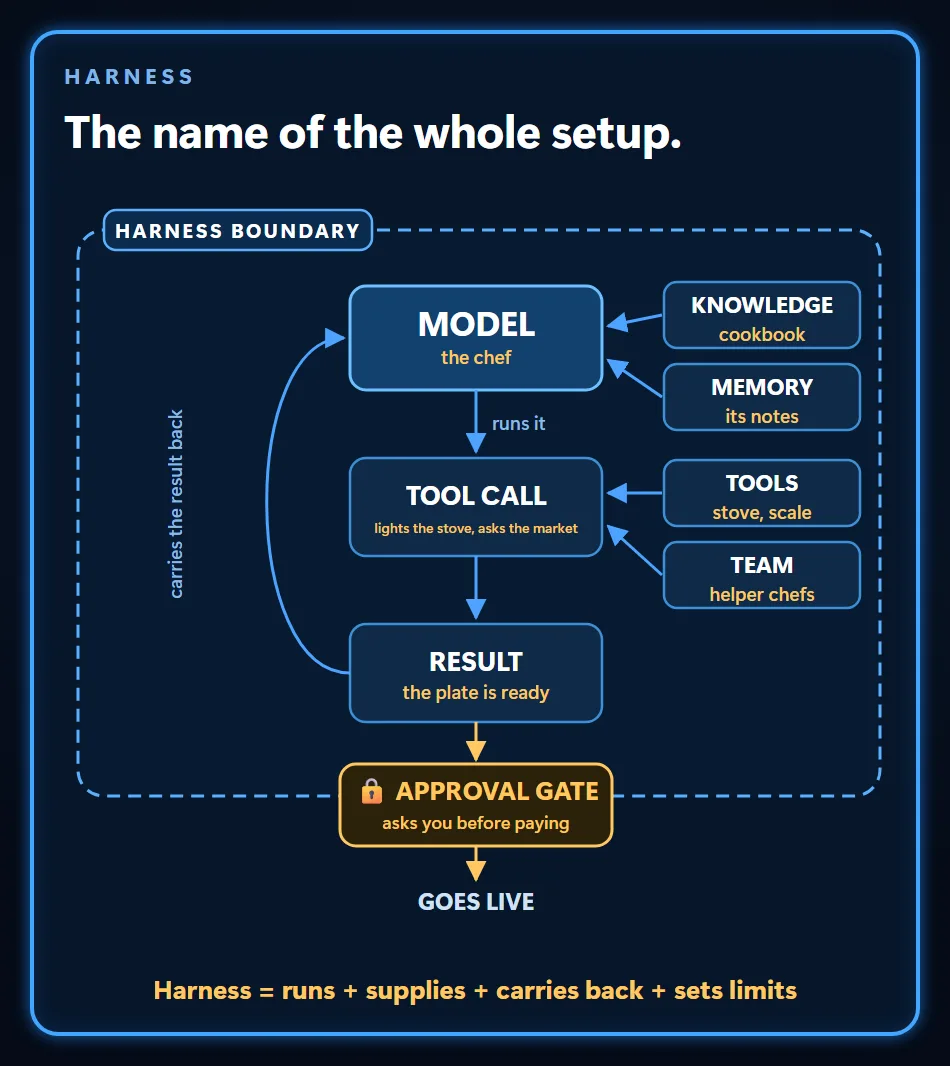
- Harness = the layer that runs all of it
We also show where the analogy breaks: a chef masters the craft with experience; a model doesn't.
An AI agent works in a loop: the model writes its next step as a request, the software around it (the harness) runs that request and returns the result, and the model reads the result and picks the next step, until the job is done, it hits a limit, or it reaches a step you’ve marked for approval. Around that loop sit tools, knowledge you provide and memory kept as the work goes. Two people on the same model get very different work out of it when one has built those parts and the other hasn’t.
How an AI agent works, step by step
A task handed to an agent runs through the same moves: it starts from a goal, makes a plan, acts through a tool, reads the result and picks the next step, until the job is done or the setup tells it to stop and ask. Say you ask an agent to check a set of ad accounts for budget drift. Here is that one job, followed through the loop.
- Goal. Find budget drift: accounts whose spend has moved out of line with their budget.
- Plan. The model reads the project’s notes file, where the rules and known pitfalls for these accounts are written down, and decides which accounts to check first.
- Action. The model can’t open Google Ads. It writes a request for a spend report; the harness runs that query through a script connected to the Google Ads API and hands the rows back.
- Result. The model compares spend with budget. When an account looks off, its next request digs into that account instead of moving down the list.
- Next step or stop. Reading needs no approval, so the loop carries on by itself. If the fix means changing a budget, the agent records the current value, writes down what would change and how to undo it, and waits for approval. The job ends when every account is checked and the summary is in front of you, or earlier if it hits a limit set in the harness.
The parts of an AI agent in one table
Each part of an agent setup does a job the model can’t do alone. The first column uses the kitchen from the video; for the definition of an agent itself, start with What Is an AI Agent.
| In the kitchen | Technical term | What it does |
|---|---|---|
| The chef | Model | Reasons and writes the next request; runs nothing itself |
| Deciding what to do about a missing ingredient | Agent loop | Picks each step from the last result, not from a fixed script |
| Checking prices, filling the basket, ordering | Tools | Carry out one action and return the result |
| One shared way of ordering instead of each shop’s own | MCP | Open standard for connecting tools and data; not a tool |
| The cookbook | Knowledge | Information you provide, the same on every run |
| A note that a shop delivers late | Memory | Notes kept as the work goes, by the agent or by you |
| Helpers for the shopping and the dessert | Multi-agent | Splits work across agents, at a coordination cost |
| Asking before paying | Approval gate | In a safe setup, holds a hard-to-undo step until you approve |
| The whole kitchen routine | Harness | Runs each request, carries results back, enforces your limits |
Workflow or agent: who picks the next step?
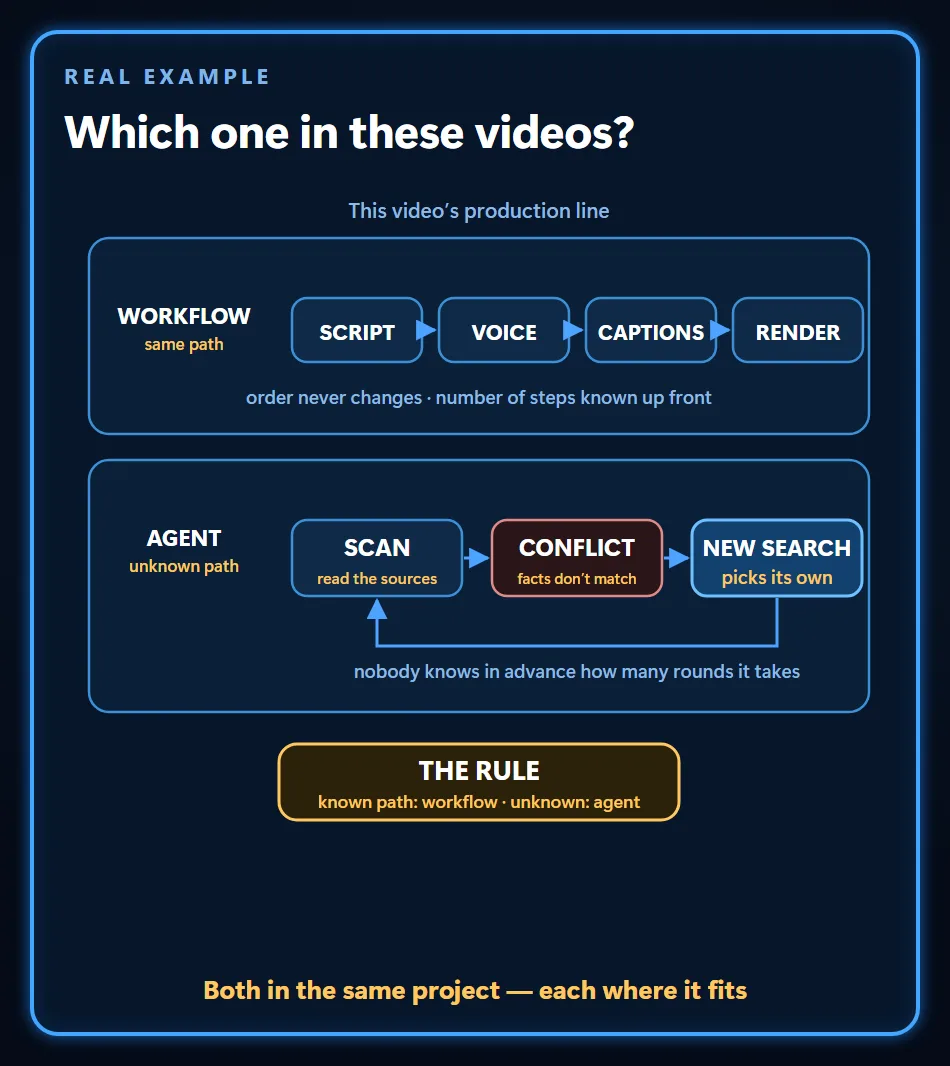
In a workflow, the steps and any branches were written in advance, so it can choose between written paths but can’t open a new one; in an agent, the model picks the next step while the work runs. An agent isn’t automatically better. When the path is known, a workflow is cheaper and more predictable; an agent adds flexibility, but also cost and room for errors to pile up, because each decision feeds the next. My test is what the system should do when something happens that nobody wrote down, and I work through it in AI Agent vs Workflow.
I use both to make videos like the one above. Turning an approved script into voiceover, captions and a render is a workflow: the order never changes, and I know the number of steps before it starts. Researching the topic is agent work: when two sources disagree, something has to decide to search again, and nobody knows in advance how many rounds that takes.
The most common mistake I see when a business starts automating is picking the most complicated process to go first. The “if we’re doing this, let’s start with the hardest part” reflex comes up in nearly every intro call I have. A task whose steps you already know, run as a workflow, makes a better first project. If an agent isn’t worth it for the job, I say so on that call.
Tools do the work, MCP connects them
An agent acts through tools, and MCP (Model Context Protocol) is an open standard for connecting the app that runs an agent to tools and data sources. MCP isn’t a tool itself, and a tool can be wired in without it; Anthropic first released it in November 2024.
The model never uses a tool directly: it asks for one, the harness runs it and brings the result back, and the model picks the next move. MCP only standardises that connection, so it can’t conjure a tool that isn’t there.
MCP isn’t always the right connection either. On the WordPress sites I look after, I chose SSH and WP-CLI, WordPress’s command line, because the MCP route uses far more tokens per operation and would put a plugin taking commands over the web on live sites. Skills, instruction files for recurring jobs, sit on a third layer; I separate all three in Agentic AI Skills vs Tools vs MCP.
Knowledge is given, memory is written
Knowledge is what you hand the agent before the work starts, the same on every run. Memory is the record kept as the work goes: the agent can write it, you can write or correct it, and more than one agent can read the same notes. Within one job, the loop already carries each result forward in the model’s context window, the text it can see at once, which some guides call short-term memory; memory notes are what lasts from one job to the next.
The two go wrong differently. You fix wrong knowledge at the source, the way you’d replace an outdated document in RAG, where the agent pulls matching passages from your files. Wrong memory is harder to catch, because the agent treats an old note as true. So the notes my own agents read treat account counts as a dated snapshot, and a count that drives a decision gets measured again rather than copied: counts like these move as clients are added.
Do AI agents learn? Where the kitchen analogy breaks
AI agents don’t learn the way people do: the model stays the same while the agent works, and what looks like learning is usually a record kept outside it.
The kitchen comparison breaks here twice. A chef comes out of each service a bit better and keeps that skill; a model comes out of the job unchanged. And a chef cooks with their own hands, while the model touches nothing: it writes requests, and the harness carries them out. Changing the model itself takes a separate training step, such as fine-tuning it on your own examples, and that gives you a new model, not one that learned on the job.
In my own setup, that record includes a notes file in each project folder with the rules and the pitfalls I’ve already run into, read at the start of every session; I describe it in My Agentic Stack. Delete those notes and the “experience” is gone, because the model never held it.
Multi-agent: more helpers, more coordination
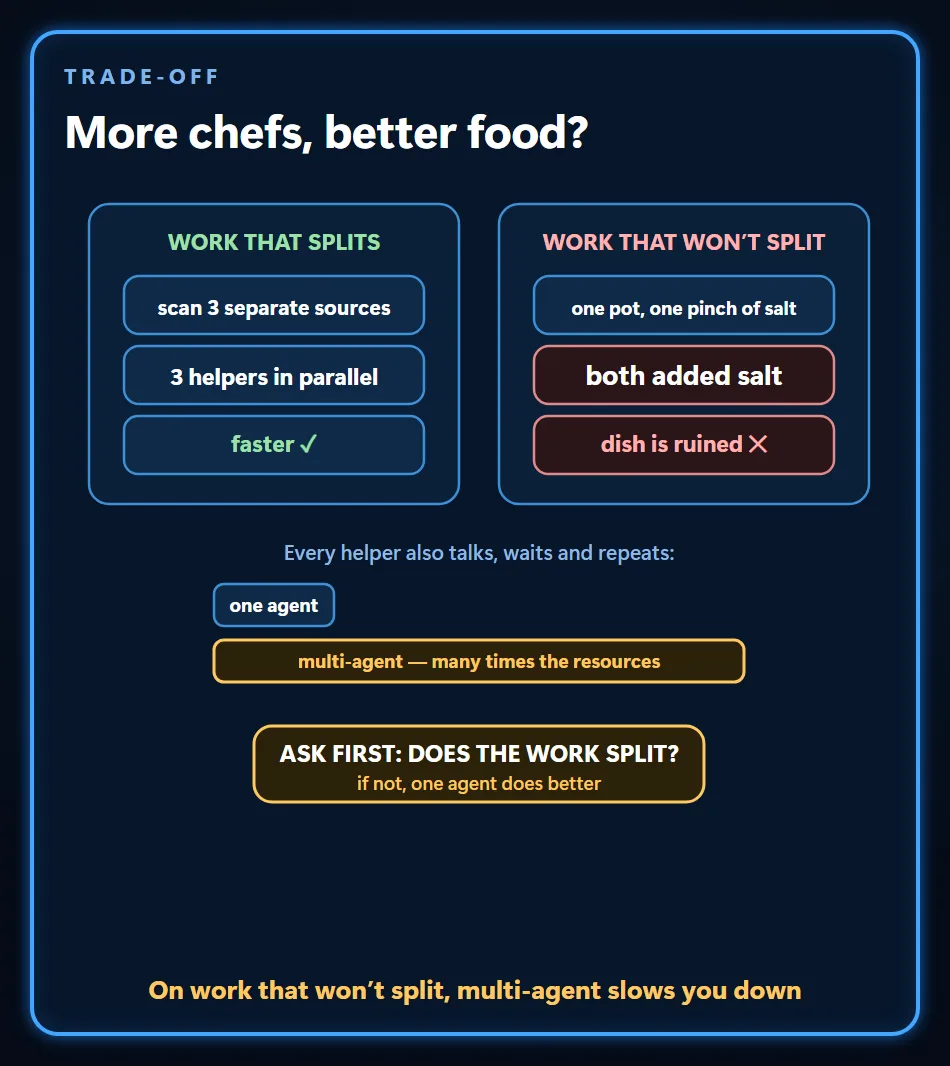
More agents help when the work splits into separate jobs or needs a second pair of eyes; otherwise each helper mostly adds coordination cost.
Two helpers scanning separate sources at once really is faster, but a single dish doesn’t split: two chefs salting the same pot ruin it. Helpers also message and wait on each other, and that overhead can eat the gain. So the question before adding a helper is whether the work really splits into separate jobs or skills; if it doesn’t, one agent usually does better. What Is a Multi-Agent System covers when a team earns its place.
The approval gate: where it stops and asks you
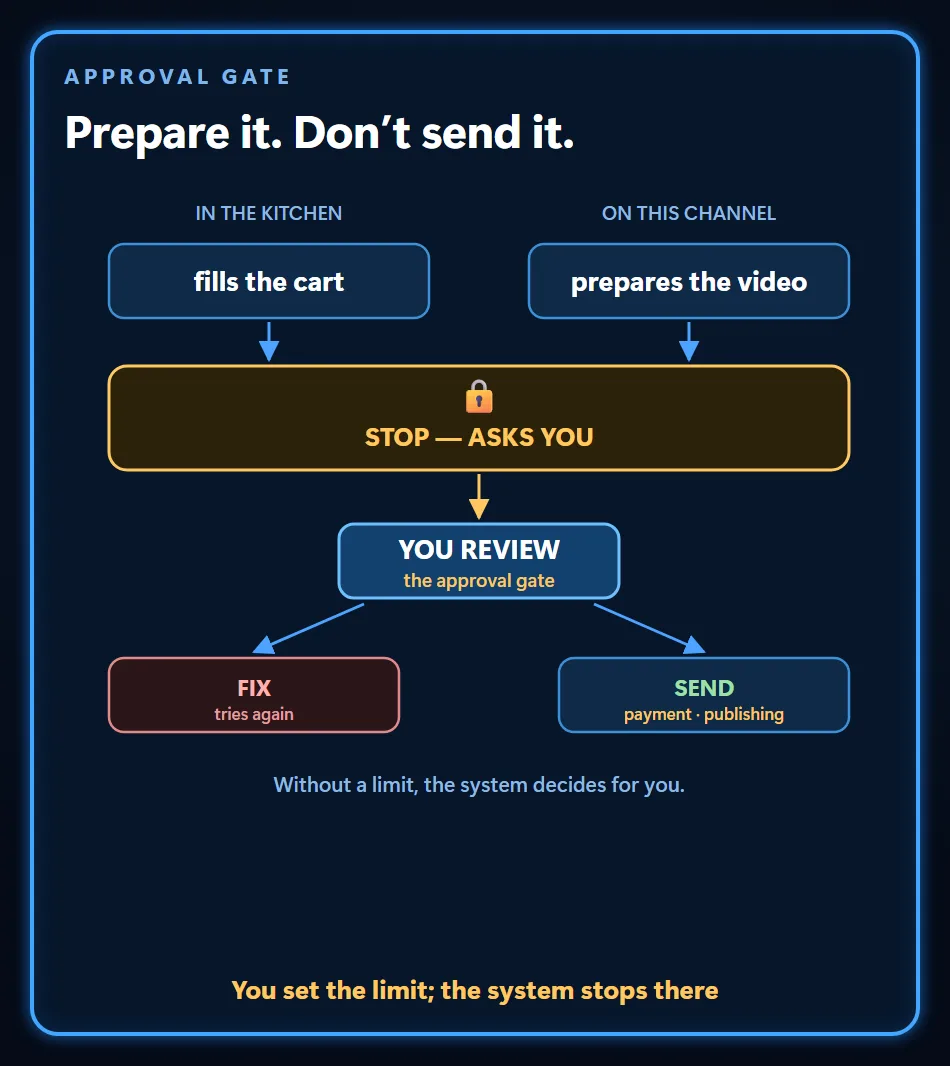
An agent stops to ask you only at points you’ve built into its setup, usually before a step that’s hard to undo; that stop is the approval gate. Nothing in how an agent works forces it, so a safe setup adds it on purpose.
In my own work, reading is free, and anything that would change a live system, whether it spends money, publishes, changes a setting or deletes, either follows a rule I wrote in advance or gets a backup first and waits for my approval. I explain that routine in Is It Safe to Give an AI Agent Account Access?
My video pipeline uploads each video to YouTube as private, and making it public is a manual step in YouTube Studio. When the answer at a gate is no, the work goes back to be fixed and comes through the gate again.
The harness: what you’re actually choosing
In practice, the harness is the app or platform you pick to run an agent, and the model inside it can often be swapped. In Claude Code, which I use, I can change the model while my notes files, connected tools and written rules stay put. So when you compare agent products, look past the model name: which tools can it reach, where does it stop for approval, and what does it record about each step? The harness also decides what stays in the context window and when the loop ends; What Is a Harness in AI Agents covers those jobs.
Frequently Asked Questions
Is ChatGPT an AI agent?
It can work either way. When ChatGPT answers and you carry out the rest, it’s working as an assistant, even if it runs a quick web search along the way. When you hand it a multi-step task and it uses tools, checks each result and picks its next step until the job is done, it’s working as an agent. I compare a plain model with an agent in AI Agent vs LLM.
Do AI agents learn from experience?
Not while they work. The model behind an agent stays the same during a job; what usually grows is the record around it. An agent can also improve because the provider ships a newer model or because collected data goes into a separate fine-tuning run, and both give you a different model rather than one that learned mid-task. Textbooks list a “learning agent” type, but in today’s agents built on language models, that learning comes from the record or a later training run.
Will a more powerful model make my AI agent better?
Only partly. A stronger model makes most decisions better, but it can’t connect a missing tool, supply knowledge nobody gave it or set a limit nobody set. When an agent isn’t delivering, look for the missing part before you change the model: is the tool connected, is the right knowledge in front of it, is an old note misleading it, is the gate in the right place?
What stops an agent from looping or running up costs?
Limits set in the harness. A cap on steps or running time stops an agent that keeps retrying the same thing, and an approval gate can hold the steps that spend money or are hard to undo. Content is a separate risk: an agent reading a web page or an email can take an instruction written there as part of its task, one more reason to keep a gate in front of writes to live systems.
Follow for content about AI
More videos
 Motion Design with Just Claude Opus: 32 Experiments and Prompts
 Can You Run AI Locally on a 16 GB Graphics Card?
 Customer Wrote at Night, Request Ready by Morning
 Give AI the Address, Not the Route: Which Job Goes to Which Model
 Stop Using Excel and Google Sheets as a Database: To a Web App
 ADHD Didn't Change. The Tools Did: A Scattered Brain and Agents
 Can AI Fix Its Own Mistakes? I Checked It Is Not I Fixed It
 OpenRouter and Hugging Face Aren't Models: Three Ways In
 AI Agents for AEC Firms: How the Five-Layer Setup Works