
AI Agent vs Workflow: Is Your Automation Flow an Agent?
Short answer: no. Most of the Zapier or Make flows you have set up are not AI agents — they’re workflows. The reason is simple: a workflow runs a predefined sequence of steps; it doesn’t make decisions. An agent, on the other hand, gets a goal from you and plans the rest itself — it decides which step to take, in what order. In this piece I draw a clear line between the two with a single test, and show why this distinction is less clear-cut than you’d think.
What Makes a Workflow Feel Like an Agent
There are two concrete reasons a workflow you built with tools like n8n, Zapier, or Make can feel like an “agent”:
- It runs without a human. Once triggered, nobody presses a button; the system moves forward on its own.
- It chains multiple tools together. A form submission writes to the CRM, sends an email, drops a Slack notification — all in one flow.
This is exactly where it’s tempting to look at a definition of an AI agent and say “isn’t this the same thing?” But the similarity ends there: automation and autonomy are not the same thing. Automation runs “without a human”; autonomy runs not “without deciding,” but by actually deciding.
The Clear-Cut Test: “What Does It Do in an Unexpected Situation?”
Without diving too deep into theory, there’s one useful question: What does this system do when it hits a situation that wasn’t written in advance?
The answer separates a workflow from an agent:
- Workflow: If it hits an unexpected data format, an empty field, or a different-than-usual API response, the flow stops, throws an error, or (at best) falls into a predefined “error branch.” It doesn’t try a new path, because a new path was never written.
- AI agent: In the same situation, it uses the tools it has (search, reading a file, a different API call) to try a new approach. It changes its own plan to reach the goal.
This single question settles most “is this actually an agent” debates in a few seconds. A complex schema, a large number of nodes, or a step with “AI” in its name doesn’t automatically make a system an agent.
Hybrid Systems: Pure Separation Is Rare
Most of the systems I actually see in the field are neither pure workflow nor pure agent — they’re a mix. The moment you drop a single “AI decide” node into the middle of an automation flow, everything after that point becomes agentic: the LLM evaluates the context it has, decides between a few options, and the flow branches based on that decision.
The practical implication: you shouldn’t ask “is this a workflow or an agent” about the whole system — you need to ask it about each step of the system separately. In an email classification flow, the first step (fetch the email) is a pure workflow; the middle step (“decide which category it belongs in”) is agent behavior; the final step (write to CRM) is a pure workflow again.
An Observation From My Own Operation
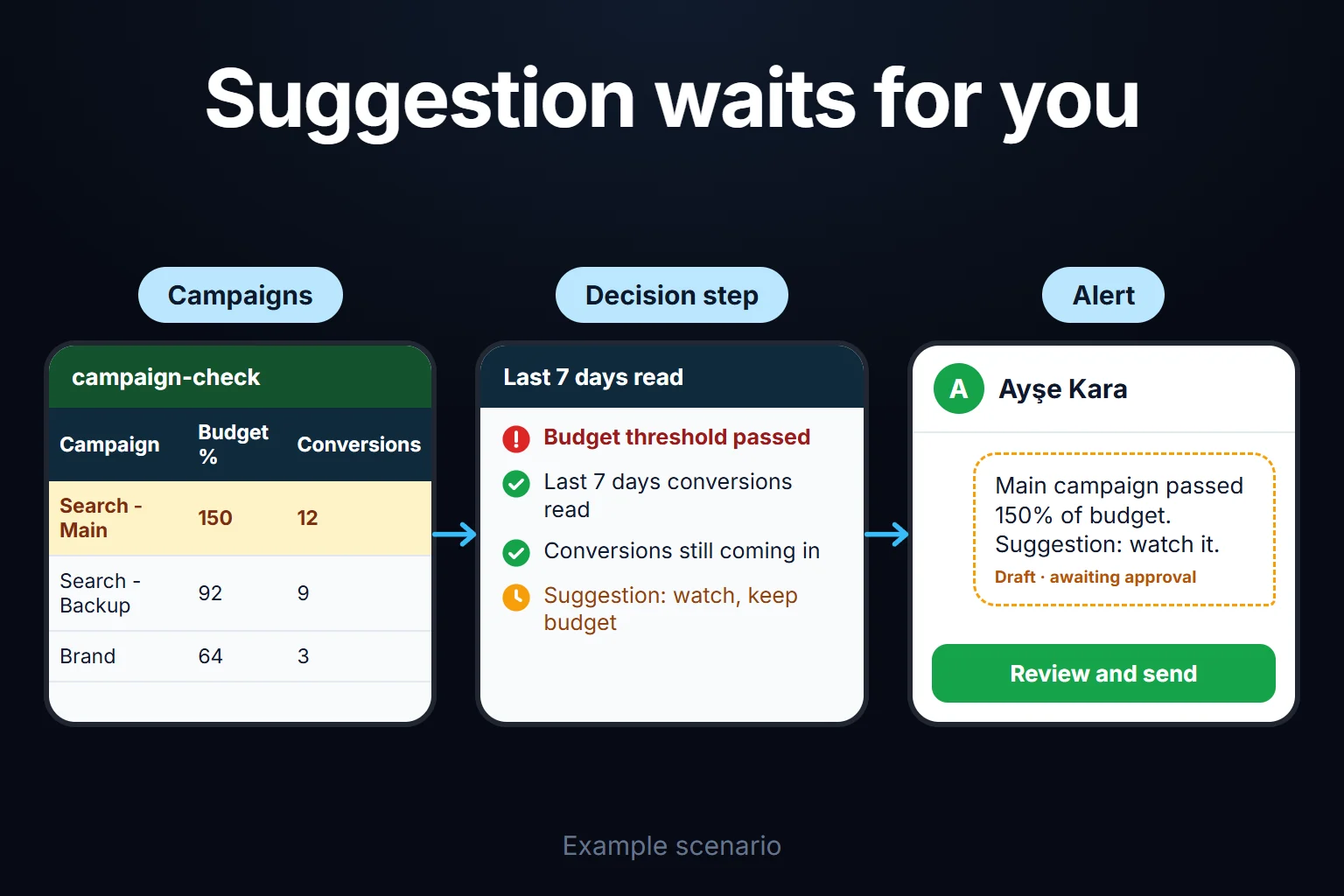
While managing my ad accounts largely on my own, most of the flows I set up stayed pure workflows for a long time: when a specific rule was met — for instance, a campaign’s daily spend passing 150% of budget — I’d get a notification, and that was it. The decision was still mine.
When did I add decision-making capability? When the rule itself started falling short. “Spend passed 150%” isn’t meaningful on its own — sometimes it’s a good sign (the campaign is converting better than expected), sometimes bad (a click surge with no conversions). The workflow couldn’t make that distinction — it just checked the threshold and fired an alert. That’s when I added a step that also evaluates the account’s conversion data from the last 7 days and decides “stop / watch / notify” on its own. The rest of the flow — fetching data, writing to Slack — is still pure workflow. Only that single decision point became agentic.
Which One Should You Choose? A Practical Decision Framework
Moving from theory to practice, the question usually becomes: which one should I build for this job? A rough framework:
| Situation | What’s sufficient |
|---|---|
| Steps and all possible outcomes are known in advance | Workflow |
| Error tolerance must be low, behavior must be predictable | Workflow |
| Input is highly varied, the “right answer” depends on the situation | AI agent (or hybrid) |
| System is new, there’s no data yet, the outcome is uncertain | Build a workflow first, observe, then agentify |
In practice, the right order is usually: build a pure workflow first and run it, observe where decision-making gets stuck, then add decision-making capability only at that point. Starting from scratch by saying “let the agent do everything” produces both a more expensive and a less predictable result.
You Can Ask Me to Do This
We can find together exactly where a workflow in your own operation is getting stuck, and which single point needs decision-making capability added. You can ask me to do this: work that typically takes 2 hours to 2 weeks, remote, billed hourly. For details, see Your Own AI Assistant, or for the general framework of agentic AI, read the Agentic AI Guide.
Frequently Asked Questions
Is Zapier, Make or n8n an AI agent?
No. On their own they are workflow automation tools. If you add an LLM node inside it and give that node decision-making authority, that part of the flow becomes agentic — but the tool itself is not an agent.
If Zapier has an ‘AI’ feature, does that make it an agent?
Not on its own. Generating text at one step (e.g., drafting an email) isn’t agent behavior, because the system is still following the order you defined. Agent behavior begins when the system itself decides which step to take and when.
Which is cheaper: workflow or agent?
A workflow is almost always cheaper and more predictable because it runs a fixed number of steps. An agent makes an extra LLM call to decide, which increases both cost and response time. For simple, repetitive jobs, a workflow is enough — moving to an agent requires enough real uncertainty to justify the extra cost.
Can I turn a workflow into an agent later?
Yes, and that’s usually the path I recommend. Build a pure workflow first, run it, observe exactly where the decision gets stuck, then add a decision step only at that point. That’s both cheaper and more controllable than building the whole system as an agent from scratch.