
QR Code Ordering System: From Table, Room and Sunbed to Kitchen, Till and End of Day
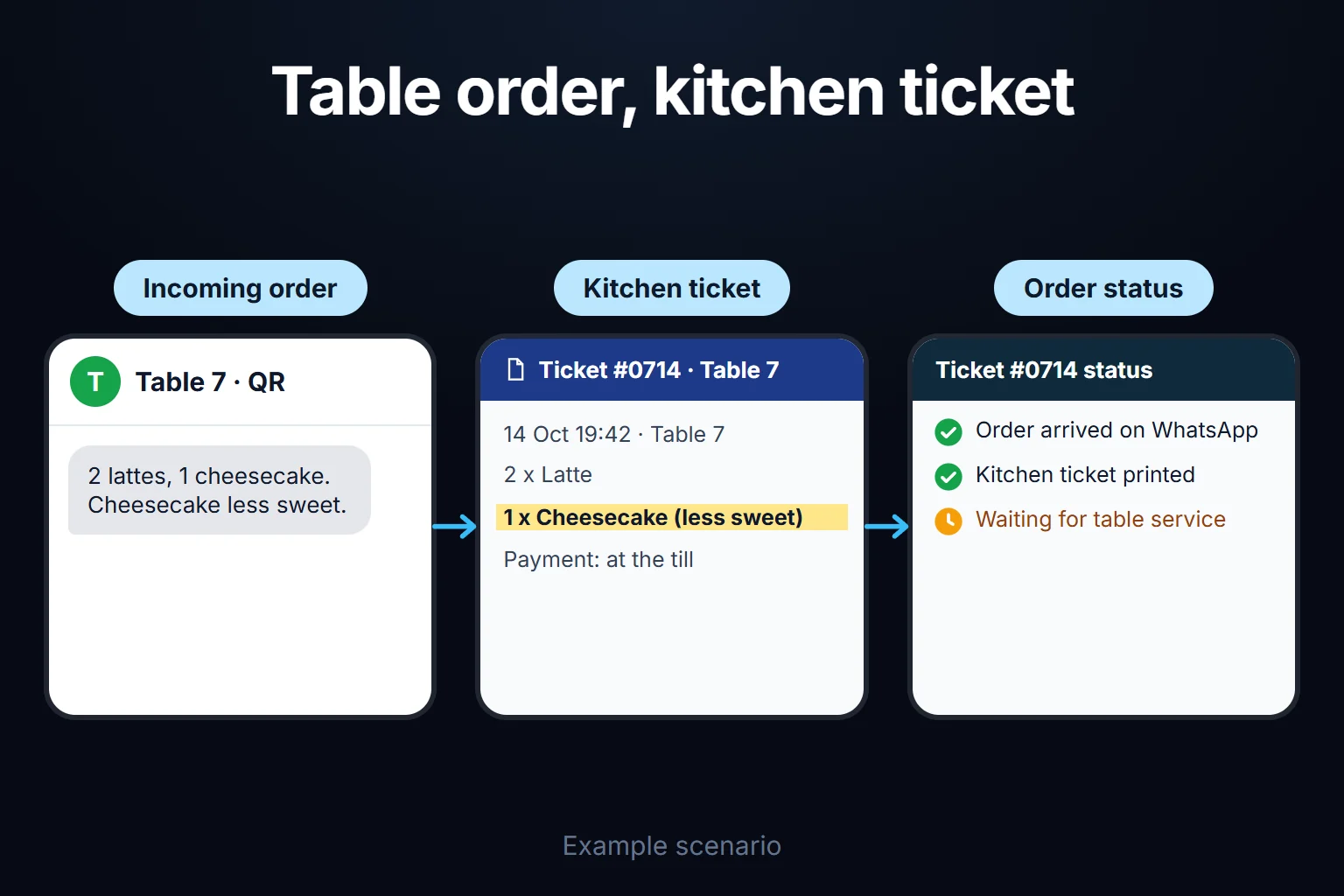
A QR code ordering system is a web app that gets an order from the code on a table, in a room or on a sunbed to the right person, and tracks it until the end of the day. The guest installs nothing: the menu opens in the phone’s browser, they choose and send. The order arrives as a WhatsApp message, prints as a kitchen ticket on a thermal printer, or both, and you update the menu yourself. I build it custom for your venue.
Any off-the-shelf QR menu puts the menu on a phone. Where several people touch the same order, the hard part is three questions: who has this order now and at what status, who may cancel it once preparation has started, and did every QR order delivered reach the guest check, the till or the room account by close of day?
This page is for hotel restaurants, room service, pool bars and restaurant groups; examples and rules are set in Turkey, where I work. A fictional hotel’s month of 4,810 QR orders produces three findings: evening cancellations at the pool bar run at four times the daytime rate because sunbed codes keep taking orders as the pool closes; a sold-out dish stays orderable for 42 minutes and takes 11 orders; six delivered room service orders never reach the room account. If you run one small outlet or your POS’s QR module does the job, see “Who is it for” below.
How does an order travel from the table to the end of day?
A QR order is one record that opens when the guest presses send and closes at the end-of-day check. Every status change records who made it and when.
The code knows where it is. Each table, room and sunbed has its own code. The link behind it isn’t a guessable number, so nobody can turn “table-12” into “table-13”. Outside service hours the code shows the menu but takes no orders.
The order reaches you two ways, or both: a WhatsApp message with table, items, notes and total, needing no hardware, or a kitchen ticket printed on a thermal printer; often a ticket to the kitchen and a WhatsApp note to the manager. I don’t sell hardware; we try your existing printer first.
Screens that can be added as needed. Where several people work the same order, a kitchen and bar screen, a server screen, the status flow below, room account posting and a head office view can be added. They are not part of every setup; the first version’s scope is set in writing in the first step.
| status | who changes it | what the guest sees |
|---|---|---|
| Received | the guest, or a server for a guest without a phone | “Order received” |
| Preparing | kitchen or bar accepts it | “Being prepared” |
| Declined | kitchen or bar can’t make it (e.g. the dish ran out) | “Can’t be prepared right now”; a server comes over |
| Ready | kitchen or bar | “Ready, on its way” |
| Delivered | the server who brings it | order summary |
| Cancelled | under the rules below | “Cancelled” and the reason |
After delivery it goes into the billing record, meaning wherever the money is recorded: the guest check in the restaurant’s POS, the bar till, or the guest’s folio in the property management system (PMS), the hotel’s front office software. How it gets there depends on whether your system accepts outside orders; I check that in the first step and don’t promise it unseen. If it doesn’t, the server keys the order in and the end-of-day check still works.
A sample month: one hotel, three outlets, 4,810 QR orders
Sample data, fictional, for a hotel in Turkey. Money is shown as shares of sales, not amounts. A 120-room hotel has a 32-table restaurant, a pool bar (80 sunbeds and 12 bar tables; pool open 10:00–19:00, bar until 23:00) and room service. Its systems accept outside orders. The month has 30 days.
| outlet | QR orders | cancelled | rate | delivered | share of QR sales |
|---|---|---|---|---|---|
| Restaurant | 2,340 | 47 | 2.0% | 2,293 | 64.5% |
| Pool bar | 1,860 | 93 | 5.0% | 1,767 | 21.9% |
| Room service | 610 | 18 | 3.0% | 592 | 13.6% |
| Total | 4,810 | 158 | 3.3% | 4,652 | 100% |
Why are evening cancellations at the pool bar four times the daytime rate?
| shift | orders | cancelled | rate | cancelled after preparation started |
|---|---|---|---|---|
| Day (10:00–17:00) | 1,240 | 31 | 2.5% | 9 |
| Evening (17:00–23:00) | 620 | 62 | 10.0% | 49 |
A repeat rule flagged it: if one shift’s cancellation rate is more than twice the other shift’s at the same outlet, with at least 10 cancellations, it goes on the manager’s list. The floor keeps a quiet shift from false alarms. The reason given was always “guest changed their mind”, which invites looking at one person. The timestamps disagreed: 41 of the 49 late cancellations came at least 15 minutes after the item was ready, all on sunbed orders. Bar tables showed nothing similar. When those sunbed orders were placed:
| sunbed order placed | evening sunbed orders | cancelled undelivered 15+ min after ready |
|---|---|---|
| 17:00–18:00 | 160 | 1 (0.6%) |
| 18:00–18:30 | 70 | 4 (5.7%) |
| 18:30–19:00 | 58 | 36 (62.1%) |
A guest orders at 18:40, leaves as the pool closes at 19:00, and when the drink is ready the server finds nobody. With no “guest not found” option, the server picks “guest changed their mind”. Before 18:30 the rate stays under 6%; after, it jumps to 62%.
The 41 orders equal about 2.3% of the pool bar’s monthly sales. That is lost sales. The real waste is what the drinks cost to make: with no cost data in the example, an assumed 25% cost ratio puts it at about 0.6% of monthly sales. The system takes the real figure from recipe costs.
The decisions:
- Sunbed codes stop taking orders at 18:30. The menu stays visible with “The pool is closing, we’ll see you at the bar”. Bar table codes stay open until 23:00. This alone prevents 36 of the 41, at a cost: the 22 orders delivered without trouble in that half hour stop too, though the bar message may win some back.
- For the other 5: if an item can’t be delivered 10 minutes after it is ready, the server marks “sunbed empty” and the bar supervisor takes it back. “Guest not found” joins the reason list.
- Cancelling after preparation needs the bar supervisor’s approval; the item goes on a separate waste line.
Review after two weeks; if the evening rate is below twice the daytime rate, the setup stays (my suggestion).
A sold-out dish stayed orderable for 42 minutes
The daily grilled fish ran out at 20:10. The kitchen told the servers, but only the restaurant manager could switch items off, and did so at 20:52. Meanwhile 11 fish orders came in; three guests switched dishes and 8 orders were cancelled, 17% of the restaurant’s 47 cancellations for the month.
The decisions:
- The “sold out” button sits with the head chef, who knows first. Meanwhile the kitchen can mark incoming orders “declined”.
- Counted items: for dishes with a fixed daily quantity, the morning count is entered and each order takes one off; at 3 left a warning shows, at 0 the item closes itself.
- A sold-out item stays listed as “sold out today” with its button disabled. A guest who can’t find a dish keeps looking and asks; the label answers the question.
Six room service orders never reached the room account
The end-of-day check showed no difference all month at the restaurant or the pool bar. Room service showed one on each of six days: 592 orders delivered through QR, 586 posted to room accounts.
All six orders were placed and delivered between 10:00 and 12:00 on the guest’s departure day. The guest checked out afterwards, the folio closed, the posting was rejected and the rejection landed on nobody’s screen. The guests had gone, so the six orders, 1.0% of the month’s room service sales, couldn’t be collected. That is an uncollected charge, not lost sales, and the real problem is a rejection that made no sound.
The decisions, if your PMS allows them:
- Orders from a room checking out that day carry a “departure day” tag, and the guest is asked whether to charge the room or pay on delivery.
- Posting happens on delivery, not on ordering.
- If the PMS reports rejected postings to outside systems, a rejection goes straight to the front office until the manager closes it. If it doesn’t, the difference shows up at the next end-of-day check.
The mistake I see most often with dashboards is cramming in every number; one line per outlet and a difference column is what made room service stand out.
Who is it for, and who isn’t it for?
Most venues take QR orders through their POS, and rightly so. I wouldn’t recommend a separate system when:
- One outlet, one small team takes and prepares orders. A ready-made QR menu and a server are enough.
- Your POS’s own QR module covers kitchen screens, void permissions and end-of-day reporting. A second system means arguing over two sets of numbers.
- You use Turkey’s e-Adisyon (electronic guest check) and your provider’s QR module opens the check when the order is placed. A separate app only adds a link.
- Your PMS’s room service module posts straight to the folio and room service is your only QR outlet.
A custom system makes sense when several outlets go to different billing records, when your void, comp and waste rules don’t fit a product’s template, when you need location rules tied to hours (sunbeds, rooms), or when head office wants several sites under the same definitions.
What it doesn’t solve. It doesn’t take payment; card payment from the QR page would mean assessing a payment provider and its obligations separately. It issues no tax documents. People still do the service, and a server enters orders for guests without a phone. Without internet it stops: servers use paper guest checks and enter them later as “late entry”.
Business rules: my starting suggestions
These times and thresholds are starting suggestions, tuned to your service and first month of data. The sample month’s decisions stand as written above; these are the others.
| rule | suggestion | what it prevents |
|---|---|---|
| Guest cancellation | Only while “received”; after that, via a server | Prepared items cancelled silently from a phone |
| Cancelling after preparation | Requested with a mandatory reason (guest changed their mind, guest not found, wrong item, item faulty); head chef or bar supervisor approves; item goes on the waste line | A cancellation that cost food looking like a lost sale |
| Nobody approves their own cancellation | The chef’s requests are approved by the outlet manager | The person who made the mistake closing it |
| Complimentary items | Server proposes, outlet manager approves; above a per-shift amount you set, senior management | Comps hidden inside voids or discounts |
| Delivery delay | 10 minutes after “ready”, red on the server’s screen; after 15, a notice to the chef or bar supervisor | Ready items waiting on the pass |
| Price changes | Entered with an effective date and time; past orders keep the old price; QR menu and printed list share one price table | Two different prices for one dish |
| End-of-day check | Each outlet’s QR-delivered total vs its billing record; differences go to an exceptions list, and to senior management if unexplained by 12:00 next day | A difference noticed only at month end |
Who does what: who can void and who can comp?
Voids and comps sit one level above the person who took the order. In a hotel, “outlet manager” is the restaurant or bar manager and “senior management” the food and beverage (F&B) manager or general manager; in a group, they are the site manager and head office. In a three-person team where the chef is also the manager, approvals move up to the owner and the table shrinks to three columns.
| action | server | kitchen / bar | head chef / bar supervisor | outlet manager | senior management |
|---|---|---|---|---|---|
| Accept, decline, “preparing”, “ready” | — | ✓ | ✓ | — | — |
| “Delivered” | ✓ | — | — | — | — |
| Cancel after preparation | requests | requests | approves | approves the chef’s requests | sees |
| Complimentary item | proposes | — | — | approves (within limit) | approves above limit |
| “Sold out” and daily counts | — | ✓ | ✓ | ✓ | — |
| Recipe and allergen field | — | — | enters | approves | sees |
| Price and effective date | — | — | — | enters | approves |
| Close an end-of-day difference | — | — | — | approves | sees what stays open |
| Sees | own tables | own items | own outlet | own outlet, exports | all, exports |
The till and front office explain end-of-day differences; the front office manager closes rejected room postings. Refunds are processed by the till in its own system; here only the request and approval trail are kept. The ticks are my suggestion, kept in one written permission table.
The audit trail keeps who changed each status and when; who requested and approved every void and comp, and why; old and new prices with effective dates; allergen field changes against recipe versions; “sold out” switches; rejected postings and who closed them. Nothing is deleted; corrections are new lines.
In Turkey these rules shape the design. Restaurants and cafés keep a price list at the entrance and on tables; the table list may also be shown by QR code, but the list must also be provided on request, every item served must be listed with the date its price took effect, and since January 2026 no service, table or cover charge may be added (Labour Law Art. 51 reserved). So the QR menu and table list share one price table, sold-out items stay listed and there is no service-charge setting. For unpackaged food in restaurants, the dish name and 14 listed allergens must be given on the menu in Turkish, so the allergen field can’t be blank. Table-service restaurants, cafés and bars taxed on the actual (not simplified) basis must issue a guest check (adisyon); the electronic e-Adisyon is optional unless the tax authority requires a given business to join, and it is created “while the order is taken”. My reading, for your accountant to confirm: an e-Adisyon venue needs the QR order to reach its billing software at once. Sources, read on 15 October 2026 in the current texts on mevzuat.gov.tr: Price Label Regulation Arts. 5(7) and 8 (last amended 30 Jan 2026), Food Labelling Regulation Arts. 4, 15(5), 18(1) and Annex 1 (last amended 6 Apr 2024), Tax Procedure Communiqué No. 509 section IV.12. This is not legal advice. In the EU, allergen information for non-prepacked food is mandatory too (Regulation (EU) No 1169/2011, Art. 44).
How does it work in a restaurant group?
The menu, prices and allergen table live at head office; a site-specific price is a separate dated line that head office approves. The repeat rule compares sites instead of shifts. Site managers see only their own site, head office sees all, and an unexplained end-of-day difference goes up to head office.
What does AI do in this system, and where does it stop?
AI suggests; it never changes an order, a price or an allergen field, and each suggestion is recorded under the approver’s name. Three uses:
- Menu translation. Nothing goes live until the F&B manager approves it. Allergen names come from a fixed table in every language, never from translation.
- Allergen consistency check. The model compares recipe ingredients with the menu’s allergen field. Example: the Caesar salad card lists only milk and gluten, but the dressing contains anchovy, egg yolk and mustard; the model flags “fish, egg and mustard may be missing” for the chef to approve. It never marks a dish “allergen-free” or fills an empty field.
- Explaining the repeat rule. The rule finds the pattern; the model explains it in one sentence, about outlets, shifts and codes, never people.
The limits:
- No row reaches the model without passing the permission filter first. An answer to the restaurant manager mentions only the restaurant.
- The system calculates the numbers; a note whose numbers don’t match the table is replaced by the table.
- Guest data does not go to the model: no room numbers, basket notes or allergy notes. Data concerning health is a special category under Article 9 of the GDPR and Turkey’s data protection law, and an allergy note may count. I don’t give legal advice; I list in writing which fields reach the model, and your legal adviser assesses it.
The system works without AI; all three findings came from rules and timestamps.
How do we start, who owns the data and code, and what if the POS or hotel system changes?
The first step is watching one service. Bring your menu with prices and allergens, your list of tables, rooms and sunbeds, an export sample from your POS, till or PMS, and last month’s void and comp report if you have one. The output is written: status list, rules table with your thresholds, role table, how orders reach the billing record, and the first version’s scope and estimated timeline. A PMS connection such as room account posting adds scope and time; a single-outlet first version is shorter.
The mistake I see most often in automation projects is picking the most complex process first. Here that is usually room service. My sequence:
- One outlet, usually the restaurant: ordering, message or ticket, role table, audit trail.
- Void and comp rules, “sold out”, the end-of-day check.
- The pool bar, then room service.
- AI suggestions, once the rules run cleanly.
Who owns the data and code? The app runs on a rented virtual private server (VPS); server, keys and accounts can be in your company’s name. The data is yours, exportable to Excel or CSV at any time. There are no per-user licences; the cost is the server’s monthly fee plus maintenance, so in a small or mid-sized team adding servers doesn’t change it. The code sits in a repository you can access, with run instructions, dependencies and known limitations. As it handles guest and staff data, I assess access, security, hosting and maintenance at the start.
How do users sign in? Everyone signs in with their own account; no shared “kitchen password”, because “nobody approves their own cancellation” needs separate accounts. Guests never sign in. I set out the sign-in method in writing in the first step.
What if your POS or hotel system changes? Orders, rules and history stay in your database; only the connection to the billing record is rebuilt, with its scope shared in writing first.
Hotel room revenue and occupancy reporting is in the hotel reporting screens. Phone orders and bookings go to the voice ordering and reservation line, which complements this.
Send one service’s kitchen tickets or POS export, with guest and room details removed, through the contact page, and we’ll look at where orders wait and who closes voids.
Frequently Asked Questions
Can someone outside order using a photo of a table or room code?
Changing a number won’t reach another table, but a photo of the code can be used. My suggested safeguard: codes take no orders outside service hours. If a server screen is set up, the first order from a table the server hasn’t marked “occupied” waits for their approval. For room service, an order the guest at the door didn’t place is neither delivered nor charged.
How do I find out whether my POS accepts outside orders?
Ask your provider: “Do you have a documented interface (API) for sending orders in from outside, and how do we get access?” and “If we use e-Adisyon, can a guest check be opened by an outside order?” Two yeses mean orders go straight into the POS. Otherwise you use the provider’s own QR module or the server keys orders in.
Can everyone at a table order from their own phone?
Yes. Orders from the same table code join the table’s open order and show as one table on the server’s screen. The bill is split where it is today, in your POS or at the till.
Can we update the menu and prices ourselves?
Yes, without me. Whoever holds the right in the role table adds items, edits allergens and changes prices; each price has an effective date and your printed list comes from the same table. Changes appear on the QR menu when their effective date arrives; no reprinting.
How do I work?
Work-hour packages
Tell me about your business and what you need on WhatsApp or by phone; we agree on a work block of somewhere between 5 and 40 hours and I start doing what is needed. What you get is not a calendar window — it is net working hours spent directly on your business. I can use 40 hours working three days straight, or deliberately spread it out and finish it over a year — whatever the work calls for. I do not spend my time estimating how long something will take, I spend it doing the work; every hour I spend leaves a lasting result in your business. We keep going for as long as you find it useful.
Why not monthly?
Is 40 hours a week?
On a fixed monthly fee both sides are watching the wrong thing: you watch a fixed cost, the other side watches how many more contracts like this they can line up. Working by the hour puts us both in front of the same thing — the real value of the work that got done. I know not having an upfront answer to "how much will this cost in total?" is the natural cost of this model. But instead of paying a fixed fee for months to a setup that is not producing results, you only pay for the qualified time spent on your work — and you see exactly where that time went, start to finish. That is why my clients keep coming back.