
Custom Restaurant CRM, Service and Cash Tracking
As a restaurant general manager, you manage the dining room, kitchen and shifts while following orders, payments and customer requests. I can bring spreadsheets, WhatsApp conversations and accessible records from your current software into a multi-user web application. These are capabilities that could be developed for your restaurant, not an existing SaaS product or a completed client case.
The first aim is to organise a specific process that delays daily decisions. If the kitchen does not receive a group booking’s latest menu, we can choose the quote-to-service workflow. If POS reports, cash counts and platform settlements disagree at closing, we can start with financial control. Your existing order and sales software may continue operating; the whole restaurant does not need to change at once.
Who holds the information during a busy service?
A customer may confirm a group meal on WhatsApp while the dining room supervisor has a different guest count. The kitchen misses the final menu and the cashier searches a separate note for the deposit. The problem is more than message volume: the latest approved information and ownership of the next action may be unclear.
I build the application around these handovers. The special menu version, table plan status, customer confirmation and payment connect. Service staff see the preparation information they need; the manager sees matters awaiting a decision. Answering a message does not complete a service task. Employee screens stay short. Rather than demand detailed reporting in the middle of a shift, recording responsibilities are placed at the actual point of work.
Example scenario: a group meal quote through service closing
This workflow uses entirely fictional data. A corporate customer asks about a weekend group meal. The sales owner collects the number of guests, time and menu requirements. The manager approves capacity and special terms. When the customer accepts a quote version, reservation, preparation and deposit tracking begin.
| Step | Information recorded | Owner | Completion check |
|---|---|---|---|
| A group enquiry arrives | Date, guest count and contact | Reservations | Missing fields completed |
| A special menu is prepared | Menu version and included services | Kitchen and manager | Price and deliverability approved |
| The customer accepts | Quote acceptance and table plan | Dining room supervisor | No conflicting allocation |
| A deposit is sent | Payment reference | Cashier/accounting | Bank or provider verification |
| Service starts | Preparation and service tasks | Shift supervisor | Current menu available to the team |
| The bill closes | Additional orders, payment and refund | Cashier | Compared with the source bill |
If guest numbers change later, the earlier information remains available and affected preparation tasks are checked again. A photo of payment proof does not independently establish receipt of money. An unavailable kitchen item must not receive an automatic firm promise.
Screens selected around your restaurant
For a general manager, the start and end of responsibility matter more than screen count. I can develop these functions according to your needs:
- Reservation book: date, time, guest count, table/area and confirmation status.
- Group quotes: menu versions, minimum conditions, validity and customer approval.
- Customer CRM: visits, quotes, open requests and communication permissions.
- Service preparation: separate checklists for dining room, kitchen and cashier.
- Shared WhatsApp inbox: assigned conversations, internal notes and handover.
- Order exceptions: missing items, change requests and authorised decisions.
- Cash closing: cash counts, POS records and unexplained discrepancies.
- Platform reconciliation: orders, deductions, refunds and expected settlements.
- Purchase requests: products, quantities, approval and expected delivery.
- Stock and waste records: counts, usage and wastage with stated reasons.
- Complaint tracking: incident, resolution owner and customer feedback.
- Branch management: comparison available only to authorised central roles.
If your sales system already handles orders correctly, I do not create a second authoritative bill source. Completing missing coordination and control may be more suitable.
Customer CRM explains a returning customer’s history
Restaurant CRM is more than attaching a label to a phone number. It can keep a customer’s group quotes, unresolved issues from a visit, preferred communication language and marketing permissions together. Corporate accounts, event organisers and contact people can be related separately.
I do not automatically merge people who share a phone number. The system may suggest matching records for authorised review. A number supplied through an ordering platform is not treated as ongoing marketing consent. Allergy and health information is not casually added to general customer notes. Information necessary for safe service requires purpose and access limits. AI does not make allergen safety decisions; customers are directed to authorised staff. Requests to delete or correct information can also be tracked as recorded actions.
Dining room, kitchen, cashier and head office have different permissions
Employees sign in through individual accounts and see the fields their work requires. Permissions apply to data access and exports as well as screens.
| Role | View | Fields they can update | Approval required |
|---|---|---|---|
| General manager | Business overview and exceptions | Rules and decisions | Defined authority limits |
| Dining room supervisor | Reservations and service preparation | Tables/areas and tasks | Acceptance beyond capacity |
| Kitchen | Approved menu and preparation | Preparation and item status | Menu/price changes |
| Cashier | Source bill link and receipts | Payment entry and counts | Refunds, discounts and closing discrepancies |
| Purchasing/stores | Materials and deliveries | Requests, counts and receipts | Orders beyond budget |
| External customer | Their own quote or request | Confirmation and appropriate details | Verified individual access |
Branches can have separate records. Head office may need aggregate reporting rather than every personal detail. A departing employee’s account is closed; shared passwords are not the standard operating model.
End-of-day cash and platform reconciliation
Cash, bank cards, meal cards, bank transfers and platform collections are distinct payment types. Expected closing cash follows the opening balance and cash receipts/payments. A card order does not increase the physical drawer balance. A platform’s bank settlement may cover multiple orders.
Deductions, commission, campaign contributions, refunds and settlement dates are matched using source reports. If a platform marks an amount paid but no bank record is found, the discrepancy remains visible with its explanation. Cash differences can require authorised explanations before closing. This supports operational control; it does not automatically replace statutory accounting, fiscal devices or tax processes. The authoritative records in sales and accounting systems are explicitly identified, and corrections retain their history.
Purchasing, preparation stock and waste
The purchasing list can connect stock on hand with upcoming group service and open orders. A department requests materials, a manager approves and quantities are checked on receipt. Differences between invoice and delivery quantities go for review.
Recipes can calculate theoretical consumption, but that is not actual stock without real portions, counts and wastage records. Waste records include the item, reason, employee and any document. A count discrepancy alone does not automatically accuse or penalise an employee. Batch and expiry tracking can be scoped where needed. Software does not replace physical food checks or authorised safety decisions. The first version may cover purchasing and receipt control alone.
How is the transition from Excel checked?
File ownership, purpose and authoritative sources are established. Reservation, item, branch and payment names are matched to shared lists. Formulas, manually marked cancellations and different menu versions are reviewed together. There is no assumption that every cell transfers automatically to the application.
An uploaded report must not create duplicate orders, receipts or stock issues when uploaded again. Source transaction references are used; ambiguous rows enter a review list. After import, order counts, payment totals, open balances and sample bills are compared. Faulty uploads can be reversed. File timestamps are displayed. Reports are not all labelled current without a named review owner; Excel exports may continue for relevant tasks.
Menu, document and approved answer sources for AI
AI can answer using approved menus, opening hours and procedures. It can extract dates and guest numbers from group enquiries, read supplier quotes and summarise shift notes. Each suggestion links to the original message or document. Menu translations are checked against source ingredients and prices.
Bill totals, taxes, discount limits and stock movements follow defined rules. AI does not invent availability or preparation times for items it cannot access. Refunds, special discounts and confirmed reservations can require human approval. Customers retain a direct route to staff in case complaints are misclassified. Model provider, data sharing and usage budgets are agreed separately. Summarising communication history does not mean exposing all customer data to every employee; chat responses follow the same access permissions.
Approved drafts for reviews and social posts
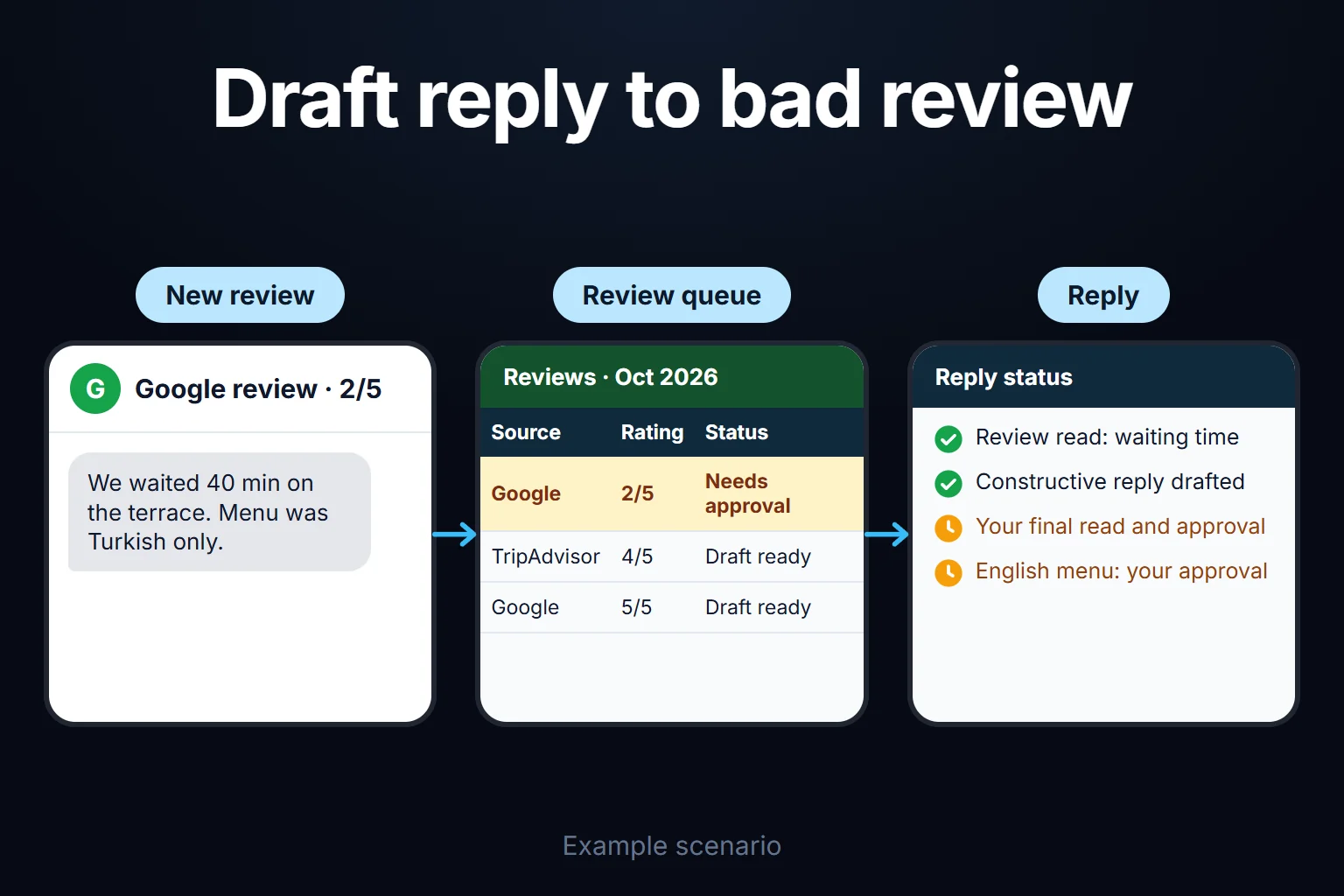
As in the illustrated review-response example, a draft addressing a guest’s complaint waits for the responsible person’s approval before publication. Menu translations and social announcements can use the current menu, real photographs and approved service information. An automatic draft is not a published reply, verified allergen information or a confirmed booking.
Conditions for WhatsApp and SMS notifications
Checked 30 October 2026: the WhatsApp Business messaging policy requires approved templates outside the 24-hour window following the customer’s last message. Consent and opt-out rules also apply.
WhatsApp requires official API access, account eligibility, permissions and necessary templates. The WhatsApp policy provides messaging conditions. SMS workflows use an authorised provider, appropriate message classification and consent/opt-out/İYS checks. The İYS FAQ is one source explaining the distinction between service and marketing notifications.
| Event | Recipient | Required confirmation |
|---|---|---|
| A reservation request arrives | Enquirer | Receipt acknowledgement only; table confirmation is separate |
| A group quote is ready | Relevant customer | Manager approval of price and menu |
| A reservation approaches | Booking contact | Current reservation and permission check |
| An order is ready | Customer or assigned employee | Kitchen preparation record |
| Complaint resolution is approved | Person who complained | Authorised resolution confirmation |
| A return-visit campaign is planned | Customer with appropriate consent | Opt-out and marketing permission checks |
A send log prevents another message when an event is processed again. Opt-outs apply to subsequent marketing. An SMS delivery report does not prove an order was physically delivered. AI can stop when an employee takes over a conversation, while management sees failed messages and pending conversations separately.
Connections to sales, payment and ordering platforms
A CSV or Excel report may be enough initially. For automatic connections, accessible fields and supported actions are verified through the actual account. Reading sales reports does not grant permission to change menus, open bills or issue refunds. Write integrations must verify a successful result in the source system.
I do not promise ready-made connections to every food platform, printer or fiscal device. QR ordering also requires stock, payment and kitchen confirmation. A payment screenshot does not close a receipt before the bank or provider result arrives. A failed platform connection shows its last data timestamp and error; old status is not presented as current service capacity. Critical acceptance or payment requires authorised confirmation.
Management reports and the review queue
Reservation-to-visit conversion, quote follow-up, open complaints, service tasks, cash discrepancies and supply delays can be reported separately. Accessible cancellations and refunds stay in the reports. The difference between theoretical consumption and counted stock is explained; estimates are distinguished from measured outcomes.
Where measurement technology and consent allow, the website and advertising can connect to actual enquiry records. Everyone clicking a message button is not counted as a customer. Unmatched records remain visible. Managers can open source records from a number, with branch, period, filters and freshness shown. Incorrect data stops critical transactions and creates a review task. Historical comparisons unavailable before the system began are not invented later.
Setup, staff training and acceptance
The initial process and data review is paid. Existing workflows and files are identified first, followed by written screens, roles, integrations and acceptance criteria. We may start with a group reservation or end-of-day closing. Staff receive training based on their work; data and support owners are identified.
A limited, controlled comparison period, backup and rollback method are planned. Support hours, incident priorities, hosting, messaging and AI costs are explained separately. We agree on manual fallback during internet outages and later reconciliation; untested offline operation is not promised.
- Re-uploading a report must not duplicate sales or payments.
- The latest menu change must reach the relevant preparation screen.
- A deposit must not count as received before verification.
- A cash difference must not close without a reason and approval.
- Kitchen staff must not see unauthorised customer or financial fields.
- Withdrawal of consent must stop the next campaign message.
- A failed source connection must show a clear error.
- Selected records must be restored from backup and compared.
Frequently Asked Questions
Must I remove my current sales system?
In many cases it can continue. The application provides coordination and control using accessible data; full replacement is a separate scope.
Could a standard product suit a small restaurant better?
If a ready-made product covers standard reservations and sales, using it makes sense. Custom development should address a clear recurring gap between teams.
Does AI provide definitive allergen or food safety answers?
I do not promise critical safety decisions. Approved information can be shown while preserving staff review and access to an authorised person.
Do delivery platforms connect automatically?
Access is checked separately for each platform. Authorised reports can be a starting point; unsupported APIs or printer integrations are not existing features.
Does a CRM record mean marketing consent?
No. Customer history and marketing permission are separate. A phone number in a file does not permit every message.
Does the system guarantee greater profitability?
Delivery of measurement and workflows can be committed to. Profit also depends on product costs, pricing, service and demand. I do not promise unmeasured commercial results.
Define your restaurant’s first shared workflow
You can start by saying, I want to define the scope of group reservations, service and closing for my restaurant. The initial paid engagement documents the screens, data sources and delivery checks. Presentations can use samples without personal data; actual customer files are handled through an agreed secure sharing method.