
Turning Phone Voice Recordings Into Text With AI
The short answer: record with your phone’s own app, and try your phone’s own transcription first. If the recording is sensitive (a client call, business information, health) or the phone’s transcript is not good enough, transcribe it with a local Whisper setup on your computer, so the audio file never leaves it. What decides between the two is not the brand of the app but where the recording goes.
First: your phone’s own feature
Samsung’s Voice Recorder and the iPhone’s Voice Memos (and Notes app) can both record and transcribe.
- Samsung. According to Samsung’s Galaxy AI page (as of October 2026), Transcript Assist works on recordings made with Samsung’s own Voice Recorder, Phone, Notes and Interpreter apps. It needs an internet connection and a Samsung account sign-in, the audio file must be under 3 hours, it can separate speakers, and Turkish is among the supported languages (the list is dated 11 July 2025). Samsung gives no accuracy guarantee.
- iPhone. According to Apple’s support page, call recording for phone and FaceTime audio calls has been available since iOS 18; recordings land in a “Call Recordings” folder in Notes. Apple says the transcript is offered only in select regions and languages. I could not tell from the page whether Turkish and Turkey are among them, so try it in Notes on your own phone.
For short notes this is often enough. It has two limits: Samsung’s feature needs internet and an account, so you should not assume the processing stays on the device (the page does not say; read the privacy terms), and these features depend on the phone’s own recording apps and may not work on a file from another app.
If you want to record a phone call
“Recording what is said on the phone” often means recording a call with another person. Two things to watch:
- It is not on every phone. Samsung says on its own page that call recording in the Phone app may not be supported in some countries. On iPhone, Apple says both parties hear an audio notice when recording starts.
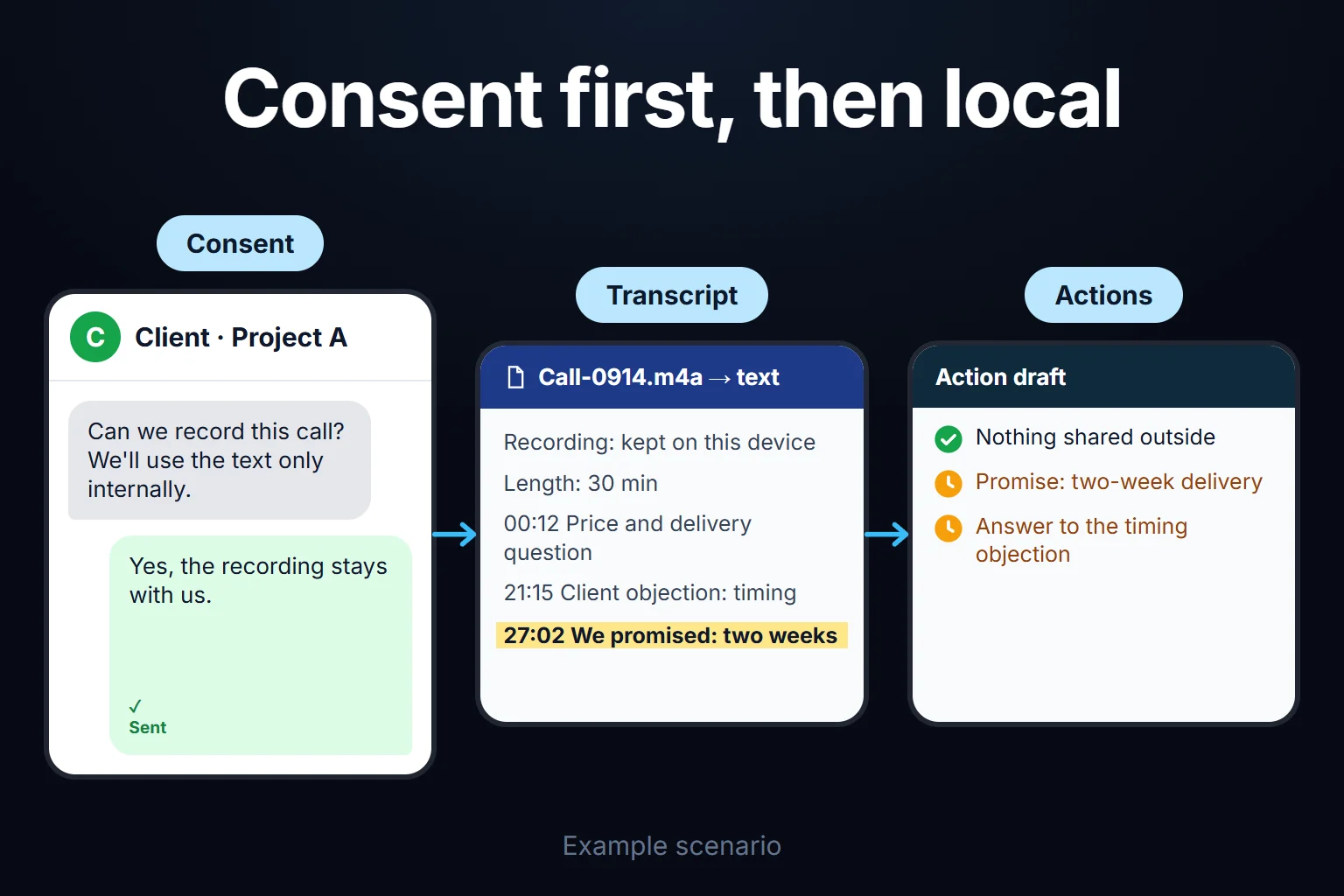
- Consent. Tell the other person and get explicit consent; Apple advises the same. The legal position on recording calls depends on the country and the case, so if you will share the recording, ask a lawyer.
If you cannot record the call, the fallback is to put the call on speaker and record it with a second device or a recorder on your computer; the same consent rule applies.
Three things for recording quality
- Hold the phone close to your mouth. Whisper copes well with noise, but the error rate rises on distant, echoey audio.
- Close the windows in the car. Road noise is one of the things that damages a transcript most.
- Do not split a long recording. A half-hour recording does not need cutting; Whisper takes it in one go, it just takes longer. Phones save m4a, and the tools below read it directly with no conversion. With third-party recording apps, read the terms to see whether recordings are uploaded to their servers.
When to stay local
There is nothing wrong with sending your shopping-list note to the cloud. Staying local matters in these cases:
- A client conversation: it contains the other party’s data and may fall under data protection law (KVKK in Turkey, GDPR in the EU/UK).
- A business idea or strategy you have not made public.
- Health, legal or financial conversations: these can count as special-category data.
Whisper is OpenAI’s open-source speech recognition model; because you download it and run it on your own computer, the audio does not go to OpenAI.
Local Whisper: which tool, which model
Tool: faster-whisper. According to the project’s own page it is up to four times faster than the original Whisper at the same accuracy, and uses less memory; FFmpeg does not need to be installed. In the benchmark on that page (13 minutes of audio, GPU, large-v2, fp16) the original Whisper took 2 min 23 s and faster-whisper 1 min 3 s. My estimate from that ratio: a half-hour recording takes a few minutes with a GPU; without one it falls back to the CPU, with the same result and a clearly longer wait. For a GPU you need NVIDIA with CUDA 12 / cuDNN 9 (project page).
Model: large-v3 for Turkish. turbo is much faster (about 8x in OpenAI’s table, Whisper page), but OpenAI says it loses more accuracy in some languages (Thai and Cantonese are the examples) and gives no figure for Turkish. I use large-v3 for Turkish. If you want to try turbo, transcribe the same recording with both models and compare for yourself.
If you do not want to write code there are interface options: Subtitle Edit on Windows has Whisper built in, Buzz and Vibe run cross-platform, and MacWhisper on Mac. They all use the same model; the difference is the interface.
Three things you will meet during setup:
- The model downloads on first run (a few GB), once.
- Set the language manually. If the first seconds are silent or noisy, automatic language detection can pick the wrong language and ruin the whole transcript. Set it to Turkish.
- Scan for proper names. Brand names and technical terms can be wrong; skim the transcript before you use it. I do not give a single error rate for Turkish: I have no figure I measured or could verify. You can measure it yourself by correcting two minutes of your own recording by hand and counting the wrong words.
Handing the transcript to an AI
Whisper gives raw text: punctuation is there, but no paragraphs or speaker separation, and fillers like “uh” and “so” stay in. Saying “summarise” works, but the result is average. Say what you want: “this is my voice memo, pull out an action list” or “this is a client call, separate the objections and the promises I made.” With context the output improves noticeably.
Whisper does not tell who said what on its own. Tools like WhisperX add it, and its accuracy depends heavily on recording quality. Samsung’s Transcript Assist offers speaker separation itself.
My own setup
I record voice notes on my phone and transcribe them on my computer with faster-whisper + large-v3 on the GPU. The recordings do not leave my computer. I turn a half-hour note into text with a single command, then give the text to my AI assistant to pull out decisions and action items.
I chose this deliberately: my notes contain client names, pricing conversations and business ideas I have not published. I cannot recommend a standard to a client that I do not apply to my own data. whisper.cpp is installed as a backup; if the GPU gives trouble it still gets the job done, with slightly lower accuracy.
You can ask me for this
If you do not want to set it up yourself, or it needs to be set up for a team, I can help: local transcription, a flow that produces a summary and action items from a recording, or an in-house tool. I work remotely, on an hourly basis. You can reach me through the contact page.
Related posts: automatic reports and action items from meeting recordings and AI data security.
Frequently Asked Questions
Isn’t my phone’s built-in transcription good enough?
For short, non-sensitive notes it often is. Samsung’s feature needs internet and a Samsung account, so do not expect the processing to stay only on the device; for iPhone, check Turkish support on Apple’s page. For a client call or business information, a local solution is more controllable.
Do I need a powerful computer for local Whisper?
Not necessarily, but a GPU speeds things up: in the benchmark on the project page, a 13-minute recording was transcribed with large-v2 in about a minute on a GPU. On a CPU-only laptop the wait is clearly longer. Smaller models are faster but Turkish accuracy can drop; test with your own recording.
Should I get consent before recording a phone call?
For your own voice memo, no issue. If you record a conversation with another person, tell them and get explicit consent; Apple advises the same. Sharing the recording, and where and how long you store it, are also legal and data-protection questions; ask a lawyer if you are unsure.