
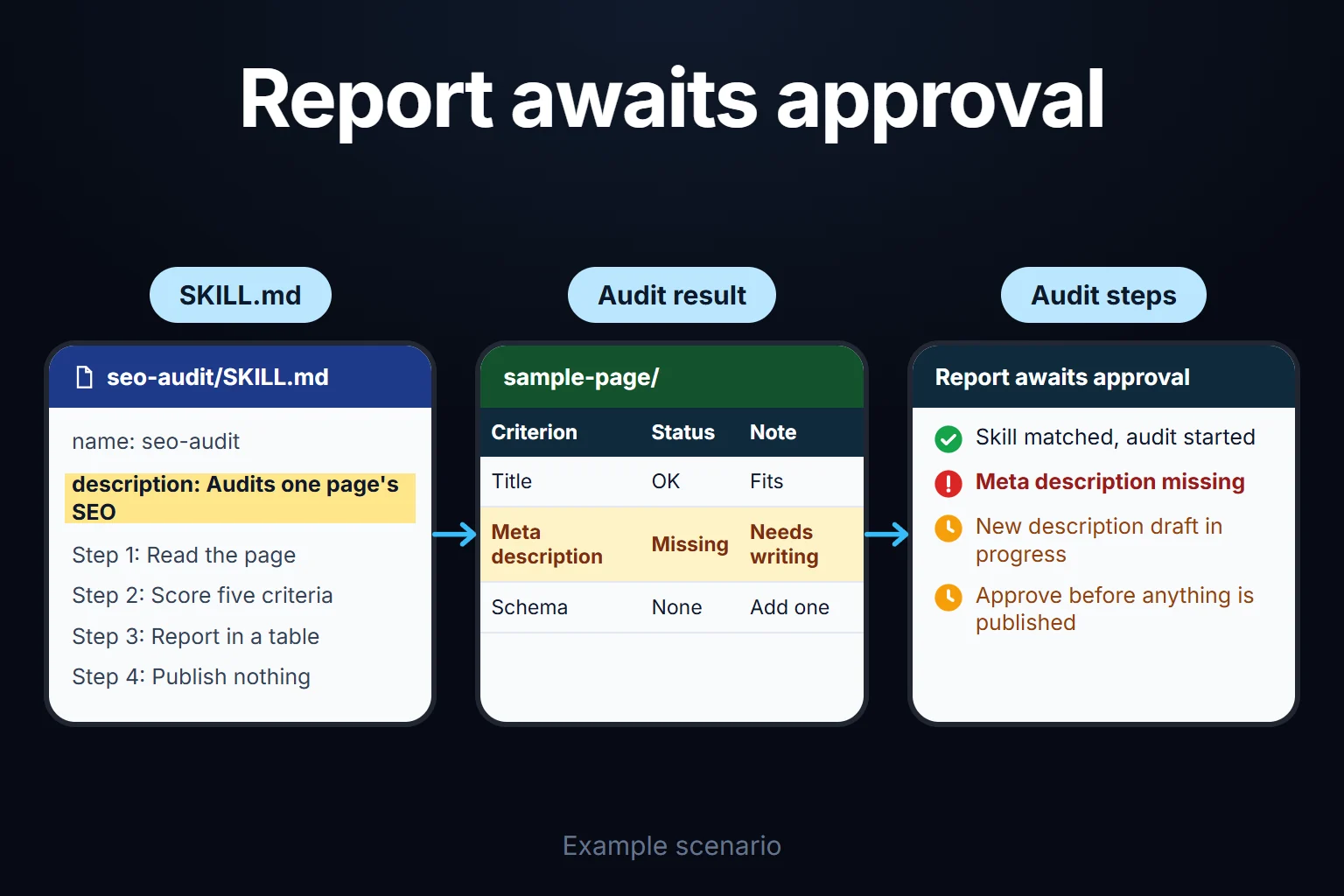
What Is Claude Skills, What Is It For?
Claude Skills are reusable instruction packages that teach Claude, Anthropic’s AI model, how to perform a specific task from start to finish. Each skill consists of a SKILL.md file that describes the step-by-step method, plus helper scripts and templates if needed. When Claude encounters a task, it looks at the list of skills it has and picks the right one for the job itself — you don’t have to rewrite the same instructions every time. In this piece I explain what it is, how it differs from the different kinds of Claude “instructions,” how to add one, and which tasks it’s genuinely useful for.
What Are Claude Instructions, and How Are They Different From a Skill?
“Claude instructions” isn’t the name of one feature; it’s a loose label for several ways of giving Claude standing guidance. Here is what each one is for:
| Method | Where it applies | When it enters context | Best for |
|---|---|---|---|
| Prompt | That chat | The moment you type it | A one-off request |
| Instructions for Claude (account-level) | All your chats | Every chat | General preferences: language, form of address, tone |
| Project instructions | Chats inside that project only | Every chat in the project | Context and rules specific to one project |
| CLAUDE.md | A folder or your user account in Claude Code | Every session | Codebase rules, commands, working conventions |
| Skill | Wherever you added it | Only when the task matches | A describable task that repeats |
As of October 2026, according to the Claude Help Center, account-level instructions are added under “Instructions for Claude” in Settings and apply to all your conversations, while project instructions only affect chats inside that project (source: Claude Help Center). In Claude Code the same role is played by CLAUDE.md files; Anthropic describes them as context rather than enforced configuration (source: Claude Code docs). If you need an action blocked no matter what, the docs point you to hooks instead.
Which One Should You Use?
My rule of thumb: a rule that should hold in every task goes into instructions or CLAUDE.md; a method for one specific kind of task goes into a skill. Anthropic’s Claude Code documentation draws the same line: CLAUDE.md content is always loaded, a skill’s body loads only when it’s used, and once instructions have grown into a procedure, a skill is the better home.
- “Reply in Turkish, call me Oguz” → account instructions.
- “In this folder, run the tests with this command” → CLAUDE.md.
- “Audit a site against these five criteria and report in this format” → skill.
I compare prompts, skills and agents more broadly in Prompt vs Skill vs Agent.
How It Works: SKILL.md and Automatic Selection
The core of a skill is a single file called SKILL.md. It usually contains three things:
- A short description of what the skill does and when it should trigger (the
nameanddescriptionfields at the top of the file), - Instruction text describing step by step how the task is done,
- Helper files if needed — a Python script, a template, a reference table, or sample output.
Claude looks at the task list and picks the right skill on its own — you don’t have to say “run this skill.” I explain step by step how to write a skill from scratch in How to Write a SKILL.md.
Why Installing Many Skills Doesn’t Bloat the Context
Skills load in stages. According to Anthropic’s documentation (as of October 2026), Claude loads only each skill’s name and description at startup, roughly 100 tokens per skill. The body of SKILL.md is read when your request matches the description, and the docs put it under 5k tokens. Bundled files and scripts open only when the task needs them (source: Agent Skills docs). So skills that don’t match your request take up almost no room.
The same page limits name to 64 characters (lowercase letters, numbers, hyphens) and description to 1,024 characters, and says the description must state both what the skill does and when to use it. That description is what most decides whether a skill fires.
How to Add a Claude Skill
How you add one depends on where you use Claude, and custom skills don’t sync across surfaces: a skill uploaded to claude.ai isn’t automatically available in the API or Claude Code (Anthropic docs, October 2026). Interface labels can change; the steps below follow the Help Center and docs pages as I read them in October 2026.
In claude.ai
- Prepare the skill folder (it must contain a SKILL.md) and package it as a ZIP file.
- Under Settings > Capabilities, make sure “Code execution and file creation” is on; skills need code execution. On Team and Enterprise, an organization owner turns this on.
- On the Customize > Skills page, click ”+”, then ”+ Create skill”.
- Choose “Upload a skill” and upload the ZIP.
- The skill appears in the list, where you can toggle it on or off.
Typical upload problems: an oversized ZIP, a folder name that doesn’t match the skill name, a missing SKILL.md, or invalid characters in the name or description (source: Claude Help Center). Custom skills in claude.ai are per user; everyone on a team uploads separately. Anthropic’s prebuilt skills for Excel, Word, PowerPoint and PDF work without any setup.
In Claude Code
There’s no upload in Claude Code; a skill is just a folder. You put the SKILL.md in one of these locations (source: Claude Code skills docs):
- Personal (all projects):
~/.claude/skills/<skill-name>/SKILL.md - Project (that repository):
.claude/skills/<skill-name>/SKILL.md
You can let Claude match it to your request, or call it directly by typing /skill-name. According to the docs, Claude Code watches these folders, so editing an existing skill doesn’t require a restart.
In the Claude API
In the API, custom skills are uploaded through the Skills API (/v1/skills) and used together with the code execution tool; an uploaded skill is available to everyone in the workspace (source: Agent Skills docs). If you’re not a developer you won’t need this route.
Skill, MCP or Subagent?
These aren’t interchangeable; each answers a different question:
| Layer | Question it answers | Example |
|---|---|---|
| Skill | How should Claude do this task? | An audit checklist, a report format |
| MCP | What can Claude reach? | A database, a calendar, an ad account connection |
| Subagent | Who does this work, in a separate context? | Running a long scan without cluttering the main chat |
If Claude does the work wrong, think skill; if it can’t reach a system, think MCP; if the context is getting crowded, think subagent. That split is my own reading; the definitions come from the official docs above.
What Tasks Get Written as Skills
Any repetitive task with clear steps can become a skill. The examples I run into most often:
- SEO/GEO audits — scanning a site’s title, description, schema, and internal links against the same checklist every time.
- Weekly report production — summarizing ad account or GA4 data in the same format every week.
- Code review — reviewing a pull request against a fixed checklist for security, performance, and style.
- Brand tone checks — checking whether a piece of text to be published follows tone, forbidden-word, and format rules.
- Client onboarding briefs — asking the same questions and producing the same summary format when a new client comes in.
The common thread: the task is describable and it repeats. There are three cases where writing a skill is pointless: one-off, constantly changing tasks (a plain prompt is enough), general rules that apply to every task (put them in instructions or CLAUDE.md), and small personal preferences only you need (account instructions are enough).
An Observation From My Own Operation
I use the same logic in my own work. I check every page on this site’s title, description, image, schema, and English equivalent against the same five criteria every time; after turning this into a skill, the audit became both faster and more consistent than the version I did by hand. Along the same lines, scanning industry developments weekly and turning them into content ideas now also runs through a repeatable skill. The difference: before writing the skill, I re-explained these tasks every time; now I don’t.
Skill Marketplaces: Check Before You Install
Sites that share skills (marketplaces) are multiplying fast, but this space is very new — a security or quality standard hasn’t settled yet. The risk you should know: a skill isn’t just instruction text — it often contains an executable script too. Anthropic gives the same warning: use skills only from sources you wrote yourself or trust; a malicious skill can steer Claude into tool calls that don’t match its stated purpose, or into leaking data (source: Agent Skills docs, October 2026).
Before installing:
- Read SKILL.md and every script in the folder.
- Look for unexpected network requests, file access, or operations unrelated to the skill’s purpose.
- Be extra careful with skills that pull content from an external address; that content can change later.
Running a skill from an unclear source without reading it is the same as running a program written by someone you don’t know on your computer.
Where This Fits In
Claude Skills isn’t a standalone feature — it’s part of agents’ broader ability to use tools, make decisions, and take over repeated work. To see the full picture, you can start with the Agentic AI Guide.
You Can Ask Me for This Work
Building a skill architecture — deciding which tasks become skills, writing the SKILL.md, testing it — requires technical knowledge but isn’t a big project. You can ask me for this work: it’s remote, hourly-billed work that typically takes 2 hours to 2 weeks. We can also treat it as part of the process of setting up your own AI assistant.
Frequently Asked Questions
Is Claude Skills free?
Skills themselves are usually a freely shared text/code file. Pricing depends on which Claude plan you use, not on the skill itself. In claude.ai, skills need code execution to be enabled; check the current Help Center page for which plans include it, since coverage can change.
Do I need to know how to code to write a skill?
No. Most skills consist of plain instruction text (SKILL.md) alone. Code only comes into play when part of the task genuinely needs automation, and even then, adding a ready-made script is usually enough.
Which Claude versions support skills?
According to Anthropic’s documentation (October 2026), skills are available in claude.ai, Claude Code and the Claude API. Custom skills don’t sync between these surfaces; you add them to each one separately. Coverage can change, so check the current documentation.
How do I add a Claude skill?
In claude.ai you package the skill folder as a ZIP and upload it from Customize > Skills; in Claude Code you put the folder under ~/.claude/skills/ (personal) or the project’s .claude/skills/. The steps are in the “How to Add a Claude Skill” section above.
How do I use a Claude skill?
In claude.ai, with the skill turned on, Claude uses it by itself when your request matches the skill’s description. In Claude Code you can also call it directly by typing /skill-name. If a skill doesn’t fire, word the request more explicitly and check that the description clearly says when the skill applies.
What is CLAUDE.md, and is it the same as a skill?
No. CLAUDE.md is the standing instruction file Claude Code reads every session; a skill loads only when the task matches. Put general rules in CLAUDE.md and the method for a specific task in a skill.
Is this the same thing as a custom GPT or GPT Actions?
The goal is similar — packaging a repeated task — but the architecture is different. Skills are built around instructions and optional files, while GPT Actions relies more on API integration. Treating them as interchangeable would be a mistake.