
AI Chatbot Setup for Your Website
I set up a chat box on your website that answers visitors’ questions by looking at content you wrote. The bot speaks only from the information you give it, and where it doesn’t know, it stops and points the visitor to you. The aim isn’t to solve every question; it’s to cover the repeated ones, including at night.
What do I set up?
The setup is four pieces of work, each with a clear owner:
- Knowledge sources. Together we choose which pages, documents and FAQ texts feed the bot. I don’t say “crawl the whole site”: an old campaign page or an outdated price gets taught to the bot too.
- Instructions and limits. The bot’s tone, and which topics it will and won’t answer. This text defines the bot’s character.
- Handover to a person. Where the bot sends a visitor when it can’t answer: WhatsApp, email or phone.
- Placement and testing. Matching the look to your brand, setting which pages it opens on and how it behaves on mobile, then trying it with real questions.
Why a bot can produce wrong answers, and how that’s reduced, is covered in what is hallucination; Anthropic also recommends grounding answers in a knowledge base and letting the model say it doesn’t know (Anthropic, reducing hallucinations).
Ready-made widget or custom setup?
| Ready-made widget (Tidio, Crisp, Intercom and similar) | Custom setup | |
|---|---|---|
| Setup time | Short; it scans your site and runs quickly | Longer; needs content selection and testing |
| Answer quality | Generic; may miss exceptions specific to your sector | Closer to the content you selected |
| Control | The tool shows only limited detail on what it read | You can tell which source an answer came from |
| Cost | The tool charges a subscription | Tool fee plus setup effort |
| Fits | A small, simple site | A business with many price and condition exceptions |
For most small businesses the realistic starting point is in between: a ready-made tool, but fed with content you chose and bound by written limits. Once I know which tool you use and how many pages you have, I’ll recommend one; there’s no “best tool”, only the tool that fits the scope. I broke down the cost items in what does it actually cost to build a chatbot.
What shouldn’t the bot know?
A bot that tries to answer everything is worse than one that answers nothing correctly. In every setup I deliberately keep three areas out:
- Price negotiation and special offers. It can state the list price; to “could you go lower?” it makes no commitment and hands over to a person.
- Personal and sensitive data. Reservation numbers, payment details, health information: the bot shouldn’t ask for them or store them.
- Binding answers. On warranty coverage, cancellation and refund rights or contract interpretation, the bot shouldn’t speak with certainty.
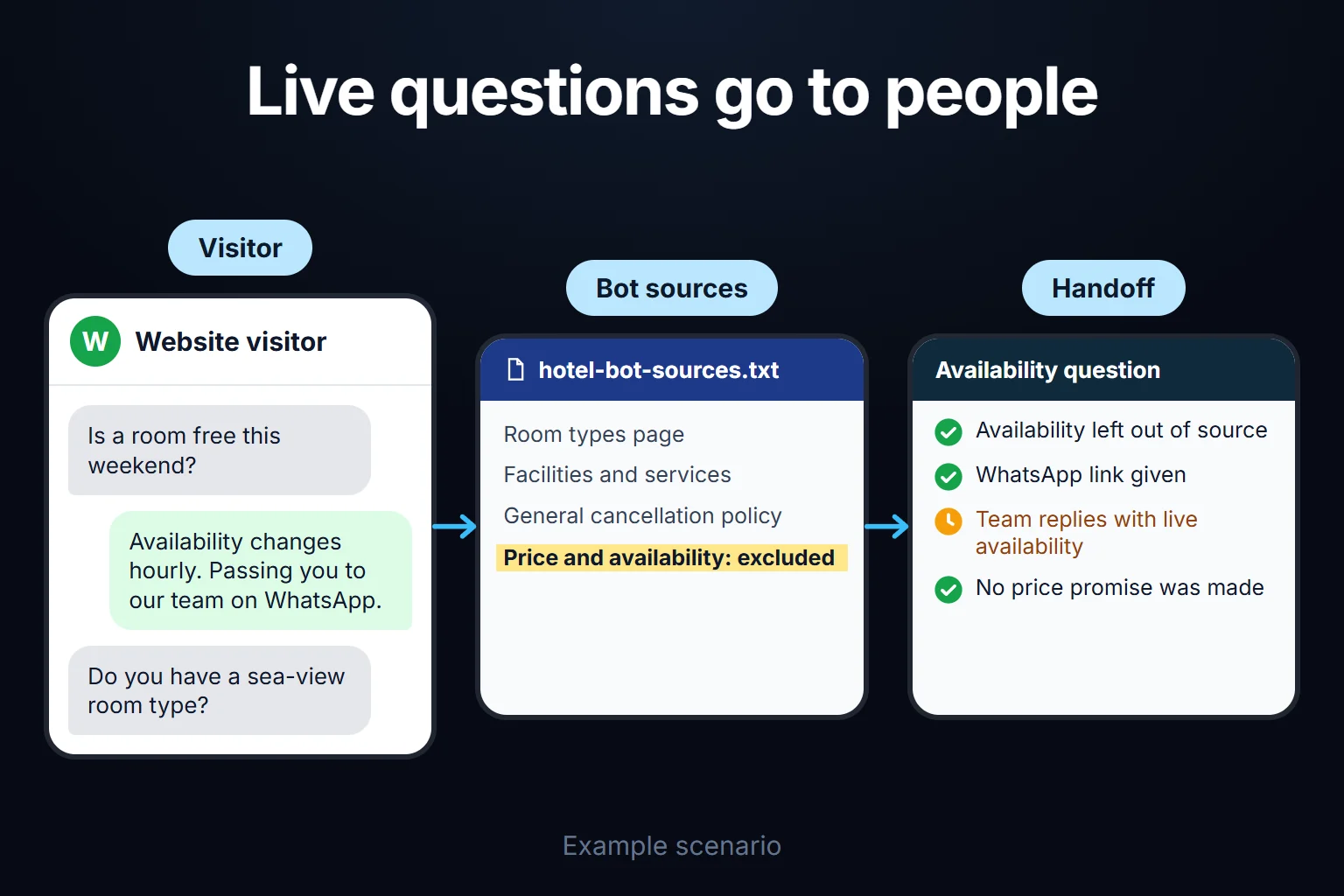
I often don’t give the bot information that changes daily (availability, live prices) at all; handing the visitor to a person is better than answering from stale data. I tried this design on an accommodation site: the bot got room types, facilities and the general cancellation policy, and price and availability were left out on purpose.
What happens after setup?
The work doesn’t end when the bot goes live. In the first days we look at what visitors actually ask: questions the bot couldn’t answer show topics that belong in the knowledge source, and wrong answers show what to fix in the instructions. When a price or condition changes, the bot’s source has to change too; we agree on who does that at the start.
In the chatbots I’ve built, the effort comes not from the technology but from how tidy the data source is. A setup built on a few fixed question-answer pairs is quick. For one connected to a product catalogue or a reservation system, most of the time goes to understanding which information changes how often.
Personal data: KVKK in Turkey, GDPR in the EU/UK
A visitor may type a name, a phone number or other personal details into the bot, and chat logs can count as personal data. As the data controller you must inform visitors under Turkey’s KVKK notification obligation before processing (KVKK, notification obligation, in Turkish, as of October 2026). I recommend a short notice in the chat window with a link to your privacy notice. This is not legal advice; ask your own lawyer to draft the text. This page cites Turkey’s KVKK because that is the law I work under day to day. The GDPR (EU) and UK GDPR have a comparable duty to inform people about how their data is used; if you operate outside Turkey, your own country’s rules apply.
When shouldn’t you set one up?
- If you get a few messages a day and can reply to all of them quickly yourself.
- If most questions change from case to case and can’t be turned into rules.
- If your site has no tidy content for the bot to read. Sorting the content first is more useful.
If this isn’t quite what you’re after, the closest options:
- A bot that acts for the visitor (booking, opening an order): AI agent vs chatbot.
- A helper for your own team rather than your site: your own AI assistant.
- The how-to version of the setup steps: adding a question-answering bot to your website.
How do we start?
Send me your site address and the questions you most want the bot to handle, on WhatsApp or through the contact page. First we talk about what’s realistic; then you pick one of the work-hour packages at the bottom of this page. The time depends on how many pages and documents feed the bot and how much testing you want; I also wrote about how long an AI project takes.
Frequently Asked Questions
Do I need to know how to code to set up a chatbot?
No. In most tools a single code snippet is pasted into the site, and on platforms like WordPress it installs as a plugin. The real work isn’t technical: it’s choosing the content that feeds the bot and testing it.
What happens if the bot gives a wrong answer?
A well-built bot says it doesn’t know when a question falls outside its knowledge source and points the visitor to you. The risk doesn’t drop to zero, but it shrinks by keeping the scope narrow, handing critical topics to a person and testing regularly.
Does a chatbot help SEO?
Not directly. The bot’s conversations don’t become pages for search engines. As an indirect benefit, a visitor who finds the answer on your site may stay longer, but I don’t claim a measured result.
How do I work?
Work-hour packages
Tell me about your business and what you need on WhatsApp or by phone; we agree on a work block of somewhere between 5 and 40 hours and I start doing what is needed. What you get is not a calendar window — it is net working hours spent directly on your business. I can use 40 hours working three days straight, or deliberately spread it out and finish it over a year — whatever the work calls for. I do not spend my time estimating how long something will take, I spend it doing the work; every hour I spend leaves a lasting result in your business. We keep going for as long as you find it useful.
Why not monthly?
Is 40 hours a week?
On a fixed monthly fee both sides are watching the wrong thing: you watch a fixed cost, the other side watches how many more contracts like this they can line up. Working by the hour puts us both in front of the same thing — the real value of the work that got done. I know not having an upfront answer to "how much will this cost in total?" is the natural cost of this model. But instead of paying a fixed fee for months to a setup that is not producing results, you only pay for the qualified time spent on your work — and you see exactly where that time went, start to finish. That is why my clients keep coming back.