
Web Data Collection | Listings and Tracking Setup
Your competitor’s price, the number of listings in your sector, the list of companies in your target market — this data is publicly available on the web, but tracking it by hand takes hours. Web data collection means this kind of data gets scanned at regular intervals and kept in an up-to-date table. Not a one-off list — a continuously running system.
This page is about the technical infrastructure behind it — a system that pulls data from sources you define and keeps it updated on a schedule. If what you want instead is a ready, one-off research report, see Market Research Report or Supplier and Product Research (to review competitors yourself, competitor analysis with AI walks through it step by step) — these are reports I put together and deliver, with keeping them updated left to you. If you want continuous competitor price monitoring specifically, Competitor Price Tracking is focused on exactly that.
How It Gets Built
- Sources and fields get defined. Which websites, and which pieces of information (price, listing date, company name, contact details) need to be pulled.
- The scan frequency gets decided. Daily, weekly, or monthly — depending on how fast the underlying data changes.
- The output format gets chosen. Google Sheets, an Excel file, or an import into an existing system.
- Compliance gets checked. Each site’s
robots.txtrestrictions and terms of use are checked before anything gets scanned — I don’t build a setup that violates them. - The system goes live and gets watched. Output accuracy is checked over the first few runs; ongoing maintenance is needed so a site redesign doesn’t quietly break the scan.
Who This Makes Sense For
E-commerce businesses monitoring competitor prices continuously, buyers tracking deals across listing sites, marketing teams watching how many companies operate in a given sector, and procurement teams tracking supplier price changes.
The Mistake I See Most Often
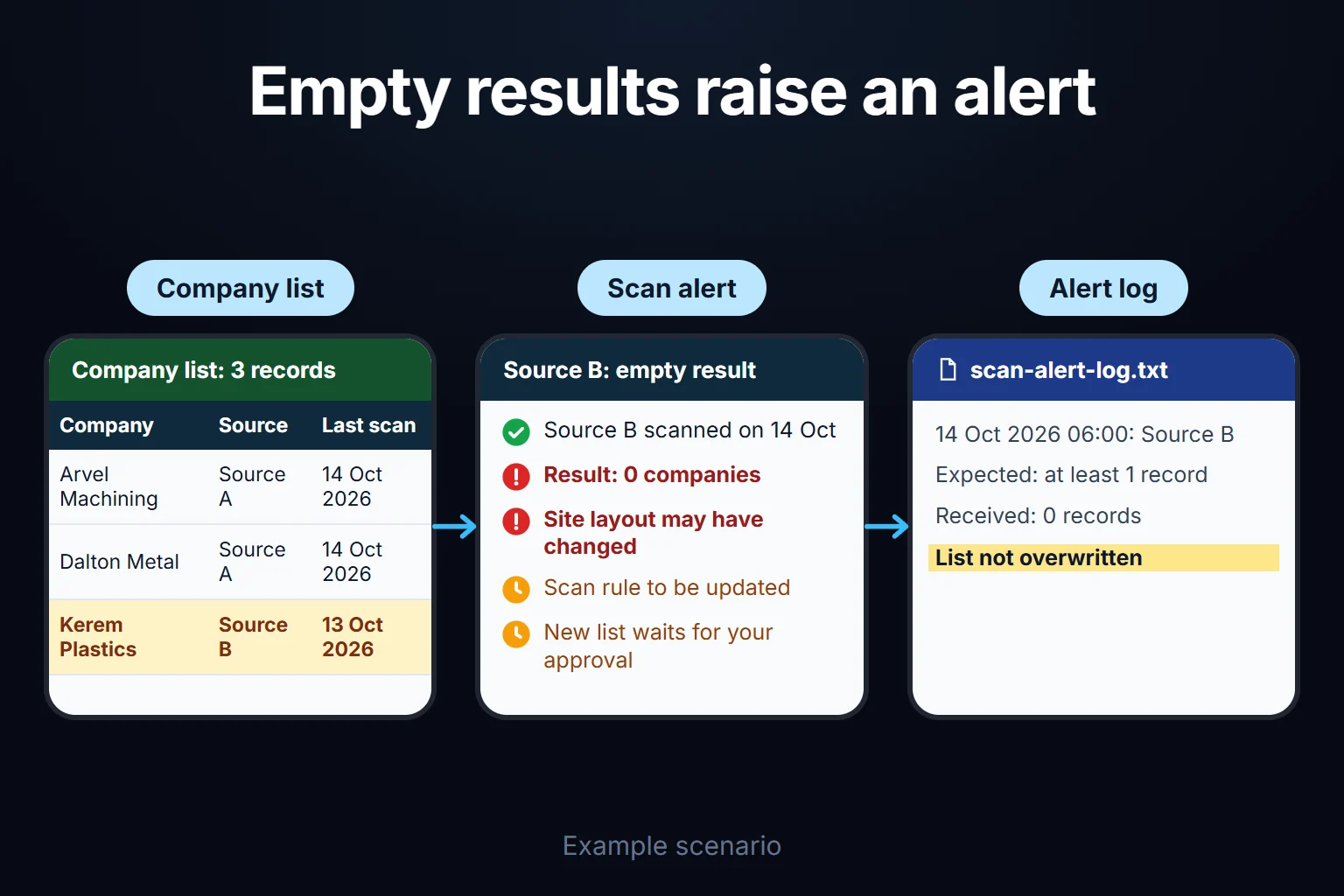
Not noticing when a site’s structure changes. Websites redesign themselves from time to time; if the scanning system isn’t built to catch this, it starts quietly collecting empty or wrong data. The systems I build include a check layer that alerts when the result is unexpectedly empty — I don’t leave you silently exposed to “data was collected but none of it means anything.”
What It Does Not Do
- It doesn’t collect data behind a login, a paywall, or anything explicitly barred by terms of use. Compliance with each source’s rules is checked upfront.
- It doesn’t collect personal data. Company contact details can be collected; I don’t build a setup that targets individuals’ personal data.
- It doesn’t interpret the data. The output is raw or organized data prepared for your decision-making — analysis and decisions stay with you.
You Can Hire Me for This
You can hire me for this: remote, billed hourly. Setup usually takes 2-5 days; what drives the timeline is the number of sources and how consistent each one’s structure is.
To start, we talk through which site, which information, and how often it needs collecting; we check compliance together. Write to me from the contact page.
Frequently Asked Questions
Can you collect data from any website?
No. Sites explicitly barred by their terms of use or robots.txt are out of scope. I check each source’s rules before setup; if it’s not workable, I say so upfront.
Will the system break if a site’s design changes?
Briefly, yes — but it doesn’t go unnoticed. The system I build includes an alert for unexpected results; once a break is detected, the scanning logic gets updated.
How often can you update the data?
Anywhere from daily to monthly, depending on your needs. Fast-changing data like prices usually needs daily scans; more static data like a company list is usually fine weekly or monthly.
Can the collected data go straight into our system?
Yes, output is flexible — beyond Sheets/Excel, writing directly into systems with an open API is also possible. We clarify the target system together before setup.