
Invoice Processing Automation | From Invoice to Ledger
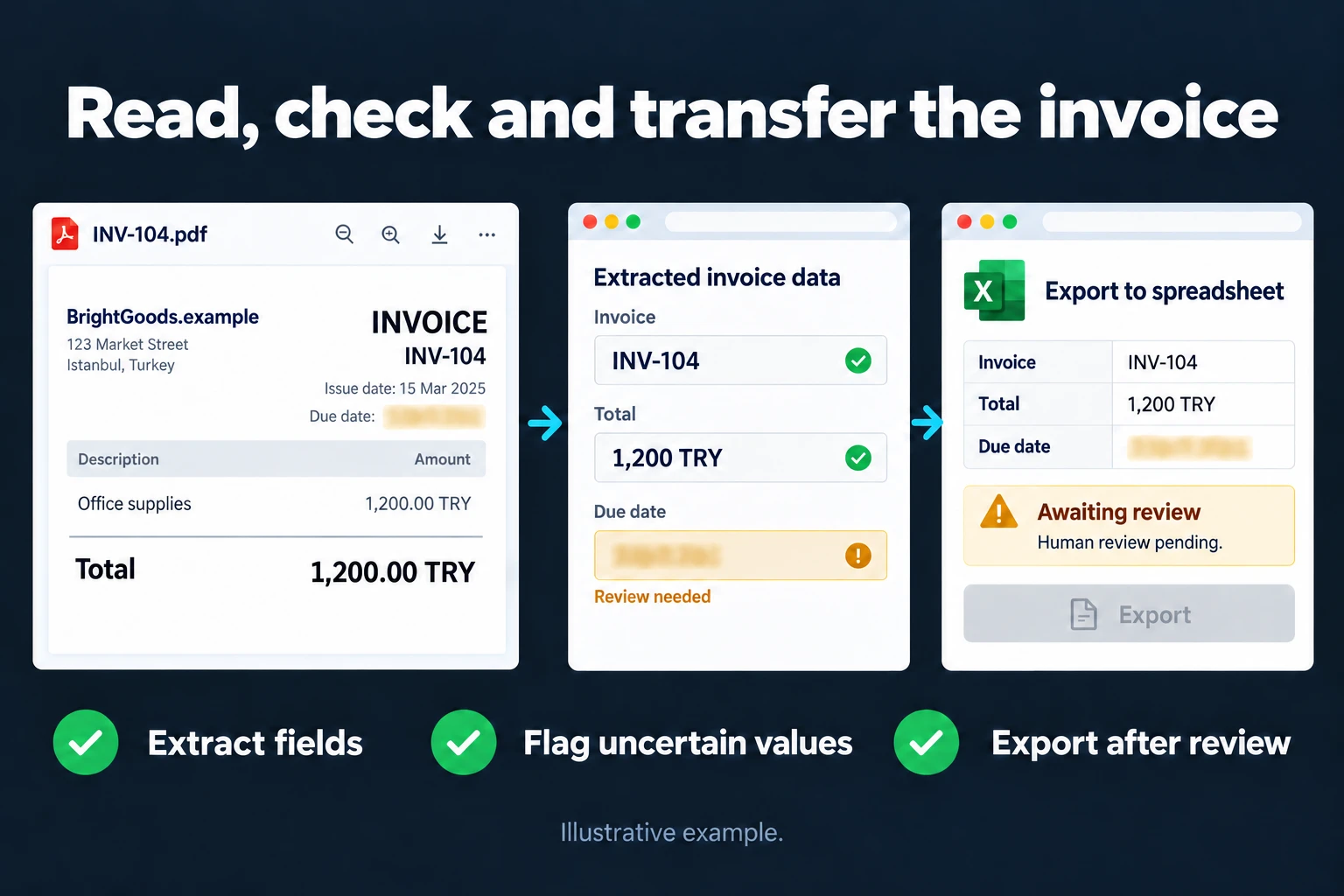
In most businesses, the path an invoice takes from inbox to ledger runs by hand: someone downloads the attachment, opens it, reads the amount and date, types it into a table, files it away. A minute or two per invoice looks like nothing — at 300 invoices a month it adds up to a full working day. Invoice processing automation builds that path end to end: the invoice is read the moment it arrives, its fields are extracted, checked, and dropped into whatever table or accounting system you use.
This page describes a continuously running flow. If you have a backlog and want a one-off conversion, PDF to Excel Conversion is the right page; for turning old scanned paperwork into a searchable archive, see Digitizing Scanned Documents.
How the Flow Is Built
Four steps, all four tuned to your process during setup.
- Capture. Invoices are picked up wherever they arrive: attachments landing at a specific email address, files dropped into a folder, or receipt photos sent from a phone. There is no requirement for a single source, but each source has to be defined separately.
- Extraction. The fields on the invoice are pulled out: supplier, date, invoice number, net amount, tax, total. Accuracy is high on PDFs with a text layer; on photos and scans, OCR steps in and the error rate rises.
- Validation. Skip this step and the system is worthless. Does the tax total reconcile with the net amount, is the date within a plausible range, has this invoice number appeared before? A record that fails does not pass through automatically — it goes to a review queue.
- Export. Validated records are written to the target: an Excel/Google Sheets file, or the import format your accounting software accepts. The original invoice is also renamed by date and supplier and copied to the archive.
Where It Works Well
- Recurring suppliers. An invoice arriving monthly from the same company has a fixed layout; the system learns it after a few examples. Accuracy is highest here.
- E-invoice / e-archive PDFs. The text layer makes extraction almost error-free.
- Receipts and expense documents. If photo quality is adequate, amount and date come out reliably; line-item detail may not.
There are places it struggles: handwritten notes, creased or folded receipt photos, several documents on one page, and foreign invoices with unfamiliar layouts. None of these make the system unusable — they land in the review queue and you look at them.
The Mistake I See Most Often
Skipping the validation step and trusting the output blindly. A flow nobody checks for months will quietly carry a single misread digit into your books, and the error surfaces only at reconciliation. By then, correcting it retroactively costs more than doing the work by hand would have.
The rule in the flows I build: the system only passes records it is confident about, and holds the rest. Early on, the share landing in the review queue is high; it drops as suppliers become familiar. Reaching zero is not the goal — a setup designed to reach zero was built wrong to begin with.
What It Does Not Do
- It does not replace your accountant. Which invoice goes to which account, whether something is an expense or a cost — those are professional decisions. The system prepares the data; it does not make the call.
- It does not file tax returns or submit official declarations.
- It does not scan paper. Digitizing physical paperwork is separate work; I do not offer scanning, I work with files that are already scanned.
An Observation From My Own Operation
I use the same pattern on ad spend in my own business. Across all the Google Ads and Meta accounts I manage, compiling monthly spend breakdowns by hand is not feasible; the reading and tabulating runs automatically.
What I learned was about the value of the validation step. The first version I built passed every record through. One account used a different currency, so its amounts looked lower than they were — and I only caught it during an end-of-month comparison. I changed the rule afterwards: any record falling outside the expected range gets held. That class of error has not slipped through since.
You Can Hire Me for This
You can hire me for this: remote, billed hourly. Setup usually takes between 2 days and 1 week; what drives the timeline is not the invoice count but how many different sources and layouts are involved.
To start, I ask you for 20-30 sample invoices; I measure the accuracy rate on those and show you the result. If the rate is not good enough, I say so upfront — I do not take money for a setup that will not work. Write to me from the contact page.
Frequently Asked Questions
My invoices are handwritten and sent as photos. Can this still work?
Partly. Printed fields — amount, date, company name — can be read if photo quality is adequate; handwritten notes are not reliable. The right approach is to measure the accuracy rate on 20-30 samples first. If it comes out low, I will suggest a different arrangement rather than a build.
Can it write directly into my accounting software?
That depends on the software’s import support. Most common packages accept Excel/CSV import, and the flow produces that format. Where an open API exists, writing directly is also possible — but that needs to be verified together before the build starts.
What happens if it reads something wrong?
That is exactly what the validation step is for: an inconsistent record does not pass automatically, it goes to the review queue. Even so, no setup is 100% accurate — which is why I do not recommend dropping your monthly reconciliation. The system speeds the work up; it does not remove the need to check.
Our invoices are already electronic. Is this still needed?
Electronic invoice files are digital, but most businesses still download them as PDFs and type them into a table by hand. If the flow reads the structured file directly, accuracy is at its highest — which makes the build shorter, not unnecessary.
How do I work?
Work-hour packages
Tell me about your business and what you need on WhatsApp or by phone; we agree on a work block of somewhere between 5 and 40 hours and I start doing what is needed. What you get is not a calendar window — it is net working hours spent directly on your business. I can use 40 hours working three days straight, or deliberately spread it out and finish it over a year — whatever the work calls for. I do not spend my time estimating how long something will take, I spend it doing the work; every hour I spend leaves a lasting result in your business. We keep going for as long as you find it useful.
Why not monthly?
Is 40 hours a week?
On a fixed monthly fee both sides are watching the wrong thing: you watch a fixed cost, the other side watches how many more contracts like this they can line up. Working by the hour puts us both in front of the same thing — the real value of the work that got done. I know not having an upfront answer to "how much will this cost in total?" is the natural cost of this model. But instead of paying a fixed fee for months to a setup that is not producing results, you only pay for the qualified time spent on your work — and you see exactly where that time went, start to finish. That is why my clients keep coming back.