
Don't Hunt for Free AI: Pay for It and Use It
On YouTube
Don't Hunt for Free AI: Pay for It and Use It
If you only use AI to ask a question and get an answer, you're not using most of its power. This video is the map of your first month: eight stations from a hundred-dollar plan to running like a one-person company.
Full description
1. Paid plan: stop chasing free; get the plan at that price from Claude, ChatGPT or Gemini. 2. The desk: leave the chat window; install Claude Code, Codex or Antigravity. 3. The onboarding file: one instruction file and a folder of documents. 4. The keys: connectors (MCP), skills and plugins; together they make the agent harness. 5. Permissions: reading is free, deleting, sending and paying need your approval; keys live in a vault, logins use passkeys. 6. First job: give a goal, approve the plan, let it test, split work across sub-agents, ship with Git. 7. Audit: a second session runs the security test, not the one that wrote the code. 8. Marketing: SEO, a content calendar, ad copy, metrics and a report every morning.
I'll break down each step in upcoming videos. Follow along and save this one; it's made to be paused.
Previous video, the best way to give AI computer use: https://youtu.be/GSHKjMx80Z0
If you only use AI to ask a question and get an answer, most of what it can do sits unused. This page is the map of your first month for someone starting to work with an AI agent. The video moves through eight stations quickly; here I explain what each concept does and why it comes in that order. Each station gets its own video later.
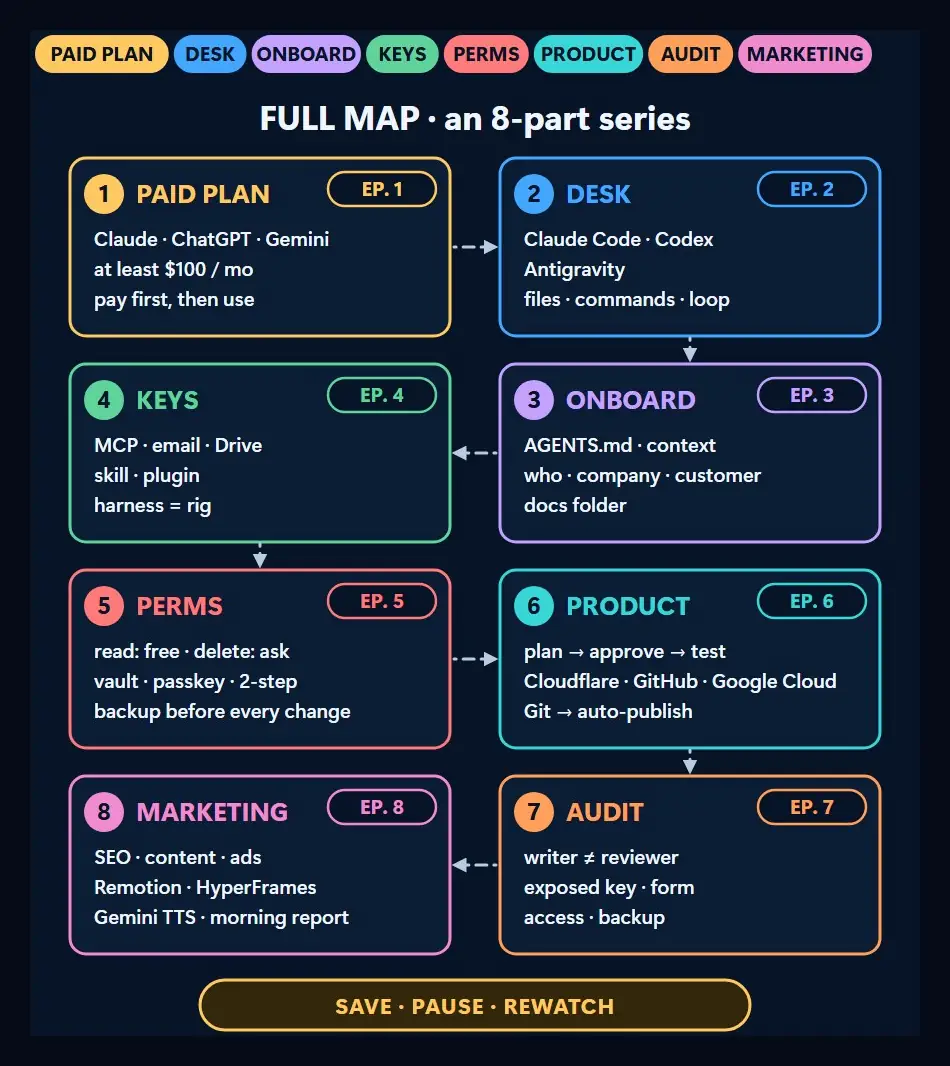
1. Paid plan: pay instead of chasing free
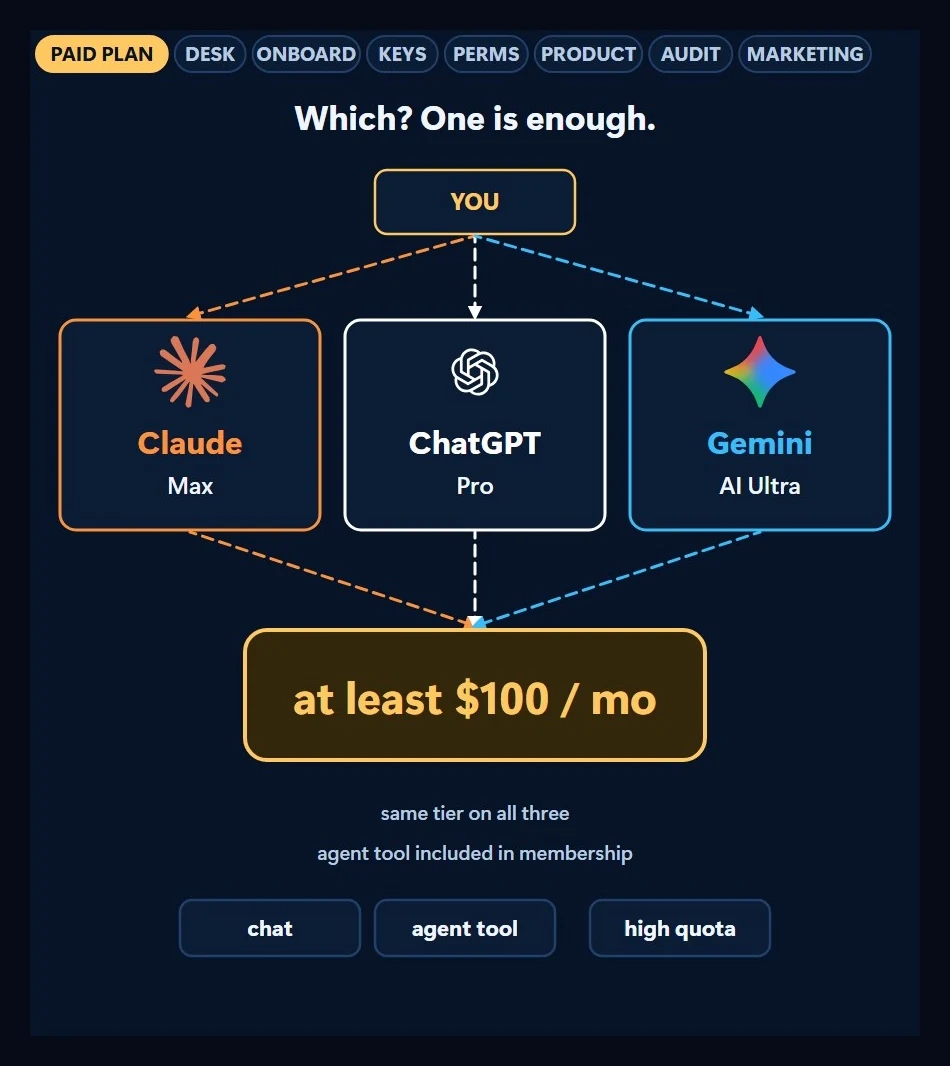
Talking about free AI is easy, because free has plenty of buyers. My advice is the opposite: start by paying at least a hundred dollars a month. Get the plan at that price from Claude, ChatGPT or Gemini; which one you pick matters less.
On the free path you hit a quota, switch to another tool, open a new account and explain everything again. On the paid path you go deep with one tool and one account. And once you’ve paid, you use it to get your money’s worth. My claim in the video is that this money buys a worker that moves faster than big companies manage to. Read that as my judgment, not a measured result.
There’s also the “learn first, pay later” trap. Paying before you know what you’ll use it for looks backwards, but the waiting path ends in a dead end: you watch videos, compare tools, wait. The paying path starts today, hands over real work and learns on the job. The rest is a hiring process: desk, onboarding, keys, permissions, first job, audit and marketing, in that order.
2. The desk: leave the chat window
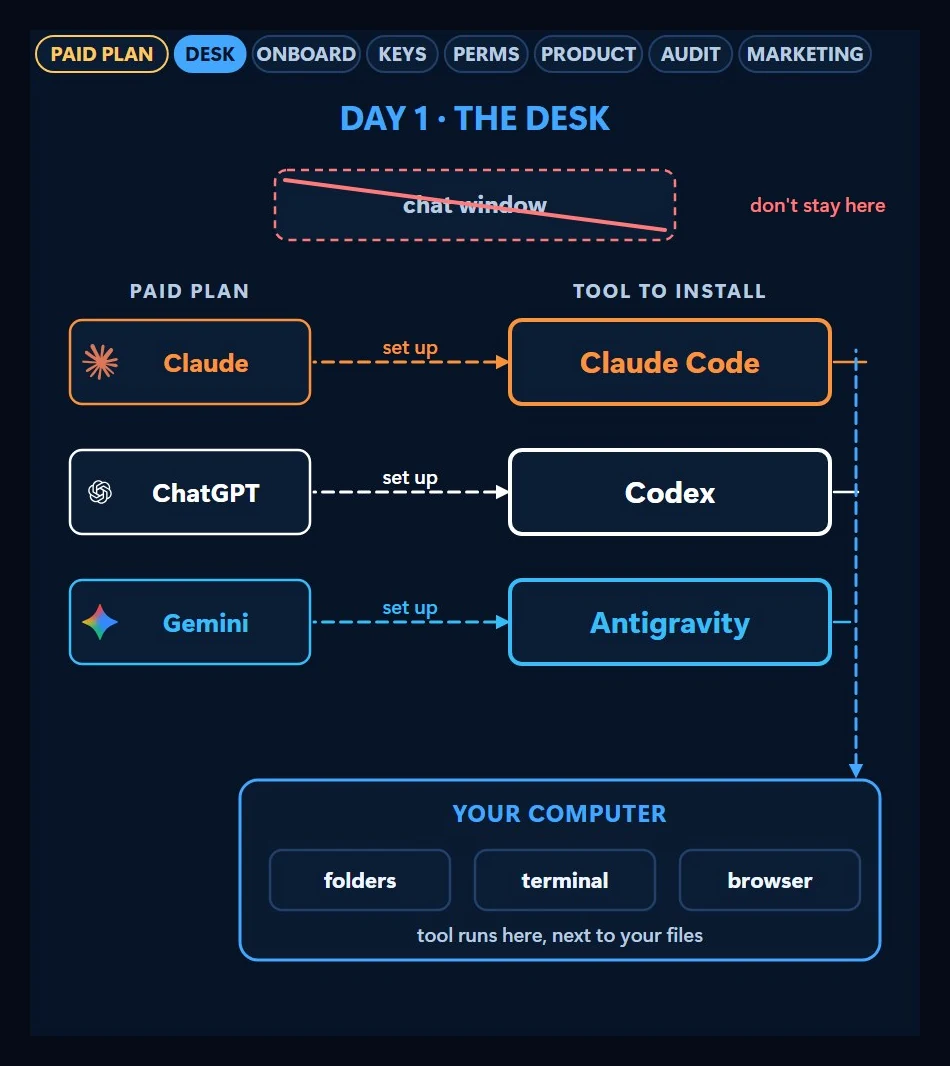
After the plan, leave the chat window. On Claude, install Claude Code; on ChatGPT, Codex; on Gemini, Antigravity. Chat writes you an answer and you copy and apply it. These tools open files on your computer, run commands and finish the job themselves. You give the goal and approve the result.
3. The onboarding file: write down who you are once
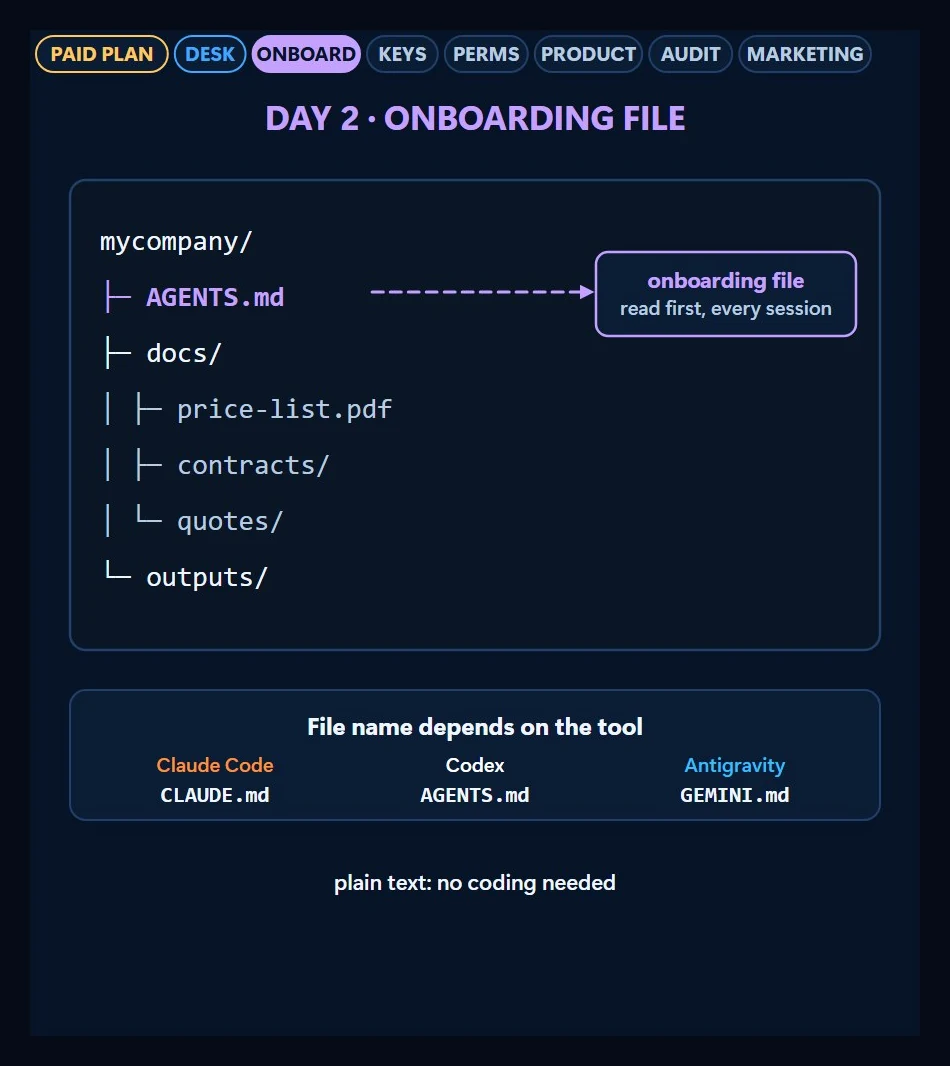
On day one you’d brief a new hire on the company. You do the same for the agent with a file: make a folder and put one instruction file in it. It answers who you are, what your company does, who your customer is, what language and tone to write in, and what must never be touched. The agent reads it first in every session, because it doesn’t remember yesterday’s conversation; whatever you want remembered goes in the file. Put your price list and contracts in the same folder.
The file’s name depends on the tool; the board in the video shows different names for Claude Code, Codex and Antigravity. The content is plain text, no coding needed.
The instruction file needs five parts. Who I am sets how the agent addresses you, company sets the context, customer sets the tone, and language sets the output language. The never touch part is the most important line: write the live site, bank and patient records there. The documents folder holds the price list, contracts, old quotes, brand guide and FAQ, so the agent reads prices from your contract instead of making them up.
4. The keys: connectors, skills, plugins and the harness
On its own, an agent sees only the files in the folder. To reach your email, calendar, Drive and Google Cloud account you use connectors, and their standard is called MCP. You connect once and they’re ready in later sessions. The agent reads the inbox and fills the spreadsheet itself.
The copy-and-paste chain goes away. You used to do six steps by hand: open, copy, paste, fix, save, send. With a connector, saying “log yesterday’s orders to the sheet” is enough: the agent reads the orders in the inbox and writes them to the table. The table in the video is sample data.
You describe a repeating job once and save it as a skill; next time it follows the same steps and produces the same output. A plugin is a way to install someone else’s ready-made setup: according to the board in the video, skills, connectors, commands and hooks come in one pack.
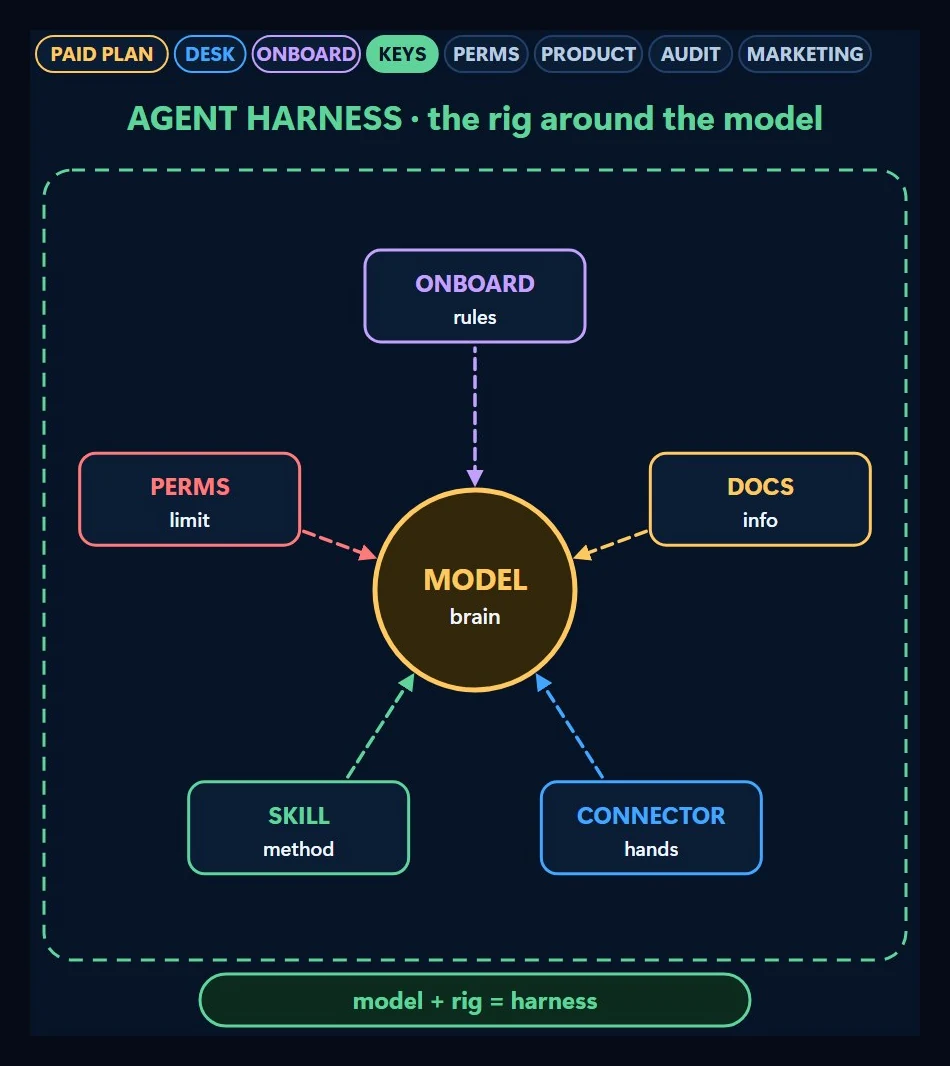
The whole that lets the model work with instructions, documents, connections and skills is called the agent harness. The model is the brain; the harness is the rig that makes it useful. For the concept in detail, see what is a harness.
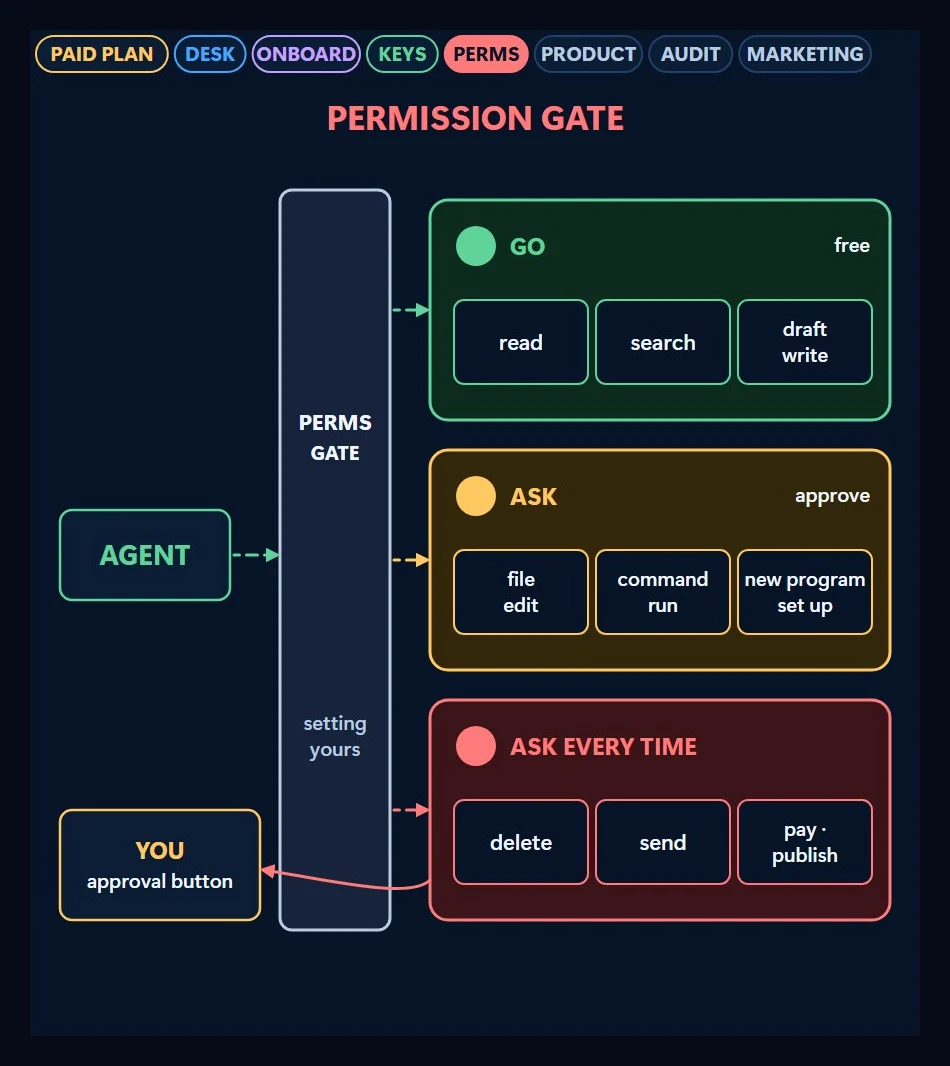
5. Permissions: set limits for a worker who can reach everything
You draw the limits for a worker with this much access. The rule in the video: let it read freely; make deleting, sending and paying wait for your approval. The board shows three lanes: what passes freely (reading, searching, drafting), what it asks about (editing files, running commands) and what asks every time (deleting, sending, publishing).
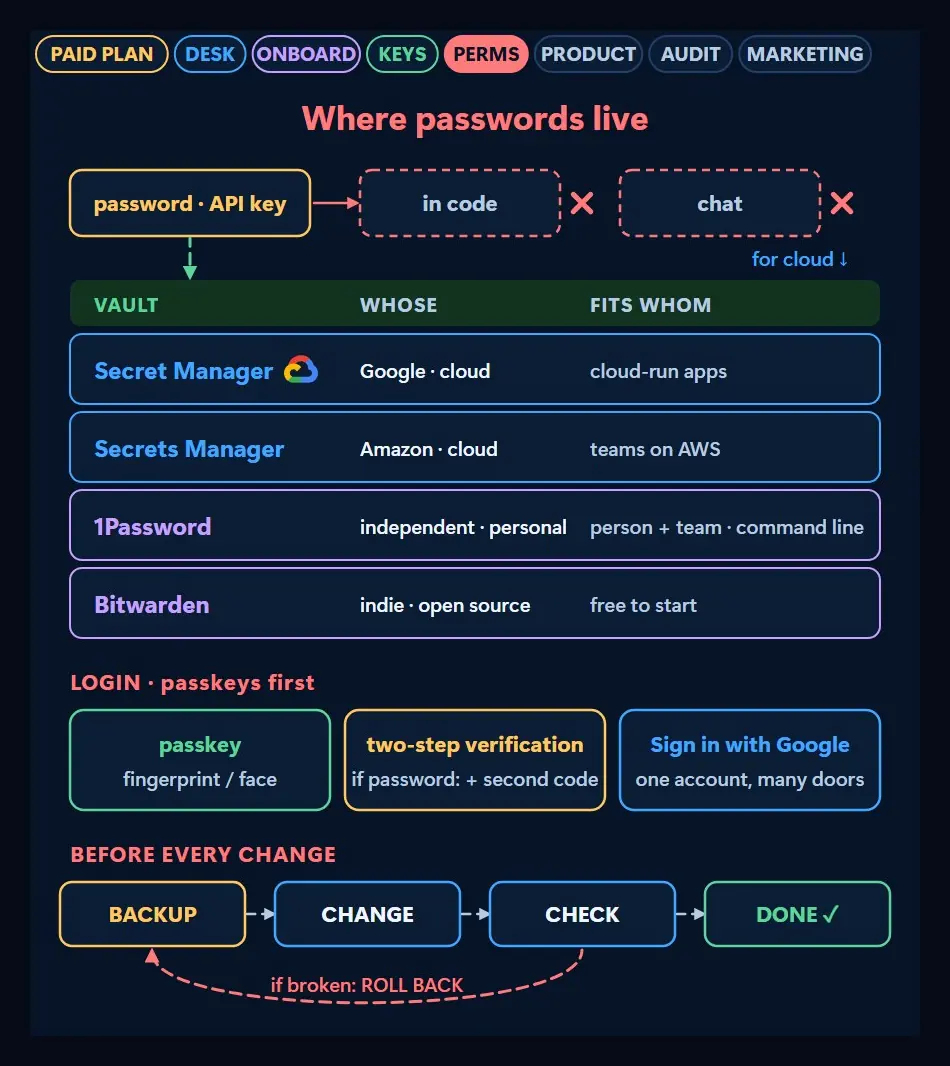
Passwords and API keys don’t go in the code or the chat; they sit in a vault. Use Google Secret Manager or AWS Secrets Manager for programs running in the cloud, and 1Password or Bitwarden for personal use. For logins, prefer a passkey first; if you stick with passwords, turn on two-step verification. And take a backup before every change, so you can roll back if something breaks.
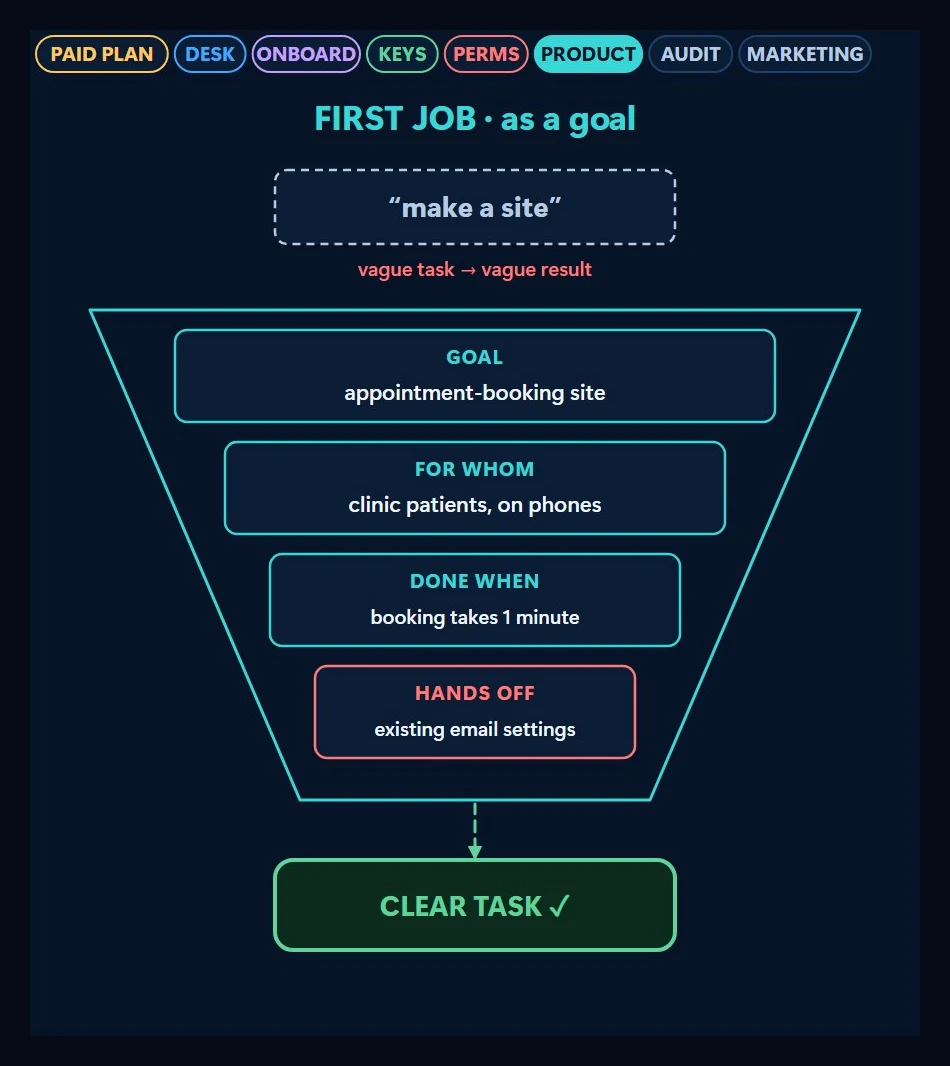
6. First job: give it as a goal, let it plan and test
You don’t hand over work as “make a site”. You write the goal, who it’s for, the done-when criterion and what must not be touched. The example in the video is a booking site: pages, a form, a database and a notification email. The agent drafts a plan first and you approve; then it writes, tests and fixes its own mistakes.
The plan arrives as a five-step chain: page skeleton, booking form, database table, notification email and test scenarios. Keep four concepts apart in one line each: the page is the face visitors see, the form is the door that collects information, the database is the ledger where records live, and the notification is the bell that tells you something happened. You can read a plan in a minute; a wrong plan means hours of wrong work.
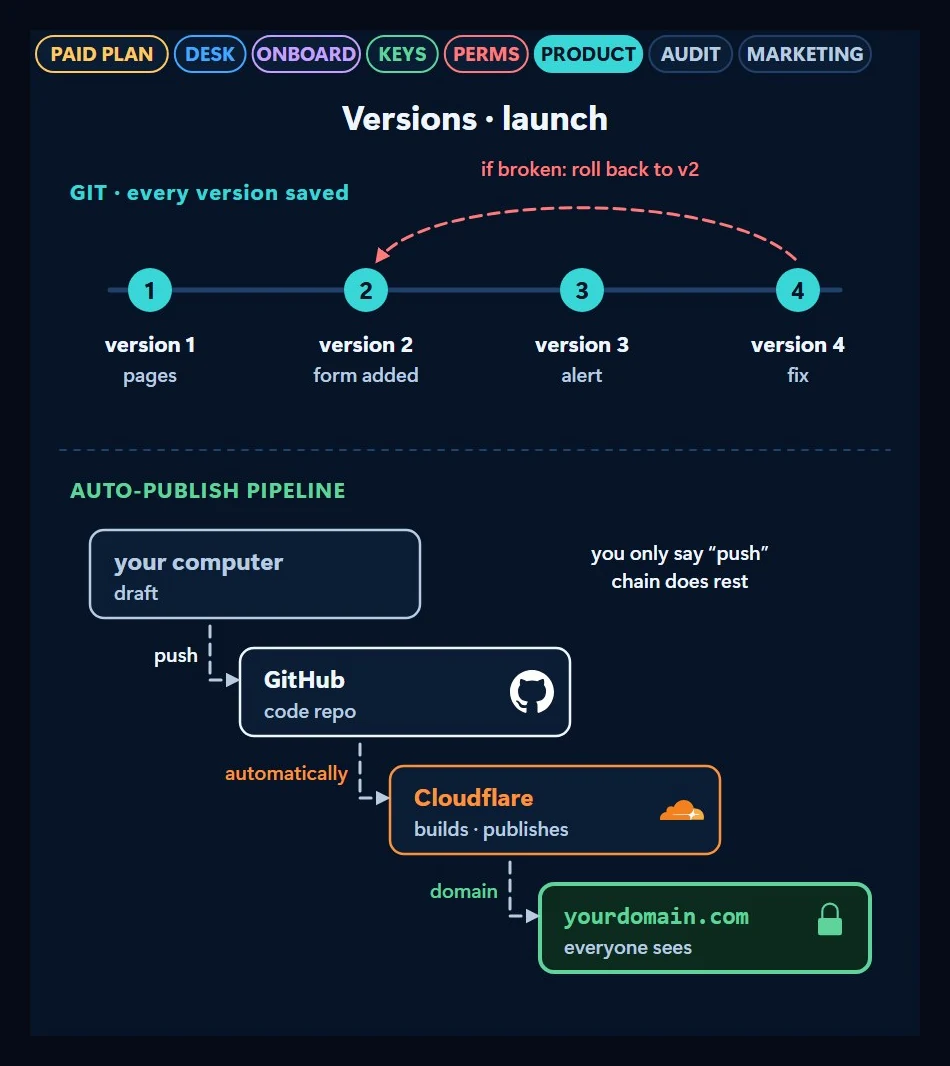
Three services will come up often at this stage. Cloudflare publishes your site, holds your domain, stores your files and guards your form against bots. GitHub is home to your code and its versions. Google Cloud is the door to your email, spreadsheets, Search Console, Analytics, ads and key vault.
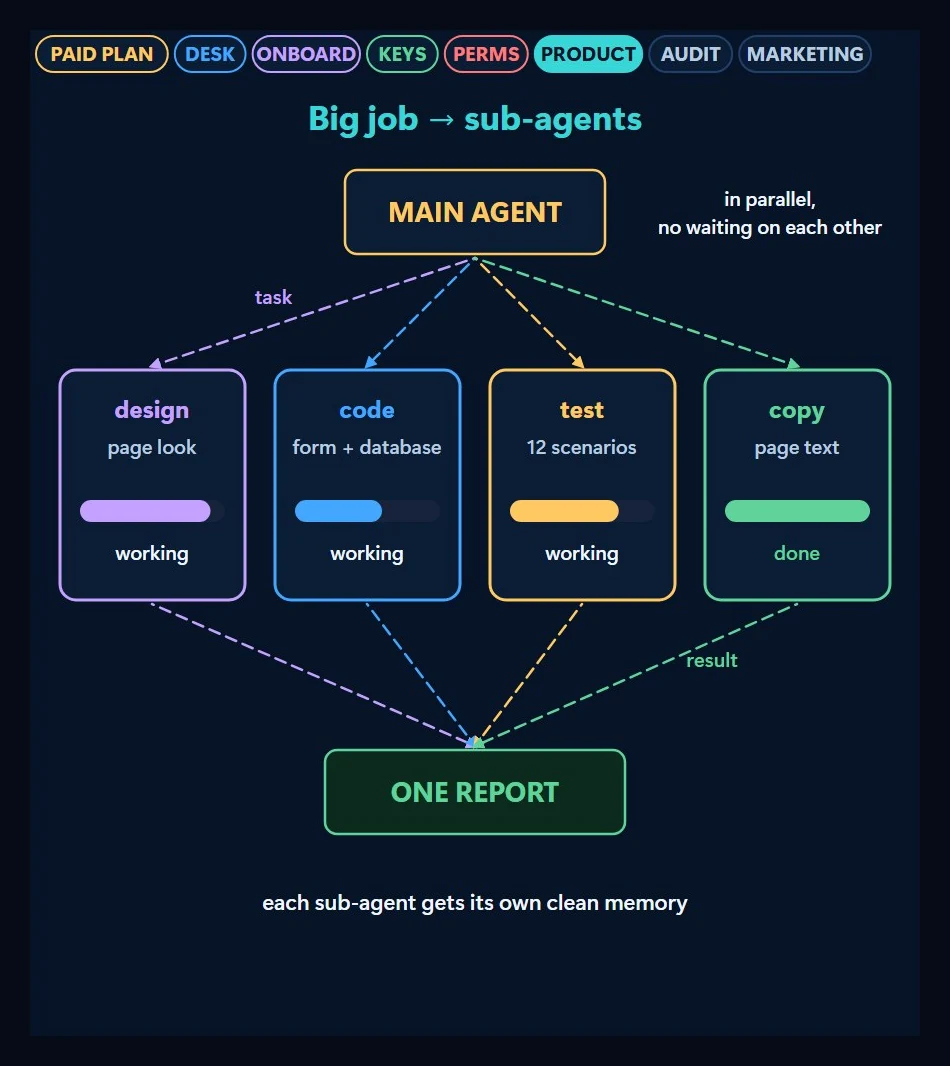
Two things come into play as the job grows. The first is sub-agents: the main agent splits the big job, and each sub-agent works with its own clean memory. The second is the context window: the amount the agent can hold in mind at once is limited. On a long job you have it write notes to a file and continue from them in a new session.
Every version is saved in Git, so you can go back from a broken one. Every push to GitHub puts the site live on its own; you only say push.
7. Audit: the writer shouldn’t review its own work
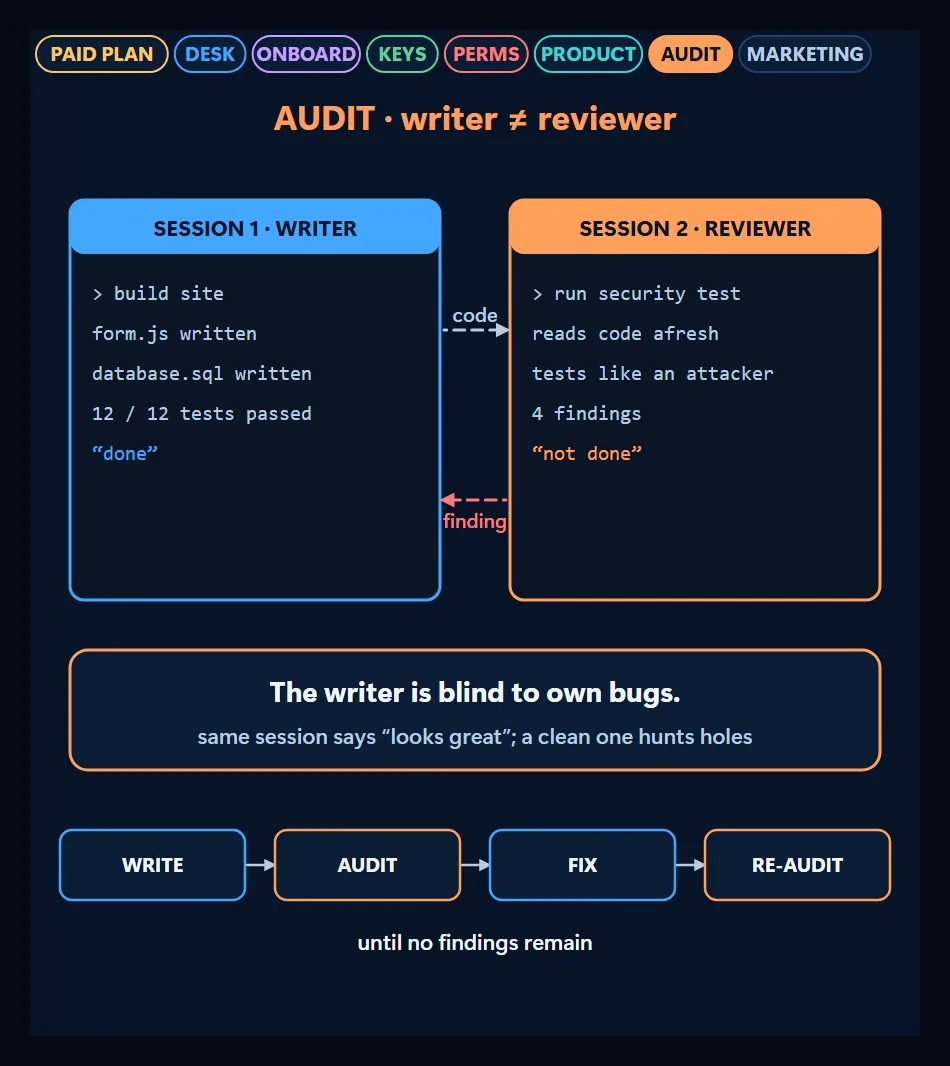
The writing session is blind to its own bugs; the same session says “looks great”. So you have a second, clean session run a security test. The video asks four questions: are passwords or keys exposed, can someone break in through the form, can an unauthorized person open the admin page, and does the backup actually restore. Findings go back to the writing session, get fixed, and the audit repeats until no findings remain.
8. Marketing: the product is out, time to tell people
The last station is marketing: search engine settings, a content calendar, ad copy, a metrics dashboard and a scheduled task that brings a report every morning. The dashboard reads the funnel that shows a visitor’s path from form to customer. Even video can be produced with code: it writes the scenes with Remotion or HyperFrames and you voice them with Google’s Gemini speech model. This video was made that way.
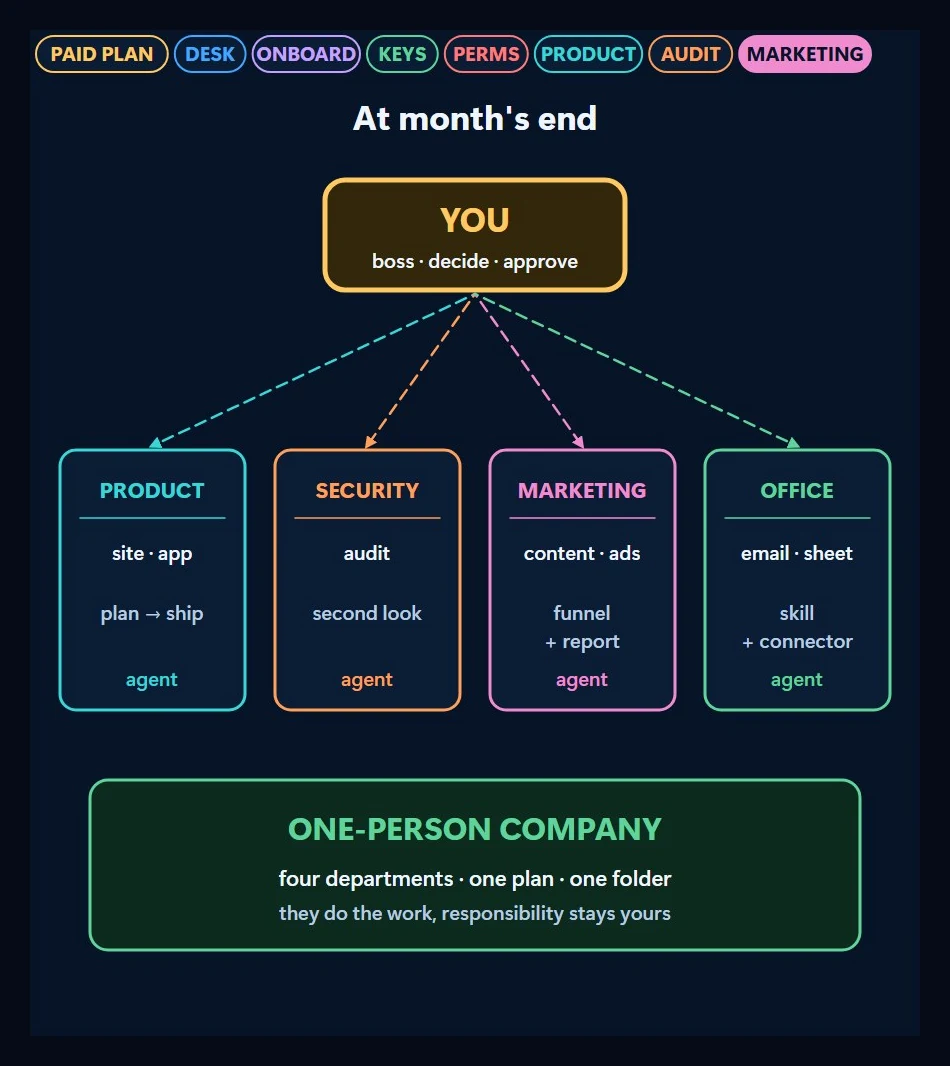
Where the video ends up: by the end of a month you can operate like a one-person company. Agents run product, security, marketing and office work; responsibility stays with you.
How to use this video
The video is dense and fast; it’s made to be paused. Watch once to see the map, then pick the station on this page closest to where you are. If you haven’t bought the plan yet, start at station 1; if you’ve installed the tool, start at station 3. I’ll open each station one by one in upcoming videos; if you follow and save the video, they’ll reach you in order.
Frequently Asked Questions
Why shouldn’t I start with free AI?
The reasoning in the video is time. On the free path, when the quota runs out you switch tools and explain things from scratch. On the paid path you go deep in one tool and finish the job. That’s my judgment, not a measured comparison.
Should I choose Claude, ChatGPT or Gemini?
I don’t push a pick in the video; getting the plan at that price from any of the three is enough. The tool follows the plan: Claude Code for Claude, Codex for ChatGPT, Antigravity for Gemini.
What’s the difference between chat and an agent tool?
Chat writes an answer and you do the applying. An agent tool opens files on your computer, runs commands and finishes the job itself; you give the goal and approve the result.
How should I give passwords to the agent?
From a vault, never written into the code or the chat. Google Secret Manager or AWS Secrets Manager for the cloud, 1Password or Bitwarden for personal use. Prefer a passkey for logins.
What did I cover in the previous video?
How I give AI use of my computer. Link: The Best Way to Give AI Computer Use.
Follow for content about AI
More videos
 From Chat to Autonomous Agents: 7 Stages
 Expense Tracking with AI Automation: Google Sheets or Excel
 Motion Design with Just Claude Opus: 32 Experiments and Prompts
 Can You Run AI Locally on a 16 GB Graphics Card?
 Customer Wrote at Night, Request Ready by Morning
 Give AI the Address, Not the Route: Which Job Goes to Which Model
 Stop Using Excel and Google Sheets as a Database: To a Web App
 ADHD Didn't Change. The Tools Did: A Scattered Brain and Agents
 Can AI Fix Its Own Mistakes? I Checked It Is Not I Fixed It
 OpenRouter and Hugging Face Aren't Models: Three Ways In
 How Do AI Agents Work? Same Model, Different Results
 AI Agents for AEC Firms: How the Five-Layer Setup Works