
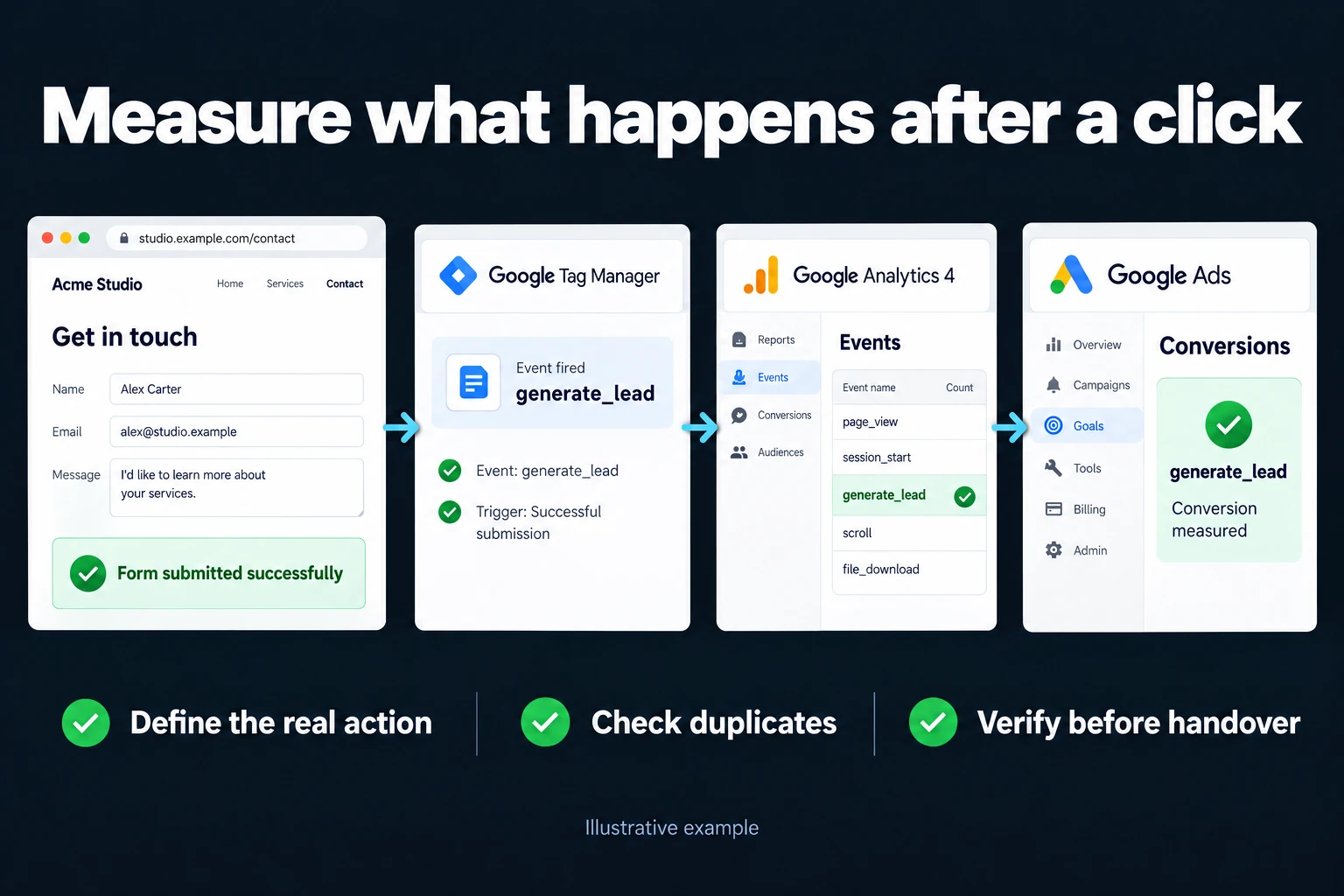
Conversion Tracking Setup (GA4 + Tag Manager)
Conversion tracking means measuring that the person who clicked your ad did what you wanted on your site (filled in a form, called, messaged you on WhatsApp, bought) and reporting it to GA4 and Google Ads. Technically three parts work together: a Google Tag Manager (GTM) tag that catches the event on your site, GA4 that records it, and Google Ads that receives it as a “conversion”. This page covers the steps of a setup, which route fits which situation, and how I do the work. You can follow the steps yourself or ask me to do the setup.
What happens when tracking is broken?
The most expensive mistake in ad management is making decisions based on the wrong data. If conversion tracking is broken, you shut down a profitable campaign and scale up a losing one. Google’s automated bidding learns from the same data too: if you count the wrong thing as a conversion, it works to bring you more of it.
The pattern I see in most accounts I take over: GA4 is installed but events aren’t defined, conversions aren’t imported into Google Ads, or the same conversion is counted in two places and the numbers are inflated. These are silent errors; everything looks normal on the dashboard.
What are the steps of a setup?
- Decide what to measure. The action you want from the ad: a form submission, a phone click, a WhatsApp click, a purchase. A page view or browsing the site is not a conversion; if you make it one, automated bidding brings you people who look at a page and leave.
- Install the GTM container and configure the GA4 property correctly.
- Catch the event and send it to GA4. For a form, the reliable route is an event that fires when the form is actually submitted, or a thank-you page. Clicking into a form is not submitting it. More: form conversion tracking.
- Mark the event as a key event in GA4. According to Google’s help page (as of October 2026), the path is Admin > Data display > Events and the “Mark as key event” switch; a new event may not be markable until it has fired and appears in the recent events list. So trigger the event yourself first.
- Bring it into Google Ads as a conversion (two routes below).
- Turn on enhanced conversions and consent mode.
- Test. In Tag Manager preview mode, in a real browser, by filling in a real form. There is often a gap between “I set it up” and “it works”. After setup I also check that the events show up in GA4 and Google Ads.
Import the conversion from GA4, or count it with a Google Ads tag?
Both work, but don’t count the same action as a primary conversion from both; the numbers inflate. According to Google’s help page (as of October 2026):
| Import from GA4 | Google Ads conversion tag | |
|---|---|---|
| When it fits | You also want to see all traffic sources on your site | You only track Google Ads–sourced conversions |
| Prerequisites | Ads account linked to Analytics, auto-tagging on, GCLID not altered on the site | The tag installed on the site or in GTM |
| Note | Conversions created from the Analytics interface are set to secondary; history before the import isn’t included | You define the conversion directly in Ads |
In both cases, data can take up to 24 hours to appear in Google Ads.
Four conversion settings worth recording
A correct tag can still feed the wrong objective to bidding. I record these decisions for each conversion action.
Primary or secondary. Primary actions normally enter the Conversions column and bidding when their goal is used. Secondary actions are generally observation-only in All conversions. Custom goals need particular care: a secondary action included in a custom goal can still be used for bidding. Check campaign goals as well as the action label.
One or every. A purchase usually has value each time; repeated lead submissions after the same ad interaction often do not represent new prospects. Choose counting rules for the action instead of maximising the total.
Conversion window. Match the attribution period to the decision cycle. A short window can miss later enquiries; a long one changes what the report credits. Document the choice.
Value. When enquiries have different business value, use a documented value model or actual qualified outcomes. An arbitrary number is not automatically more useful than no value. Record what the value means so later reviewers can interpret it.
Sources checked in October 2026: Primary and secondary conversions · Conversion counting.
Enhanced conversions and consent mode
Enhanced conversions: they send first-party data such as email or phone number to Google, hashed with SHA256, to complete your existing measurement (as of October 2026). The “web” type is for your website; the “leads” type is for leads from forms that turn into offline sales. I explain the setup in enhanced conversions setup.
Consent mode: some visitors who decline cookies can’t be measured. Consent mode passes each visitor’s consent status to Google tags; it isn’t a cookie banner itself and works with your banner. According to Google (as of October 2026), in basic mode tags don’t load until consent is given; in advanced mode tags load and, if consent is denied, a cookieless ping is sent, which allows more detailed conversion modeling. Modeling results need the mode to have been running for at least 7 full days. A wrong setup hurts in two directions: you lose data, or you collect data without consent. More: consent mode setup.
Documented delivery
When I finish, I leave a document showing which event fires where, which tag is tied to which trigger, and what flows where. That way, when someone else takes over or something breaks, you know where to look. It may look like leaving this document works against me, but I think a client shouldn’t have to depend on me.
How do we start? First we talk about what you want and what’s realistic. If you agree, I send the scope and price in writing, then we begin. You can reach me through the contact page.
Frequently Asked Questions
I see a conversion in GA4 but not in Google Ads — why?
Marking an event as a key event in GA4 doesn’t automatically carry it over to Google Ads. The accounts need to be linked and the conversion imported on the Ads side. The import doesn’t bring history from before it was set up, and data can lag by up to 24 hours. This is the gap I run into most often.
Is Tag Manager required — can’t we just add code directly?
You can, but I don’t recommend it. Without Tag Manager you wait for a developer for every new tag, and tracking what lives where gets harder. You also lose the ability to test.
Can I count WhatsApp clicks as a conversion?
Yes, and for most service businesses in Turkey it’s the most meaningful conversion. I can catch the click on a WhatsApp link as an event and import it into Google Ads as a conversion. It doesn’t show that a sale was completed, but it’s the best proxy signal. On Display ads, where accidental clicks are common, don’t rely on it much. Starting with secondary observation helps separate clicks from real enquiries; also check how custom goals affect bidding.
Will you break my existing setup?
No. I first review the existing setup and work out what works, then I add to it or fix what’s wrong. The container version is saved before any change, so it can be rolled back.
How do I work?
Work-hour packages
Tell me about your business and what you need on WhatsApp or by phone; we agree on a work block of somewhere between 5 and 40 hours and I start doing what is needed. What you get is not a calendar window — it is net working hours spent directly on your business. I can use 40 hours working three days straight, or deliberately spread it out and finish it over a year — whatever the work calls for. I do not spend my time estimating how long something will take, I spend it doing the work; every hour I spend leaves a lasting result in your business. We keep going for as long as you find it useful.
Why not monthly?
Is 40 hours a week?
On a fixed monthly fee both sides are watching the wrong thing: you watch a fixed cost, the other side watches how many more contracts like this they can line up. Working by the hour puts us both in front of the same thing — the real value of the work that got done. I know not having an upfront answer to "how much will this cost in total?" is the natural cost of this model. But instead of paying a fixed fee for months to a setup that is not producing results, you only pay for the qualified time spent on your work — and you see exactly where that time went, start to finish. That is why my clients keep coming back.