
Appointment Reminder Automation | Fewer No-Shows
Every appointment-based business knows this problem: the customer forgets, and that slot goes to waste. Appointment reminder automation prevents this by sending an automatic message a set time before the appointment — a simple setup whose effect is measurable from the first week.
Taking the booking itself is separate work — for a 24/7 assistant that shows open slots and books appointments, see AI Appointment Assistant. This page is about reminding people of a booking they already made.
How It Gets Built
- The channel gets chosen. SMS, WhatsApp, or both — whichever your customers actually pay attention to.
- Timing gets defined. A day before, a few hours before, or both. This varies by sector — short-lead appointments (a hair salon) do fine with a few-hours-ahead reminder; longer-lead ones (dental treatment) work better with a day-before plus a few-hours-before combination.
- Message content gets written. Date, time, address, and clear instructions for cancelling or rescheduling.
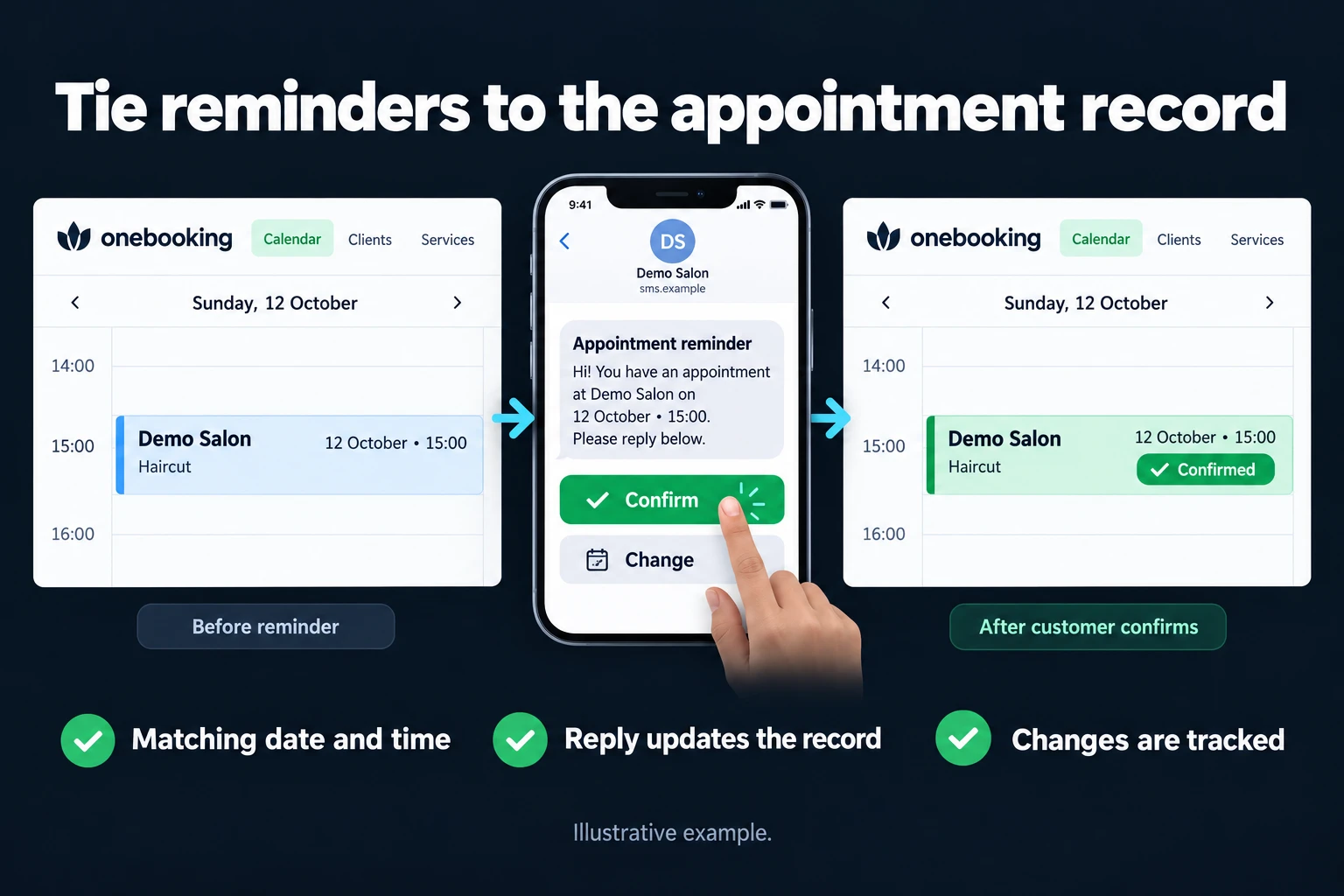
- Cancel/reschedule handling gets added (optional). If a customer can cancel by replying to the reminder, the freed slot can be offered to someone else.
- Measurement gets set up. The no-show rate before and after the reminder gets compared — whether the setup actually works stops being a guess and becomes a number.
The Mistake I See Most Often
Building the reminder as one-way only. A message goes out, but if the customer replies wanting to cancel, that information goes nowhere — the slot still shows as booked and gets wasted anyway. Feeding a cancel/reschedule reply back into the calendar is the most valuable part of the build.
Who This Makes Sense For
Any appointment-based business where no-shows are costly: hair and beauty salons, dental clinics, consulting, physiotherapy, auto service. If your no-show rate is already very low (for example, you take a deposit upfront), the value of this build may be limited.
What It Does Not Do
- It doesn’t take the booking — that’s separate work, see AI Appointment Assistant.
- It doesn’t persuade the customer. A reminder prevents forgetting; it doesn’t change a decision not to show — a customer cancelling on purpose still cancels.
You Can Hire Me for This
You can hire me for this: remote, billed hourly. Setup usually takes 2-3 days; faster if it connects to your existing booking system, or it can be built on a simple calendar if not.
Start by writing to me from the contact page about which booking system you use.
Frequently Asked Questions
Does it work with my existing booking software?
It can integrate with most common booking software if the API is open. If not, we build a calendar-based alternative — we check this before setup.
How many hours ahead should the reminder go out?
Depends on the sector; we decide together. General rule: for short appointments (30-60 minutes), a few hours ahead; for longer, planned appointments, a day-before plus a few-hours-before combination works better.
Will my no-show rate actually drop?
I can’t give you an exact figure since it varies by sector and current state, but I measure the rate before and after and show it to you — not a guess, a result based on your own data.
Is SMS or WhatsApp more effective?
WhatsApp usually has a higher read rate than SMS, but if your customer base doesn’t use WhatsApp (age group, sector), SMS can be more reliable. We discuss this in the first conversation.
How do I work?
Work-hour packages
Tell me about your business and what you need on WhatsApp or by phone; we agree on a work block of somewhere between 5 and 40 hours and I start doing what is needed. What you get is not a calendar window — it is net working hours spent directly on your business. I can use 40 hours working three days straight, or deliberately spread it out and finish it over a year — whatever the work calls for. I do not spend my time estimating how long something will take, I spend it doing the work; every hour I spend leaves a lasting result in your business. We keep going for as long as you find it useful.
Why not monthly?
Is 40 hours a week?
On a fixed monthly fee both sides are watching the wrong thing: you watch a fixed cost, the other side watches how many more contracts like this they can line up. Working by the hour puts us both in front of the same thing — the real value of the work that got done. I know not having an upfront answer to "how much will this cost in total?" is the natural cost of this model. But instead of paying a fixed fee for months to a setup that is not producing results, you only pay for the qualified time spent on your work — and you see exactly where that time went, start to finish. That is why my clients keep coming back.