
AI Appointment Assistant | Automated Booking
In appointment-driven businesses, a large share of demand arrives outside working hours: the customer messaging at nine in the evening, filling in a form on the weekend, asking on Instagram at midnight. By the time someone replies the next morning, a portion of them have already gone elsewhere. An AI appointment assistant closes that gap: whatever time the customer writes, they see the open slots, pick one, and the booking lands in your calendar.
This page is about taking the booking. Reminding people about a booking they already made — and cutting the no-show rate — is separate work: Appointment Reminder Automation. If you need spoken answers for people who call, see AI That Answers Your Phone; for automatic follow-up on missed calls, Missed Call Automation.
How It Works
The assistant connects to three things: your calendar, the channel your customers already use, and your rules.
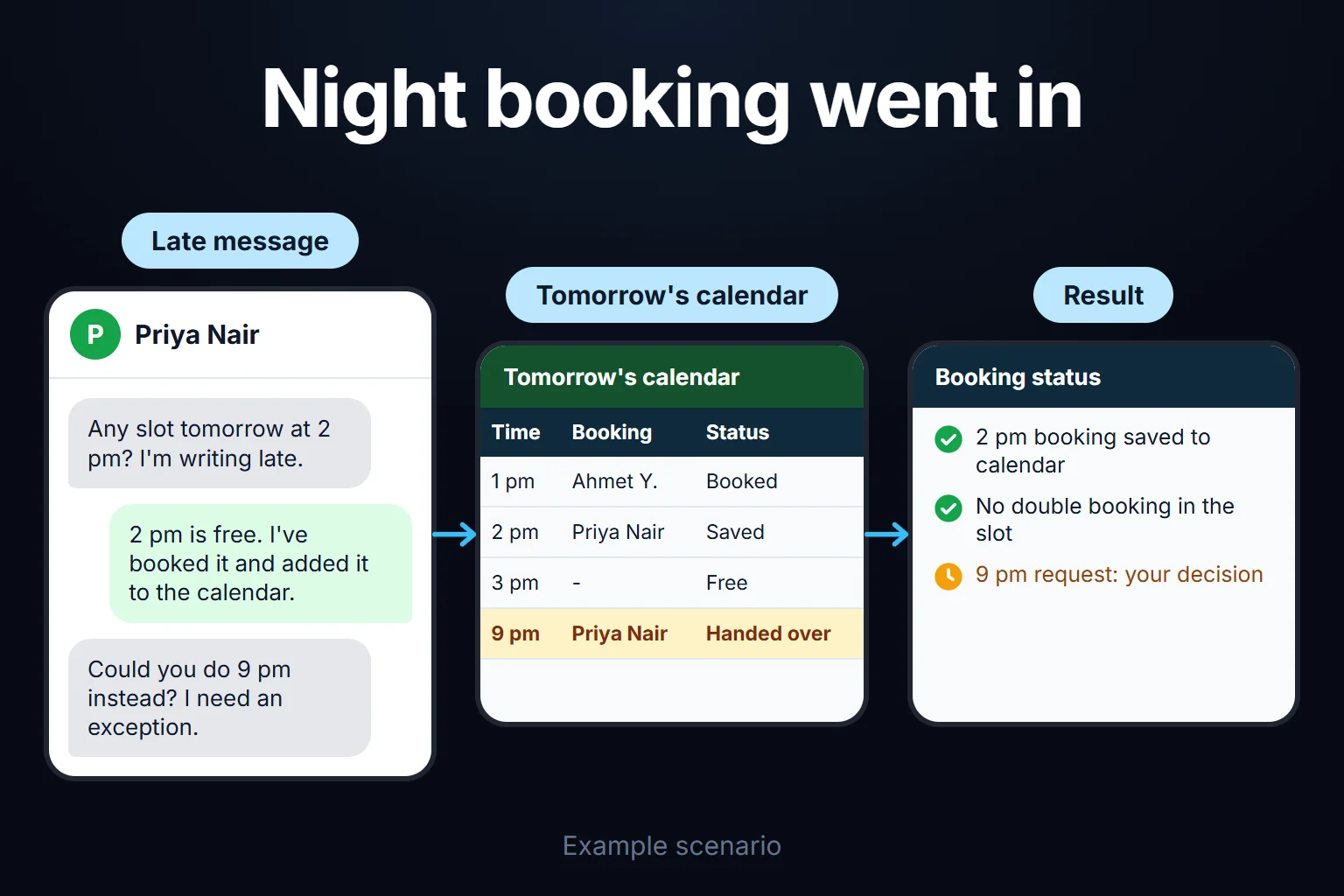
- The calendar connection is two-way. It does not just read your free slots; it writes the booking back. One-way setups produce double bookings — two customers get the same slot, and you find out when one of them shows up at the door.
- The channel is where you already are. WhatsApp, a window on your website, Instagram messages, or all three. Trying to move customers onto a new app is the fastest way to lose them.
- The rules are yours. How long each service takes, whether there is cleanup or prep time in between, whether same-day bookings are accepted, which hours are closed, how late a cancellation is allowed. The quality of the assistant is exactly as good as the clarity of these rules.
Where It Works Well
It performs best where service duration is standard and booking volume is high: hair and beauty salons, dental clinics, veterinary practices, physiotherapy, auto service, consulting calls.
There are harder cases. If service duration varies a lot by customer (15 minutes for a first visit, 5 for a follow-up), the assistant has to ask questions and pick the right duration; that is buildable, but the rule count grows. Where pricing is negotiated, there are things that need discussing before a booking exists — there the assistant should gather information and pass it to you rather than book.
When It Must Hand Over to a Human
This is the most important decision in the build. Situations the assistant should not handle alone:
- The customer is complaining or angry
- They are asking a medical or legal question
- They are requesting an exception (“could you fit me in after hours”)
- They have asked the same thing twice and still cannot get anywhere
In these cases the assistant should say a colleague will take over, stop, and notify you. Without a handover threshold, the assistant keeps the customer in a loop — and that customer does not write again.
The Mistake I See Most Often
Connecting the calendar one-way. The easiest way to build this is to let the assistant read the calendar but not write to it, which appears to remove the risk of breaking something. What actually happens: two customers take the same slot, one waits for nothing, and you lose them. You lose more than the booking earned you.
The second common mistake: setting the assistant up and never watching it. Reading the conversations for the first two weeks is essential — what it fails to understand and where it gets stuck only becomes visible there.
An Observation From My Own Operation
I handle intro-call requests with a similar arrangement in my own business. What I learned was about rule clarity: at first I said “show my open slots,” and the result was that every empty hour of the day became bookable, chopping the day into fragments. Adding a transition buffer and a block-hour rule fixed it.
The lesson: the assistant’s weak point is not the AI side, it is that your own rules were never written down. Rules that are clear in your head but recorded nowhere — “I don’t take bookings on Friday afternoons” — do not exist as far as the assistant is concerned.
You Can Hire Me for This
You can hire me for this: remote, billed hourly. Setup usually takes between 2 days and 1 week; what drives it is the number of service types and how complex the rules are.
What gets built runs on your calendar and your accounts, and keeps working after I step away. For the first two weeks we review the conversations together and correct the rules — that part is included. Write to me from the contact page.
Frequently Asked Questions
Will customers realise they are talking to a bot?
They will, and that is fine. In the systems I build, the assistant introduces itself upfront — imitating a human destroys trust entirely at the first wrong answer. What bothers customers is not talking to a bot; it is getting stuck in a loop with no way to reach a person.
Does it work with my existing calendar?
It works with Google Calendar, Outlook, and most common booking software. If you use industry-specific software, we check whether a connection is possible before the build — with closed APIs, a different arrangement may be needed.
What if it books the wrong slot?
Because the calendar is connected two-way, conflicts are prevented; the assistant cannot see a slot that is already taken. Even so, every booking is sent to you as a notification, so anything odd is caught the same day rather than at the door.
What do I need for it to work on WhatsApp?
Your business number and a WhatsApp Business account are enough. I handle that part of the setup; your number does not change and your existing conversations are not lost.