
Getting AI to Audit Your Website
You can have AI audit your website, but the work has to be split: Google PageSpeed Insights, Lighthouse and Search Console do the measuring; AI interprets that raw output, ranks the problems by importance, and turns them into a plain-language action list. An ordinary chat window can’t browse your site and take measurements on its own; pasting a link and saying “audit my site” often leads to guesses, or even invented findings. If a tool that can open pages (a coding or browser tool) is connected, that changes, but the measurement should still come from a tool.
What data should you collect first?
| Source | What it gives | What you paste into AI |
|---|---|---|
| PageSpeed Insights | Speed and Lighthouse findings | The list of recommendations and failed audits |
| Search Console, Page indexing | Which pages aren’t indexed and why | The flagged URLs and reasons |
| Search Console, Performance | Which queries and pages got impressions and clicks | An exported table |
| Crawler output | Missing or duplicate titles, broken links, heading structure | An exported table |
According to Google (as of October 2026), the PageSpeed Insights API can be used with or without an API key; a key is recommended for frequent, automated queries. The response’s lighthouseResult section carries the lab measurement and loadingExperience carries real-user data; Google says it plans to stop including real-user data in this API and recommends the CrUX API instead. You can also run Lighthouse on your own machine from Chrome DevTools or the command line (Lighthouse docs).
One caution: a lab measurement is taken under one device and network condition. Don’t decide on speed from a single run; compare it with the real-user data in Search Console.
Step by step: from raw data to an action list
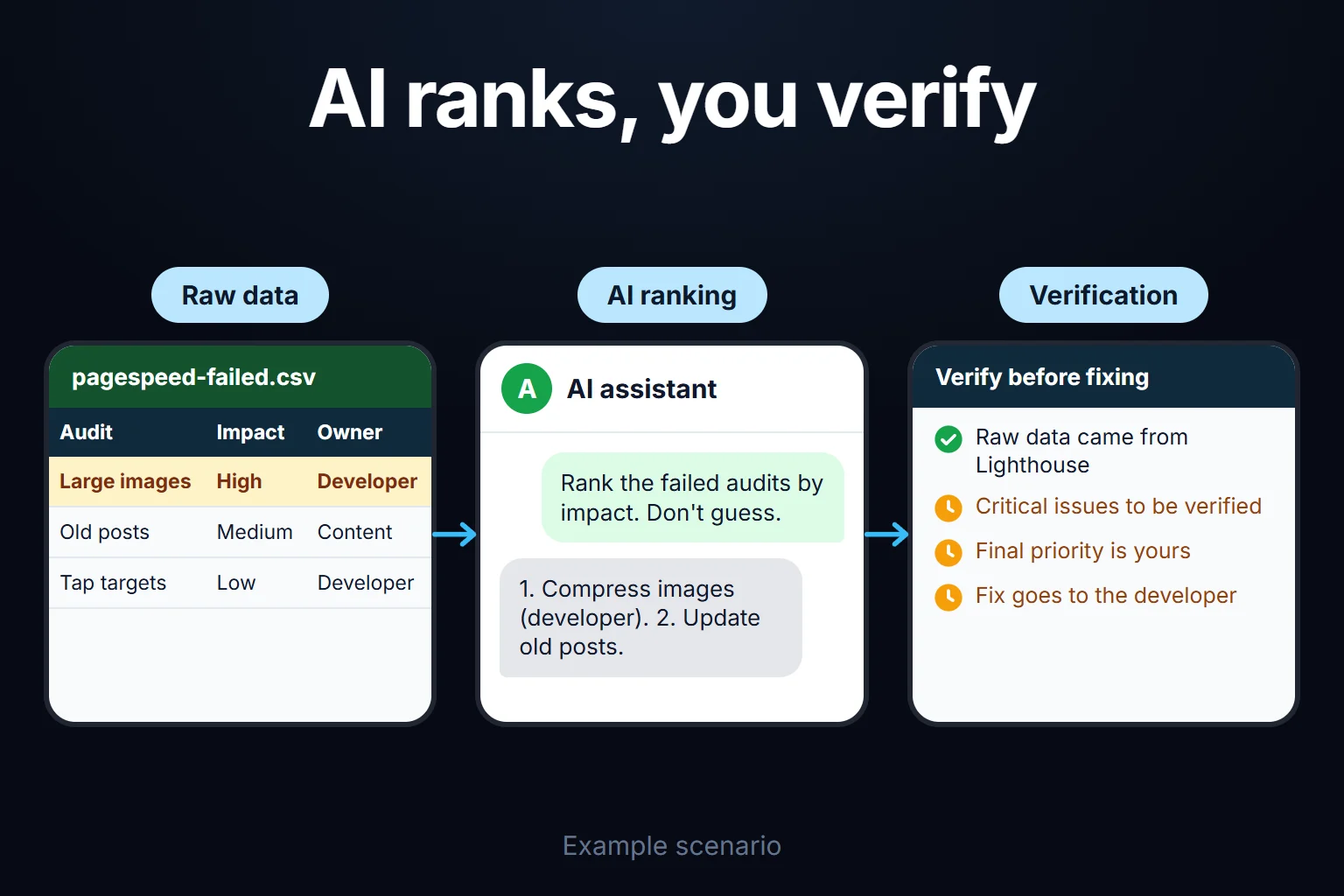
- Pull the data. Start with one or two sources from the table. Don’t paste everything at once; Lighthouse’s raw JSON is long, so extract the failed audits and give those.
- Give it context. Tell it the site type (corporate, e-commerce, blog), which pages earn money, and where traffic comes from. Without that, AI treats the biggest numeric deviation as “critical”; a problem on an archive page with 10 visitors a month isn’t your real priority.
- Ask for a ranked order. Example prompt: “Rank the failed audits in this Lighthouse result by impact. For each, say what to do, who should do it (developer, content, me), and what you don’t know. Don’t guess at anything you can’t see in this data; if you need a different export, say which.” The last sentence cuts down on invention considerably.
- Ask for plain language. Add “explain this to a business owner who doesn’t code.” Instead of “LCP 4.2 seconds” you get “while the main image loads, visitors stare at a blank screen for 4 seconds.”
- Verify before fixing. Confirm every critical finding with Search Console’s URL Inspection tool or Lighthouse itself. AI interprets; it isn’t the source of truth.
What problems can AI find?
With the raw data in hand, it produces clear findings in four areas:
- Speed: uncompressed large images, short cache lifetimes, CSS/JS files that block the page. It puts the PageSpeed recommendations in order.
- Basic SEO: missing or duplicate titles and descriptions, broken links, unindexed pages.
- Content: posts not updated for years, removed products, outdated prices. You find these by reading the site, not from raw data; give AI the page text.
- Mobile: tiny tap targets, tables overflowing on mobile, a missing viewport setting.
What can’t AI do?
- It doesn’t apply the fix. Server settings, a CDN, or a theme/plugin conflict need a developer. AI tells you what to do and often can’t do it itself.
- It doesn’t know your business. If you don’t say which page converts or which gets ad traffic, it can’t set priorities correctly.
- It can invent measurements. With no data in front of it, it may produce a plausible-looking number. Be suspicious of any figure that isn’t in the output you gave it.
Is your site open to AI search tools?
A separate question is “can the crawlers of tools like ChatGPT or Claude reach my site?” You can check this yourself by reading robots.txt; each bot does a different job and is managed separately:
| Bot | What it does (according to its maker) |
|---|---|
| OAI-SearchBot (OpenAI) | Surfaces sites in ChatGPT’s search features (as of October 2026) |
| GPTBot (OpenAI) | Crawls content that may be used to train models; disallowing it signals you don’t want training use |
| ChatGPT-User (OpenAI) | Visits a page when a user asks a question; doesn’t determine search inclusion |
| ClaudeBot (Anthropic) | Gathers web content for training (as of October 2026) |
| Claude-User (Anthropic) | Visits sites when a Claude user’s question needs it |
| Claude-SearchBot (Anthropic) | Analyzes content to improve the relevance and accuracy of search results |
Allowing a bot isn’t a visibility guarantee; it only removes the block. You can also block the training bot while allowing the search bot. How your site appears in AI search as a whole is a separate audit: AI visibility audit.
You can ask me for this work
I can run the whole process: collecting the raw data, prioritizing, and turning it into an action list you can act on. It’s typically a 2-hour to 2-week job, remote, billed hourly. You can look at my technical SEO audit service or write to me directly. To apply the same method to competitor sites, see how to do competitor analysis with AI.
Frequently Asked Questions
Can AI crawl and audit my website on its own?
An ordinary chat window can’t; even if you give it a link, it may not read the page correctly and may guess. If it’s connected to a tool that can open pages and take measurements (a coding tool, browser automation), it can. Either way, the source of the measurement should be PageSpeed, Lighthouse or Search Console, and AI should only interpret.
Which tools should I get raw data from?
To start, PageSpeed Insights (speed) and Search Console (indexing, clicks, coverage errors) are enough. A title-and-link table from a tool that crawls your site is a third source.
Should I fully trust the priority order AI suggests?
No, only partly. AI puts the biggest technical deviation in the data first; it doesn’t know which page your traffic comes from or which page converts. Compare the ranking with your own business context and make the final call yourself.
How often should I repeat this audit?
There’s no fixed rule. A small, static site is fine with a look every few months. On a site that adds content often or gets ad traffic, also run a round after a theme, plugin or campaign changes.