Source: https://oguzerol.com/en/bank-transaction-reconciliation-app/ [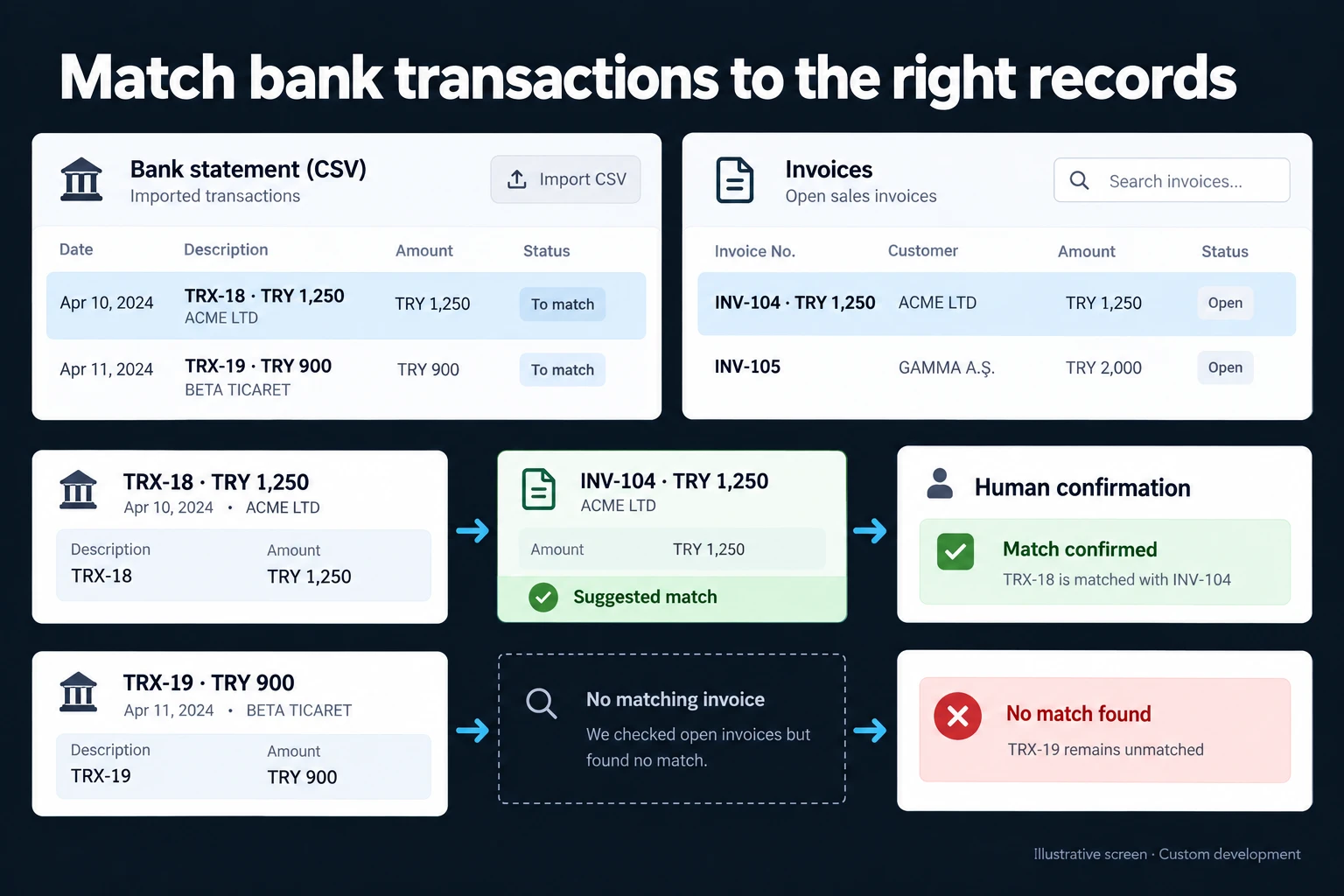 View full size](https://oguzerol.com/gorseller/hizmet-kapaklari/banka-hareketi-mutabakat-uygulamasi-webapp-v1-en.webp) # Bank and Card Settlement Reconciliation App: Fees, Holds and Payout Timing [Oğuz Erol](https://oguzerol.com/en/about-me/) | 17 min read The web app I describe here puts four numbers side by side: card sales in your till or ERP, the card terminal’s end-of-day batch, the acquirer’s merchant statement and the amount that actually reached your bank account. Within a month these four rarely agree. The app ties every difference to a reason (fees, holds, payout timing, instalments, refunds, voids or a genuine error) and puts anything that needs action into an exception queue. The biggest trap is comparing the money in the bank with that month’s sales: a branch paid after a holding period can show a large month-end gap that is not missing money, only receivables not yet due. ## Which four sources does card reconciliation compare? Card and bank reconciliation checks whether four separate sources agree, and each answers a different question. | source | where it comes from | question it answers | | --- | --- | --- | | Sales record | Till, ERP or online order | What did we sell, on which card type, in how many instalments? | | Terminal batch | Terminal end-of-day report, online gateway report | Was the card actually charged, or voided? | | Merchant statement | Acquirer’s statement or settlement report | What fee was deducted, and when will it be paid? | | Bank account | Bank export (Excel, CSV or PDF) | Which day did the money arrive? | Stripe’s [payout reconciliation report](https://docs.stripe.com/reports/payout-reconciliation) follows the same logic: it matches each bank payout with the transactions it settles and itemises every payment, refund, dispute and fee. The app keeps those lines separate, because one “deductions” figure would hide the deviation you are looking for. If you sell through a marketplace or a payment provider, the four layers stay the same; two of them change source. The provider’s transaction report takes the place of the terminal batch, and its payout or settlement report takes the place of the merchant statement. Such reports often combine the net of many orders into one payout, so the single bank line closes through a many-to-one match. The app imports each order’s gross, fee and payout date as separate lines, so a payout can be traced down to the order number. ## A worked month: three channels, two acquirers The business and every figure below are fictional and shown without a currency symbol. It sells by card through a terminal at the main store (acquirer A), an online gateway (also A) and a terminal at a branch (acquirer B). Rates and holding periods are an example agreement, not any provider’s pricing. “Paid after a hold” means the acquirer pays card sales a fixed number of days after the sale instead of the next day; in this example it charges no fee in return. The example follows Turkish card-acquiring practice, where a merchant can choose next-day payout with a fee or a fixed holding period without one, and customers can split a card payment into instalments at the till. The four-layer comparison itself is not specific to any country. | September (example data) | Main store · A | Online · A | Branch · B | | --- | --- | --- | --- | | Settlement terms (example) | Next day, fee deducted | Next day, fee deducted | Paid after a hold, no fee | | ERP / order record | 1,240,000 | 350,000 | 480,000 | | Terminal batch / gateway report | 1,236,500 | 352,400 | 480,000 | | Fee on the statement | 32,882.50 | 9,867.20 | 0 | | Refunds on the statement | −12,000 | 0 | 0 | | Received in September | 1,189,267.50 | 341,732.80 | 414,500 | | Difference needing correction | 3,500 + 270 | 2,400 | none | The fee line is taken here by transaction date. If your statement deducts fees on the payout date, align the date ranges before comparing. One equation links all three channels: **Received = terminal gross − fees − refunds − net carried to later months + net arriving from earlier months** For the main store: 1,236,500 − 32,882.50 − 12,000 − 41,300 + 38,950 = 1,189,267.50. Read from totals alone, the branch looks 65,500 short. The equation shows nothing is missing. Three kinds of item appear below. A **difference needing correction** has a known cause but stays open until someone acts (a void, an overcharged fee, a duplicate charge). A **timing item** is not an error, just money whose payout date has not arrived or arrived last month (held receivables, month-end drift). An **unexplained difference** fits neither and goes to the top of the queue. ### Main store: a void, an overcharged fee and month-end drift The ERP shows 1,240,000 in card sales; terminal batches total 1,236,500. The app finds the 3,500 on 17 September: a sale voided on the terminal before the batch closed is still invoiced in the ERP. A void does not reach the statement (check how your acquirer handles this), so the correction belongs in the ERP. The fee check uses the example agreement. All rates are fictional: | breakdown (example) | batch amount | example rate | expected fee | | --- | --- | --- | --- | | Credit cards, single payment | 616,500 | 2.50% | 15,412.50 | | Debit cards | 400,000 | 1.00% | 4,000 | | Three-instalment sales | 220,000 | 6.00% | 13,200 | | Total | 1,236,500 | | 32,612.50 | The statement shows 32,882.50. The app narrows the 270 to one line: an 18,000 debit transaction charged at the credit rate, 450 instead of 180. It goes to the finance manager to dispute. Timing explains the rest. With next-day settlement, 30 September’s net (41,300) arrives on 1 October and 31 August’s net (38,950) arrived on 1 September. Weekends and public holidays widen the drift. The app flags “late” only after the expected payment date. ### Online: one order, two charges The gateway shows 2,400 more than the order system: one order was charged twice. A rule catches two successful charges on one order number; the item stays open until the refund settles. With the example 2.80% fee and the same month-end drift (11,200 carried to October, 10,400 in from August), 341,732.80 arrived in September. ### Branch: sold, but not in the bank yet Acquirer B pays credit card sales after 30 days and debit card sales after 15. Instalment sales arrive one instalment a month. September sales were 480,000: 300,000 credit, 100,000 debit and 80,000 in four instalments. | Received in September (example data) | amount | | --- | --- | | August credit card sales, hold released | 286,000 | | Late-August debit card sales | 45,500 | | Early-September debit card sales | 52,000 | | September instalments from earlier sales | 31,000 | | Total | 414,500 | September’s 480,000 splits in two: 52,000 already paid, and 428,000 still on hold at 30 September (300,000 credit, 48,000 debit, 80,000 of instalments over four months). The same equation for the branch: 480,000 − 428,000 (still on hold) + 362,500 (from earlier months: 286,000 + 45,500 + 31,000) = 414,500. No fees, no refunds; the whole 65,500 gap is a timing item. ### What comes out at month end Differences needing correction are assigned to a person; timing items are checked automatically on their due date. 1. **3,500, main store (correction):** store fixes the ERP, accounting approves. 2. **270, main store (correction):** finance manager disputes. 3. **2,400, online (correction):** accounting refunds; closes when the refund settles. 4. **428,000, branch (timing):** each amount listed with its payment date. 5. **41,300 main store and 11,200 online (timing):** checked automatically on 1 October. In this example there is no unexplained difference. The team reviews 6,170 needing correction instead of 2,070,000 of card sales. If your acquirer pays next day with a fee, look at fee lines first; if it pays after a hold, look at the receivables schedule first. ## What is the expected fee table? The expected fee table is the app’s record of what each acquirer should charge, by card type, instalment count and settlement terms, so every fee line on a statement can be checked against it. I pay attention to three details when setting it up: - **Tax included or not.** Some acquirers quote rates with local tax included. If the table does not fix this from the start, every line shows a false deviation. - **Instalment count gets its own row.** Where instalments exist, the fee and the holding period can rise with the number of instalments, so one “instalment rate” is not enough. - **Early release is a separate fee.** If you draw held money early, a separate fee line may appear. Mixed into the sales fee, it looks like a rate deviation. When your agreement changes, a new dated version of the table is opened and earlier months are still checked against the old rates. **Try it on your own statement:** 1. Write down your contract rates by card type and instalment count, and decide whether tax is included. 2. Total your terminal batches with the same breakdown. If your report lacks it, ask the acquirer for a report that has it. 3. Multiply each line by its rate, add them up and compare with the fee on the statement. Make sure both sides cover the same date range: if the statement deducts fees on the payout date, the month edges shift by a day. 4. If they differ, check misclassified card types first, then early release fees, then tax. **For a dispute, prepare:** the statement line and date, transaction date and amount, card type and instalment count, the authorisation code on the receipt, the dated version of the contract rate, and the expected versus charged amount. Check the dispute deadline in your contract. ## Instalments, refunds and chargebacks in brief An instalment sale here means the customer splits a card payment into monthly instalments at the till, an option acquirers offer in some markets, including Turkey. Depending on the acquirer, the merchant may be paid one instalment a month, in full the next day with a higher fee, or in full with interest added to the cardholder’s instalments (Halkbank, for example, documents these three models). The app opens one expected receipt per instalment and closes each as it arrives. A refund arrives as a separate negative line with its own date, so it matches the ERP’s credit note rather than the original sale. In the worked month, the main store’s −12,000 is a 22 September refund of a 9 September sale; the app matches it to the credit note and links it to the original sale. Whether the fee is returned on a refund depends on your contract; the example assumes it is not, so the refund does not change the 32,882.50 fee. A chargeback (a cardholder disputing a charge through their bank) arrives as another negative line; a foreign currency sale stores its settlement currency and rate. Turkish central-bank rules on holding periods and merchant fees are covered on the [Turkish version of this page](https://oguzerol.com/banka-hareketi-mutabakat-uygulamasi/). ## Bank transfers: which invoice does this line belong to? For customer bank transfers the question is which customer and invoice a bank line belongs to. The illustrated records are fictional; the worked month above is currency-neutral, and only this illustration uses Turkish lira (TRY). Bank line **TRX-18** is **TRY 1,250**, and open invoice **INV-104** is also **TRY 1,250**. The screen suggests the match on amount and customer; it is not confirmed until a reviewer approves it. **TRX-19**, **TRY 900**, has no suitable record and stays open. ## Matching rules: which rule for which situation? Matching runs from strict to loose rules, and every match records the rule that produced it. A strict rule with one candidate suggests; a loose rule only lists candidates. | rule | example | how it works | | --- | --- | --- | | Exact reference | INV-107 on bank line and invoice | Reference and amount agree: strong suggestion | | Amount + date window | One open 1,250 invoice in the last 10 days | One candidate: suggestion; several: a list | | Tolerance | Batch 52,418.40, statement gross 52,418.38 | Within a pre-agreed rounding tolerance; its approver is recorded | | Many-to-one | 214 terminal transactions, one deposit | Gross day total minus fee matches the deposit | | One-to-many | One transfer pays three invoices | Screen shows the split; a person approves it | | Partial | 6,000 against a 10,000 invoice | Part-paid; 4,000 stays open | A fully allocated bank line cannot quietly be reused, and when two open invoices share an amount, the app shows both. ## What if the same file is uploaded twice? A repeated upload creates no new rows. A fingerprint of the file rejects an identical file; a row key of account, date, amount and bank reference removes overlap when a September file also covers late August. Where the bank gives no reference (this can happen with some banks or PDF statements), two genuine identical transactions are possible, so the app asks a person rather than merging them. ## Who does what: roles and permissions Role separation means one person cannot match, approve and reverse the same item. It is what separates [a custom web app for your team](https://oguzerol.com/en/custom-web-apps-for-your-team/) from a shared spreadsheet. | action | branch cashier | accounting | finance manager | auditor | | --- | --- | --- | --- | --- | | Uploads own branch’s batches and voids | ✓ | ✓ | — | — | | Uploads bank and merchant statements | — | ✓ | ✓ | — | | Approves a suggested match | — | ✓ | ✓ | — | | Takes ownership of and closes an exception item | ✓ (own branch) | ✓ | ✓ (disputes) | — | | Changes tolerance or expected fee table | — | — | ✓ | — | | Reverses a confirmed match, with a reason | — | ✓ (open period) | ✓ | — | | Closes or reopens a period | — | — | ✓ | — | | Sees everything, changes nothing, exports the audit trail | — | — | — | ✓ | A cashier sees only their own branch. If accounting and finance are one person, “no approving your own match” goes to a second person or is switched off on record. The same approval logic for corporate card statements and receipts is on the [expense receipt and document tracking](https://oguzerol.com/en/expense-receipt-document-tracking/) page. ## Audit trail: who changed what, and when? Every match, approval and reversal leaves an undeletable line: who, when, which record, old and new value, rule and reason. A reversal adds a line rather than erasing one. Closing a period locks it; reopening needs the finance manager and a reason. ## What does AI do, and where does it stop? AI suggests; it never approves. Every step that finalises money needs an authorised person. - **Customer from description:** suggests the likely customer and invoices from a messy transfer description, with confidence and reasoning. - **Anomaly cause:** catching a fee off the expected rate is a rule, not AI. Suggesting why (“card type looks misclassified”) and finding similar past lines is where AI helps. - **PDF-only statements:** parsed lines are accepted only when totals match the PDF. Suggestions are logged with model and input; closing periods, changing tolerances and opening disputes stay with people. Payer names are personal data, so I would design masked input or a rules-only setup, chosen with your legal adviser. ## Where exactly does Excel break? You can reconcile cards in Excel; it breaks because the rules live in one person’s memory: - **VLOOKUP returns the first match,** so two same-day transactions of the same amount both point to the first. - **Many-to-one and one-to-many** splits are manual and undocumented. - **Pasting a statement twice** gives no warning. - **Permissions** such as “a branch sees only its own rows” cannot be set per row in a shared workbook. Change history shows who edited a cell, not who was allowed to approve or why. In the web app, the defined business rule is applied as data is entered. ## When your accounting software or the acquirer’s report is enough With one acquirer, one terminal and next-day settlement, you probably do not need a separate app: use the acquirer’s settlement report and your accounting package’s bank matching first. A separate app makes sense when several acquirers, held channels, instalments and role separation meet. ## How do people search for this? People search for the concept itself: “bank reconciliation” drew 6,600 monthly US searches and 1,000 in the UK, against 50 and 30 for “bank reconciliation excel” (Google Ads Keyword Planner, 14 October 2026). ## How I would set up the first version The first version covers one acquirer, one terminal and one month. The most common mistake I see in automation projects is choosing the most complex process first; here that means building every bank, the gateway, instalments and transfers on day one. 1. **Scope:** a de-identified month of ERP sales, terminal batches, merchant statement and bank export, plus your agreed rates. 2. **Manual walk-through:** we explain that month by hand with your accounting lead, using the equation above, so we know what the app must produce. 3. **First version:** upload, expected fee table, matching, exception queue, roles and audit trail for that channel. 4. **Check:** rerun the month in the app; every manual difference must appear as the same item. 5. **Expand:** further acquirers, gateway, instalments, transfers and AI suggestions after a clean month. Scope and delivery schedule are shared in writing after I review your current setup. No bank login or payment authority is involved. ## Who owns the data, the code and the maintenance? The app runs on a server (VPS) and its records live in that server’s database. The server can be opened in your name. The data is yours, and you can export all of it as Excel or CSV at any time. The complete source code sits in a repository you can access, delivered with run instructions, a dependency list and a written list of known limits. Keys and accounts are opened in your name too. There is no per-user licence; the cost is the server’s monthly fee plus maintenance. If your bank changes its file layout, whether the import update falls under maintenance is agreed in writing. To start with one month of your own files, [contact me](https://oguzerol.com/en/contact/) and we will agree which channel goes first. ## Frequently Asked Questions ### Do I need to provide my bank login? No. With file uploads the app never opens a bank session, asks for a password or holds payment authority. A direct bank connection is assessed separately, only through access the bank supports and authorises. ### My bank only provides PDF statements. Does that work? Yes, though we first check whether online banking offers an Excel or CSV export. If not, PDF lines are parsed and accepted only when page totals match. ### Does the app post entries to my accounting system? Not by default. It exports the approved result in a format your package can import; direct posting is added only after we confirm the route your package supports. ### If the bank’s statement itself is wrong, does the app correct it? No. It never changes the bank’s record. It shows the difference at line level, flags it as a dispute item and keeps it open until the bank’s correction appears on a statement. When it does, the item closes with its audit trail. [Back to top ↑](https://oguzerol.com/en/bank-transaction-reconciliation-app/#icerik) ## You may also find these useful [Cash Flow Tracking System | Where's Your Money Going?Money moving through your bank account, laid out in one table: what came in, what went out, what's expected next month. No accounting software needed.](https://oguzerol.com/en/cash-flow-tracking-system/)[Expense Permissions and Reporting Screen: Who Sees What, Which Report Goes to WhomLet project managers see only their project and auditors get read-only exports: a web app that scopes each expense line by role. Walk through a sample company.](https://oguzerol.com/en/expense-permissions-reporting-screen/)[Employee Expense Approval Workflow: Manager-to-Finance Chain, Limits and ReturnsExpense approval from manager to finance: amount limits, delegation, line-level approval, returns and an audit trail, worked through a sample month.](https://oguzerol.com/en/employee-expense-approval-workflow/) [Browse all articles →](https://oguzerol.com/en/articles/) WHAT YOU CAN ASK FOR ## How do I work? Work-hour packages Tell me about your business and what you need on WhatsApp or by phone; we agree on **a work block of somewhere between 5 and 40 hours** and I start doing what is needed. What you get is not a calendar window — it is net working hours spent directly on your business. I can use 40 hours working three days straight, or deliberately spread it out and finish it over a year — whatever the work calls for. I do not spend my time estimating how long something will take, I spend it doing the work; every hour I spend leaves a lasting result in your business. We keep going for as long as you find it useful. WORK BLOCKS ## Why not monthly? Is 40 hours a week? On a fixed monthly fee both sides are watching the wrong thing: you watch a fixed cost, the other side watches how many more contracts like this they can line up. Working by the hour puts us both in front of the same thing — the real value of the work that got done. I know not having an upfront answer to "how much will this cost in total?" is the natural cost of this model. But instead of paying a fixed fee for months to a setup that is not producing results, you only pay for the qualified time spent on your work — and you see exactly where that time went, start to finish. That is why my clients keep coming back. 5hours300€ + VAT60€ per hour[Choose this block](https://wa.me/905496546489?text=Hi%2C%20I%27d%20like%20info%20about%20the%205-hour%20work%20block.) 10hours500€ + VAT50€ per hour[Choose this block](https://wa.me/905496546489?text=Hi%2C%20I%27d%20like%20info%20about%20the%2010-hour%20work%20block.) 20hours800€ + VAT40€ per hour[Choose this block](https://wa.me/905496546489?text=Hi%2C%20I%27d%20like%20info%20about%20the%2020-hour%20work%20block.) 40hours1,400€ + VAT35€ per hour[Choose this block](https://wa.me/905496546489?text=Hi%2C%20I%27d%20like%20info%20about%20the%2040-hour%20work%20block.)