Source: https://oguzerol.com/en/appointment-resource-planning-app/ [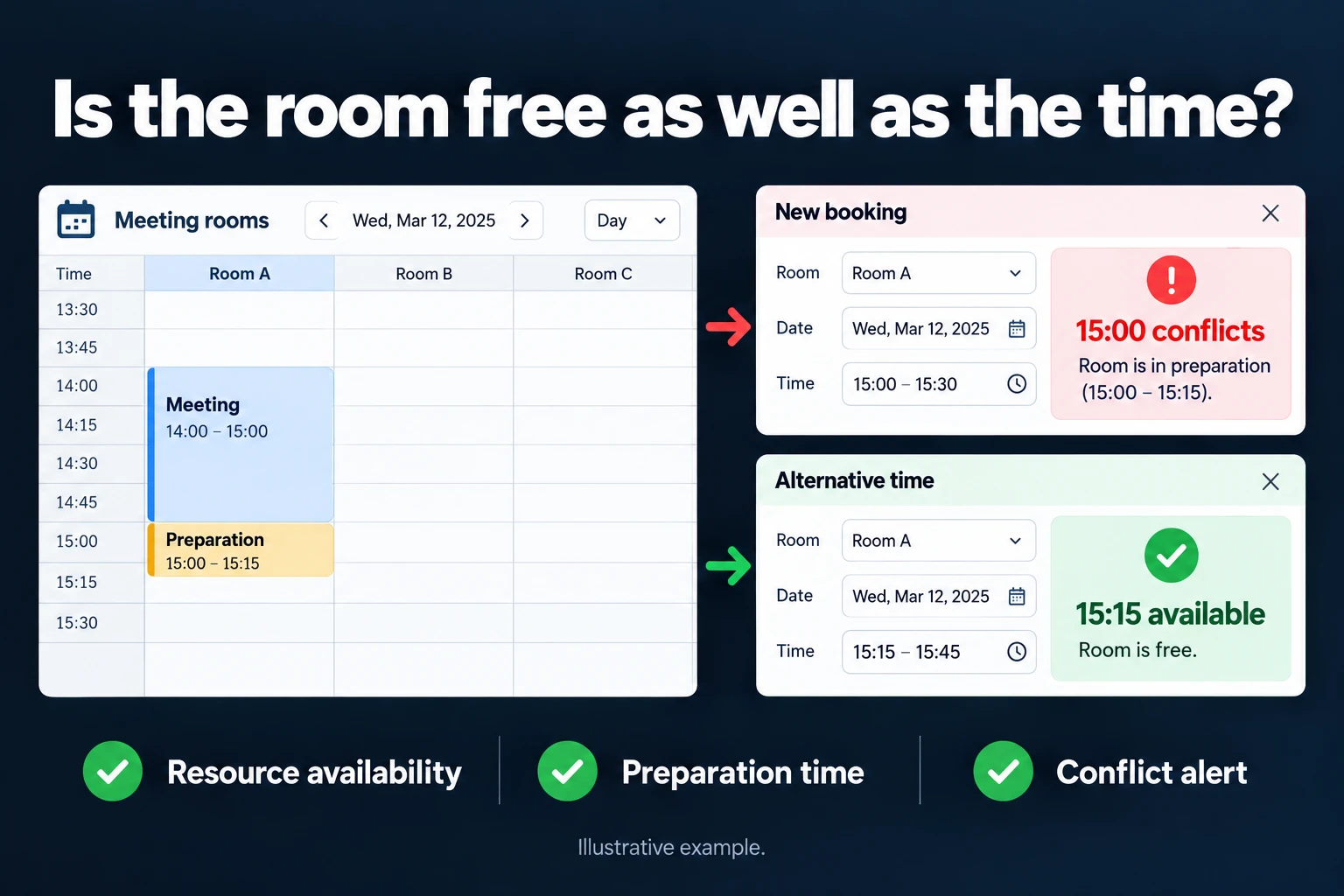 View full size](https://oguzerol.com/gorseller/hizmet-kapaklari/randevu-kaynak-planlama-uygulamasi-seri-v1-en.webp) # Resource Booking App: Double Bookings, Buffer Times and Real Utilisation [Oğuz Erol](https://oguzerol.com/en/about-me/) | 17 min read In the example month below, a vibration test system is 85.9% booked but only 60.5% used: 56 hours were booked and never used, while a purchase request for a second unit “because it is always full” waits for approval. A shared spreadsheet or calendar answers “who booked it”, not “was it used”. I build apps that let teams share rooms, test equipment, cars or technicians without clashes and record booked and used hours separately. This is for manufacturers and test labs of roughly 150 to 300 staff. A resource’s own maintenance schedule belongs to [periodic maintenance tracking](https://oguzerol.com/en/periodic-maintenance-tracking-app/); here an overdue resource simply cannot be booked. ## Which records does resource booking keep apart? Bookings, usage and internal recharges are three separate records; counting one as another corrupts both the capacity report and the cost split. Terms used on this page: - **Buffer:** time after a booking to get the resource ready again (tidying a room, changing a fixture). - **Check-in and release:** the user’s “started” and “finished” records; usage is measured between them. - **No-show:** a booking with no check-in after its start. **Unreleased hours:** the work finished early but the resource was not released. - **Available hours:** open shift hours minus maintenance and calibration blocks; here one shift, 08:00 to 18:00. Buffers between teams stay inside it (13 hours in the example month), so utilisation can never reach 100%. Unattended night testing is a separate band, so it does not dilute the daytime figure. - **Booking rate:** booked hours ÷ available hours. **Utilisation:** hours actually used ÷ available hours. On this page “utilisation” only ever means this. - **Pre-empting (bumping):** a higher-priority request taking the place of an existing booking. - **Internal recharge:** splitting a resource’s cost between departments; a management report, not an invoice. ## Example month: “fully booked”, yet nearly 40% of the hours sit idle *Example data, fictional; I checked the numbers against each other with a script.* A manufacturer of electrical panel components with about 260 staff shares two meeting rooms (Room A, Room B), a 40-seat training room, a vibration test system with two test technicians, a calibration bench and three pool cars. R&D, Quality (pre-shipment tests), Sales (witness tests customers attend) and Production all use the vibration system. The month has 22 working days, numbered below. It is the app’s first month: check-ins are recorded, but automatic release and recharging are still off. | vibration test system, first month | hours | | --- | --- | | Available (22 working days × 10 hours) | 220 | | Booked | 189 (**booking rate 85.9%**) | | Actually used (check-in to release) | 133 (**utilisation 60.5%**) | | No-shows (6 bookings) | 34 | | Finished early, not released | 22 | | Not booked (13 hours of it buffers between teams) | 31 | | Also: lost by Quality to an overrun | 2 | | Also: requests turned away as “full” and pushed to another week | 9 requests, 41 hours | Used, no-show, unreleased and not booked add up to 220; the last two rows are separate. **Other resources.** 5 of the pool cars’ 52 bookings came back over 30 minutes late (on day 6 the next user took a taxi); 17 of 118 meeting room bookings (14.4%) had no check-in. **Day 9, an overrun.** R&D’s 08:00–13:00 test finished at 15:00. Quality’s 13:30–17:30 test could only start at 15:30 after the buffer and lost two hours; the remaining two went into a new booking from 08:00 to 10:00 on day 10, and the shipment slipped by half a day. **Day 12, the last free slot.** Quality and Production requested the last free four hours on the afternoon of day 15 within the same minute. The app rechecked availability at the moment of saving: Production saved first; Quality was offered the next free slot. In a spreadsheet both would have saved their rows and the clash would surface later. **Day 14, a bump.** A customer wanted a witness test on days 17 and 18, when R&D held the system. Sales opened a bump request with 3 working days’ notice, the lab manager approved it, and R&D picked days 21 and 22 from three alternatives. Of the 20 hours booked for the witness test, 18 were used: on day 18 the inspector left at 16:00 and nobody released the system. **All month, placeholder bookings.** Nobody turned up for three R&D bookings (10, 6 and 4 hours), all made “in case the test sample arrives”. Two 4-hour Sales pre-tests did not happen: the test samples never came. ### Month end: why does the second unit wait? The request rested on the 41 hours turned away; I placed them week by week into the wasted hours with a script. - **The 31 unbooked hours could not take it:** 13 were buffers between teams, 12 fell in the migration week, when no turned-away request was due, and 6 were 1–2 hour fragments across the rest of the month. The shortest turned-away test needed 3 hours. - **With only the check-in rule:** a no-show lapses after 30 minutes and a request ready that day takes the slot. 5 of the 9 requests, 18 hours, fit; utilisation rises to 68.6%. - **With placeholder bookings gone as well:** R&D’s “in case” bookings would have been bookable in advance; 7 requests, 29 hours, fit and utilisation reaches 73.6%. 12 hours remain: a 4-hour Quality test and an 8-hour witness test. Twelve hours is a weak case for a second unit, so the plant manager put the request on hold for two months and set four rules: 1. With no check-in 30 minutes after the start, the booking lapses and anyone waiting for that day is told. 2. Recharging is based on booked hours, with the exceptions below. 3. An overrun alerts the next user and the lab manager at the planned end; extending past the buffer needs their approval. 4. The second unit is reconsidered in two months if utilisation exceeds 75% and more than 20 hours a month are still turned away. These thresholds are my suggested starting point. ## Booking rules: clashes, buffers, cancellations, overruns and breakdowns All rules are my *suggested starting point* for the example company; thresholds depend on the resource, shifts and agreements between departments, and are confirmed in writing in the first step. | rule | suggested starting point | | --- | --- | | Clash | overlapping active bookings on one resource, buffers included, cannot both be saved; rechecked at the moment of saving | | Buffer | meeting room 15 min, training room 30 min, vibration system 30 min between teams (0 within a test series), pool car 30 min | | Multi-resource | a vibration test books the system and a technician together, or neither | | Authorised users | only trained or cleared people; your health and safety lead sets the training | | Breakdown | future bookings move to an “affected” list, owners are told, nothing is recharged; the resource owner re-places them in priority order once it is fixed | | Booking horizon | vibration system up to 15 working days ahead; longer needs the resource owner’s approval | | Check-in | none within 30 min (15 for rooms): the booking lapses; we choose the notification channel together | | Overrun | at the planned end the next user and the resource owner are notified; extending past the buffer needs approval | | Recurring booking | every occurrence is checked; clashes are listed before the series is saved | ## Priority: which job may take over which booking? Only a higher priority class can pre-empt an existing booking, every bump needs approval, and the bumped team picks first from the alternatives. Suggested classes: (1) customer-bound work such as witness and pre-shipment tests; (2) production, such as validation that holds up a line; (3) development, training and internal meetings. The requester does not choose the class: the resource owner assigns it from a defined list, and class 1 requires a customer, order or shipment reference. Suggested conditions: 3 working days’ notice and the resource owner’s approval; shorter notice needs the plant manager. For an unbooked slot, whoever saves first wins (day 12). ## Why measure utilisation separately from the booking rate? Investment decisions such as a second machine or an extra car should rest on utilisation, because the booking rate also counts placeholders. The 56 hours between them have two sources: 34 no-show hours shrink with the check-in rule, and 22 unreleased hours with release alerts and the recharge exception below. | department (example data) | booked | used | unused (no-show + unreleased) | share of own booking used | | --- | --- | --- | --- | --- | | R&D | 90 | 58 | 34 | 64.4% | | Quality | 56 | 44 | 10 | 78.6% | | Sales | 28 | 18 | 10 | 64.3% | | Production | 15 | 13 | 2 | 86.7% | Two of R&D’s 58 hours are the day 9 overrun, so 2 of Quality’s hours appear in neither column (56 = 44 + 10 + 2). Utilisation is only as reliable as the check-ins: users check themselves in, check-ins a technician records for others are flagged, and late ones are counted monthly. If the second-unit request comes from Quality and Quality’s technicians record the check-ins, a third person (finance or the plant manager) signs off the utilisation report. ## Internal recharge: booked hours or used hours? I suggest charging booked hours, because a booked hour is one no other team can use. Pure booked-hour charging does not reward releasing early, so I add four exceptions: 1. Hours cancelled at least 1 working day ahead are not charged. 2. Hours lost to a bump are not charged to the bumped team. 3. Hours released early or lapsed as a no-show are charged to whoever uses them; if nobody does, the booker pays. 4. Hours lost to an overrun are charged to whoever overran. With the system’s monthly cost pool (depreciation, maintenance and calibration, technician time) as 100%: | department | by used hours | by booked hours, no exceptions | by booked hours, exceptions applied | | --- | --- | --- | --- | | R&D | 43.6% | 47.6% | 48.7% | | Quality | 33.1% | 29.6% | 28.6% | | Sales | 13.5% | 14.8% | 14.8% | | Production | 9.8% | 7.9% | 7.9% | With the rules off, nobody reused a lapsed hour, so the exceptions only move the 2 overrun hours from Quality to R&D. With the rules on, 11 of the 18 hours that fit under the check-in rule would have landed on R&D’s no-show bookings (days 8, 13 and 19: 4 + 4 + 3 hours), been charged to their users, and cut R&D’s share to 42.9%: the payoff when someone else uses a no-show slot. ## Roles: who sees, books and approves? Nobody approves their own request. - **User:** creates and cancels own bookings, checks in and releases; sees other teams’ bookings as “busy” with the team name, not a witness-test customer’s name. - **Team lead:** sees the team’s bookings and utilisation; opens bump requests for the team. - **Resource owner (lab, facilities, fleet):** defines resources, buffers and authorised lists; assigns priority classes; approves bookings beyond the horizon, bumps and extensions. Their own department’s requests go to the plant manager. - **Test technician:** sees assigned tests; records check-in, release and notes. - **Sales and finance:** Sales sees witness-test customers and requests bumps; finance enters the pool. Neither approves bookings. - **Plant manager:** sees everything; approves short-notice bumps and rule changes. - **Auditor:** reads everything, exports the audit trail. Assigning work to people is a separate subject: [team task assignment tracking](https://oguzerol.com/en/team-task-assignment-tracking-app/). **Audit trail.** Every booking, bump, extension, check-in and release is an undeletable row: who, when, old and new value, reason. A correction is a new row, so last month’s utilisation cannot change. ## What does AI do, and where does it stop? Rules handle clashes, buffers, bumps and recharges; people decide. AI makes two kinds of suggestion: 1. **Resource and duration from a free-text request.** From “New panel sample, sine vibration test on three axes, start Tuesday” it suggests system, technician, duration and first free slot; the requester confirms. 2. **No-show patterns.** It classifies notes on no-shows (“test sample did not arrive”, “customer cancelled”) and reports the pattern to the resource owner: all three R&D no-shows in the example month were “test sample did not arrive”. The model never bumps or cancels a booking, sets a priority or writes a recharge. No row reaches the model without passing the user’s permission filter, and an answer only names teams and customers that user can see. I suggest sending roles (“R&D user 3”) instead of employee names. **In Turkey**, personal data sent to a model hosted abroad falls under [Article 9 of Law No. 6698](https://www.mevzuat.gov.tr/mevzuatmetin/1.5.6698.pdf) as amended by [Law No. 7499, Article 34](https://www.resmigazete.gov.tr/eskiler/2024/03/20240312-1.htm) (Official Gazette of 12 March 2024, no. 32487, in force 1 June 2024; I read the current text on mevzuat.gov.tr on 15 October 2026). This is my reading, not legal advice. ## Where exactly does a spreadsheet or shared calendar break? A spreadsheet can find clashes, buffers included, but cannot block them; a shared calendar can block clashes but offers no buffer, priority or cost field; neither records usage, bumps or recharges. If you stay in Excel, use these columns: `A` resource, `B` start (a real date-time value), `C` end, `D` buffer in minutes, `E` status (“Cancelled” or blank; use a drop-down so the spelling never varies), `F` start minute, `G` end minute including buffer, `H` clash count. - `F2`: `=ROUND(B2*1440,0)` - `G2`: `=ROUND(C2*1440,0)+D2` - `H2`: `=IF(E2="Cancelled",0,COUNTIFS($A$2:$A$500,A2,$F$2:$F$500,"<"&G2,$G$2:$G$500,">"&F2,$E$2:$E$500,"<>Cancelled")-1)` `H` above 0 means an overlap with another active booking, both buffers included; extend the ranges past 500 rows. Whole minutes remove any risk of rounding drift at an exact buffer boundary. I tested the logic in Python: after Room A’s 14:00–15:00 booking and 15-minute buffer, 15:00 clashes and 15:15 does not. The formula is not where it breaks: - **It flags; it does not block.** Two people typing into one slot at once both get saved, and `H` flags both afterwards. Even as data validation it can be bypassed: per Microsoft, a plain paste does not trigger validation ([Microsoft Learn](https://learn.microsoft.com/en-us/office/dev/add-ins/excel/excel-add-ins-data-validation)). - **Usage, multi-resource bookings and bumps are invisible:** no cell shows who turned up, the technician row lives apart from the machine row, and an overwritten row loses who approved it. Resource accounts in Microsoft 365 or Google Workspace are a step up: a clashing invitation is declined. The four documents I read on 15 October 2026 show where this breaks: - **Recurring series.** In an Exchange resource mailbox the conflict limits default to 0, so by default a series with any clashing occurrence is declined outright. If an admin raises the limits, the series is accepted and the clashing occurrences declined, and because response details are on by default the organiser gets an email for each declined occurrence; per the documentation that email depends on the setting, so turning it off stops it ([Set-CalendarProcessing](https://learn.microsoft.com/en-us/powershell/module/exchangepowershell/set-calendarprocessing)). A Google Workspace resource accepts the whole series and declines unavailable dates, with a notice for each, if no more than 8 occurrences, and no more than half, clash ([Google Workspace Admin Help](https://knowledge.workspace.google.com/admin/calendar/share-room-and-resource-calendars)). - **No buffer, priority or cost field.** I found none among the `Set-CalendarProcessing` parameters, and Google’s resource calendar page does not mention buffers. - **Check-in and release are built around rooms.** Microsoft’s auto-release relies on Teams devices, chat or email, defaults to 10 minutes and has licensing conditions ([Microsoft Learn](https://learn.microsoft.com/en-us/microsoft-365/places/enable-auto-release)). Google releases a room when all but one attendee decline, and not for rooms that hold 20 or more people ([Google Workspace Admin Help](https://knowledge.workspace.google.com/admin/calendar/release-unused-calendar-meeting-rooms)). Neither is ready-made for a test system or a pool car. In a web app, a defined business rule is applied as data is entered. ## When a spreadsheet or calendar is enough Four numbers tell you whether you need a separate app, and measuring them needs no app. My suggested start: for two weeks, pin a sheet by the machine for who booked, real start and end, and requests turned away as “full”, then compare it with your booking list. Do not commission an app if: 1. Your only shared resources are meeting rooms, set up as resource accounts in your company calendar. 2. Two or three people share a machine and agree the order between themselves; the spreadsheet above will do. 3. Your four numbers are low. My suggested starting point for “low”: (a) at most 1 double booking a month; (b) no-show hours under 5% of available hours; (c) at most 1 job a month delayed by an overrun; (d) hours turned away as “full” under 5% of available hours. For the example company, (a) was 3 clashes in the three-month spreadsheet list imported on day 1, so 1 a month; (b) to (d) were 15.5%, 1 and 18.6% in the example month. Two of four are over the line. 4. You do not recharge departments and the only question is an investment; the two-week sheet answers that. A custom app pays off when departments with different priorities share a resource, equipment and technician are booked together, or an investment rests on a calendar that looks full. ## How do we start, and who owns the data and code? I start with the resource group that causes the most arguments (here the vibration system and its technicians), not every room and car at once, and import the last three months of bookings. The first step ends in writing: resource list, buffers, priority classes, bump, cancellation and recharge rules, roles, first-version scope and timeline. The app runs on a server (VPS) that can be opened in your company’s name; the data is yours and you can export all of it to Excel or CSV at any time, and the full source code is delivered in a repository you can access, with run instructions, a dependency list and known limitations. There is no per-user licence; the cost is the server’s monthly fee plus maintenance, and in a small or mid-sized team adding users does not change it. Everyone signs in from a browser; because bookings carry employee names, I assess access, security and hosting separately. A link to Outlook or Google Calendar, and which side is the source of truth, is decided in writing in the first step after seeing your IT policy; it is not something I promise today. Share your shared resources, the departments using them and three months of bookings (departments, not names) on the [contact page](https://oguzerol.com/en/contact/); in the first meeting we look at what your booking rate says about usage. ## Frequently Asked Questions ### How do you book a resource with more than one place? A 40-seat room is booked by head count, and overlapping bookings cannot exceed it. Three pool cars are three resources. A system taking two test samples at once has capacity 2. ### Can someone book on behalf of another department? A team lead or resource owner can open a booking for another department; the record keeps who opened it and which department it is for in separate fields, and the recharge goes to that department. Who holds this right is decided in writing in the first step. ### What if someone forgets to check in, or presses the wrong button? The flow I suggest, with scope set in writing in the first step: a reminder before the booking lapses; if the resource is still free, the user takes it back and the trail records a “late check-in”; a mistaken release reopens if nobody has taken the slot. Many late check-ins in the monthly report mean that month’s utilisation needs caution. [Back to top ↑](https://oguzerol.com/en/appointment-resource-planning-app/#icerik) ## You may also find these useful [Appointment Reminder Automation | Fewer No-ShowsAn automatic SMS/WhatsApp reminder before the appointment measurably lowers your no-show rate. You decide how far ahead it goes out, on which channel.](https://oguzerol.com/en/appointment-reminder-automation/)[AI Appointment Assistant | Automated BookingLet customers book at midnight: calendar-connected, no double bookings, reminders included. Setup, limits, and handover to a human all covered.](https://oguzerol.com/en/ai-appointment-assistant/)[Hotel Reporting Screens: Occupancy, ADR, RevPAR and Net Channel RevenueA role-based hotel screen that turns PMS records into occupancy, ADR, RevPAR, net-of-commission channel revenue and cancellations. See a sample month worked.](https://oguzerol.com/en/hotel-reservation-records-reporting-screens/) [Browse all articles →](https://oguzerol.com/en/articles/) WHAT YOU CAN ASK FOR ## How do I work? Work-hour packages Tell me about your business and what you need on WhatsApp or by phone; we agree on **a work block of somewhere between 5 and 40 hours** and I start doing what is needed. What you get is not a calendar window — it is net working hours spent directly on your business. I can use 40 hours working three days straight, or deliberately spread it out and finish it over a year — whatever the work calls for. I do not spend my time estimating how long something will take, I spend it doing the work; every hour I spend leaves a lasting result in your business. We keep going for as long as you find it useful. WORK BLOCKS ## Why not monthly? Is 40 hours a week? On a fixed monthly fee both sides are watching the wrong thing: you watch a fixed cost, the other side watches how many more contracts like this they can line up. Working by the hour puts us both in front of the same thing — the real value of the work that got done. I know not having an upfront answer to "how much will this cost in total?" is the natural cost of this model. But instead of paying a fixed fee for months to a setup that is not producing results, you only pay for the qualified time spent on your work — and you see exactly where that time went, start to finish. That is why my clients keep coming back. 5hours300€ + VAT60€ per hour[Choose this block](https://wa.me/905496546489?text=Hi%2C%20I%27d%20like%20info%20about%20the%205-hour%20work%20block.) 10hours500€ + VAT50€ per hour[Choose this block](https://wa.me/905496546489?text=Hi%2C%20I%27d%20like%20info%20about%20the%2010-hour%20work%20block.) 20hours800€ + VAT40€ per hour[Choose this block](https://wa.me/905496546489?text=Hi%2C%20I%27d%20like%20info%20about%20the%2020-hour%20work%20block.) 40hours1,400€ + VAT35€ per hour[Choose this block](https://wa.me/905496546489?text=Hi%2C%20I%27d%20like%20info%20about%20the%2040-hour%20work%20block.)