Source: https://oguzerol.com/en/turning-excel-into-a-web-app-with-ai/ [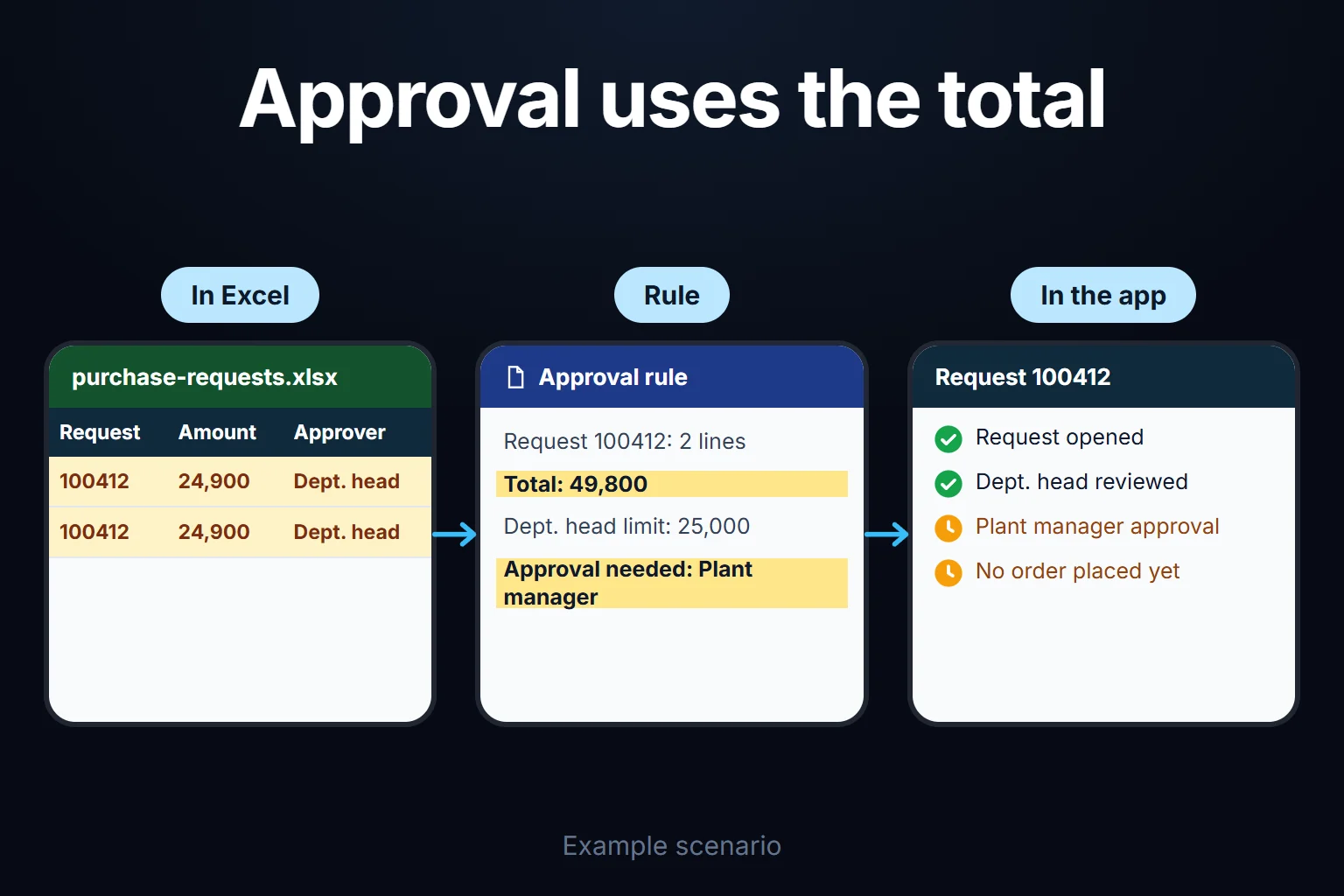 View full size](https://oguzerol.com/gorseller/senaryo/turning-excel-into-a-web-app-with-ai-senaryo-en.webp) # Building an App From Excel With AI: Seven Steps and Where AI Stops [Oğuz Erol](https://oguzerol.com/en/about-me/) | 18 min read | Published: 3 August 2026 | Updated: 24 October 2026 ## Quick summary Seven steps to turn a shared Excel file into a multi-user web app: reading it, tables, roles, rules, migration, cutover. See where AI helps and where it stops. You can turn an Excel file into a web app with AI, but the hard part is finding the business rules buried in the file, not generating screens. AI summarises the file, proposes tables and screens, and writes code. You decide which formula is a real rule, who sees what and who approves what. The fictional purchasing file below hid four rule errors nobody had noticed for years. One hid a budget overrun: Excel showed about 99% of a department’s budget used, actual use was 101%. Can you do it yourself? A one-person tracking screen or a prototype, yes. For an app where several people work with different permissions, you need to test that permissions are enforced on the server, approval rules run when data is saved, and the audit trail can’t be deleted; how to test that is below. [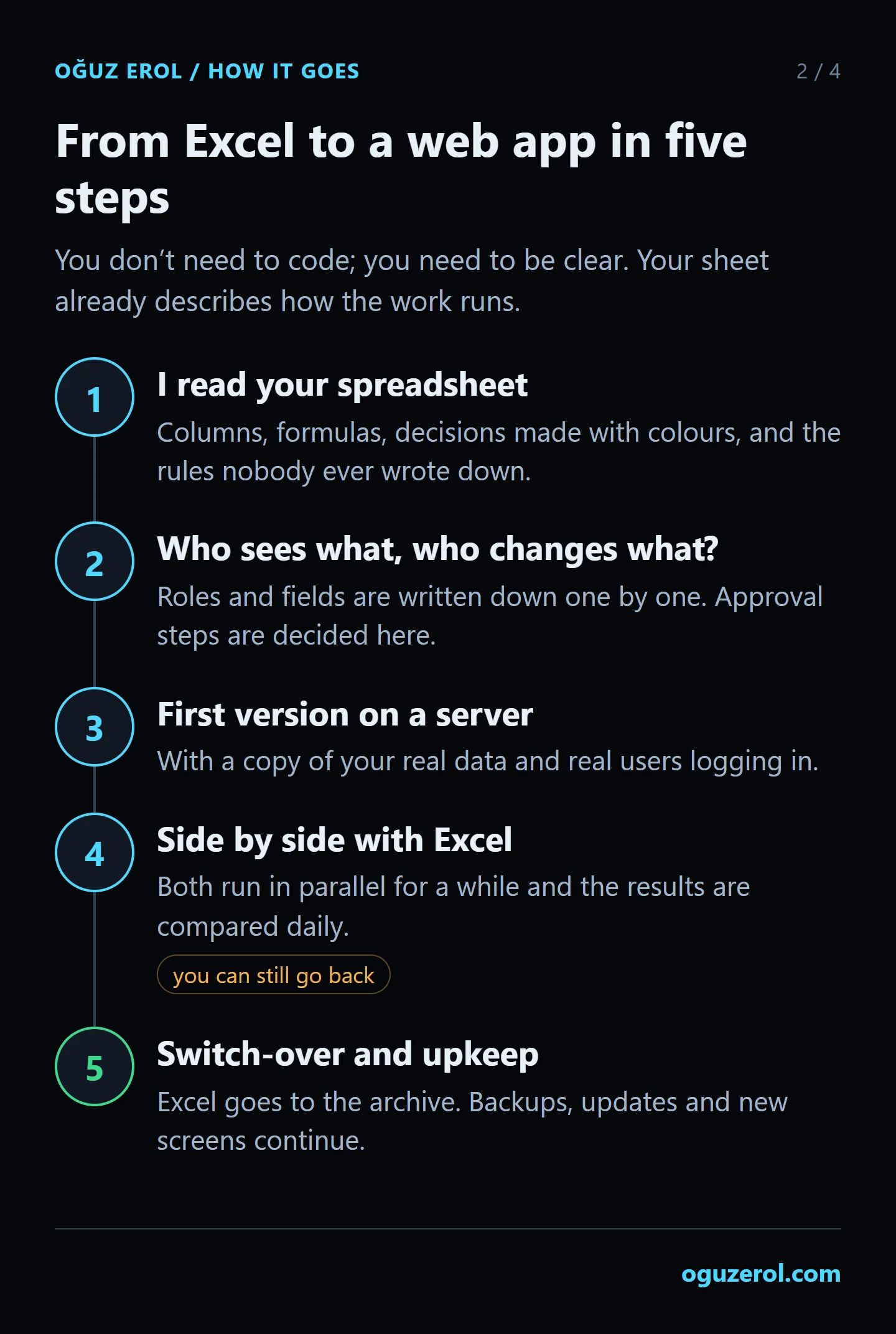](https://oguzerol.com/gorseller/web-uygulama/excel-to-web-app-5-steps.webp) The five steps in the image summarise the seven below. The image's first-version trial happens here in the parallel run's test copy. Decide where data will be hosted and how code will be handed over before migration; the “How to start, and who owns the data and code” section below explains that boundary. ## Example: a three-year purchase request file *Every number here comes from fictional data generated by a Python script I wrote; it is not a real client file.* Picture a hydraulic cylinder manufacturer with three years of purchase requests in one shared workbook. Twenty people write to it: 11 requesters from five departments, 5 department heads, 2 purchasing specialists, the plant manager and the general manager. A request total up to 25,000 (in the home currency) is approved by the department head, up to 150,000 by the plant manager, above that by the general manager. Euro lines are converted with one exchange-rate cell updated by hand every week. | sheet | rows | what it is | | --- | --- | --- | | Requests | 1,996 lines (986 requests) | data | | Materials | 420 | data | | Suppliers | 43 | data | | Limits | 4 | parameters: thresholds, rate | | Budget | 5 | report | | Summary | 5 | report | | Requests (2) | 612 | a copy taken two years ago | ## Three data types that can change silently during migration A value that looks correct in the workbook may differ from what is actually stored. In a migration rehearsal I compare the meaning of identifiers and dates as well as row counts. **Long identifiers and leading zeros.** Checked on 24 October 2026, [Microsoft’s automatic conversion documentation](https://support.microsoft.com/en-us/excel/data-import-and-analysis-options-in-excel) explains that numeric conversion can remove leading zeros and change digits after the first 15. Product codes, barcodes, phone numbers and account identifiers are not quantities to add; they should be text fields in the application. If the fictional product code `00123` has become `123`, changing its cell format to text afterwards does not recover the lost zeros. Nor would I guess the original digits of a long identifier that has already changed in storage. I compare it with the source record and put unmatched entries on a correction list. Scientific notation alone is not proof of data loss; the underlying value must also be inspected. **Date systems and text dates.** Checked on 24 October 2026, [Microsoft’s explanation of date systems](https://support.microsoft.com/en-gb/excel/date-systems-in-excel) identifies a 1,462-day difference between the 1900 and 1904 systems. Serial values copied without conversion from an older workbook can therefore shift dates. Text such as `12.03.2024`, `12/3/24` and `March 2024` also has different levels of precision; day/month interpretation must be agreed first. For the rehearsal, I document the expected type of each field, inspect minimum and maximum dates, and review invalid examples. Selected source records are compared side by side with their application equivalents. AI can help identify conversion candidates; it does not make the final decision to alter an ambiguous code or date without human review. ## 1. Reading the file: which sheet is data, which is a report? Reading the file means writing down what each sheet is and which formulas carry rules. The script counted constant cells, formula cells and cross-sheet references per sheet, which split the sheets into four kinds: - **Data:** sheets others look at or people fill in by hand: Requests, Materials, Suppliers. - **Parameters:** a small sheet others look at: Limits. Changing it needs permission and an audit trail. - **Report:** formulas pointing at other sheets, nothing pointing back: Budget, Summary. Rebuilt in the app, not migrated. - **Copy:** same headers as Requests, nothing points at it: Requests (2). It stays in the archive. More important: no formula looks at Materials or Suppliers. Request lines link to them by codes and names typed by hand, so one typo breaks the link silently. **Who writes to it?** Per Microsoft, Show Changes in Excel for Microsoft 365 shows edits from the past 365 days with who, where, when and the previous value ([Microsoft Support](https://support.microsoft.com/en-us/office/show-changes-that-were-made-in-a-workbook-978ceea7-bbf6-4337-bca7-22e7cc9892e8), read 16 October 2026). It covers one year and doesn’t say why, so talk to users too. In the example, Show Changes showed 14 people editing Status in the last year; interviews revealed 7 were requesters cancelling their own requests. Nothing stopped them typing “Approved” either. **Which formula carries a rule?** Two formula columns in Requests (amount and approval level) and the sum on the Budget sheet, which defines what an “approved request” is. ### A sample prompt for having AI read the file This is an example; I didn’t run it on a model for this page and claim no result. Use a masked copy: > Attached is an .xlsx copy of a purchase request file; people’s names are masked. 1) Classify each sheet as “data / parameters / report / copy” and give your reasoning. 2) For every column containing a formula, write out the formula text exactly and say whether it carries a business rule. 3) List every formula that refers to another sheet. 4) Count the columns where the same information is written in different ways (e.g. the distinct values in Status). 5) Mark anything you’re unsure about as “unsure”; don’t guess. Don’t propose rules; only report what you see. Don’t convert the file to CSV. Per Microsoft, CSV saves only the active sheet and text formats remove all formatting ([Microsoft Support](https://support.microsoft.com/en-us/office/save-a-workbook-to-text-format-txt-or-csv-3e9a9d6c-70da-4255-aa28-fcacf1f081e6), read 16 October 2026). Check the model writes the formulas out exactly. **Where AI stops:** the model classifies and explains; the sheet’s owner decides whether a formula is a rule and whether it’s right. The model can’t tell whether “OK” in Status is an approval or a note. ## 2. Tables and relationships: from sheets to a database Step two gives each kind of record its own table, linked by an identifier that never changes (a key). One Excel row carries request, line, approval and order; in the app they’re separate records: | in Excel | table in the app | key and link | | --- | --- | --- | | Request No, Date, Requester | request | request_id → user, department | | Material, Quantity, Price, Currency | request_line | line_id → request, material | | Approver, Approval Date, Status | approval | approval_id → request, approver | | Supplier, Order No | purchase_order | order_id → request, supplier | | Materials, Suppliers | material, supplier | unique code, tax number | | Limits | approval_threshold | with a valid-from date | | Requester names | user | everyone has their own account | Two new decisions: the approval record stores the amount and rate at approval, and thresholds carry a valid-from date so old requests keep old thresholds. **Where AI stops:** the model can draft this table from step one’s output. What becomes a key and whether the approved amount is frozen are decisions for finance and purchasing. ## 3. Roles and permissions: who sees what, who changes what? Step three writes down what each role sees, enters and approves, enforced on the server: a row a user may not see never reaches the browser. My proposal: | role | sees | enters, changes | approves | can’t | | --- | --- | --- | --- | --- | | Requester | own requests | opens, edits until submitted | nothing | see others’ requests | | Department head | department’s requests, budget | comments, sends back | up to 25,000 | approve own request | | Purchasing | approved requests | supplier, actual price, order no | nothing | change amounts | | Plant manager | all requests | comments, sends back | up to 150,000; heads’ requests | approve own request | | General manager | all requests, budget | approves threshold changes | above 150,000; plant manager’s requests | approve own request | | Authorised board member | general manager’s requests | nothing | general manager’s requests | approve anything else | | Finance | all requests, budget, audit trail | budgets, rate records | nothing | open or approve a request | | System admin | user list | users and roles | nothing | change data | The basic rule I propose: nobody approves their own request; it goes one level up. Your signing authorities decide who approves the general manager’s; in the example, an authorised board member who isn’t among the 20 writers and gets an account only for this approval. Department heads had approved 26 of their own requests; “Approver” is free text, so nothing stopped it. An **audit trail** keeps an undeletable row for every change: who, when, which record and field, old and new value. Everyone should sign in with their own account; a shared login makes the trail meaningless. The sign-in method is set out in writing in the first step. **Where AI stops:** the model can draft roles from the list of writers. Who sees what is a management decision. ## 4. Moving rules from formulas into validation and workflow Step four turns each formula into a rule applied when data is entered or approval is given. The example’s formulas (English Excel): - Amount, L2: `=H2*J2*IF(K2="EUR",Limits!$B$5,1)` - Approval level, M2: `=IF(L2<=Limits!$B$2,"Department head",IF(L2<=Limits!$B$3,"Plant manager","General manager"))` - Used budget, Budget!C2: `=SUMIFS(Requests!L:L,Requests!E:E,A2,Requests!P:P,"Approved",Requests!C:C,">="&$G$1)` The script compared these with what the rule requires: across 919 approved requests, three formula errors, plus a fourth in people’s behaviour that the formulas didn’t catch: | error | what happened in Excel | rule in the app | | --- | --- | --- | | Level per line | 76 requests needed a higher approver by total; a lower level approved them | Level from the request total | | Live rate | 7 requests now show a higher approver than on approval day | Rate and amount stored at approval | | Free-text status | 87 approved requests say “Approved ” (trailing space), “OK” or “Approval”; the budget formula skips them | Only the authorised approver changes status | | Split requests | 11 groups: same person, same supplier, within four working days, each under 25,000, together over it | Warning to the approver, not a block | **A caveat:** that SUMIFS skips “Approved ” with a trailing space rests on criteria matching the whole cell when there are no wildcards. Microsoft’s page doesn’t state it, and I haven’t tested it in Excel. To check your file, list the distinct values in Status: `=UNIQUE(P2:P2000)` in Microsoft 365, Excel 2021 and later ([Microsoft Support](https://support.microsoft.com/en-us/office/unique-function-c5ab87fd-30a3-4ce9-9d1a-40204fb85e1e)), or Data > Data Tools > Remove Duplicates on a copy of the column. If two values look identical, `=LEN(P2)<>LEN(TRIM(P2))` flags leading, trailing or extra inner spaces, but not non-breaking spaces (NBSP). “Four working days” is my starting suggestion, not a measured truth. All 11 groups were genuine splits in the example, but real files have coincidences, so the rule shows the approver the person’s other recent requests to that supplier instead of blocking. **Can Excel fix it?** Partly. A helper column with the request total, `=SUMIF($A:$A,A2,$L:$L)`, and the level calculated from it flags all 76. But the total uses today’s rate, so 15 correctly approved requests also look wrong (separate from the 7 in the table). Same cause: Excel doesn’t freeze the moment of approval; an approval record does. One more rule I’d propose: if the actual price purchasing enters exceeds the approved amount by more than 5%, the request goes back for approval. The 5% is also a starting suggestion. **Where AI stops:** the model turns each formula into a sentence and writes test cases (“two lines of 24,900, total 49,800: plant manager”). The rule’s owner approves thresholds, exceptions, and warning versus block. ## 5. Cleaning the data and the migration rehearsal A migration rehearsal loads a copy of the data into the new database and accounts for every row. This step needs code. The first rehearsal rejected 1,129 of 1,996 rows, mostly people’s names: 18 people under 29 spellings, all fixed by one mapping table. The second loaded all 1,996. Without code you can list the distinct values in Requester, Approver and Supplier and add a “correct name” column. That list is the mapping table. Empty material codes are where AI genuinely helps, suggesting the nearest code from the name. The example’s suggestions are a simulation; I didn’t run a model. The model gets most rows right and usually spots unlisted materials, but misses or hesitates on a few, so each suggestion enters the mapping table under its approver’s name. Cleaning can’t fix one thing: Excel never stored the rate at approval, so accounting supplied the rate history and euro lines were recalculated and marked as such. Duplicate merging, the shadow period and rollback are covered in full on the [Excel to SQL database migration page](https://oguzerol.com/en/excel-to-sql-database-migration/). ## 6. Rebuilding the reports Users return to Excel the day a number is missing, so I rebuild reports like this: 1. **Inventory:** every report and who uses it. Unclaimed reports aren’t rebuilt. 2. **Same number:** a query for every number in the old report, same period, same filters. 3. **Reconciliation:** differences go into a table with written reasons. A report isn’t done until every difference is explained. In the example, that forced a decision. Maintenance’s budget this year is 6,010,000. Excel’s Budget sheet showed about 99% used (5,949,733); the app showed 101% (6,069,502). The difference table: | item | amount | | --- | --- | | 20 requests not written as “Approved”, so Excel skipped them | +258,036 | | Euro lines summed at today’s rate instead of approval day | −138,267 | | **Difference** | **+119,769** | The two errors pulled opposite ways and partly hid each other. Finance and the general manager decided that until year end, maintenance requests also go to the plant manager; in the app, a budget overrun adds that step automatically. ## 7. Parallel run and cutover During the parallel run Excel stays the working source, a copy loads nightly into the new system, reports are compared, and each role works in a test copy. The parallel run ends on criteria, not a calendar. My starting suggestion: three nights in a row the reports show only explained differences, and at least one period close (here, the budget report’s month end) matches on both sides. Then, for cutover, when Excel becomes read-only: 1. Every row is loaded or out of scope by written decision. 2. At least one person per role has done their job in the test copy. 3. Open requests sit with the right approver in the new system. 4. A restore from backup has been tested once. **What happens to Excel after cutover?** The old file stays in a read-only archive. You can keep analysing in Excel; a permission-filtered export can be built if needed, scoped in writing in the first step. Just don’t type the same information into both the app and a spreadsheet. ## What AI sees once the app is live Once the app is live, no row reaches the model without passing the permission filter: a department head asking “what did we buy most this month?” gets an answer only from data that head can see. Employee names are personal data under most privacy laws, so the model gets a masked copy. **In Turkey**, this falls under the Personal Data Protection Law (KVKK, Law No. 6698). Sending personal data to an AI service abroad falls under its Article 9, as amended by Law No. 7499, in force since 1 June 2024; I read the current consolidated text on mevzuat.gov.tr on 16 October 2026. I don’t give legal advice; I list in writing which fields go to the model, and your legal adviser assesses it. ## Where “app in minutes” tools are enough, and where they aren’t Tools that build an app from a description do well for a one-person tracking screen or a prototype: in an afternoon you have a form, a list and a simple calculation. Use sample or masked data in a prototype, not real names and amounts. Screen layout and draft rules carry over; permissions and the audit trail are rebuilt, because a prototype may keep those rules in the screen. Some tools come with sign-in and roles, so I ask four questions: - **Where are permissions enforced?** If only on screen, another department’s request still reaches the browser. - **Is there an undeletable audit trail** of who changed which field, when, from what to what? - **Where does the approval rule live?** Applied on save, or only in whether a button shows? - **Who owns the data and code?** Can you export everything, and is the code in a repository you can access? Four yeses and your tool will do. Wherever it’s no, use the prototype as a draft and build the real app separately. ## If Excel is enough, don’t switch With one or two people, no approval chain and no need to restrict who sees what, stay in Excel. It supports co-authoring on files stored in OneDrive ([Microsoft Support](https://support.microsoft.com/en-us/office/co-author-a-workbook-66ad7ca3-3818-46ac-be5b-6c8dbea8a93e)); Google Sheets lets you limit editing of a range to chosen people ([Google Help](https://support.google.com/docs/answer/1218656?hl=en)). A dropdown in Status stops the spelling problem on new rows. If your ERP has a purchasing module, ask about that first. What justifies an app is three needs, not file size: people see only their own records, approval goes to the right person by rule, and the audit trail can’t be deleted. ## How to start, and who owns the data and code In the first step I read a masked copy of your file as in step one and listen to the users. The written output covers sheet classification, formula inventory, rule errors, table draft, roles and cutover conditions. Scope and timeline are set out in writing in the first step. I keep the first version narrow: the most common mistake I see in automation work is picking the most complex process first. Here that means requests, approvals and budget; supplier quotes and stock come later. The app runs on a server (VPS) that can be opened in your company’s name. The data is yours; you can take it as Excel or CSV whenever you like. For a small or mid-sized team there’s no per-user licence; the cost is the server’s monthly fee plus maintenance. The full source code sits in a repository you have access to, with run instructions, a dependency list and a list of known limits. The rest of the handover is scoped in writing in the first step. Because the file holds employees’ personal data, I assess access, security, hosting and maintenance separately at the start. If your ERP changes, requests, approvals and the audit trail stay; a new ERP link is scoped separately. Fees are also set in writing, by scope, in the first step. How I work and sample screens: [Excel to web app service](https://oguzerol.com/en/turn-your-excel-into-a-web-app/). Send a masked copy of your file through the [contact page](https://oguzerol.com/en/contact/). In the first meeting we’ll look at which formulas carry rules. ## Frequently Asked Questions ### Can I build this app myself with AI, without coding? A one-person screen or a prototype, yes. For a multi-user app you can run this test without code: sign in with another role’s account and try to open a record you shouldn’t see, approve your own request, and delete an audit trail row. All three should fail. ### How long does it take? It depends on how many sheets and formulas carry rules, the number of roles and approval steps, how much data needs cleaning (the example’s first rehearsal rejected over half the rows) and the parallel run, which ends when reports match, not on a date. So I don’t promise a duration unseen; scope and timeline are set out in writing in the first step. ### What happens to the macros (VBA) in my Excel file? Macros carry rules like formulas and go into the step-one inventory as a separate list. AI is useful for turning macro code into plain sentences; users tell you when each runs and who runs it. Rule-carrying macros are rewritten server-side; formatting-only ones aren’t migrated. [Back to top ↑](https://oguzerol.com/en/turning-excel-into-a-web-app-with-ai/#icerik) ## You may also find these useful [Stop Wrestling with Excel: I Turn Your Spreadsheet into a Web App Your Team Can UseI convert the Excel or Google Sheets file your team shares into a web app on a server: one database, permissions per person, a full change log. See how.](https://oguzerol.com/en/turn-your-excel-into-a-web-app/)[PDF to Excel Conversion: Invoices and Bank StatementsGet invoices and bank statements from PDF into Excel with Power Query, then catch page-break, separator and date errors with check columns and a balance check.](https://oguzerol.com/en/pdf-to-excel-conversion/)[How to Share an Excel File With Multiple Users: Co-authoring, Locks and Permission LimitsIf your team works in one Excel file, learn what co-authoring needs, why 'file is locked' appears, how far change history goes and where Excel stops.](https://oguzerol.com/en/share-excel-file-with-multiple-users/) [Browse all articles →](https://oguzerol.com/en/articles/)