Source: https://oguzerol.com/en/project-cost-tracking-app/ [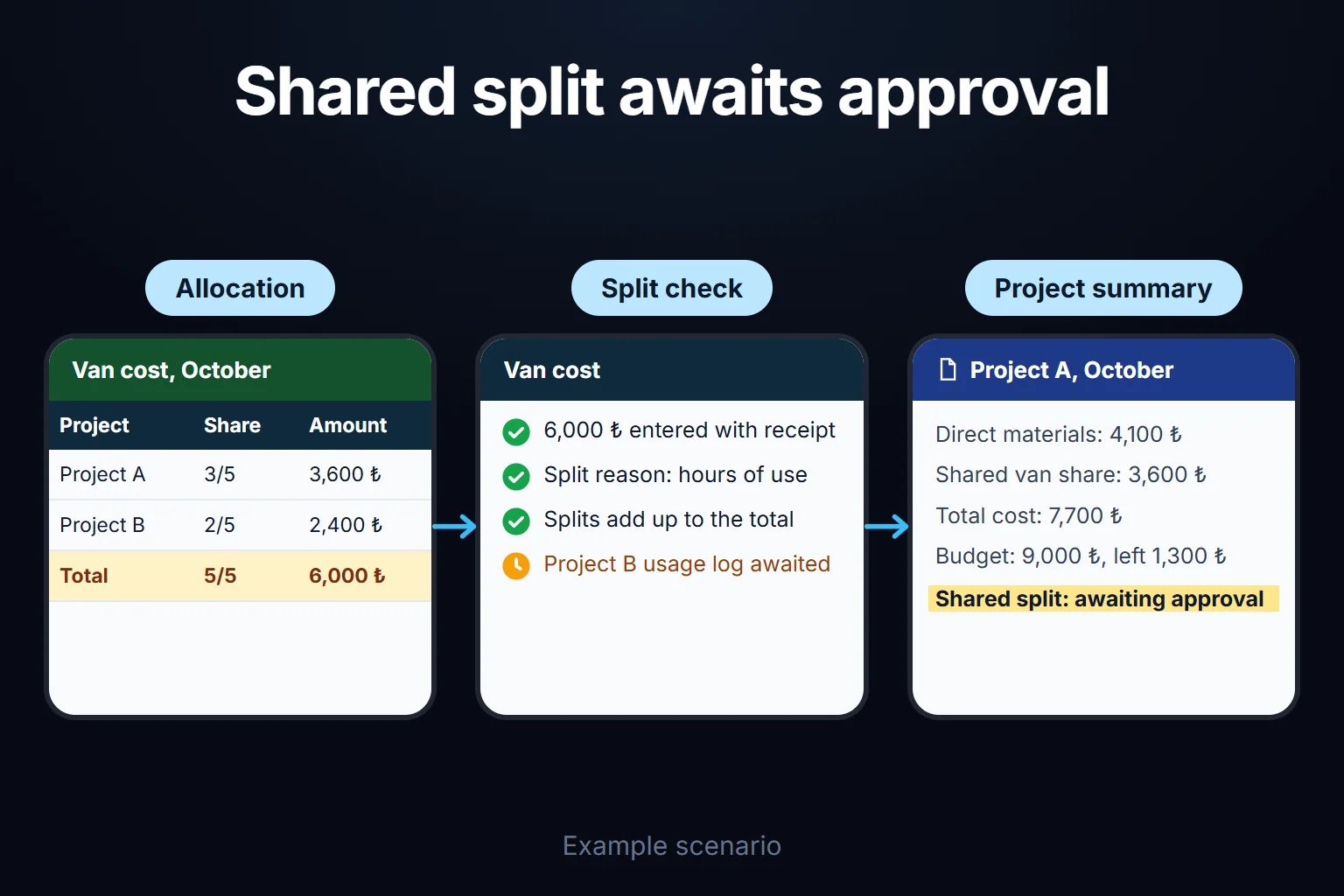 View full size](https://oguzerol.com/gorseller/senaryo/project-cost-tracking-app-senaryo-en.webp) # See Each Project’s Costs Separately [Oğuz Erol](https://oguzerol.com/en/about-me/) | 4 min read When several jobs run at once, materials, travel and outside-service costs can disappear into the company’s total spending. I build custom apps that connect the expenses in your Excel and Google Sheets files to the projects they belong to, giving you a clearer view of the cost of each job. ## Separate direct expenses from shared costs Materials bought for an installation belong directly to that project. A vehicle or equipment cost shared by several jobs needs an allocation rule. We record the amount, supporting document and project together, and show how shared costs were split. A project lead can review their work while management compares projects within a selected period. ## Build the budget comparison from real entries A project record, expense form and category totals provide a focused first version that your team can try quickly. Planned and actual spending use the same category definitions. If an expense later moves to another project, its earlier assignment remains traceable. We can export period summaries to your existing spreadsheet format and add document review or approvals as needed. ## Which records define a project’s cost? I would not build the expense screen around amount and description alone. Avoiding duplicate documents, separating payment from expense recognition and explaining shared costs need a clear record structure. The following is a proposed scope to adapt to your business. | Record | Decision it supports | | --- | --- | | Project code and expense category | Separates similar job names and different cost types | | Document identifier, line and source file | Flags repeat imports for review | | Document date and payment date | Separates the expense period from cash movement | | Currency and exchange rate used | Avoids adding different currencies without an explanation | | Allocation rule and approver | Explains why a shared cost belongs to a project | **Illustrative scenario:** A team uses one vehicle for several installation jobs. Charging the full fuel document to every project would overstate spending. The document stays as one record, with allocations linked to the selected projects. It cannot be finalised unless those allocations equal the document amount. Any rounding difference has an explicit destination. ## Who enters, reviews and approves expenses? Employees submit their expenses and supporting documents. Project leads review the projects assigned to them. Finance checks categories, periods and documents, while management sees comparisons across projects. One person can hold several roles; that does not mean every employee needs access to every project’s costs. I design permissions for record viewing, document downloads, edits and spreadsheet exports, rather than only hiding screen buttons. Moving an approved expense to another project should retain the previous value, replacement value, reason and person responsible. ## AI can read the document; who makes the cost decision? An optional document-reading step can suggest the date, supplier and amount from an image. Unreadable fields stay open for review instead of being guessed. Project and category suggestions remain provisional until approved. The provider receiving document data and the retention arrangements are part of the implementation scope. ## How would we accept the first version? - Upload the same document again and check the duplicate warning and review route. - Allocate a shared expense and reconcile project totals with the source document. - Attempt to view another project’s record and attachment with an unauthorised account. - Correct a closed-period entry and inspect the history and report version affected. An Excel or Sheets process may remain sufficient when project codes, categories and regular checks meet the need. A custom app becomes useful when different people enter and approve costs and access varies by project. This screen is not presented as a replacement for accounting records; accounting exports and revenue data are separate parts of the scope. ## Frequently Asked Questions ### Can one expense be divided between projects? Yes. We can allocate it by percentage or fixed amounts, check that the allocations equal the original cost, and record the reason for the split. ### Can the app show project profit? If revenue is available and the cost scope is agreed, we can add that summary. Defining the included costs first helps avoid presenting an incomplete margin as profit. ## Discuss your workflow Describe your workflow on the [contact page](https://oguzerol.com/en/contact/). ## Related services - [Employee Expense Approval Workflow](https://oguzerol.com/en/employee-expense-approval-workflow/) - [Budget vs Actual Expense Dashboard](https://oguzerol.com/en/budget-vs-actual-expense-dashboard/) [Back to top ↑](https://oguzerol.com/en/project-cost-tracking-app/#icerik) ## You may also find these useful [Mobile Employee Expense EntryA custom app where employees submit expenses from phones and responsible staff collect them in one view. Built for Excel and Google Sheets workflows.](https://oguzerol.com/en/mobile-employee-expense-entry/)[Budget vs Actual Expense DashboardA custom dashboard that compares planned budget and actual expense by category and period, with paths to underlying records. Built for Excel workflows.](https://oguzerol.com/en/budget-vs-actual-expense-dashboard/)[Expense Permissions and Reporting ScreenA tailored panel that separates expense entry, team visibility and company-total access by user role. Built for Excel and Google Sheets workflows.](https://oguzerol.com/en/expense-permissions-reporting-screen/) [Browse all articles →](https://oguzerol.com/en/articles/) WHAT YOU CAN ASK FOR ## How do I work? Work-hour packages Tell me about your business and what you need on WhatsApp or by phone; we agree on **a work block of somewhere between 5 and 40 hours** and I start doing what is needed. What you get is not a calendar window — it is net working hours spent directly on your business. I can use 40 hours working three days straight, or deliberately spread it out and finish it over a year — whatever the work calls for. I do not spend my time estimating how long something will take, I spend it doing the work; every hour I spend leaves a lasting result in your business. We keep going for as long as you find it useful. WORK BLOCKS ## Why not monthly? Is 40 hours a week? On a fixed monthly fee both sides are watching the wrong thing: you watch a fixed cost, the other side watches how many more contracts like this they can line up. Working by the hour puts us both in front of the same thing — the real value of the work that got done. I know not having an upfront answer to "how much will this cost in total?" is the natural cost of this model. But instead of paying a fixed fee for months to a setup that is not producing results, you only pay for the qualified time spent on your work — and you see exactly where that time went, start to finish. That is why my clients keep coming back. 5hours300€ + VAT60€ per hour[Choose this block](https://wa.me/905496546489?text=Hi%2C%20I%27d%20like%20info%20about%20the%205-hour%20work%20block.) 10hours500€ + VAT50€ per hour[Choose this block](https://wa.me/905496546489?text=Hi%2C%20I%27d%20like%20info%20about%20the%2010-hour%20work%20block.) 20hours800€ + VAT40€ per hour[Choose this block](https://wa.me/905496546489?text=Hi%2C%20I%27d%20like%20info%20about%20the%2020-hour%20work%20block.) 40hours1,400€ + VAT35€ per hour[Choose this block](https://wa.me/905496546489?text=Hi%2C%20I%27d%20like%20info%20about%20the%2040-hour%20work%20block.)