Source: https://oguzerol.com/en/multi-select-related-record-form/ [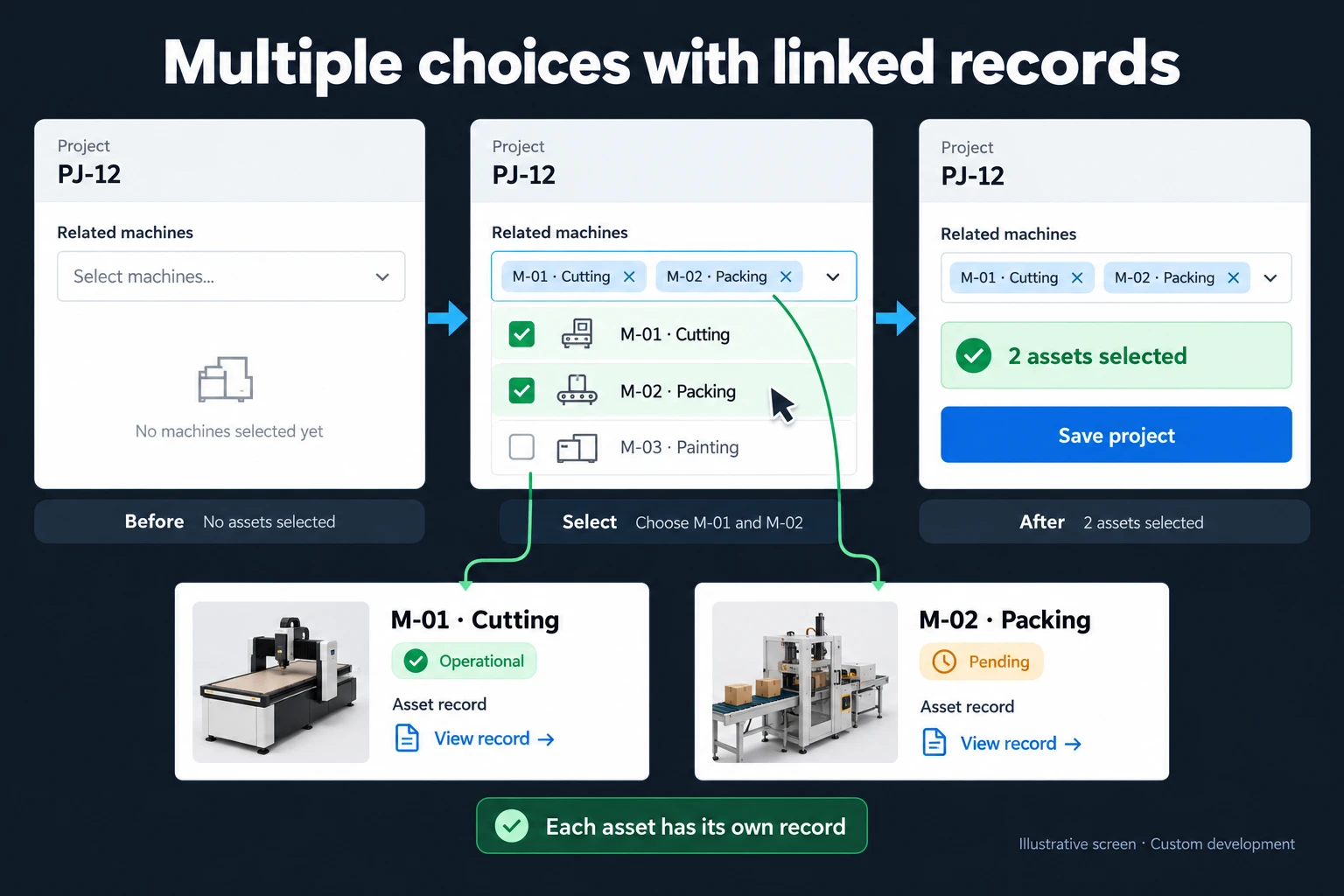 View full size](https://oguzerol.com/gorseller/hizmet-kapaklari/coklu-secimli-iliskili-kayit-formu-webapp-v1-en.webp) # Multi-Select Forms with Related Records: Linking Many Products and People to One Project [Oğuz Erol](https://oguzerol.com/en/about-me/) | 17 min read A multi-select related record form links one record (a project, a service job, a quote) to several others (products, parts, people) and stores each choice as its own link row, never as comma-joined text in one cell. Each link carries its own quantity, date and author, so “how many projects use this product, and how many units” takes one formula. I build these apps for companies; the same logic also works in Excel with three sheets, formulas below. At a fictional machine-line builder, a supplier announces a mandatory firmware update for the S-210 servo drive. Each project’s products sit in one comma-separated cell, and the quality manager’s formula returns 11 projects. In reality S-210 is used in 14 projects, 31 units. Two of the 11 actually use a different model (S-2100), and 5 of the real 14 don’t show up. Field visits planned from the old list would have included 2 wasted trips and missed 7 drives in 3 delivered projects. This page covers form and record design; moving an existing Excel file into a database is covered in [a controlled Excel-to-SQL migration](https://oguzerol.com/en/excel-to-sql-database-migration/). ## Why shouldn’t multiple selections live in one cell? In one cell, a choice becomes text: a report can only search inside it, missing other spellings and catching similar codes, and quantities in brackets can’t be summed. Two forms: - **Comma-separated cell**, such as “M-01, S-210 (x2), PLC-5”: easy to read, hard to count, filter or sum. - **Side-by-side columns**, “Product 1, Product 2, Product 3”: a fourth product brings an “Extra products” column no formula looks at, and each quantity needs another column. The same pattern appears in projects (products, people), service jobs (parts with serial numbers) and quotes (lines with the price offered). One structure fits all three. ## What is a junction table, and why three lists? A junction table is a third list connecting two others: each row is one link between one project and one product. I call each row a **link row**. Here stations, drives and control units are all “products”; the illustration’s “assets” means the same. Its PJ-12 screen shows M-01 · Cutting and M-02 · Packing selected as separate records. Behind it is one link row per product, the drives on a third: | Project no | Product code | Qty | Added by | | --- | --- | --- | --- | | PJ-12 | M-01 | 1 | Project engineer | | PJ-12 | M-02 | 1 | Project engineer | | PJ-12 | S-210 | 2 | Project engineer | Name, unit and supplier belong to the product record; quantity, date added and a “field-updated” flag belong to the link, since the same product appears elsewhere in other quantities. Likewise a person’s role on a project sits on the project–person link, and a quote line’s price and discount sit on the link, so old quotes don’t change with the current price. ## Example: how many projects use S-210? *Sample data, fictional.* A packing and cutting line builder has opened 40 projects in three years; status Open means in the workshop, Delivered means at a customer. In its Excel project list, column D holds each project’s products with commas; years ago someone added column E, “Extra products”. The notice covers S-210, not the similarly named S-2100. The quality manager needs the projects, the units and which are at customers: those get a field visit, workshop projects get the update before shipment. Three formulas in the old file, tested with a script: | formula | result | correct answer | | --- | --- | --- | | `=COUNTIF(D:D,"*S-210*")` | 11 projects | 14 projects | | `=COUNTIF(D:E,"*S-210*")` | 13 projects | 14 projects | | `=COUNTIF(D:D,"S-210")` | 0 projects | 14 projects | | total units | can’t be calculated | 31 drives | Why they go wrong: - **Substring.** `*S-210*` also counts the two “S-2100” projects; Microsoft says the asterisk matches any sequence of characters ([COUNTIFS, Microsoft Support](https://support.microsoft.com/en-us/office/countifs-function-dda3dc6e-f74e-4aee-88bc-aa8c2a866842), read 16 October 2026). - **Spelling.** “S210”, “S 210” and “S–210” (an en dash from the supplier’s PDF) don’t match. Lower-case “s-210” does, since COUNTIF criteria aren’t case sensitive ([COUNTIF, Microsoft Support](https://support.microsoft.com/en-us/office/countif-function-e0de10c6-f885-4e71-abb4-1f464816df34), read 16 October 2026): characters are the problem, not letters. - **Side column.** Two projects list S-210 only in column E. D:E finds them, but the other problems remain. - **Repeats.** “S-210, S-210” is one cell, counted once. - **No wildcard** needs the whole cell to be “S-210”: zero. - **Quantity.** “(x2)”, “x2”, “(4 units)” and “(2)” can’t be summed reliably. The same data in a junction table (columns F and I are explained in the Excel layout below): | question | formula | result | | --- | --- | --- | | How many projects? | `=COUNTIFS(ProjectProducts!B:B,"S-210",ProjectProducts!I:I,1)` | 14 | | How many units? | `=SUMIFS(ProjectProducts!C:C,ProjectProducts!B:B,"S-210",ProjectProducts!I:I,1)` | 31 | | Projects at customers? | `=COUNTIFS(ProjectProducts!B:B,"S-210",ProjectProducts!F:F,"Delivered",ProjectProducts!I:I,1)` | 9 | | Units at customers? | `=SUMIFS(ProjectProducts!C:C,ProjectProducts!B:B,"S-210",ProjectProducts!F:F,"Delivered",ProjectProducts!I:I,1)` | 20 | Formulas use commas; where your regional settings use a semicolon as list separator, Excel expects semicolons. No wildcard, because the code was picked from a list and the cell holds only the code. S-2100 is counted separately: 2 projects, 3 drives. ### The decision, made the same day - **9 projects at customers, 20 drives:** a field visit, assigned to the person listed as commissioning engineer on that project’s project–person link. - **5 projects in the workshop, 11 drives:** an “S-210 firmware version” item on the pre-shipment checklist. - **Each update goes on the link row** (flag, date, who), not the product record. The old 11-project list would have meant 8 field visits, 2 of them to the two S-2100 projects; 7 drives in 3 delivered projects would have been missed, and 6 workshop drives in 2 projects would have skipped the check. With one row per choice picked from a list, the old file could have given this answer too. The problem was the layout, not Excel. ## If you stay in Excel: the layout I suggest Create three sheets, format each as an Excel table and feed the dropdowns from them. Microsoft says a dropdown whose source is a table updates automatically when table items are added or removed ([Microsoft Support](https://support.microsoft.com/en-us/office/create-a-drop-down-list-7693307a-59ef-400a-b769-c5402dce407b), read 16 October 2026). - **Projects:** A Project no, B Customer code, C Status (Draft, Open, Delivered, Cancelled), D Project manager - **Products:** A Product code, B Name, C Group, D Status (Active, Inactive), E Link rows - **ProjectProducts:** A Project no, B Product code, C Qty, D Date added, E Added by, F Project status, G Duplicate check, H Removed (date), I Counts A and B in ProjectProducts come from dropdowns, never free text. The formulas: - F2, project status: `=VLOOKUP(A2,Projects!A:C,3,FALSE)` - I2, whether the link is live: `=IF(H2="",1,0)`. Don’t delete the row of a product removed from a project; put the removal date in H. I turns 0 and the row drops out of counts but stays in history. Removing S-210 from PJ-38 would take the count to 13 projects, 30 units. - G2, times the same pair was entered as live: `=COUNTIFS(A:A,A2,B:B,B2,I:I,1)`. Above 1 is a duplicate. Had PJ-17’s “S-210, S-210” become two rows, G2 would show 2 and the count would read 15, not 14. - Products!E2, link rows using the product, removed ones included: `=COUNTIF(ProjectProducts!B:B,A2)`. For S-210, 14. Above zero, don’t delete; set it to Inactive. **To block duplicates as they are typed**, use data validation. Microsoft’s help page gives `=COUNTIF($A$2:$A$10,A2)=1` as a custom formula for unique values in one column ([Microsoft Support](https://support.microsoft.com/en-us/office/apply-data-validation-to-cells-29fecbcc-d1b9-42c1-9d76-eff3ce5f7249), read 16 October 2026). Column B already has the dropdown rule, so I put my pair version on column C (Qty): `=COUNTIFS($A$2:$A$500,A2,$B$2:$B$500,B2,$I$2:$I$500,1)=1`. Enter the rule in C2 first (Data > Data Validation > Custom), then copy it to C3:C500; it covers rows 2–500 only, and Qty must be typed after A and B. A repeated pair can’t get a quantity; re-adding a removed link stays allowed. I tested this adaptation with a script, not in Excel. Microsoft says validation only works on data typed into a cell, not on copied or filled data ([Microsoft Support](https://support.microsoft.com/en-us/office/more-on-data-validation-f38dee73-9900-4ca6-9301-8a5f6e1f0c4c)), so keep column G. Two limits remain: nothing stops deleting a Products row (link rows keep the code, formulas return errors), and nothing records who changed a link. **Moving the old comma-separated cells:** in Power Query you can split column D at each comma into rows; Microsoft’s documentation shows this as choosing rows as the split direction in the advanced options ([Microsoft Learn](https://learn.microsoft.com/en-us/power-query/split-columns-delimiter), read 16 October 2026). Trim the leading spaces afterwards, or ” S-210” and “S-210” count as different values. Splitting doesn’t merge “S210” with “S-210” or turn “(x2)” into a quantity; you need a small table mapping each spelling to a code. **Finding the spellings:** search wide, then narrow. In the sample file `=COUNTIF(D:E,"*210*")` returns 16 and `=COUNTIF(D:E,"*S-210*")` 13; the 3 cells in between are spelled differently. Filtering the split column for “210” shows 10 distinct pieces; without the quantity text, 6 spellings remain (one is S-2100). ## Dependent dropdowns: group first, then model A dependent dropdown narrows its options according to what was picked in the previous list. Here the user picks a product group (drive, station, control unit), then sees only active models in it. S-210 and S-2100 sit on separate rows with code and name, and since nobody types the code, “S 210” can’t be entered. Inactive products drop out but still read correctly on old links. Narrowing options by user, customer or stock is covered in [dependent dropdown custom forms](https://oguzerol.com/en/dependent-dropdown-custom-forms/). Spreadsheets today (official help pages, read 16 October 2026): - **Excel’s dropdown** picks one item per cell; Microsoft’s dropdown page (linked above) describes no multiple-selection option. - **Google Sheets** offers an “Allow multiple selections” option on chip-style dropdowns, but Google says that on mobile you currently can’t select more than one option even with it on ([Google Sheets Help](https://support.google.com/docs/answer/186103)). Fine for tagging at a desk, not for selecting on phones in the field. ## What happens to linked records when a record is deleted? What happens on deletion is a rule written in advance for each record type. I suggest three: a product in use is never deleted, only made inactive; deleting a draft project deletes its link rows; removing a link leaves both project and product in place. Databases write this into the relationship; the PostgreSQL documentation uses this very case: deleting a product still referenced by an order is blocked, and deleting an order deletes its order items, because an item is part of the order while a product is a separate thing ([PostgreSQL documentation, foreign keys](https://www.postgresql.org/docs/current/ddl-constraints.html)). | deleted or changed | behaviour I suggest | prevents | | --- | --- | --- | | Product with links | Not deleted; made inactive (not offered for new projects, shown on old ones) | 14 projects of history vanishing in one click | | Unused product opened by mistake | Can be deleted | Dead codes | | Draft project | Can be deleted, with its link rows | Orphaned link rows | | Open or delivered project | Set to Cancelled, not deleted | Losing the record of a system at a customer | | Product removed from a project | Row kept with a “removed” flag and date | No answer to “was this drive ever here?” | | Change on a delivered project | Reason required; someone else approves | Field changes never reaching the record | | Employee who leaves | Account closed; name and role stay on old links | Losing commissioning history | Making a product inactive doesn’t touch link rows: old reports and counts stay the same, and the product only drops out of new selections. In this design renaming doesn’t break links either, as they point to a fixed internal identifier. Duplicate product records can be merged by an authorised person; links move over and the merge is logged. ## Form and business rules: my starting point These are my starting point, tuned with the first month’s records. Rules on a single record’s own fields belong to a [rules-based data entry form](https://oguzerol.com/en/rules-based-data-entry-form/); these govern how records link. | rule | my suggestion | prevents | | --- | --- | --- | | Uniqueness | Same project and product can’t be added twice; quantity goes up. If tracked per sub-assembly, that field joins the rule | Duplicates inflating the count | | Source | Products picked only from the list; a missing one needs a request, and purchasing or engineering opens the record | “S 210” as free text | | Inactive product | Not offered for new links; visible on old ones | A discontinued model in a new project | | Re-check on submit | A product made inactive while the form was open is checked again | Trusting a list seen once | | Quantity and unit | Quantity on the link, unit from the product; no zero or negative values | Quantities buried in “(x2)” | | Flagged product | If wanted: the quality manager flags a product; whoever adds it to a new project sees the warning and confirms | S-210 quietly entering a new project after the notice | ## Who does what, and how is the audit trail kept? The core rule I suggest: a change on a delivered project is never approved by the person who made it. - **Project engineer:** links and removes products and people on their own projects; requests changes on delivered ones. - **Project manager:** approves change requests on their own projects; their own changes go to the quality manager. - **Purchasing:** opens, updates and deactivates product records; sees usage everywhere but can’t change links. - **Quality manager:** runs the usage report and field list, approves merging product records; sets flags if that rule is built. - **Service and commissioning team:** sees only assigned projects; records field updates on link rows. - **Management and auditors:** see everything, change nothing. Everyone signs in with their own account, or the approval rule means nothing. **The audit trail I suggest** is a row per change that can’t be deleted through the app: who, when, which record, old and new value, reason. Two rows from the example: - **PJ-19, moving from the old file.** S-210 was only in column E. The project engineer opened the link row (quantity 1, reason “old file, Extra products column”); the project manager approved, and PJ-19 joined the field list. - **PJ-11, the same week.** The service engineer recorded all 4 drives as updated, and PJ-11 showed as “done” on the field list. A head-office report can be built to show product usage, field updates still pending and changes awaiting approval; all records are exportable as Excel or CSV. ## What does AI do, and where does it stop? AI suggests; it doesn’t decide. Rules and counts belong to the app, approval to a person. Three uses: 1. **Matching spellings when moving old records.** The model can suggest mapping “S210”, “S 210” and “S–210” to S-210, keeps “S-2100” apart and lists any spelling it isn’t sure of as an exception. A person approves row by row; the model never merges similar codes on its own. 2. **Line items from a quote PDF.** If built, the model drafts links that enter the record only after the engineer approves. 3. **Reports from a question.** If built, “which delivered projects use S-210” becomes the app’s own query; the number comes from the query, not the model. No row reaches the model without passing the permission filter, and its answers name only what the person asking may see. **Person links are personal data.** Send the model codes, not names, and check with your data protection lead which fields may go to an AI service. **In Turkey**, sending personal data to an AI service abroad falls under Article 9 of KVKK as amended from 1 June 2024; the [Turkish version of this page](https://oguzerol.com/coklu-secimli-iliskili-kayit-formu/) gives the details. ## When is Excel, a form service or your current system enough? I wouldn’t recommend a separate app when: - The choices are only tags, never counted and without quantity or date. - One person enters records and keeps the three-sheet layout with discipline. - Your ERP already holds a material list per project and your team uses it. - Your office suite has a no-code app builder that lets you add fields (quantity, role) to the link row, block deleting a record in use and limit each role to its own projects. Try it with your own licence first. If you use a form service, look at how a multi-answer question appears in your own response export. If the choices sit in one cell as joined text, this page’s counting problem is yours too. ## How do we start, and who owns the data and code? In the first step we look at your sheet: where choices sit, and how many spellings one product has. The written output covers record types, link fields, delete rules, roles and the first version’s scope; screens are built to your needs, and which go into the first version is set in writing. The first version starts with one relationship (project–product); person links, flagged products and AI suggestions can follow as needed. The app runs on a server (a VPS) that can be opened in your company’s name. Records are yours, exportable in full as Excel or CSV at any time. There is no per-user licence; the cost is the server’s monthly fee plus maintenance, so in a small or mid-sized team adding users doesn’t change it. The source code sits in a repository you can access, with run instructions, dependencies and known limitations. Because person links carry personal data, I assess access, security, hosting and maintenance separately at the start. **What if the ERP changes?** Only the product import is rebuilt; projects and links stay with you, and I share the import’s scope in writing beforehand. Send a few rows of your project or quote sheet, names masked, through the [contact page](https://oguzerol.com/en/contact/). In the first meeting we check how many spellings one product has and how long “how many projects use this” takes to answer today. ## Frequently Asked Questions ### What happens to old projects if a supplier changes a product’s code? The link points to an internal identifier, not the code. The code field is updated and old projects stay on the same record. If the new code really is a different product, a new record is opened, the old one made inactive, and a “replaced by” link can connect them. ### How is the same product recorded if it’s used in two sub-assemblies of one project? A sub-assembly field is added to the link row and uniqueness covers project, product and sub-assembly. The project’s total is the sum of both rows. The app can be built to count distinct project numbers, so the project counts once; we set that in writing in the first step. In the Excel layout above COUNTIFS counts rows, so it would count twice and you’d need to correct for that. ### Can quote line items be carried over to the project later? It can be built as needed. For example, when a quote is accepted its lines are copied to the project as draft links for the project engineer to approve. Price and discount stay on the quote; product and quantity move to the project. A later revision doesn’t change the project’s links by itself; a list of differences can be produced. We set the scope in writing in the first step. [Back to top ↑](https://oguzerol.com/en/multi-select-related-record-form/#icerik) ## You may also find these useful [Excel Multi-Select Dropdown: VBA Code and AlternativesMultiple selections in an Excel dropdown: why data validation picks one value, a working VBA macro, a macro-free separate-rows method and how to choose.](https://oguzerol.com/en/excel-multi-select-dropdown/)[Google Sheets Multiple Selection Dropdown: Set It UpEnable a Google Sheets multiple selection dropdown in chip format. Check mobile limitations and distinguish cell labels from separate related records.](https://oguzerol.com/en/google-sheets-multiple-selection-dropdown/)[Dependent Dropdown Forms for Excel and Google Sheets WorkflowsMove dependent dropdowns into a custom web form that checks product compatibility, stock and user access together. Explore a practical catalogue example.](https://oguzerol.com/en/dependent-dropdown-custom-forms/) [Browse all articles →](https://oguzerol.com/en/articles/) WHAT YOU CAN ASK FOR ## How do I work? Work-hour packages Tell me about your business and what you need on WhatsApp or by phone; we agree on **a work block of somewhere between 5 and 40 hours** and I start doing what is needed. What you get is not a calendar window — it is net working hours spent directly on your business. I can use 40 hours working three days straight, or deliberately spread it out and finish it over a year — whatever the work calls for. I do not spend my time estimating how long something will take, I spend it doing the work; every hour I spend leaves a lasting result in your business. We keep going for as long as you find it useful. WORK BLOCKS ## Why not monthly? Is 40 hours a week? On a fixed monthly fee both sides are watching the wrong thing: you watch a fixed cost, the other side watches how many more contracts like this they can line up. Working by the hour puts us both in front of the same thing — the real value of the work that got done. I know not having an upfront answer to "how much will this cost in total?" is the natural cost of this model. But instead of paying a fixed fee for months to a setup that is not producing results, you only pay for the qualified time spent on your work — and you see exactly where that time went, start to finish. That is why my clients keep coming back. 5hours300€ + VAT60€ per hour[Choose this block](https://wa.me/905496546489?text=Hi%2C%20I%27d%20like%20info%20about%20the%205-hour%20work%20block.) 10hours500€ + VAT50€ per hour[Choose this block](https://wa.me/905496546489?text=Hi%2C%20I%27d%20like%20info%20about%20the%2010-hour%20work%20block.) 20hours800€ + VAT40€ per hour[Choose this block](https://wa.me/905496546489?text=Hi%2C%20I%27d%20like%20info%20about%20the%2020-hour%20work%20block.) 40hours1,400€ + VAT35€ per hour[Choose this block](https://wa.me/905496546489?text=Hi%2C%20I%27d%20like%20info%20about%20the%2040-hour%20work%20block.)