Source: https://oguzerol.com/en/internal-knowledge-base/ [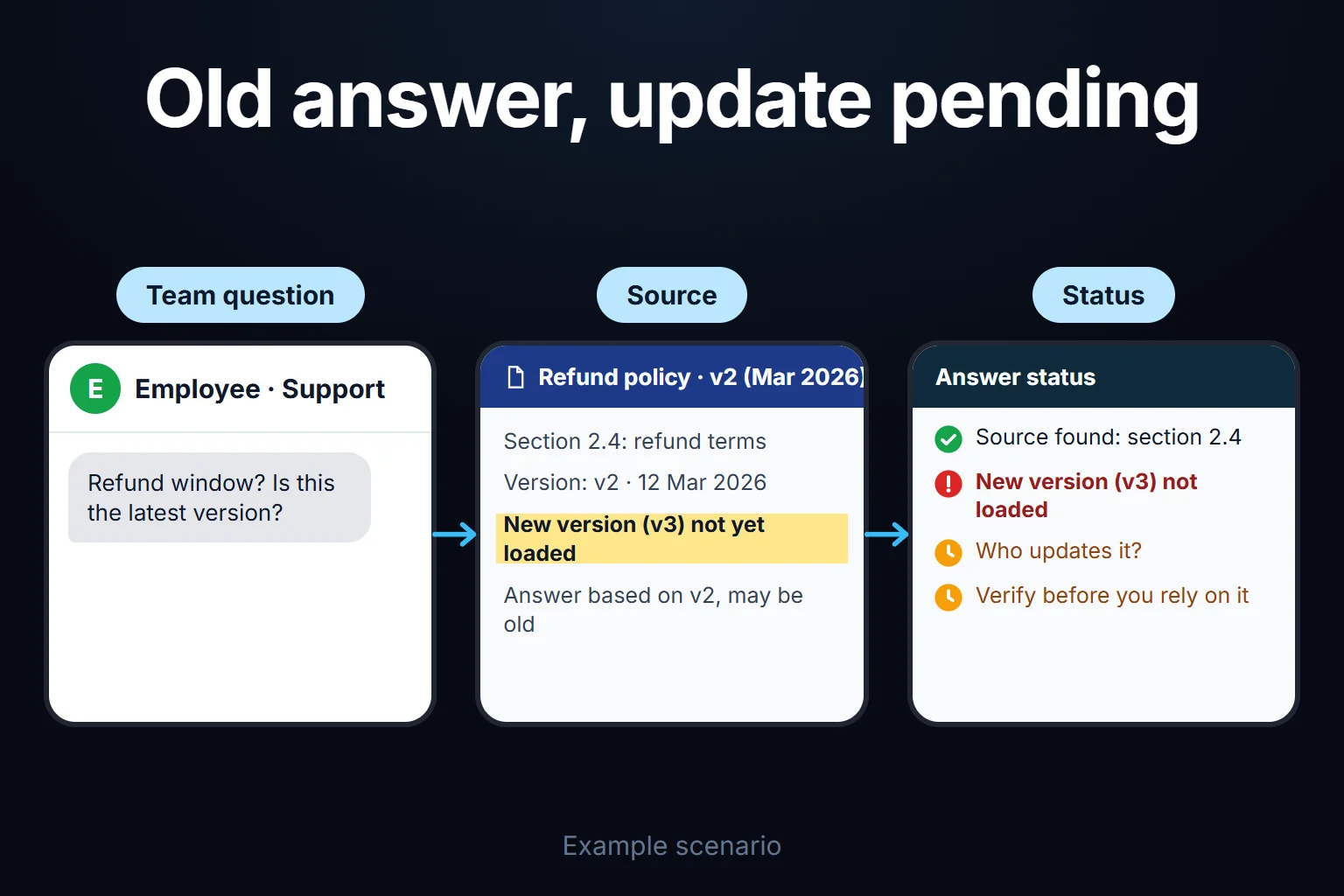 View full size](https://oguzerol.com/gorseller/senaryo/internal-knowledge-base-senaryo-en.webp) # Internal Knowledge Base | Answers in Seconds [Oğuz Erol](https://oguzerol.com/en/about-me/) | 4 min read | Published: 29 July 2026 | Updated: 21 August 2026 ## Quick summary Instead of asking you, your team asks the system directly and gets an answer in seconds — procedures, pricing, past projects. Ongoing upkeep included. If “how did this procedure go” keeps landing on you or one experienced employee every time, part of that person’s time is being spent acting as institutional memory. An internal knowledge base hands those questions to AI instead: procedures, price lists, and past project notes get loaded into a system, the team asks directly, and gets an answer in seconds. This page is about a system your team **uses daily and keeps up to date on an ongoing basis**. If you’re curious about the technical side — which tool (Claude Project, a RAG setup) is the right choice and when, the step-by-step process — see [Setting Up an AI That Answers From Your Documents](https://oguzerol.com/en/setting-up-an-ai-that-answers-from-your-documents/); this page is its **HR/operations-focused, continuously run** application. ## What’s Covered - **Content gathering.** Procedures, FAQs, price lists, past project summaries — whatever the team asks about frequently gets collected. - **Setup.** Questions become askable from a channel your team already uses — Slack, Teams, email, or a simple web interface. - **First test round.** Tried against questions the team will actually ask; incomplete or vague answers get fixed. - **Keeping it current.** When a procedure changes or a new price list comes out, the system gets updated too — otherwise it keeps presenting outdated information as if it were correct. ## Who This Makes Sense For Any team where the same questions get asked over and over, and where a large share of an experienced employee’s time goes to answering them. The benefit shows up most clearly with high new-hire turnover (onboarding questions) and in branch/distributed teams, where without a central source each location applies its own version of “what we know.” ## The Mistake I See Most Often **Setting it up and forgetting to update it.** A knowledge base freezes at the information it had when built; even after a procedure changes, the system keeps giving the old answer. That’s worse than having no system at all — because the employee now trusts the wrong information because “the system said so.” Whose job it is to keep it current needs to be settled during setup. ## What It Does Not Do - **It’s not a customer-facing support system.** This is for your own team’s use; customers asking questions on your website is separate work — see [Add a Bot That Answers Questions to Your Website](https://oguzerol.com/en/adding-a-question-answering-bot-to-your-website/). - **It doesn’t make the decision itself.** For something like “can I offer this customer a discount,” the system shows the procedure; the person still makes the call. - **It doesn’t automatically filter sensitive information.** Keeping sensitive data like salary information out of the system entirely, or access-restricted, gets planned during setup. ## You Can Hire Me for This **You can hire me for this:** setup is remote, billed hourly; keeping it current can also be taken as an optional monthly service. Setup usually takes 3-7 days, depending on how many topics need covering. To start, I ask for the 10-15 questions your team asks most often — to build the system around your actual need. Write to me from the [contact page](https://oguzerol.com/en/contact/). ## Frequently Asked Questions ### At what team size does this make sense? If the same question gets asked to multiple people repeatedly, it makes sense regardless of team size — the benefit shows up whether the team is 5 people or 50. Only the number of topics to cover changes. ### What happens if it gives a wrong answer? A properly built system should say “I don’t have this” on something outside its knowledge, rather than guess. For sensitive topics (salary, legal, health), I recommend having a person verify the output. ### Does it work inside our existing Slack/Teams, or do we need a separate app? It usually works inside your existing channel — no new app for the team to learn. A separate interface is also possible if you’d prefer; we discuss that before setup. ### Is keeping it current my responsibility? Yours or mine — we decide that together. If content changes often, I’d recommend a monthly maintenance service; if it rarely changes, you can update it yourself, and I provide a short usage note. [Back to top ↑](https://oguzerol.com/en/internal-knowledge-base/#icerik) ## You may also find these useful [Document Approval and E-Signature Workflow SetupLeave request, purchase request, contract sign-off — no more paper circling the office. A digital chain where who approved and who's holding it up is visible.](https://oguzerol.com/en/document-approval-and-e-signature-workflow-setup/)[Adding a Question-Answering Bot to Your WebsiteAdding a question-answering bot to your website: ready-made widget vs. custom build, the step-by-step process, and a real example from my own client work.](https://oguzerol.com/en/adding-a-question-answering-bot-to-your-website/)[AI Agent vs Chatbot: The Difference Between 'Answering' and 'Doing'A chatbot answers questions, an AI agent completes the task end-to-end. A comparison table and concrete examples to help you figure out which one you need.](https://oguzerol.com/en/ai-agent-vs-chatbot/) [Browse all articles →](https://oguzerol.com/en/articles/)