Source: https://oguzerol.com/en/google-sheets-two-way-sync-app/ [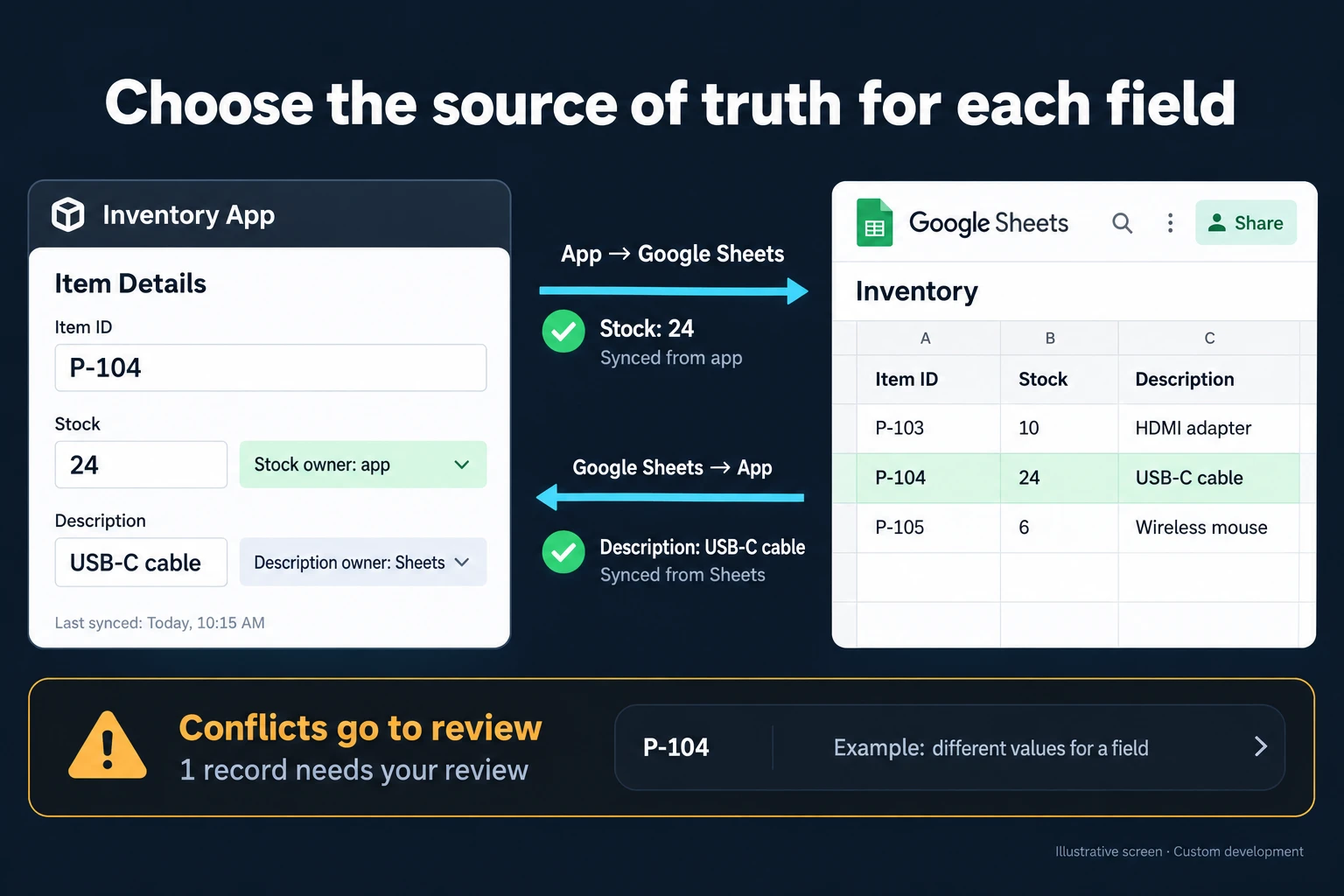 View full size](https://oguzerol.com/gorseller/hizmet-kapaklari/google-sheets-cift-yonlu-senkronizasyon-webapp-v1-en.webp) # Google Sheets Two-Way Sync: Conflicts, Deleted Rows and Sync Delay [Oğuz Erol](https://oguzerol.com/en/about-me/) | 17 min read Two-way sync between Google Sheets and an app or ERP is safe when every field has one owner and records match on a stable record key, never a row number. Without both, “last write wins” quietly loses data, and a sync that treats a deleted row as a delete instruction can close an open order. I build it as part of a custom web app. In a fictional sample month, sales reps track open orders in Sheets, planners in an app. On day 14 a rep deletes 23 rows to “clean up”; 6 are unfinished partial shipments. Last month’s script would have cancelled them in the app. The new sync deletes nothing and asks the sales manager. Several people typing into one sheet at once is covered on the [concurrent data entry page](https://oguzerol.com/en/concurrent-data-entry-app/); this page is about two systems holding one record. ## How does two-way sync work? Two-way sync is a loop comparing changes to one record in two systems at set intervals, updating each field only from its owner. Six terms: - **Record key:** the never-changing value identifying a record on both sides; here, the order number. Row numbers and names move with sorting and renaming. - **Field owner:** the system holding a field’s correct value; the other side cannot change it. - **Last synced value:** what both sides last agreed on, stored per field; it shows which side changed. - **Conflict:** the same field changed differently on both sides since the last synced value. - **Error queue:** changes that could not be processed (unreadable date, unowned column, unknown header). They wait, neither applied nor discarded. - **Control count:** open records and total open quantity, counted hourly on both sides. A mismatch means something went missing. Each cycle reads the tab in one request, takes Sheets-owned changes and sends the app’s in one batch write. ## Sample month: 418 open orders, six reps, two systems *Sample data, fictional.* A distributor of industrial fasteners and hydraulic parts. Six reps and a sales assistant enter due dates, priority and notes in an “Open orders” tab; in the shipping app two planners set ship dates and the warehouse updates status. 20 working days. The month opens with 418 open orders; 655 arrive, 690 ship and move to a “Closed” tab, leaving 383. **Last month** an employee’s script copied the whole tab both ways every 10 minutes, matched rows by row number and trusted whichever copy it processed later. At month end the sales operations specialist found: | problem found | count | | --- | --- | | Ship date written onto another order’s row after sorting by customer | 14 | | Rep’s due date or note overwritten by an older copy from the app | 9 | | Product code lost its leading zero (0815 → 815), then written back to the app | 31 | | Open order closed in the app because its row was deleted in Sheets (noticed when the customer called) | 2 | **This month** the sync ran inside the app: order number as record key, an owner for every column, a cycle every 5 minutes, 07:00–19:00 on working days. It took 1,962 field changes from Sheets and wrote 4,215 to it. Along the way: - **12 rejected changes.** The ship date column was protected in “show a warning” mode, which asks for confirmation but doesn’t block edits ([Google Sheets Help](https://support.google.com/docs/answer/1218656), 16 October 2026). Twelve times someone confirmed and typed a date heard from a customer. The sync restored the planner’s dates and queued the changes. - **7 conflicts** on priority, the only two-way field, changed by rep and planner in the same cycle. Neither overwrote the other; the planning lead resolved six that day, one next morning. - **19 unreadable due dates** (“end of month”, “next Tuesday”) never reached the app. - **A header changed on day 9.** “Customer due date” became “Due date (customer)”. The sync stopped whole cycles for 2 hours 10 minutes (26 cycles). Once fixed, the next cycle compared everything with the last synced values and lost nothing. Last month’s script, matching columns by position, wrote into the wrong column on such days. Hence the rule: if any expected header is missing, the whole cycle stops, never part of it. ### The decision at month end On day 14, 23 rows vanished in one cycle; the hourly control count showed 401 open orders in the app, 378 rows in the tab. The rep had filtered status for anything containing “shipped”, catching “Partially shipped” too. 17 had fully shipped and would soon move to Closed; 6 still had quantities to send. Above the mass-loss threshold, 5 rows that day (calculated below), the sync closed and rewrote nothing and alerted the sales manager, who had the 6 partial shipments restored and the 17 moved to Closed. It was the threshold’s only trigger that month. The real decision came from asking why: the tab was crowded. My rule now: fully shipped orders move to Closed after 2 working days (previously 7); partial shipments get their own colour and stay until the last line ships. ## Who owns which field? The field ownership table records where each column’s correct value lives and what happens if the other side changes it: | column | owner | if changed in Sheets | | --- | --- | --- | | Order number (record key) | App | Protected. Rejected, old value restored | | Customer, product code, quantity | App | Protected. Rejected | | Customer due date | Sheets | Goes to the app; not a date: error queue | | Planned ship date, status | App | Protected. Rejected | | Priority | Two-way | Conflict rule | | Rep’s note | Sheets | Goes to the app | | Last sync time | App | Protected. Written every cycle | New orders are created only in the app; a row added by hand without a record key creates nothing and goes to the error queue. Keep two-way fields minimal: here only priority, which rep and planner both must change. Each needs a conflict rule and a person to apply it. Google also says protected ranges shouldn’t be used as a security measure ([Google Sheets Help](https://support.google.com/docs/answer/1218656)). They reduce accidents; the real safeguard is a sync that ignores the non-owning side. ## Who wins in a conflict? Neither side wins automatically: for a two-way field both values are kept, only that field is on hold until resolved, and a person decides. Other fields can’t conflict, because the non-owning side’s changes are rejected. “Last write wins” knows less than you’d think. A Sheets API value read doesn’t say when or by whom a cell changed; I found no such field in the documentation. My reading: “last write” means the order the sync noticed changes, not the order people made them. Last month’s 9 overwritten notes came from that: the script processed the app’s older copy after the rep’s note. Priority has three levels: Normal, High, Urgent. My rule: - Changed on both sides to the same value: not a conflict. - Different values: only the priority field is marked “on hold” on both sides; the record’s other fields keep syncing. Priority stays at the last synced value until resolved, with both new values shown. - Conflicts involving “Urgent” sit at the top of the planning lead’s screen; my starting point is 2 hours, after which they move to the sales manager’s list. - The planning lead decides; if one change is the lead’s own, the sales manager decides. - Conflicts older than 1 working day move to the sales manager’s list. On day 11 a rep moved a “High” order to “Urgent” because the customer’s line would stop; in the same cycle a planner set “Normal” because material was a day late. Under “app wins” it would silently have become Normal. Priority stayed on hold at High; within an hour the lead chose “Urgent” with a partial shipment. No sync could know that. ## What happens to a deleted row? A row deleted in Sheets deletes nothing in the app. A missing row may mean a filter-and-delete, a rebuilt tab or a wrong paste, not a finished record. My rules: - **Closing a record is the owner’s job.** The order becomes “shipped” or “cancelled” in the app; the sync then moves the row to Closed. - **An occasional missing row is written back** in the next cycle if the record is still open, and logged so someone can check who deleted it. - **Mass disappearance stops the sync.** Above the threshold in one cycle, the sync stops rewriting too and alerts. The cause is usually structural: a deleted tab, a broken filter, an old file pasted over. My starting point is one measure: 1.2% of open rows, rounded up, minimum 5; with 401 open rows, that’s 5. Rows the sync itself moves to Closed (about 35 a day here) don’t count, since it logs those moves. For your tab, multiply open rows by 0.012, round up, and use 5 if lower: 24 for a 2,000-row tab. Tune the rate with the first month’s data. Cell edit history may not show added or deleted rows, format changes or formula changes, Google says ([Google Docs Editors Help](https://support.google.com/docs/answer/190843), 16 October 2026). Version history shows earlier versions of the file; the sales manager compared two to find the deletion. ## How often does it sync, and how long is the delay? The example syncs every 5 minutes: a change arrives within 5 minutes plus cycle time (2.5 minutes on average), over 144 cycles a working day (2,880 a month). Fine for shipment planning; if stock must be reserved within seconds, Sheets is the wrong place. Why a fixed interval rather than “on change”? Three official facts: - **API changes don’t run triggers.** Script executions and API requests don’t cause Apps Script triggers to run ([Apps Script triggers](https://developers.google.com/apps-script/guides/triggers)), so a trigger-only sync misses changes written by other systems. - **Drive notifications don’t say which cells changed.** They carry no content, and a file channel lasts at most a day without renewing ([Drive API push notifications](https://developers.google.com/workspace/drive/api/guides/push), read 16 October 2026). - **Trigger intervals are fixed.** Apps Script minute intervals are 1, 5, 10, 15 or 30 ([ClockTriggerBuilder](https://developers.google.com/apps-script/reference/script/clock-trigger-builder), read 16 October 2026). On your own server you choose. **Are quotas a problem?** Google’s Sheets API limits are, separately for reads and writes, 300 requests per minute per project and 60 per minute per user per project, with no daily limit. My reading: “user” here is the Google account the sync connects with, so with one account, the 60 limit applies to it. Over quota you get “429: Too many requests”; Google recommends exponential backoff. Recommended maximum payload is 2 MB; requests over 180 seconds time out ([Sheets API usage limits](https://developers.google.com/workspace/sheets/api/limits), read 16 October 2026, page updated 3 September 2026). In the example, one read and one batch write per cycle is at most 5,760 requests a month, 0.2 reads per minute against 60; the 418-row tab is about 0.15 MB (assuming ~350 bytes per row). Quota fills when writing cell by cell: 180 morning ship-date updates sent one by one in the same minute would be 3 times the per-user quota, and 120 would get a 429. As a batch, it’s one request. ## Dates, decimals and leading zeros My rule for formats: read unformatted values, write text as text. - **A date is a number.** Sheets stores dates as decimals, the whole part counting days since 30 December 1899 ([Sheets API formats](https://developers.google.com/workspace/sheets/api/guides/formats)). Read as formatted text, “04/03” is 4 March or 3 April depending on locale (my example). I read serial numbers (`UNFORMATTED_VALUE` and `SERIAL_NUMBER` in the API). - **Locale changes formatting:** File > Settings > Locale sets default currency, date and number formats ([Google Docs Editors Help](https://support.google.com/docs/answer/58515)), so the sync compares values, not displays. - **Text can change on the way in.** With “user entered”, strings may become numbers or dates; with “raw”, values are stored as-is ([ValueInputOption](https://developers.google.com/workspace/sheets/api/reference/rest/v4/ValueInputOption)). That’s how 31 codes went from 0815 to 815: the old script wrote as “user entered”. Codes and order numbers are written as text, raw. - **Due date cells get date validation.** Quantities are read unformatted too, so nobody guesses whether “1.250” is twelve hundred and fifty or one point two five. ## How do you notice that sync has quietly broken? Three numbers show a broken sync before anyone notices missing data: the last successful cycle, the control count and the error queue, all visible on both sides. - **Last successful cycle,** shown in a “Last sync” column and in the app. Three cycles (15 minutes) without success alerts the sales manager and planning lead; that caught day 9’s header change. - **Control count.** If the hourly count matches but the open quantity doesn’t, a quantity change was missed; if the count differs, rows are missing, as on day 14. - **Error queue:** size and oldest item’s age, since queued changes aren’t applied. Items older than 1 working day go to the sales manager. Google says installable triggers always run under the creator’s account and failure summaries go by email ([installable triggers](https://developers.google.com/apps-script/guides/triggers/installable)). My inference: a script in an employee’s account, like last month’s, emails failures to someone who may be away or gone. I suggest an account not tied to a person, with alerts going to a role. ## If Sheets alone or a one-way transfer is enough The safest two-way sync is the one you never build. I wouldn’t recommend one when: - **One side only reads.** Then a one-way transfer will do; see the [scheduled API data import page](https://oguzerol.com/en/scheduled-api-data-import-app/). - **The data can live in one place.** A small team with no second system can use one protected, validated tab; see [Google Sheets as a database](https://oguzerol.com/en/google-sheets-as-a-database/) for where that stops working. - **Everyone can move to the app.** If the reps’ work fits an app screen, do that instead. - **Your ERP or CRM has its own Sheets connection** with documented key, conflict and deletion behaviour. Use it fully first. - **An off-the-shelf integration service may do the job.** Before choosing, ask how it handles three things: field ownership, a conflict rule and a mass-loss threshold. - **Changes are rare,** like a weekly price list: export and import under control. ## Who changes what, and how is the audit trail kept? The basic rule I suggest: nobody resolves their own conflict. - **Sales rep:** changes due date, priority and notes on their own orders; sees ship status. - **Sales assistant:** edits reps’ fields; fixes unreadable dates. - **Shipping planner:** changes ship date, status and priority in the app. - **Planning lead:** resolves priority conflicts; ones involving the lead’s own change go to the sales manager. - **Sales manager (rule owner):** changes ownership, thresholds and the Closed rule; decides mass-disappearance alerts. - **Management and auditor:** see both sides and the trail; change nothing. Anyone with access to a tab sees every row; if reps should see only their own customers, each can get a separate file. **The audit trail** holds an undeletable line per sync change: time, cycle, record key, field, old and new value, source side, rejection reason, and who resolved a conflict and why. Sheets-side, an API read doesn’t say who wrote a value, so the trail records the row’s rep and the cycle. Day 14’s 23 rows are logged as “mass disappearance”, with the rewrite and move decision under the sales manager’s name. ## What does AI do, and where does it stop? AI suggests; it doesn’t decide. It helps in two places: 1. **A date from unreadable text.** For “next Tuesday”, the model suggests a date. In the fictional month it suggested 15 of the 19, none for 4 (such as “customer will call back”); the assistant accepted 13 and corrected 2. Nothing reached the app until accepted. 2. **A mapping for a renamed header.** Seeing “Due date (customer)”, the model suggests “Customer due date”. The rule owner approves. It never resolves conflicts or deletes rows, and no row goes to the model without passing the permission filter first: a date suggestion sends only the cell text and reference date, never the customer name. **Rep notes can carry personal data,** such as a contact’s phone number, so they never go to the model. The EU GDPR limits personal data to what the purpose needs ([Art. 5(1)(c)](https://eur-lex.europa.eu/eli/reg/2016/679/oj)), as does the [UK GDPR](https://www.legislation.gov.uk/eur/2016/679/article/5). **In Turkey**, KVKK (Law No. 6698) Article 4(2)(ç) sets the same principle, and sending a field with personal data to an AI service abroad may fall under Article 9, rewritten by [Article 34 of Law No. 7499](https://www.resmigazete.gov.tr/eskiler/2024/03/20240312-1.htm) (Official Gazette 12 March 2024, No. 32487; in force 1 June 2024); I read the current text on mevzuat.gov.tr on 16 October 2026. I give no legal advice; I list in writing which fields go to the model, for your legal adviser to assess. ## How do we start, and who owns the data and code? In the first step we review your tab, what your app or ERP can expose, and recent changes. Its output puts in writing the field ownership table, record key, conflict and deletion rules, interval, roles and first-version scope. The most common mistake I see in automation projects is picking the most complex process to automate first, so version one runs one way, app to tab. Once control counts match for a few weeks, Sheets-owned fields open; the two-way field comes last. The app runs on a virtual private server (VPS) that can be opened in your company’s name. The data is yours, exportable as Excel or CSV whenever you want. In a small or mid-sized team there is no per-user licence; the cost is server plus maintenance. The source code sits in a repository you can access, with run instructions, a dependency list and known limitations. The Google account the sync uses is set in writing in the first step, and access and security are assessed separately because notes can carry personal data. **What if your ERP or the tab changes?** Records and the audit trail stay. Possible routes for reading from and writing to your ERP are an API, scheduled export or import files, and a read-only database view; which one depends on what your ERP offers and is set in writing in the first step. Send a copy of your tab, names and notes masked, with the fields each side changes, through the [contact page](https://oguzerol.com/en/contact/). We start from which fields truly need two-way sync. ## Frequently Asked Questions ### What happens if someone copies and pastes a row, or duplicates the tab? A copied row carries the same record key; when one key appears twice, neither row is processed and both go to the error queue. A duplicated tab or file copy isn’t synced: the sync is bound to one tab in one file. ### What happens when an existing sheet is connected for the first time? A one-off matching links each row to its app record by key; rows without a key or match are listed, nothing is auto-created. Two-way sync starts only when that list is cleared. ### How many people can stay on Sheets? I haven’t measured it, so no number. Signals: more days with two people writing to one row, “who changed this?” asked several times a week, or someone cleaning the sheet every month. The work has outgrown the sheet. [Back to top ↑](https://oguzerol.com/en/google-sheets-two-way-sync-app/#icerik) ## You may also find these useful [Google Sheets and Calendar SynchronisationUpdate the same calendar event when a spreadsheet time changes. Plan Sheets integration with stable record IDs, timezone rules and visible sync failures.](https://oguzerol.com/en/google-sheets-calendar-sync-app/)[Google Sheets IMPORTRANGE and a Central Data PortalReview Google Sheets IMPORTRANGE permissions, delayed updates and linked sources. Add a central portal when your team needs freshness and access controls.](https://oguzerol.com/en/importrange-alternative-data-portal/)[Google Sheets Import Data from a Website: IMPORTHTMLUse IMPORTHTML to import website data into Google Sheets. Check source tables, refresh behaviour and stale data before relying on daily results.](https://oguzerol.com/en/google-sheets-import-data-from-website/) [Browse all articles →](https://oguzerol.com/en/articles/) WHAT YOU CAN ASK FOR ## How do I work? Work-hour packages Tell me about your business and what you need on WhatsApp or by phone; we agree on **a work block of somewhere between 5 and 40 hours** and I start doing what is needed. What you get is not a calendar window — it is net working hours spent directly on your business. I can use 40 hours working three days straight, or deliberately spread it out and finish it over a year — whatever the work calls for. I do not spend my time estimating how long something will take, I spend it doing the work; every hour I spend leaves a lasting result in your business. We keep going for as long as you find it useful. WORK BLOCKS ## Why not monthly? Is 40 hours a week? On a fixed monthly fee both sides are watching the wrong thing: you watch a fixed cost, the other side watches how many more contracts like this they can line up. Working by the hour puts us both in front of the same thing — the real value of the work that got done. I know not having an upfront answer to "how much will this cost in total?" is the natural cost of this model. But instead of paying a fixed fee for months to a setup that is not producing results, you only pay for the qualified time spent on your work — and you see exactly where that time went, start to finish. That is why my clients keep coming back. 5hours300€ + VAT60€ per hour[Choose this block](https://wa.me/905496546489?text=Hi%2C%20I%27d%20like%20info%20about%20the%205-hour%20work%20block.) 10hours500€ + VAT50€ per hour[Choose this block](https://wa.me/905496546489?text=Hi%2C%20I%27d%20like%20info%20about%20the%2010-hour%20work%20block.) 20hours800€ + VAT40€ per hour[Choose this block](https://wa.me/905496546489?text=Hi%2C%20I%27d%20like%20info%20about%20the%2020-hour%20work%20block.) 40hours1,400€ + VAT35€ per hour[Choose this block](https://wa.me/905496546489?text=Hi%2C%20I%27d%20like%20info%20about%20the%2040-hour%20work%20block.)