Source: https://oguzerol.com/en/google-sheets-dependent-drop-down/ [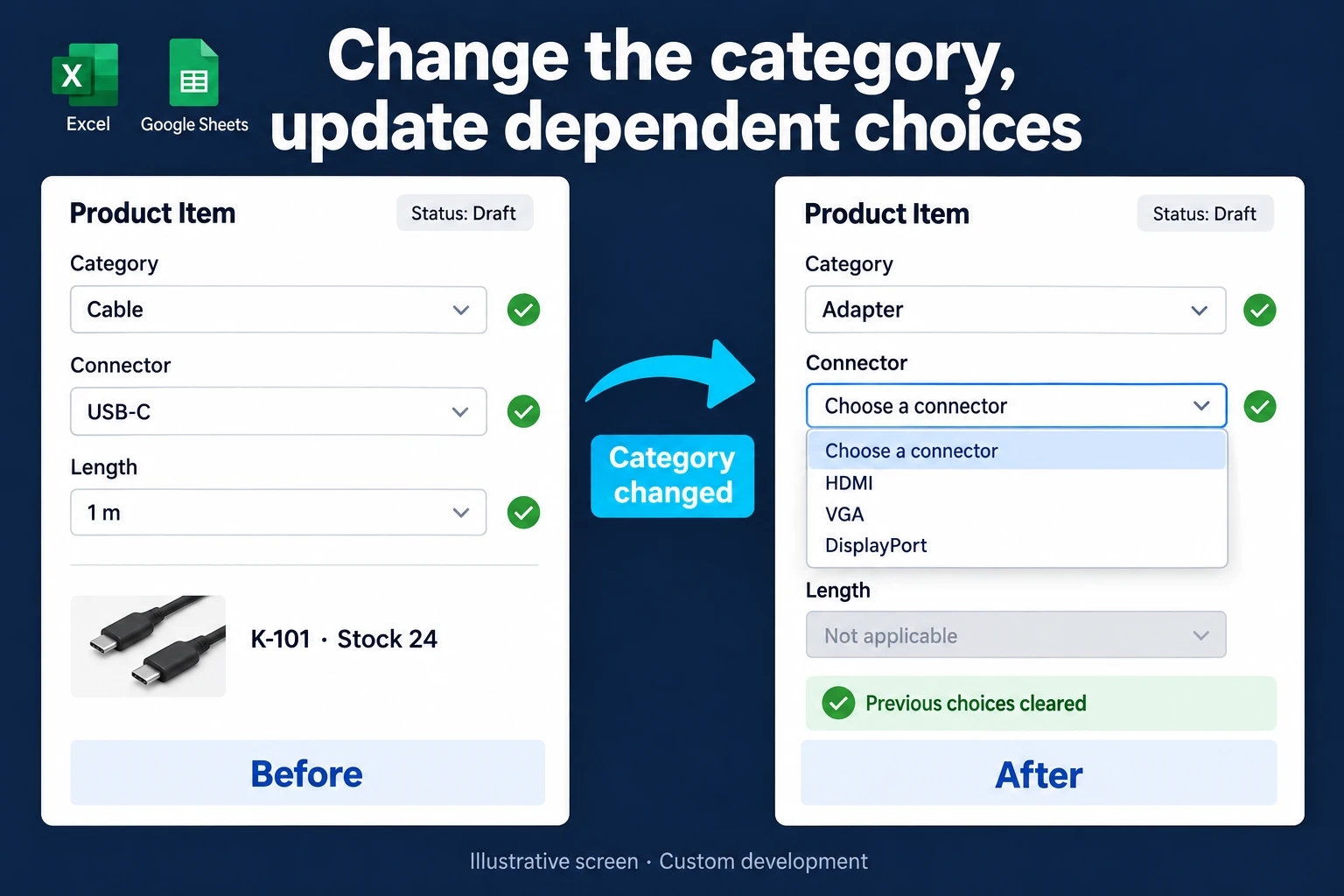 View full size](https://oguzerol.com/gorseller/hizmet-kapaklari/bagli-acilir-listeli-ozel-formlar-webapp-v1-en.webp) # Google Sheets Dependent Drop-Down: Filter the Next List [Oğuz Erol](https://oguzerol.com/en/about-me/) | 5 min read | Published: 9 October 2026 | Updated: 13 October 2026 ## Key takeaways - A FILTER helper range builds a small dependent list; clearing an earlier selection is a separate check. - Large catalogues and team data entry need search, permissions and save-time validation together. - A custom web app can store products in a shared database and enforce business rules when saving. A Google Sheets dependent drop-down uses an earlier choice to narrow a later list. Select Cable and show cable connectors; select Adapter and show adapter options. One way to build a small example is to filter the catalogue into a helper range and use that range for the second dropdown. Start with a single input row before extending the design. ## Make the helper range explicit On a sheet named `Catalogue`, use column A for category and B for connector. Enter four rows in A2:B5: Cable–USB-C, Cable–USB-A, Adapter–USB-C-HDMI and Adapter–USB-C-Ethernet. On `Input`, use B2 for the category. Open Data → Data validation and give B2 the Cable and Adapter choices. Place this formula in H2 on the Input sheet. The example uses English function names and commas. In a spreadsheet with a Turkey locale the arguments are separated by semicolons instead, so there you would write `=IFNA(FILTER(Catalogue!B2:B5;Catalogue!A2:A5=B2);"")`. If a formula returns an error, check the file’s locale under File → Settings; the separator follows that setting. ``` =IFNA(FILTER(Catalogue!B2:B5,Catalogue!A2:A5=B2),"") ``` Keep the cells below H2 empty so the filtered results can expand. For C2, add a dropdown from a range and use `Input!H2:H5`. The second dropdown now takes its options from the filtered output. Google’s [FILTER documentation](https://support.google.com/docs/answer/3093197?hl=en) explains the filtering step; its [dropdown documentation](https://support.google.com/docs/answer/186103?hl=en) covers range-based choices. When the catalogue grows, extend both the input range and the range supplying the dropdown. A category with more options can otherwise lose items at the bottom. If duplicate connector labels appear, investigate whether they represent duplicate rows or genuinely different products. Removing labels without checking product identity can hide a meaningful distinction. ## Check answers after changing the category Choose Cable and then USB-C. Change the category to Adapter. The helper list can update without automatically clearing the old answer in C2. Test that situation rather than assuming the previous selection disappeared. Review invalid-value settings using the way people actually enter or paste information. A single helper range is linked to a single category cell. It does not independently serve every row in a long order table. Repeating the design needs a clear relationship between each input row and its option source. For a small form, a single selection area may be easier to manage than a large grid of dependent inputs. Catalogue maintenance matters too. Renaming a product should not quietly change what a historical order meant. Keep stable identifiers where the records will be reused, exported or compared later. Display names and record identity solve different problems. ## Manage long lists and team entry in a web application A dependent-list formula is only one part of a team’s data entry system. As a catalogue grows, scanning choices becomes cumbersome; people need product codes, dimensions and stock on the selection screen. I can build a [searchable product selector](https://oguzerol.com/en/searchable-product-selection-screen/) that combines name or code search with category filters. The selection interface follows your workflow. In an illustrative scenario, sales selects Cable → USB-C → 1 metre, warehouse staff updates stock, and a catalogue manager adds products. Instead of giving everyone the same spreadsheet, each person signs in to a screen suited to their role. Records live in a shared database, with viewing and editing permissions checked on the server. The [concurrent data entry application](https://oguzerol.com/en/concurrent-data-entry-app/) covers this team workflow. The application can clear invalid dependent choices, reject duplicate order numbers and recheck product relationships when saving. Authorised managers maintain catalogue options in a panel. We define which new rules are configurable and which need development; hiding fields in the interface is not access control. This is a practical system, and it does not have to require a large software budget. We can start with the necessary entry screen, roles and catalogue, then extend it in stages. Development, migration, hosting and maintenance belong in the agreed scope. See [Excel and Sheets to a web app](https://oguzerol.com/en/turn-your-excel-into-a-web-app/) for that process. ## Add business rules only when needed In an illustrative catalogue, Cable → USB-C → 1 metre identifies **K-101, stock 24**. A custom form can clear connector and length when someone switches to Adapter, then ask for new selections. That reset is designed application behaviour; it is not a promise made by the FILTER formula. A simple selection list may remain in Sheets. Customer-specific access, current stock and submission-time compatibility checks can justify [dependent dropdown custom forms](https://oguzerol.com/en/dependent-dropdown-custom-forms/). I define those rules around the actual order process. See [Excel and Sheets to a web app](https://oguzerol.com/en/turn-your-excel-into-a-web-app/) for the wider team workflow. ## Frequently Asked Questions ### Does hiding the helper column secure the catalogue? No. Hiding a column changes the display, not the user’s underlying access. ### Should a catalogue edit change an old order? That depends on your record policy. A stable product ID and an order-time snapshot can preserve what was selected. ## Discuss your workflow [Discuss your catalogue and selection rules](https://oguzerol.com/en/contact/). [Back to top ↑](https://oguzerol.com/en/google-sheets-dependent-drop-down/#icerik) ## You may also find these useful [Searchable Product Selection ScreenA custom selection screen that finds the right product in long lists by code, name, brand or model. Built for Excel and Google Sheets workflows.](https://oguzerol.com/en/searchable-product-selection-screen/)[Dependent Dropdown Forms for Excel and Google Sheets WorkflowsMove dependent dropdowns into a custom web form that checks product compatibility, stock and user access together. Explore a practical catalogue example.](https://oguzerol.com/en/dependent-dropdown-custom-forms/)[Rules-Based Data Entry FormA bespoke form that flags missing, required or incompatible information before a record is completed. Built for Excel and Google Sheets workflows.](https://oguzerol.com/en/rules-based-data-entry-form/) [Browse all articles →](https://oguzerol.com/en/articles/)