Source: https://oguzerol.com/en/file-archive-sorting/ [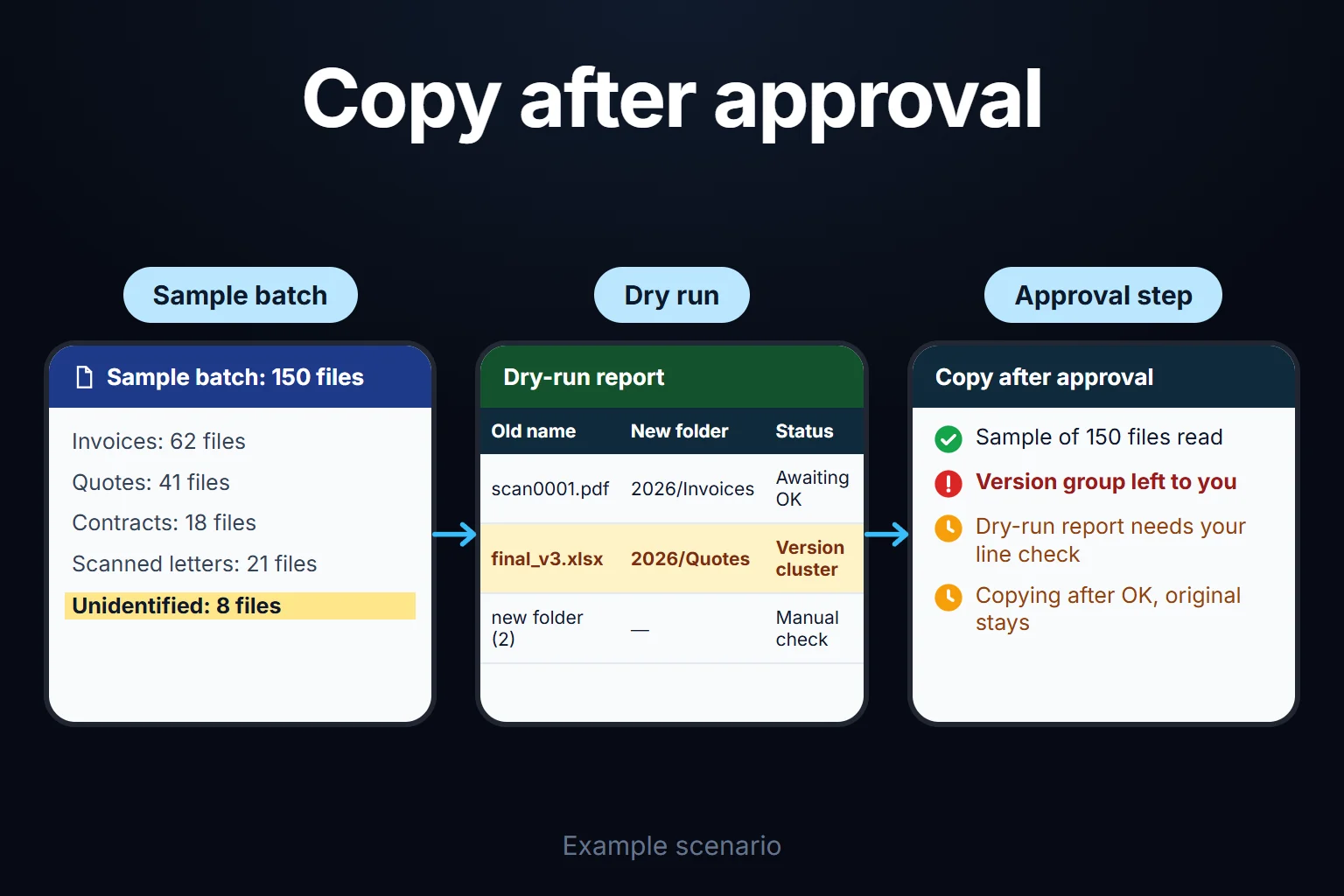 View full size](https://oguzerol.com/gorseller/senaryo/file-archive-sorting-senaryo-en.webp) # File Archive Sorting | Naming and Folders for Thousands of Files [Oğuz Erol](https://oguzerol.com/en/about-me/) | 6 min read | Published: 20 August 2026 ## Quick summary Thousands of files in a shared drive, renamed and foldered by what is actually inside them. Dry-run report first, changes only after you approve it. Most companies have the same scene in their shared drive: `scan0001.pdf`, `new folder (2)`, `final_v3_FINAL.xlsx`, `WhatsApp Image 2024-03-11.jpeg`. The files are there, but nobody can find anything — because the names say nothing about the contents and the folder structure grew on its own over the years. File archive sorting means renaming and foldering that pile **based on what is actually inside each file**: every file is opened, identified, and given a new name and location according to a rule you set. This page is about putting **the files themselves** in order. If you want the data inside them extracted into a table, see [Digitizing Scanned Documents](https://oguzerol.com/en/pdf-to-excel-conversion/); if you want to ask questions of those documents, [Setting Up an AI That Answers From Your Documents](https://oguzerol.com/en/setting-up-an-ai-that-answers-from-your-documents/). All three can be built together; the usual order is sorting first, extraction second. ## How It Works 1. **Sample batch.** I take a representative sample of 100-200 files. The goal is to see how many document types the archive actually contains — contracts, invoices, quotes, technical drawings, photos, scanned correspondence. 2. **We decide the naming rule together.** This step is your call, not mine. Something like `2026-03-11_Supplier-Name_Invoice_INV2026-0417.pdf`; put the date first and files sort themselves. The folder tree is settled here too: by year, by client, or by document type. 3. **Dry run.** Without touching a single file, the system produces a report saying “I will move this file to this name and this folder.” You check it line by line. This step is not negotiable — before an irreversible operation runs on your archive, you need to see what it will do. 4. **Approved execution.** After approval, files are copied; **the original folder stays exactly as it is**. The new structure is built separately, and you remove the old one only once you have compared the two and are satisfied. 5. **Keeping it that way.** A one-off sort reverts to chaos within six months. The job is not finished until there is a flow that puts each newly arriving file into the right name and folder. ## What It Can and Cannot Tell Apart **Where it works well:** PDFs with a text layer, Word and Excel files, properly scanned paperwork, email attachments. Document type, date, and party names come out with high accuracy on these. **Where it struggles:** documents dominated by handwriting, very low-resolution scans, technical drawings whose content is purely visual, and six different versions of the same file. That last one matters especially — which version is authoritative usually cannot be determined from inside the file. In that case the system does not decide; it flags the group as a version cluster and leaves it to you. **For photo archives** the answer splits: product and location photos can be tagged by content, but I do not run facial recognition on photos of people — that is a liability I choose not to carry. ## The Mistake I See Most Often **Skipping the dry run.** When I hear “it’s already a mess, anything you do is an improvement,” I apply that step more strictly, not less. Here is why: even a messy archive has a working order in people’s heads — “Ayşe in accounting knows those files are in date order.” Automatic sorting does not know that hidden order, and if it steamrolls it, you convert a messy but functioning system into a tidy one nobody can navigate. The second common mistake: **deleting the original.** In the setups I build the rule is fixed — copy, never move. Disk space is cheaper than an irreversible mistake. ## An Observation From My Own Operation I did this on my own archive first. Twenty years of client files, quotes, screenshots, and reports had piled into a single “Projects” folder; finding a quote from three years ago took ten minutes. What I learned was about the naming rule itself. On my first attempt I put the client name at the front, which seemed sensible — but then the same client’s work from different years interleaved. Moving the date to the front and the client to second position solved it by itself, because the operating system already sorts alphabetically, and when the date format is `YYYY-MM-DD`, alphabetical order equals chronological order. It looks like a small detail, but decisions exactly like this determine whether an archive ends up usable. That is why I set the rule together with the client, on a real sample batch — not from guesswork at a desk. ## You Can Hire Me for This **You can hire me for this:** remote, billed hourly. What drives the timeline is not the file count but **how many distinct document types** there are — 50,000 identical invoices is easier than 2,000 mixed files. To start, I measure the accuracy rate on a sample batch and show you the result; if it is not good enough, I say so upfront. I do not scan physical paper — I work with files that are already digital. Write to me from the [contact page](https://oguzerol.com/en/contact/). ## Frequently Asked Questions ### Will my files leave the company? We decide together where the setup runs. For sensitive archives, processing happens in your own environment and files never leave; that makes the build somewhat longer. In a standard setup, you get a written description of which data goes where. ### How many files does it take to be worth it? Roughly a few thousand. Below that, doing it by hand is usually cheaper, and I will tell you so plainly. If the count is low but the document types are very mixed, it can still make sense. ### What if it names something wrong? That is exactly what the dry-run report is for: you see, line by line, what will happen before any file is touched. During execution the original folder is preserved and the new structure is built on a copy. So reverting is always possible. ### Will the archive fall apart again after sorting? It will, unless a flow is set up for incoming files. That is why the final step of the job is building the arrangement that puts each new file into the right name and folder. Sorting done without it has to be repeated in six months. [Back to top ↑](https://oguzerol.com/en/file-archive-sorting/#icerik) ## You may also find these useful [Scanned Document Digitization | Archive to ExcelTurn folders of scanned paperwork into a searchable archive. OCR extraction, classification, and Excel export — we start with a sample batch to prove accuracy.](https://oguzerol.com/en/pdf-to-excel-conversion/)[Bulk PDF Summarization & Analysis | Hundreds of DocumentsI take hundreds of pages of reports, contracts, or documents and turn them into summaries and comparisons. Confidentiality first; we start with a sample.](https://oguzerol.com/en/bulk-pdf-summarization-and-analysis/)[Setting Up an AI That Answers From Your DocumentsUpload your contracts, manuals, and SOPs so your team can ask questions and get answers. Setup steps and the honest risks, laid out here. Get in touch.](https://oguzerol.com/en/setting-up-an-ai-that-answers-from-your-documents/) [Browse all articles →](https://oguzerol.com/en/articles/)