Source: https://oguzerol.com/en/excel-to-sql-database-migration/ [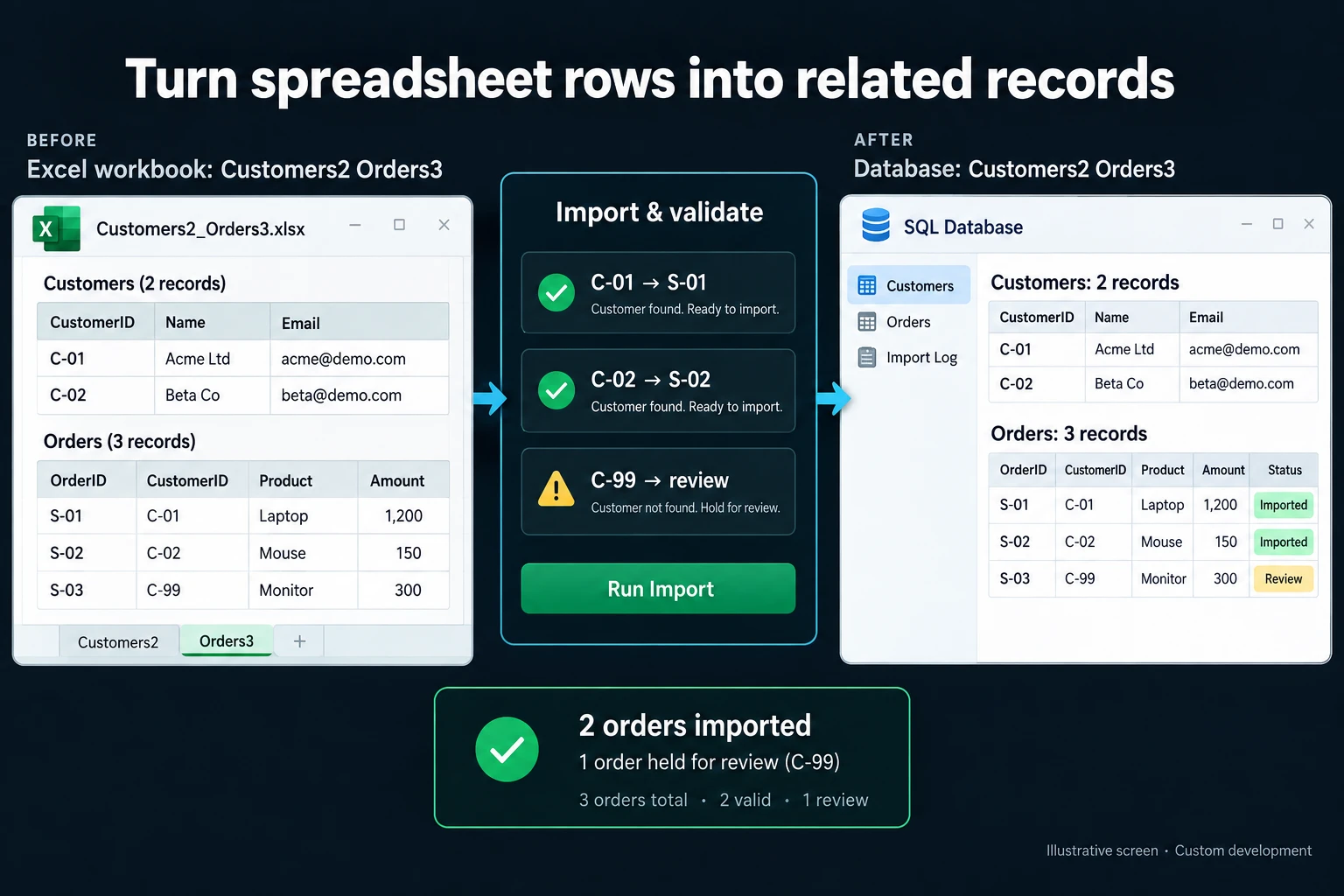 View full size](https://oguzerol.com/gorseller/hizmet-kapaklari/excel-sql-veritabani-gecisi-webapp-v1-en.webp) # Excel to SQL Database Migration: Table Design, Dry Runs and Cutover Day [Oğuz Erol](https://oguzerol.com/en/about-me/) | 17 min read The hard part of moving from Excel to a SQL database is not copying rows; it is finding out how the rows are connected. In a fictional bearing distributor’s four-year order file, the first dry-run migration flagged 1,638 of 41,260 order lines. 1,458 could not be linked to any customer or product; the other 180 had an order number shared by two customers or an unreadable date. Excel never stops an order being written against a customer that does not exist. Cutover, the moment Excel becomes read-only and the new system the only source, came only after every row reconciled three nights running. This page is for the operations, finance or IT manager of a 100–300 person manufacturer or distributor. I do this migration as the first step of a custom web application; your users work with screens, not SQL. The image at the top shows the principle: an order written against C-99, a customer that does not exist, goes to review. ## Where exactly does an Excel “database” break? Excel’s problem is not size but missing links between records. Per the Microsoft page I read on 16 October 2026, a worksheet holds 1,048,576 rows by 16,384 columns ([Microsoft Support](https://support.microsoft.com/en-us/office/excel-specifications-and-limits-1672b34d-7043-467e-8e27-269d656771c3)); the example uses 3.9% of that. It breaks elsewhere: - **Relationships are built on names.** “Ltd” and “Limited” look like two customers; one typo orphans an order. - **Deletion is not blocked.** Delete inactive customers and their orders lose their customer. - **Colour is not data.** A cancelled order is filled red; a PivotTable does not total by the source row’s fill colour. - **History has gaps.** In Excel for Microsoft 365, Show Changes lists cell edits from the past 365 days with who and when ([Microsoft Support](https://support.microsoft.com/en-us/office/show-changes-that-were-made-in-a-workbook-978ceea7-bbf6-4337-bca7-22e7cc9892e8)), but not formatting changes, PivotTable operations, hiding or filtering; edits made in one-time-purchase or older versions are not tracked and clear the pane ([Microsoft Support](https://support.microsoft.com/en-us/excel/get-help-with-show-changes-in-excel)). - **Data validation does not stop pasting.** Microsoft says data entered by copying or filling shows no validation message and can be invalid ([Microsoft Support](https://support.microsoft.com/en-us/office/display-or-hide-circles-around-invalid-data-69144e43-fc71-48e0-8d4f-0b9f1ea96c03)). - **In a conflict, the last save wins.** Co-authoring needs Microsoft 365, OneDrive or SharePoint Online and .xlsx, .xlsm or .xlsb; conflicting changes generally resolve to the last save ([Microsoft Support](https://support.microsoft.com/en-us/office/collaborate-on-excel-workbooks-at-the-same-time-with-co-authoring-7152aa8b-b791-414c-a3bb-3024e46fb104)). - **Order numbers are assigned by hand.** With “last row plus one”, two people can take the same number. ## Example: a four-year order file, 41,260 rows *Every number in the example comes from fictional data generated by a script I wrote for this purpose. The shadow period, cutover and report inventory are fictional too; this is not a client project.* A 220-person distributor of bearings and power transmission parts keeps four years of orders in one shared workbook. Nine sales reps, three order operations specialists and two finance specialists write to it. One operations specialist is appointed **master data owner** for the migration: they decide on customer and product records and enter no orders. | tab | rows | how it is kept | | --- | --- | --- | | Customers | 2,418 | Company name, tax ID (blank in 412 rows), city, rep name as free text | | Products | 6,940 | Six-digit stock code, some starting with zero | | Orders | 41,260 | One row per order line; customer name as text, number by hand, cancellations filled red | The Orders tab holds 9,896 orders but only 9,874 distinct numbers: 22 were used by two different customers. ## Table design: which tab goes to which table? In a relational database (PostgreSQL, MySQL or SQL Server, for example) each record type has its own table, linked by IDs. Three terms: - **Primary key:** a system-assigned ID that never changes, unlike a company name. - **Foreign key:** a field pointing to another table’s record; an order line cannot reference a missing customer, and a customer with orders cannot be deleted. - **Source trace:** each migrated record’s file, tab and row number in Excel. | in Excel | in the database (keys) | | --- | --- | | Customers tab | customer (customer_id; tax ID unique when filled) | | Rep name column | app_user (user_id); customer links to it | | Products tab | product (product_id; stock code text, unique) | | Orders: number, customer, date | sales_order (order_id → customer; old number kept) | | Orders: line rows | order_line (line_id → order, product) | | Red fill | sales_order.status | | Merge decisions, source trace | mapping (old row → new ID) | The unit price stays on the line, so a price list change never alters a past order. ### How are duplicate customers and products merged? Exact key first, similarity second. Before comparing names I normalise accents, case, punctuation and legal suffixes such as “Ltd”, “Limited” and “plc”. 1. **Same tax ID:** 61 groups, 134 rows. In 59 the names matched and 71 surplus rows merged. In 2 the names were entirely different: a tax ID had been pasted into the wrong row. 2. **Blank tax ID, similar name:** 38 candidate pairs among 412 rows. 29 were the same company; 9 were different companies with near-identical names in different cities. 2,418 rows became 2,318 customers. In Products, 212 codes had lost leading zeros and 47 products had two rows under old and new codes; 6,940 rows became 6,893. Both original row numbers stay in the mapping table, so a wrong merge can be undone. ## Dry runs: how many rows, how many errors? A dry run copies the data into the target database and accounts for every row. An **orphan record** is a row whose customer or product cannot be found. Three runs: | | run 1 | run 2 | run 3 | | --- | --- | --- | --- | | No matching customer | 318 | 54 | 0 | | No matching product | 1,140 | 17 | 0 | | Number used by two customers | 174 | 174 | 0 | | Unreadable date | 6 | 6 | 0 | | **Total error lines** | **1,638 (4.0%)** | **251 (0.6%)** | **0** | Decisions between runs: - **14 deleted customers (264 lines)** were recreated as inactive from the order names, list approved by the master data owner; 11 misspellings (54 lines) were linked by hand. - **Products:** 1,027 lines matched with the leading-zero rule; 9 deleted products (96 lines) were recreated as inactive. 17 lines on old closed orders had codes found nowhere; finance linked them to a placeholder, “unmatched legacy product”, keeping the amounts without inventing details. - **22 shared numbers (174 lines):** one order of each pair got a new number; the old one stays in a “source number” field. - **6 dates:** 383 of 389 text dates were read as day.month.year; 6 impossible ones, such as “31.04”, on orders closed four years ago, stay out of scope in the Excel archive. Run 3: 41,260 source lines = 41,254 migrated + 6 out of scope + 0 pending. The last 12 months’ total value, sales by rep and the top 20 customers’ totals are also compared with the source. ### Running the same check in Excel With the customer name in column C of Orders, and name in B and tax ID in D of Customers: - Orders, no matching customer: `=COUNTIF(Customers!B:B,C2)=0` - Customers, repeated tax ID: `=AND(D2<>"",COUNTIF(D:D,D2)>1)` The second flags 134 rows, the 61 groups. The first flags 3,015 lines, but 2,697 differ only in how the name is written (suffix dropped, accented letters): COUNTIF ignores case, not suffixes or punctuation. The normalising step: build the same helper column on both tabs and run COUNTIF between the two helpers. It removes suffixes, accented letters and full stops, then tidies spaces: `=TRIM(SUBSTITUTE(SUBSTITUTE(SUBSTITUTE(C2," Ltd.","")," Limited",""),".",""))`; add one SUBSTITUTE for every suffix spelling and accented letter in your file, upper and lower case separately, because SUBSTITUTE matches text exactly. The formula is a pattern, not tested as written. In Python, a helper column built with the sample data’s own suffix spellings brings the count to exactly 318; try it on a copy of your file. ## Parallel running: the shadow period and cutover day I do not ask for double entry; most of its differences are typos. My starting point is a **shadow period**: Excel stays the only working source, a copy is re-migrated every night, and every morning five control reports (monthly sales, sales by rep, open orders, sales by customer and by product) are compared. Users meanwhile practise in a trial copy. The example’s shadow period runs 10 working days: - **Day 1:** finance builds the monthly report by removing red rows by hand; the sales manager’s PivotTable totals them. The migration does not yet read colour, so the database matches the PivotTable and sits 1.7% above finance. The gap: 14 lines cancelled this month and only filled red. Of 214 red rows, 211 are cancellations and 3 mean “urgent”. Red is now read as “possible cancellation” and, once approved, goes to the status field; next night the database matches finance. - **Day 6:** two customers created in Excel that week are spelled differently, orphaning 9 lines, two on open orders. New rule: only the master data owner creates customers. Day 7 is spent on fixes. - **Days 8–10:** three clean nights. **The cutover decision.** My starting conditions, all required: 1. Rows reconcile three nights running, zero pending. 2. No orphan lines on open orders. 3. The five control reports match, or every difference is explained in writing. 4. Someone from each role has done a full day’s work in the trial copy. 5. The rollback file has been tested. 6. The new database is backed up daily and a restore from backup has been tested once. 7. Cutover does not coincide with month-end close. On day 10, a Friday, everything held: Excel went read-only at 17:00, and the final migration ran that evening and reconciled like the dry runs. Orders arriving after 17:00 waited in email and were entered first thing Monday. ### The rollback plan Test it before cutover, not after. My starting point: - **Window:** the first 5 working days. - **Trigger:** order entry down for over 4 hours, or an unexplained control report difference. Finance decides together with order operations. - **Route:** open the frozen Excel copy and append records entered since cutover, exported from the audit trail in the old layout (tested in run 3). - **Numbering:** Excel used 100001–109874; the new series starts at 200001, so the two never collide. - **After the window:** until the first month-end close, rollback only by finance’s written decision. - **Point of no return:** the first month-end close in the new system. ## Nobody leaves Excel until the reports are rebuilt Rebuild every report in use first. Macros, workbooks linked to this file and Power Query connections go on a separate list. My inference: after cutover such links may silently keep reading the frozen file, and break if it moves to the archive. The example had 11 PivotTables and 4 charts in the shared file and 8 reports in personal copies: 23 reports, links excluded. 9 were used weekly, 6 monthly, 8 by nobody; fifteen were rebuilt, five as control reports. My starting point for the unclaimed 8: rebuild one if someone asks within 30 days. What keeps people from going back: - **Every report in use matched during the shadow period.** - **Every list exports to Excel,** filtered by the user’s permissions. Exporting to analyse is fine; typing data back in from an export is going back. - **A bulk entry route.** Retyping a dealer’s table pushes people to Excel; a [controlled Excel import screen](https://oguzerol.com/en/controlled-excel-import-screen/) writes into the same database with row-by-row checks. - **No editable copy left in the shared folder.** The old file is archived read-only; your accounting and legal advisers set how long it is kept. ## Rules: my starting point These are starting points, tuned on your data in the first dry run. | topic | my suggestion | | --- | --- | | Customer ID | System-assigned; the name is not a key | | Same tax ID | Similar names: merge suggested; otherwise “suspect number” | | Blank tax ID | Normalised name similarity (0–1) of 0.85 or more: candidate pair | | Deletion | None. Customers and products go inactive; orders are cancelled with a reason | | Stock code | Always text; zero-padding only by an approved rule | | Order number | System-assigned, outside the old Excel range | | Colour and formatting | Not data; if it means something, it becomes a field | | Unmatched row | Never silently dropped: placeholder or out of scope, decision in writing | ## Who sees what, and who can change what? No record is ever deleted, and every change belongs to a person. Roles: - **Sales rep:** sees and enters orders for their own customers only. - **Order operations specialist:** sees and enters all orders, changes status; cancelling needs a reason. - **Master data owner:** creates customers and products, approves or undoes merges; enters no orders. - **Finance:** sees all amounts; decides out-of-scope and placeholder cases, and cutover and rollback together with order operations. - **Management and auditor:** see everything, including the audit trail; change nothing. - **IT administrator:** creates users and assigns roles; cannot change data or their own role. Everyone signs in with their own account, or the audit trail means nothing; the sign-in method is set in the first step. The **audit trail** records every change and cannot be deleted: who, when, record and field, old and new value, and source (screen, migration batch or merge decision). Why the 3 “urgent” red rows were not treated as cancelled is on record with the decider’s name. ## What does AI do, and where does it stop? AI suggests here; it does not decide. Tax ID matching, reconciliation and control reports run on rules. Two uses: 1. **Duplicate matching.** For the 38 pairs with no tax ID, the model writes “same / different / not sure” with a reason. Its verdicts in the example are fictional too; I ran no model: same 31, different 4, not sure 3. The master data owner rejects 2 “same” pairs as separate legal entities in one group: 29 merge. The model never merges anything itself. 2. **Column meaning.** Six of the Orders tab’s 31 columns have unclear headings (“K”, “Status2”, “Note”, three blank). The model suggests meanings for 4; the owner confirms 3, corrects 1, and explains the rest: a departed rep’s notes and a helper column. No row goes to the model without passing the permission filter first: for matching it sees company name and city only, never contact names, phones or emails; for columns, headings and a few masked samples. After cutover, the same check on new customers names only what the user may see: a rep whose record resembles another rep’s customer gets just “similar record exists, sent to the master data owner”. **Personal data.** Under the EU GDPR, personal data relates to an identified or identifiable natural person ([GDPR](https://eur-lex.europa.eu/eli/reg/2016/679/oj), Art. 4(1)). A company name is not; a contact’s name and phone are, and I treat sole traders’ business names as personal data. Data should be limited to what the purpose needs (Art. 5(1)(c)), and sending rows to an AI service outside the EU brings in the transfer rules of Chapter V. I give no legal advice; I list in writing which fields go to the model, for your legal adviser. **In Turkey**, KVKK (Law No. 6698) defines personal data in much the same way in Article 3 and sets a similar principle in Article 4(2)(ç); sending a row with personal data to an AI service abroad falls under Article 9, as amended by [Article 34 of Law No. 7499](https://www.resmigazete.gov.tr/eskiler/2024/03/20240312-1.htm) (Official Gazette 12 March 2024, No. 32487), in force from 1 June 2024. I read the current text of Article 9 on mevzuat.gov.tr on 15 October 2026. Confirm the transfer with your legal adviser before the model sees any row. ## If Excel, Access or Lists is enough, you do not need to migrate What justifies a migration is not file size but three needs: a rep seeing only their own customers (row-level permissions), an audit trail nobody can delete, and orders that cannot point at a missing customer (foreign keys). Without them, stay put: - **Your ERP or accounting software has a module for the job.** Ask first. - **One or two people maintain the file.** Excel tables, data validation and co-authoring are enough; for a one-person need you can build your own screen with AI tools, as in my [guide to turning Excel into a web app with AI](https://oguzerol.com/en/turning-excel-into-a-web-app-with-ai/). - **Access or Lists:** the example file is nowhere near their upper limits. Microsoft gives Access 2 GB per database (minus system objects) and 255 concurrent users ([Microsoft Support](https://support.microsoft.com/en-us/office/access-specifications-0cf3c66f-9cf2-4e32-9568-98c1025bb47c)); a list holds up to 30 million items ([Microsoft Learn](https://learn.microsoft.com/en-us/office365/servicedescriptions/sharepoint-online-service-description/sharepoint-online-limits)), but the 5,000-item view threshold, fixed in SharePoint Online, is a different matter: 41,260 lines is eight times that, and Microsoft advises indexing and filtering so queries stay under it ([Microsoft Support](https://support.microsoft.com/en-us/office/manage-large-lists-and-libraries-in-sharepoint-b8588dae-9387-48c2-9248-c24122f07c59)). My verdict on Access: with a small team and someone in-house to maintain it, test the three needs there first; if it meets them, stay. The same goes for Lists. - **If your team works in Google Sheets**, the limits differ; see [can Google Sheets be used as a database](https://oguzerol.com/en/google-sheets-as-a-database/). ## How do we start, and who owns the data and code? In the first step we write the scope by looking at duplicate and orphan records in a masked copy, and I listen to the users. Its output puts in writing the tab-to-table mapping, what we found, the rules, roles, cutover conditions, first-version scope and an estimated timeline. The first version stays narrow: no price lists or quotes until customers, products and orders settle, since everything links to them. The app runs on a server (a VPS) that can be opened in your company’s name. The data is yours, exportable as Excel or CSV whenever you want. In a small or mid-sized team there is no per-user licence; the cost is the server’s monthly fee plus maintenance. The source code sits in a repository you can access, with run instructions, a dependency list and known limitations; the rest of the handover is scoped in writing in the first step. Because customer files can carry personal data, I assess access, security, hosting and maintenance separately at the start. **What if your ERP changes?** The database and audit trail stay. A new ERP connection is scoped separately in writing. Send a masked copy of your file through the [contact page](https://oguzerol.com/en/contact/); in the first call we look at which tabs link by name. ## Frequently Asked Questions ### Which stages does the migration go through? In order: first review, table design and migration script, dry runs, rebuilding reports, shadow period, cutover, rollback window and first month-end close. In the example the shadow period took 10 working days and the window 5; your file sets the total, estimated in writing in the first step. ### Do we have to move all four years? No. Open orders and the reporting comparison period move; older years can stay in the read-only archive and follow later as separate batches. ### What happens to the Excel formulas? The definition moves, not the result: line values are recalculated by rule, and a past reported value that must be kept moves as a separate field. [Back to top ↑](https://oguzerol.com/en/excel-to-sql-database-migration/#icerik) ## You may also find these useful [Combine Excel Files with Power Query or an Import AppCombine Excel files using Power Query or a controlled import screen. Map columns, trace source rows and check duplicate records before publishing results.](https://oguzerol.com/en/automatically-combine-excel-files/)[Google Sheets as a Database: Limits and When to SwitchCan Google Sheets work as a database? Assess collaboration, API quotas, record relationships and access controls before moving to a custom application.](https://oguzerol.com/en/google-sheets-as-a-database/)[Turn Excel or Google Sheets Into a Multi-User Web AppI convert the Excel or Google Sheets file your team shares into a web app on a server: one database, permissions per person, a full change log. See how.](https://oguzerol.com/en/turn-your-excel-into-a-web-app/) [Browse all articles →](https://oguzerol.com/en/articles/) WHAT YOU CAN ASK FOR ## How do I work? Work-hour packages Tell me about your business and what you need on WhatsApp or by phone; we agree on **a work block of somewhere between 5 and 40 hours** and I start doing what is needed. What you get is not a calendar window — it is net working hours spent directly on your business. I can use 40 hours working three days straight, or deliberately spread it out and finish it over a year — whatever the work calls for. I do not spend my time estimating how long something will take, I spend it doing the work; every hour I spend leaves a lasting result in your business. We keep going for as long as you find it useful. WORK BLOCKS ## Why not monthly? Is 40 hours a week? On a fixed monthly fee both sides are watching the wrong thing: you watch a fixed cost, the other side watches how many more contracts like this they can line up. Working by the hour puts us both in front of the same thing — the real value of the work that got done. I know not having an upfront answer to "how much will this cost in total?" is the natural cost of this model. But instead of paying a fixed fee for months to a setup that is not producing results, you only pay for the qualified time spent on your work — and you see exactly where that time went, start to finish. That is why my clients keep coming back. 5hours300€ + VAT60€ per hour[Choose this block](https://wa.me/905496546489?text=Hi%2C%20I%27d%20like%20info%20about%20the%205-hour%20work%20block.) 10hours500€ + VAT50€ per hour[Choose this block](https://wa.me/905496546489?text=Hi%2C%20I%27d%20like%20info%20about%20the%2010-hour%20work%20block.) 20hours800€ + VAT40€ per hour[Choose this block](https://wa.me/905496546489?text=Hi%2C%20I%27d%20like%20info%20about%20the%2020-hour%20work%20block.) 40hours1,400€ + VAT35€ per hour[Choose this block](https://wa.me/905496546489?text=Hi%2C%20I%27d%20like%20info%20about%20the%2040-hour%20work%20block.)