Source: https://oguzerol.com/en/email-excel-attachment-import/ [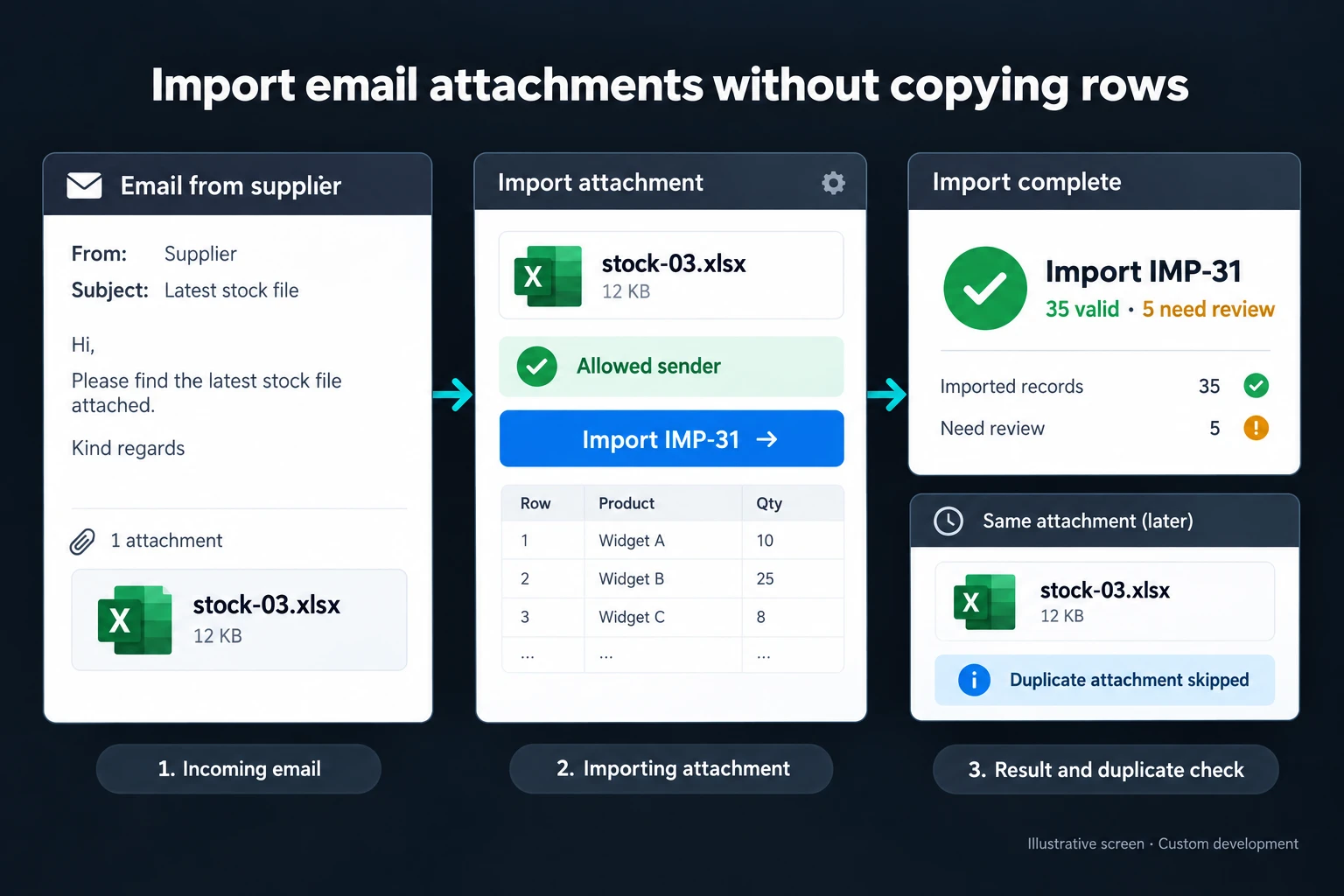 View full size](https://oguzerol.com/gorseller/hizmet-kapaklari/eposta-ekinden-excel-aktarma-webapp-v1-en.webp) # Import Excel Attachments from Email [Oğuz Erol](https://oguzerol.com/en/about-me/) | 3 min read When a supplier emails a spreadsheet every day, someone often downloads it, copies the rows and checks the result manually. I build an import workflow around that delivery channel: a defined mailbox, eligible messages, approved attachment types and a visible outcome. The aim is to process expected business data rather than sweep every file out of an inbox. ## Example: Following stock-03.xlsx In the fictional illustration, **stock-03.xlsx** arrives from an eligible sender. It becomes import **IMP-31**. Of its **40 rows, 35 pass validation and five need review**. The operator can open the source message, the file and the explanation for each exception from the import record. Reading the message again must not add the same stock twice. Message identity, attachment content and business record identity are checked separately. Renaming a file does not turn an existing transaction into a new one. Equally, a genuinely corrected attachment should not be ignored merely because it has the same filename. ## An approved sender is only one check I first establish the access needed for the chosen mailbox. Sender, subject and attachment type can select eligible files, but they do not prove that a file contains valid data. The expected sheet, required columns, product identifiers and number formats still need validation. If a message contains an invoice PDF and a stock workbook, only the configured attachment is selected. An unreadable or protected workbook goes to review, as does a file without the expected table. Running workbook macros is not a default part of the import. Access to an attachment also should not imply permission to browse the entire mailbox. ## When a dedicated application helps A ready-made workflow may be enough for one sender and one stable format. A custom screen becomes useful when formats change, several teams correct exceptions, or missing deliveries need attention. [Power Automate supports scheduled flows](https://learn.microsoft.com/en-us/power-automate/run-scheduled-tasks); the available mail and file connections still need checking for your account and setup. ## Making the scope testable I start with a de-identified example of your current file or screen and the roles of the people using it. The written scope defines where each field comes from, who can change it and where the result goes. I test a message with two attachments, a repeated file and a revised version correcting five rows. Source-message access must remain restricted to authorised users as well. The scope also covers exports, the backup approach and who handles failures. We review the first version against one real workflow before planning further connections. ## Frequently Asked Questions ### Do you need access to everyone’s personal email? I normally assess a designated business mailbox first. Eligible folders and messages are defined for the setup. Unrelated correspondence should not be copied into the application simply because it is accessible. ### What happens when the supplier sends a corrected file? The new content is compared with the earlier import. Added, changed and unchanged records are separated. Correcting five exceptions must not create duplicate copies of the 35 previously accepted rows. ### Can the system detect an email that never arrives? Yes, if expected delivery days and time windows are part of the specification. The application can show a missing delivery instead of claiming that a new import succeeded. ## Discuss your workflow For a related workflow, see [Bank Transaction Matching and Reconciliation App](https://oguzerol.com/en/bank-transaction-reconciliation-app/). Explore [custom web applications for your team](https://oguzerol.com/en/custom-web-apps-for-your-team/) or [contact me](https://oguzerol.com/en/contact/) with an example of the process you want to improve. [Back to top ↑](https://oguzerol.com/en/email-excel-attachment-import/#icerik) ## You may also find these useful [Combine Excel Files with Power Query or an Import AppCombine Excel files using Power Query or a controlled import screen. Map columns, trace source rows and check duplicate records before publishing results.](https://oguzerol.com/en/automatically-combine-excel-files/)[PDF to Excel Conversion | Invoices, Statements, ListsHow to turn a PDF bank statement, invoice or list into Excel yourself, where each method breaks, how to check the result, and when to hand the job to me.](https://oguzerol.com/en/pdf-to-excel-conversion/)[Controlled Excel Import ScreenA custom import screen that maps Excel columns and flags problem rows before data enters the shared system. Built for Excel and Google Sheets workflows.](https://oguzerol.com/en/controlled-excel-import-screen/) [Browse all articles →](https://oguzerol.com/en/articles/) WHAT YOU CAN ASK FOR ## How do I work? Work-hour packages Tell me about your business and what you need on WhatsApp or by phone; we agree on **a work block of somewhere between 5 and 40 hours** and I start doing what is needed. What you get is not a calendar window — it is net working hours spent directly on your business. I can use 40 hours working three days straight, or deliberately spread it out and finish it over a year — whatever the work calls for. I do not spend my time estimating how long something will take, I spend it doing the work; every hour I spend leaves a lasting result in your business. We keep going for as long as you find it useful. WORK BLOCKS ## Why not monthly? Is 40 hours a week? On a fixed monthly fee both sides are watching the wrong thing: you watch a fixed cost, the other side watches how many more contracts like this they can line up. Working by the hour puts us both in front of the same thing — the real value of the work that got done. I know not having an upfront answer to "how much will this cost in total?" is the natural cost of this model. But instead of paying a fixed fee for months to a setup that is not producing results, you only pay for the qualified time spent on your work — and you see exactly where that time went, start to finish. That is why my clients keep coming back. 5hours300€ + VAT60€ per hour[Choose this block](https://wa.me/905496546489?text=Hi%2C%20I%27d%20like%20info%20about%20the%205-hour%20work%20block.) 10hours500€ + VAT50€ per hour[Choose this block](https://wa.me/905496546489?text=Hi%2C%20I%27d%20like%20info%20about%20the%2010-hour%20work%20block.) 20hours800€ + VAT40€ per hour[Choose this block](https://wa.me/905496546489?text=Hi%2C%20I%27d%20like%20info%20about%20the%2020-hour%20work%20block.) 40hours1,400€ + VAT35€ per hour[Choose this block](https://wa.me/905496546489?text=Hi%2C%20I%27d%20like%20info%20about%20the%2040-hour%20work%20block.)