Source: https://oguzerol.com/en/cash-flow-tracking-system/ [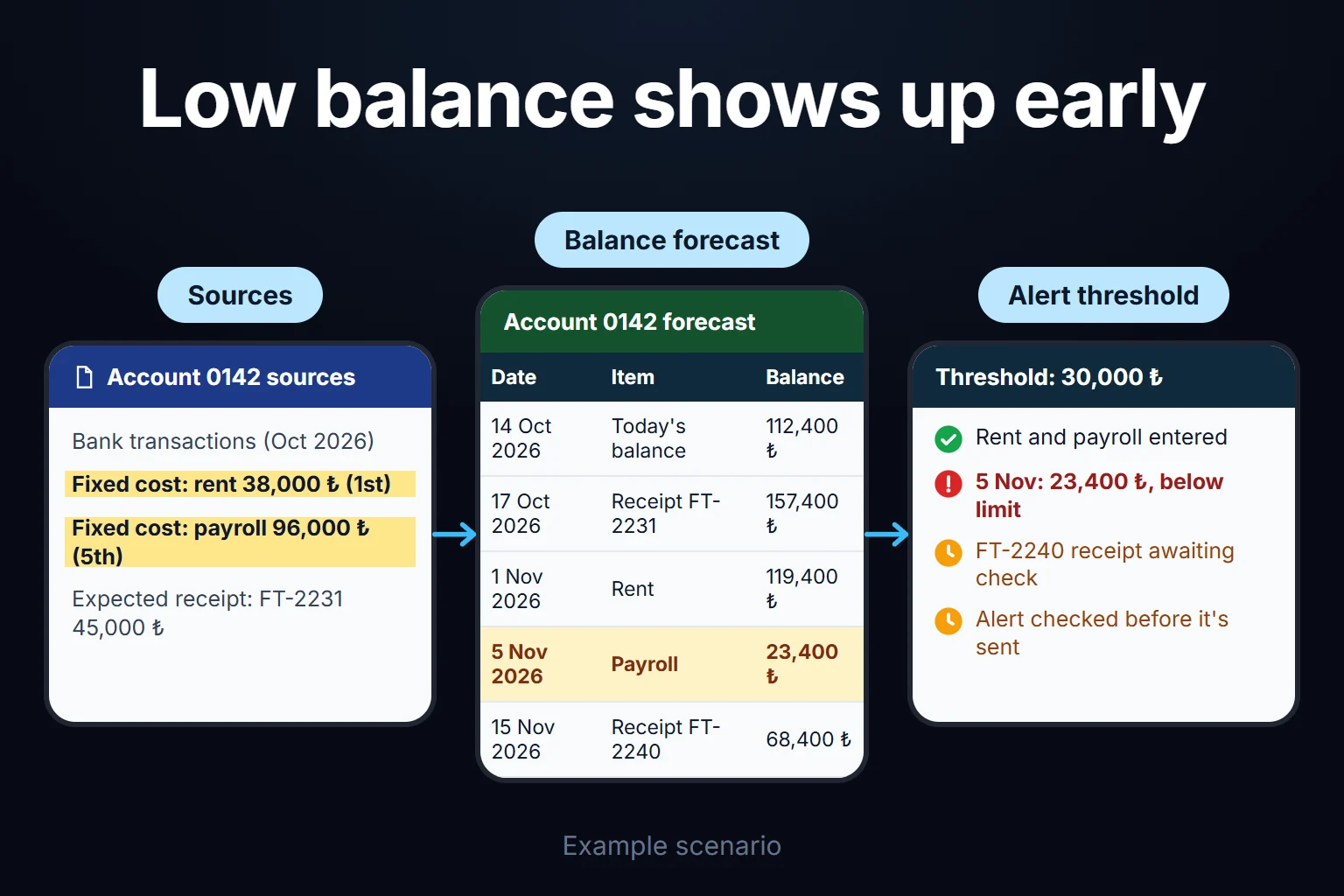 View full size](https://oguzerol.com/gorseller/senaryo/cash-flow-tracking-system-senaryo-en.webp) # Cash Flow Tracking System | Where's Your Money Going? [Oğuz Erol](https://oguzerol.com/en/about-me/) | 4 min read | Published: 29 July 2026 | Updated: 13 October 2026 ## Quick summary Money moving through your bank account, laid out in one table: what came in, what went out, what's expected next month. No accounting software needed. “We’re profitable but there’s no cash in the account” gets said in most small businesses at least once. Profit and cash are different things — you issued the invoice, but collection lands in 45 days, while rent and payroll go out on the first. A cash flow tracking system makes that gap visible: what came into your bank account and when, what went out, what’s expected next week and next month — in a single table. This page is about a narrow build **not tied to any particular accounting software**, focused only on cash flow. If you use Logo, Mikro, Netsis, or Paraşüt and want invoice reading and collection tracking in the same system, [AI for SMBs Using Accounting Software](https://oguzerol.com/en/ai-for-smes-using-accounting-software/) covers a wider scope. Logo, Mikro and Netsis are the Turkish packages I see most; the method rests on an exported table or statement, so it works the same way with a QuickBooks or Xero export. If you want a growth forecast pulled from past sales data, [Sales Forecasting](https://oguzerol.com/en/sales-forecasting/) is a separate service. ## How It Gets Built 1. **Sources get identified.** Bank transactions (statement or API), known fixed expenses (rent, payroll, subscriptions), and expected collections (deferred invoices, installments) — we start with whatever you already have. 2. **Everything lands in one table.** Every transaction gets a date, amount, and category (income/expense, fixed/variable) in a structured table. 3. **Balance and forecast get calculated.** Today’s balance plus known future transactions gives a projected balance for the next 4-8 weeks. 4. **An alert threshold gets set (optional).** If the balance risks dropping below a certain level, you get warned ahead of time — “cash may run short in three weeks,” for example. 5. **It stays current.** This isn’t a one-off table; bank transactions flow in regularly and the table keeps itself up to date. ## Who This Makes Sense For The highest value is for businesses where cash timing is variable — where income and expenses don’t land in the same month. Seasonal businesses (tourism, construction), businesses with deferred collections (B2B services, wholesale), and growing businesses that keep running into cash squeezes are typical cases. If your cash cycle is simple — you sell for cash and pay for cash — the added value here is low; your banking app’s balance already gives you enough information. ## The Mistake I See Most Often **Building the forecast around income only.** Seeing next month’s incoming invoices is easy; what usually gets missed is the timing of fixed expenses. If rent goes out on the 1st, payroll on the 5th, tax on a specific date, and none of that is in the table, the forecast comes out too optimistic — misleading you exactly when you need it most. ## What It Does Not Do - **It doesn’t keep accounting records or file tax returns.** It doesn’t do your accountant’s job — it organizes the data they need. - **It doesn’t give investment or financing advice.** If a cash gap shows up, deciding what to do about it is you and your advisor’s call; the system only provides visibility. - **It doesn’t automatically read credit card statements or cash-register transactions** — those get added manually or through a separate integration, and scope gets clarified before setup starts. ## You Can Hire Me for This **You can hire me for this:** remote, billed hourly. Setup usually takes 2-4 days; what drives the timeline is the number of bank accounts and the variety of income/expense sources. To start, I ask for the last 2-3 months of your bank transactions (names/amounts can be masked) as a sample — that way I build the categories around your actual business. Write to me from the [contact page](https://oguzerol.com/en/contact/). ## Frequently Asked Questions ### Do I need to give access to my bank account? No — if you don’t want an automatic API connection, sharing a regular statement PDF or Excel export is enough. Automatic sync through some banks’ open banking APIs is also possible, on request. ### I have multiple bank accounts — is that a problem? Not at all, multiple accounts can be merged into a single table. Setup takes a bit longer depending on how many accounts there are, but the system works on the same logic. ### Is this Excel or a custom piece of software? Usually Google Sheets or Excel is enough — no extra software cost for most businesses. If you have many accounts and need frequent updates, I can suggest a more automated setup. ### My accountant already gives me a cash flow report — do I still need this? Your accountant’s report is typically monthly and backward-looking. This system gives you a weekly, forward-looking view you can check yourself — the two don’t replace each other, they complement each other. [Back to top ↑](https://oguzerol.com/en/cash-flow-tracking-system/#icerik) ## You may also find these useful [AI for SMEs Using Accounting SoftwareFor SMEs on Logo, Mikro, Netsis, Paraşüt: invoice reading, payment reminders, cash flow summaries. Cuts admin load without replacing your accountant.](https://oguzerol.com/en/ai-for-smes-using-accounting-software/)[Bank Transaction Matching and Reconciliation AppCompare bank export rows with your records and review suggested matches. Keep unmatched payments visible with a clear human approval and correction history.](https://oguzerol.com/en/bank-transaction-reconciliation-app/)[Invoice Processing Automation | From Invoice to LedgerIncoming invoices reach your ledger without manual typing: capture, field extraction, a validation step that holds bad records, and export to your system.](https://oguzerol.com/en/invoice-processing-automation/) [Browse all articles →](https://oguzerol.com/en/articles/)