Source: https://oguzerol.com/en/automatically-combine-excel-files/ [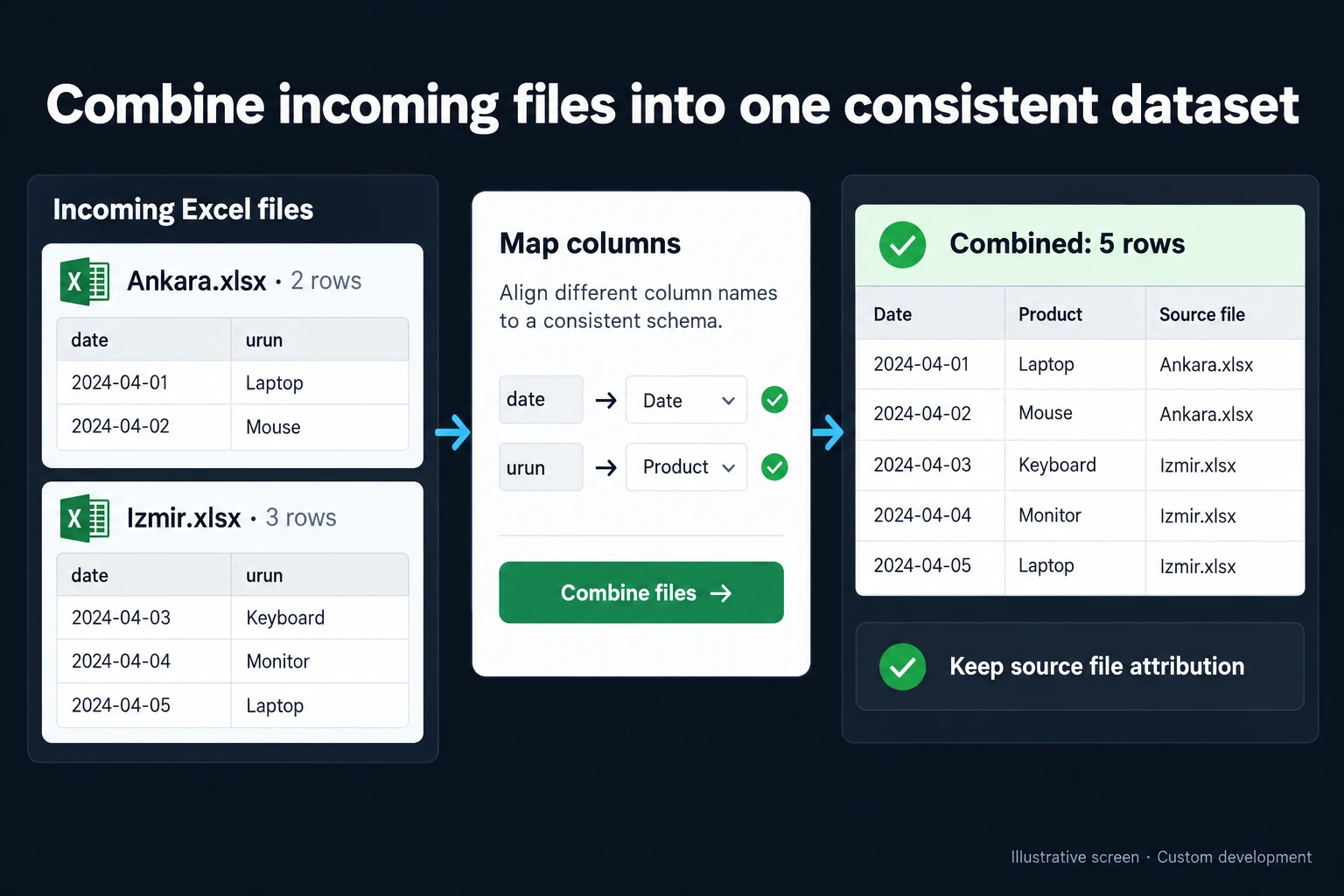 View full size](https://oguzerol.com/gorseller/hizmet-kapaklari/excel-dosyalarini-otomatik-birlestirme-webapp-v1-en.webp) # Combine Excel Files with Power Query or an Import App [Oğuz Erol](https://oguzerol.com/en/about-me/) | 4 min read If your team repeatedly opens branch spreadsheets and pastes their rows into a master file, the useful automation is more than an append command. I build an import screen that shows which files arrived, how their columns map, which rows need attention and where each accepted record came from. ## Example: Two files, five records The illustration contains fictional sample data. **Ankara.xlsx has two rows** and **Izmir.xlsx has three**. Once their columns are mapped, the combined dataset contains **five records**. The date and product fields are aligned explicitly; the position of a column is not treated as proof of its meaning. Every resulting record keeps its source file and source row. If a product code looks wrong later, the team can trace it back. Five incoming rows produce five accepted records only when all five pass validation. If some fail, the screen separates received, accepted and review counts instead of hiding missing rows behind a success badge. ## Make the next delivery predictable I save the agreed mapping as an import profile. If next week’s file is missing a required column, the process raises a review task rather than substituting a different field. Date formats, decimal separators and product codes with leading zeros are included in the mapping rules. A duplicate file and a duplicate business transaction are different problems. File-level checks avoid unnecessary reprocessing. An order or transaction identifier determines whether a row should create a record or update an existing one. Without a reliable identifier, similar-looking rows go to review instead of being silently deleted. ## Is Power Query already sufficient? [Power Query can combine folder files that share the same structure](https://learn.microsoft.com/en-us/power-query/combine-files-overview). A working query may be all you need. Start by selecting only eligible files, defining the transformation on a sample file and applying it to the others. After refreshing, compare the source file count and resulting row count. Review files whose column structure changed rather than assuming every workbook still matches. A custom application becomes useful when several people must resolve errors, track expected arrivals or access only their own branch. I assess the existing transformation rules before rebuilding anything. ## Making the scope testable I start with a de-identified example of your current file or screen and the roles of the people using it. The written scope defines where each field comes from, who can change it and where the result goes. I test a repeated file, an order repeated in another file and a renamed column. Preview approval uses copied sample files; live operational records are not used as disposable test data. The scope also covers exports, the backup approach and who handles failures. We review the first version against one real workflow before planning further connections. ## Frequently Asked Questions ### Must every file use the same column names? No. Different headings can map to a shared field, but their meaning needs checking. A sale date and a payment date must not become one field just because both contain dates. ### Does an edited source row become a new record? The agreed business identifier controls insert and update behaviour. I show changed fields for review and retain the earlier values where required. A filename alone is not a dependable record identity. ### Will every file in the folder be imported? Only files matching the defined source, type and selection rules are eligible. Archive copies and temporary files should stay out of the operational dataset. A skipped file has an explanation rather than disappearing without a trace. ## Discuss your workflow For a related workflow, see [Scheduled API Data Imports with a Monitoring Screen](https://oguzerol.com/en/scheduled-api-data-import-app/). Explore [custom web applications for your team](https://oguzerol.com/en/custom-web-apps-for-your-team/) or [contact me](https://oguzerol.com/en/contact/) with an example of the process you want to improve. [Back to top ↑](https://oguzerol.com/en/automatically-combine-excel-files/#icerik) ## You may also find these useful [Automatic Power Query Refresh and Error MonitoringReview automatic Power Query refresh options, closed-workbook limits and last-success checks. Decide when Excel controls or a monitoring screen fit.](https://oguzerol.com/en/power-query-refresh-monitoring/)[Excel Sales Report Preparation and AutomationI combine store and online sales and returns files into an Excel report with defined totals, traceable sources and checks for missing or duplicate rows.](https://oguzerol.com/en/excel-sales-report/)[Excel to SQL Database Migration with Record ChecksAssess your Excel database needs, then migrate to SQL with checked customer and order relationships, trial imports and a practical cutover plan.](https://oguzerol.com/en/excel-to-sql-database-migration/) [Browse all articles →](https://oguzerol.com/en/articles/) WHAT YOU CAN ASK FOR ## How do I work? Work-hour packages Tell me about your business and what you need on WhatsApp or by phone; we agree on **a work block of somewhere between 5 and 40 hours** and I start doing what is needed. What you get is not a calendar window — it is net working hours spent directly on your business. I can use 40 hours working three days straight, or deliberately spread it out and finish it over a year — whatever the work calls for. I do not spend my time estimating how long something will take, I spend it doing the work; every hour I spend leaves a lasting result in your business. We keep going for as long as you find it useful. WORK BLOCKS ## Why not monthly? Is 40 hours a week? On a fixed monthly fee both sides are watching the wrong thing: you watch a fixed cost, the other side watches how many more contracts like this they can line up. Working by the hour puts us both in front of the same thing — the real value of the work that got done. I know not having an upfront answer to "how much will this cost in total?" is the natural cost of this model. But instead of paying a fixed fee for months to a setup that is not producing results, you only pay for the qualified time spent on your work — and you see exactly where that time went, start to finish. That is why my clients keep coming back. 5hours300€ + VAT60€ per hour[Choose this block](https://wa.me/905496546489?text=Hi%2C%20I%27d%20like%20info%20about%20the%205-hour%20work%20block.) 10hours500€ + VAT50€ per hour[Choose this block](https://wa.me/905496546489?text=Hi%2C%20I%27d%20like%20info%20about%20the%2010-hour%20work%20block.) 20hours800€ + VAT40€ per hour[Choose this block](https://wa.me/905496546489?text=Hi%2C%20I%27d%20like%20info%20about%20the%2020-hour%20work%20block.) 40hours1,400€ + VAT35€ per hour[Choose this block](https://wa.me/905496546489?text=Hi%2C%20I%27d%20like%20info%20about%20the%2040-hour%20work%20block.)