Source: https://oguzerol.com/en/agentic_ai_skills/motion_design_with_just_claude_opus/
# Motion Design with Just Claude Opus: 32 Experiments and Prompts
[Oğuz Erol](https://oguzerol.com/en/about-me/)52 min readPublished: 10 October 2026Video length 2:58
## On YouTube
Motion design with just Claude Opus
Everyone's talking about making motion graphics with AI, and everyone's sharing their own method. So I asked: can you do it with just Claude Opus? Claude Opus 5.5 wrote the code for all 19 experiments in this video.
Full description
I'm not claiming these are great examples; I made them, so I'm sharing them for ideas.
In the video:
- The trick: the model doesn't hand you a video. It writes a recipe that draws every frame.
- Examples made with Canvas, GSAP and MotionPath, HTML/CSS 3D, HyperFrames, Three.js, Lottie, Remotion and Rough.js.
- A check that counts overflowing and too-small text on every frame; the video doesn't reach me until every counter reads zero.
What each example was made with, plus the great examples other people shared with their prompts, are collected here: https://oguzerol.com/en/agentic_ai_skills/motion_design_with_just_claude_opus/
🤖 The voice and avatar in this video were generated with AI.
[Watch on YouTube(opens in a new tab)](https://www.youtube.com/watch?v=LjPd_pDnq-Y)[All channel videos](https://oguzerol.com/en/agentic_ai_skills/)
Lately everyone is talking about making motion graphics with AI, and everyone is sharing their own method. I asked the same question: **can you do it with just Claude Opus?** Claude Opus 5.5 wrote the code for the 19 experiments below.
I’m not claiming these are great examples; I made them, so I’m sharing them to give you ideas. I wrote up each prompt and what went wrong on the [All the experiments](https://oguzerol.com/en/agentic_ai_skills/motion_design_with_just_claude_opus/#all-experiments) section below. The great examples I find from others are collected at the end of this page, and I’ll keep adding new ones.
## The model doesn’t make a video, it writes a recipe that draws each frame
That sentence is the whole trick. A language model can’t hand you a video file; it writes text. But that text can be **a program that draws what a frame looks like**. Run the program for every frame, join the frames, and you have the video.
There is one rule: **a frame depends only on time.** No clock, no timer, no randomness that changes on every run. The frame at 4.2 seconds comes out the same every time, so finding and fixing one broken frame is easy.
## I found the mistakes with a counting check, not by hand
For every experiment I had it write a small check that counts, on every frame, whether text overflows the panel, overlaps other text, or is too small to read. Until every counter reads zero, the video doesn’t come to me.
The counters weren’t enough, though. A number unreadable on a yellow background, a label sitting on a bar, an invisible obstacle in the physics scene: the counters missed all of them, and I only found them by looking at control frames. So I always lay a few frames of every video side by side and look.
## 19 experiments and what they were made with
| # | What it shows | Technology |
| --- | --- | --- |
| 1 | A model’s journey: particles flowing from disk to memory to the processor | JavaScript · Canvas 2D |
| 2 | The attention mechanism: which word “she” looks at | JavaScript · Canvas 2D |
| 3 | A word turning into pieces, the pieces into numbers | JavaScript · Canvas 2D |
| 4 | Diving into a photo: pixel, color, bit | JavaScript · Canvas 2D |
| 5 | A study notebook that reads itself | JavaScript · Canvas 2D · Segoe Print |
| 6 | An agent writing code: the test goes from red to green | JavaScript · Canvas 2D · Consolas |
| 7 | The temperature setting: probability bars | JavaScript · Canvas 2D |
| 8 | A character that reads a note and gets the job done | GSAP · MotionPathPlugin · SVG |
| 9 | An agent working in an interface: a fan of windows and a calendar | HTML · CSS 3D transforms |
| 10 | A title built from glass shards (a ready-made block) | HyperFrames · Three.js · WebGL |
| 11 | From a pencil sketch to a colorful house | HyperFrames · Three.js · WebGPU · TSL · GSAP |
| 12 | MCP: tangled cables gathered into one plug | SVG · CSS animation |
| 13 | Tool calling: the model doesn’t know the weather, so it asks a tool | lottie-web · Lottie JSON · Python |
| 14 | Shrinking a model: fewer bits, a smaller card | Remotion 4 · @remotion/paths · @remotion/noise |
| 15 | Hallucination: a made-up answer and its correction | Rough.js · Canvas |
| 16 | The Ulam spiral: primes on the diagonals | HyperFrames · GSAP · Canvas 2D |
| 17 | An agent fixing a failing test in an editor | HyperFrames · GSAP · HTML/CSS |
| 18 | A showreel: kinetic type, particles, a cube, liquid | HyperFrames · GSAP · Canvas 2D · CSS 3D · SVG filter |
| 19 | The main model splitting the job among subagents | HyperFrames · GSAP · MotionPathPlugin · HTML/CSS |
The video itself was made the same way: the opening with HyperFrames and GSAP, the examples assembled in Remotion.
## All the experiments: prompts, technologies and what went wrong
The table of the video’s 19 experiments is above. Here are **all** of them: 32 examples, in the order of the source page, in six rounds. Next to each one I wrote which guiding skill and technology were used, what I asked the model for and where we got stuck; some also show the prompt the model received. The numbers here belong to this section only; they don’t match the numbers in the table above.
An invisible (headless) Chrome draws the frames and ffmpeg joins them; I didn’t install Chrome separately, it already ships inside Remotion, which our video pipeline uses anyway. Part of this idea came from articles arguing that the results come less from the model than from the rules and checks built around it; I cover that approach separately in [Motion Design, Harness and Loops](https://oguzerol.com/en/motion-design-harness-and-loops/). For my own setup, see [My Agentic Stack](https://oguzerol.com/en/my-agentic-stack/).
### Round 1: First JavaScript experiments
The request was short: “make something in JavaScript, go beyond the usual.” No ready-made library was used in this round; everything was drawn in code on the browser’s canvas.
#### 1. A model’s journey: from disk to an answer
Disk → memory → processor → answer. Silent, 12 seconds; on-screen text is in Turkish.
**Guiding skill:** none.
**Technology:** JavaScript, Canvas 2D, our own isometric drawing formula; no library.
**Request:** I asked the model to show “the event itself” instead of cards and arrows: data moving should be shown by something flowing, not by drawing an arrow.
**What happened:** The result was a disk, memory sticks and a chip drawn in code so they look three-dimensional. About 900 particles flow along curves from disk to memory to the processor, and overlapping particles glow on their own thanks to additive blending. How full the memory sticks are isn’t decoration; it’s computed from how many particles have actually arrived. At the end a neural network assembles and the answer appears word by word. In the first version the word chips sat on top of the memory; we moved the layout down and re-rendered. There is a deliberate simplification: I didn’t show that the model usually loads into graphics-card memory.
#### 2. Attention: who does “she” point to?
A thicker ribbon means more attention; the weights are schematic. On-screen text is in Turkish.
**Guiding skill:** none.
**Technology:** JavaScript, Canvas 2D, curves and additive blending; no library.
**Request:** I asked for an abstract concept to be explained with the words themselves rather than boxes and arrows.
**What happened:** The words of the sentence “Ali threw the ball to Ayşe, and she caught it” drop in with a spring, then a ribbon of light runs from “she” to every other word. Ribbon width is proportional to the weight given to that word, and small particles of information flow along the ribbons. At the end the weak ribbons fade, the one to Ayşe stays, and the two words turn the same color. I didn’t measure the weights from a real model, I set them by hand, and the screen says “schematic”. Real models have many attention layers and heads, and not all of them resolve pronouns.
### Round 2: After two articles
Before this round I read two long pieces about how people make motion design with Claude. Two ideas stuck: let one object change shape instead of new things popping in, and never show a scene that hasn’t passed an automatic check. My request was “a different style that opens our horizons and helps teaching.”
#### 3. One object that changes shape
Sentence → piece → numbers → table → next word. On-screen text is in Turkish.
**Guiding skill:** none.
**Technology:** JavaScript, Canvas 2D, the check counters; no library.
**Request:** My only request was this: nothing should pop onto the screen; the existing object should transform.
**What happened:** A three-word sentence splits into colored capsules; each capsule breaks into eight thin bars, and the bars turn into table cells. Because the same rectangles move from one form to the next by changing position and size, the viewer never loses track of what became what. The table is scanned and the next piece, here the word “nice”, lands at the end of the sentence. The numbers are schematic; in real models a piece is represented by thousands of numbers. This turned out to be the strongest teaching language I found.
#### 4. Diving into a photo
Photo → pixel → three numbers → zeros and ones. On-screen text is in Turkish.
**Guiding skill:** none.
**Technology:** JavaScript, Canvas 2D, a 54×60-pixel mini canvas; no library.
**Request:** I asked for a “Powers of Ten” style piece that explains a change of scale with one continuous camera move.
**What happened:** We zoom into a small code-drawn landscape: first the pixels appear, then a single pixel fills the screen, splits into its red, green and blue values, and finally those numbers open into bits. The zoom grows exponentially, so the dive feels steady. The values on screen aren’t made up; they’re really read from that pixel. In the first version the numbers were unreadable on the yellow background; the check counters missed it, we spotted it on the contact sheet and darkened the background.
#### 5. A study notebook that reads itself
What is an agent: three parts, in handwriting. On-screen text is in Turkish.
**Guiding skill:** none.
**Technology:** JavaScript, Canvas 2D, the Segoe Print font that ships with Windows; no library.
**Request:** This time I deliberately broke our series’ navy-background rule and asked for the feel of study notes.
**What happened:** Lines are written in handwriting on lined paper, a highlighter passes under “three parts”, and a wobbly circle is drawn around “tools”. A note saying “the most important!” lands in the margin, and at the end a sticky note flies in. The hand-drawn feel comes not from randomness but from a fixed formula that gives the same wobble on every frame. In the first version the handwriting font hadn’t loaded and the circle was drawn in the wrong place; adding a font option to the text function fixed it.
### Round 3: Different tools
This time the request was five or six pieces that don’t resemble each other, free routes first. Here we moved to ready-made libraries (Matter.js, Three.js).
#### 6. An agent writing code
Try → read → fix → try again. Sample scenario; on-screen text is in Turkish.
**Guiding skill:** none.
**Technology:** JavaScript, Canvas 2D, the Consolas font; no library.
**Request:** I asked for an animated terminal showing what agents do in the background.
**What happened:** The test turns red, the agent reads the error, the changed line slides into place and the test turns green, while a spinning arrow at the bottom counts the rounds. The typing effect divides the character count over time, and the blinking cursor is time-based too, not random. It isn’t a real project, and the screen says “sample scenario”. In the first version the round counter’s ring overlapped its label; we made the ring bigger.
#### 7. The temperature setting
Low temperature: almost always the same word. High: surprises. On-screen text is in Turkish.
**Guiding skill:** none.
**Technology:** JavaScript, Canvas 2D, particles drifting through a noise field; no library.
**Request:** Here I asked it to actually run a formula.
**What happened:** There are five candidate words to continue a sentence about tonight’s sky; each candidate’s score is divided by the temperature and turned into a probability (softmax). At low temperature “blue” is almost always chosen; as it rises the probabilities move closer together. The scores are sample values, but the bars really are computed with that formula. The flow field in the background is stirred by the same number and goes from calm to chaos. In the first version the word labels sat on top of the bars; the check didn’t see it, and we fixed it from the contact sheet.
#### 8. When the context window fills up
Some apps drop the oldest part once the window is full. Schematic; on-screen text is in Turkish.
**Guiding skill:** none.
**Technology:** [Matter.js](https://brm.io/matter-js/) (free physics engine), JavaScript, Canvas 2D.
**Request:** I asked for the context window shown as a glass, with real physics.
**What happened:** Words fall into the glass under gravity and bump into each other; when it’s full, the oldest word turns amber and fades, and the ones above it drop down. We hit two traps: a word that wasn’t removed from the physics world stayed behind as an invisible obstacle, so nothing above it fell; and rotating boxes caused false label overlaps, so we turned rotation off. The first caption said “the oldest part is forgotten”; when I learned that’s not universal (Claude’s API, for example, returns an error instead of silently truncating), I changed it to “some apps drop the oldest part.”
#### 9. Meaning space
Words with similar meanings sit close together. Schematic; on-screen text is in Turkish.
**Guiding skill:** none.
**Technology:** [Three.js](https://threejs.org/) (free 3D library), WebGL, labels drawn on a 2D canvas on top.
**Request:** I asked for a real 3D scene.
**What happened:** Scattered words gather into animal, fruit and vehicle clusters, the camera orbits slowly, and a newcomer, “tiger”, flies over to the animals. The 3D scene renders on its own canvas, and the labels are drawn on top in 2D so the check can see them. When the camera lined the clusters up, labels collided; we narrowed the orbit and had the model write a small placer that nudges each label until it finds free space. Real meaning spaces have hundreds or even thousands of dimensions.
### Round 4: Breaking the repetition
When I watched the first examples back to back in one video, the problem was obvious: most of the scenes spoke the same language. The same navy background, a title at the top, rounded boxes in the middle, a faint footnote at the bottom; a bar chart repeated five times. So the request was clear: a few more pieces with genuinely different technologies and elements. For each one I picked a separate color palette, a separate layout and a separate technology.
#### 10. Learning is rolling downhill
Gradient descent: the ball reaches the bottom of the loss surface.
**Guiding skill:** none.
**Technology:** WebGL2, a GLSL shader (raymarching), JavaScript.
**Request:** This time I asked for a scene with no boxes or labels at all, one with light and depth.
**What happened:** The terrain is drawn by a small shader program running on the graphics card, using raymarching; it has lighting, contour lines and sunset colors. The terrain is a “loss surface”, and a ball rolls into the bottom of the valley with momentum-based gradient descent. The ball’s path isn’t decoration: the same formula was written in JavaScript too, and the step and loss values on screen are read from that path. In the first version the ball got stuck in a small side pit and disappeared behind the valley’s rim; we computed a better starting point, slowed the descent and raised the camera.
#### 11. This video’s kitchen: real data
Measured on 10 October 2026: 17.6 GB, 66,882 files.
**Guiding skill:** none.
**Technology:** [D3.js](https://d3js.org/) (free data-visualization library), a treemap layout, a real folder measurement.
**Request:** I asked for real data, not made-up numbers.
**What happened:** We measured the project folder where these videos are made: 17.6 GB and 66,882 files. D3 lays the folders out in a treemap by size, and the camera zooms from box to box. Most of the 13.5 GB in the big folder is the talking avatar model; the code for these scenes is only 8 MB. The visual language is a newspaper graphic: cream paper, serif numbers, a large headline on the left. The check caught labels running out of frame during the zoom; now a label is only drawn while its box is fully visible.
#### 12. A character’s story
Thinks, uses tools, finishes the job.
**Guiding skill:** none.
**Technology:** [GSAP](https://gsap.com/) and the MotionPath plugin (free), SVG, frames captured via browser screenshots.
**Request:** I asked for something none of the earlier examples had: a character with facial expressions.
**What happened:** The pastel character bounces in and moves with classic animation principles like squash and stretch. Its eyes follow a task note falling along a curved path, it blinks, three icons appear in a thought bubble, then it reaches for the calendar, finishes the job and smiles. It isn’t drawn on a canvas but in real SVG and page elements, so we wrote a new renderer that captures frames as screenshots. In the first version the thought bubble was cut off at the edge because GSAP overwrote its position; we moved the position to an outer group.
#### 13. An agent working in a real interface
A sample interface, not a real app.
**Guiding skill:** none.
**Technology:** Plain HTML and CSS, CSS 3D transforms; no library.
**Request:** I wanted to see a real application window, not a diagram.
**What happened:** At the start three windows fan open in 3D and focus on the calendar. The agent’s cursor types into the search box, free slots light up green one after another, a slot is clicked and an “Invite sent” notification appears. Everything is a real page element, and every style is computed from time alone. In the first version the 3D fan didn’t show at all, because the final tilt line overwrote the front window’s transform on every frame; we combined the two transforms.
#### 14. This video’s own voice
With sound (the Turkish voice-over). Whisper reads speech from this kind of picture.
**Guiding skill:** none.
**Technology:** Python, NumPy, librosa, Pillow, ffmpeg; no browser.
**Request:** This time I asked it to drop the browser entirely and visualize real data: the video’s own voice.
**What happened:** The first 12 seconds of audio scroll by as a log-mel spectrogram, the kind of picture Whisper looks at (we used 80 bands; Whisper large-v3 uses 128). The pitch bands of the female and male voices are clearly separate, and the words flow at their real timestamps in the speaker’s color. Python draws the frames and ffmpeg joins them with the audio. In the first version the words overlapped; we showed the spoken word large on its own line and spread the others over two rows.
### Round 5: Ten skills, ten technologies, ten prompts
This time my request was: “Produce ten 10–15 second explainers with different skills and technologies that look nothing alike; I’ll share the prompts and the results together.” Two things are different in this round. The first is skills: a skill is an instruction package that tells Claude how to do a particular job and that it loads when needed (for example, how to use an animation library). In some examples we followed an open-source skill as a guide; in others we worked with a library directly. Where that difference mattered is written below. The second is prompts: under each example is the actual prompt the building model received. Claude wrote these prompts too: it first picked ten topic–technology pairs that don’t repeat the topics (attention, temperature, context window, gradient descent) or technologies of the earlier examples, then wrote a prompt for each and handed the work to six separate sub-agents. The shared rules are the same as before: a frame depends only on time, text is at least 32 pixels, no paid services. Every experiment was rendered twice, in Turkish and English, and then the check frames were reviewed by eye; each example also shows that 8-frame check strip. The videos are silent, except for example 15.
#### Preparing this round: which skills we installed and which we dropped
Before the round we did two things; they produced no video, but their results carried into the examples below. First, HyperFrames: the repository of HeyGen’s open-source video framework has 28 skills. We had 11 installed, and the installed main skill routed work to skills that weren’t installed (general video, faceless explainer, product launch); installing the missing 17 made that routing work. Second, we went through a list titled “20 GitHub repos to turn Opus into a motion empire” that came our way. We were already using three of them (HyperFrames, Remotion and Remotion’s skills), had used two libraries (GSAP, lottie-web) without their skills, and 15 weren’t installed at all. In this round we actually used HyperFrames, Remotion, GSAP and lottie-web from that list. While looking for a skill that makes reels, we also dropped three candidates that depend on paid services charging roughly 2–3 dollars per clip; we used only free tools that run on the computer.
The 20-repo list: where each one stands
| # | repo | GitHub | status in this conversation |
| --- | --- | --- | --- |
| 01 | claude-motion | [whaleyxbt/claude-motion](https://github.com/whaleyxbt/claude-motion) | not installed |
| 02 | claude-motion-design | [howseen-ai/claude-motion-design](https://github.com/howseen-ai/claude-motion-design) | not installed |
| 03 | motion-graphics-skills | [charlie947/motion-graphics-skills](https://github.com/charlie947/motion-graphics-skills) | not installed (13 skills) |
| 04 | claude-remotion-skill | [haidrrrry/claude-remotion-skill](https://github.com/haidrrrry/claude-remotion-skill) | not installed |
| 05 | klik-anim-skill-creation | [t3knobox/klik-anim-skill-creation](https://github.com/t3knobox/klik-anim-skill-creation) | not installed |
| 06 | hyperframes-motion-reel-skill | [Sunwood-ai-labs/hyperframes-motion-reel-skill](https://github.com/Sunwood-ai-labs/hyperframes-motion-reel-skill) | not installed |
| 07 | product-launch-motion | [AbubakrChan/product-launch-motion](https://github.com/AbubakrChan/product-launch-motion) | not installed; HyperFrames’ product-launch-video is |
| 08 | animate | [emilkowalski/skills](https://github.com/emilkowalski/skills) | not installed |
| 09 | motion-design-skills | [iart-ai/motion-design-skills](https://github.com/iart-ai/motion-design-skills) | not installed |
| 10 | hyperframes-student-kit | [nateherkai/hyperframes-student-kit](https://github.com/nateherkai/hyperframes-student-kit) | not installed; its short-form-video name clashes with ours |
| 11 | hyperframes | [heygen-com/hyperframes](https://github.com/heygen-com/hyperframes) | installed, 28 skills; used in 16, 17 and 19 |
| 12 | remotion | [remotion-dev/remotion](https://github.com/remotion-dev/remotion) | our pipeline engine; used in 15 and 22 |
| 13 | skills | [remotion-dev/skills](https://github.com/remotion-dev/skills) | installed, 12 skills; used in 22 |
| 14 | gsap-skills | [greensock/gsap-skills](https://github.com/greensock/gsap-skills) | skill not installed; GSAP library used in 12 and 16 |
| 15 | motion-design-skill | [LottieFiles/motion-design-skill](https://github.com/LottieFiles/motion-design-skill) | not installed |
| 16 | awesome-motion-design-agent-skills | [frankxai/awesome-motion-design-agent-skills](https://github.com/frankxai/awesome-motion-design-agent-skills) | not installed |
| 17 | motion-graphics | owner unknown | not installed; our skill of the same name is HyperFrames’ |
| 18 | motion-dev-animations-skill | [199-biotechnologies/motion-dev-animations-skill](https://github.com/199-biotechnologies/motion-dev-animations-skill) | not installed |
| 19 | motion | [motiondivision/motion](https://github.com/motiondivision/motion) | not used |
| 20 | lottie-web | [airbnb/lottie-web](https://github.com/airbnb/lottie-web) | used in 21 (JSON written in code) |
The 17 HyperFrames skills installed and the reel services dropped
The HyperFrames repository has 28 skills; 11 were installed. The missing 17 were installed: general-video, faceless-explainer, product-launch-video, pr-to-video, music-to-video, talking-head-recut, embedded-captions, slideshow, figma, remotion-to-hyperframes, glass-shard-title, canopy-part-title, code-slice-hero, cuboid-carousel, frost-sequence-camera-orbit, orbit-card, wireframe-portal-title. The last seven are ready-made visual blocks (example 17 uses one of them). Paid candidates dropped while looking for a reel tool: a video-clipping skill that depends on Klap and Captions.ai (roughly 2–3 dollars per clip), and the MuAPI and OpenClip skills. Used instead: semantic-video-clipper and short-form-video (free, run on the computer).
#### 15. From a long video to a reel
With sound. A 36-second section of one of our 161-second videos; the hook card is on screen from the first frame.
**Guiding skill:** `semantic-video-clipper` (seefreed/skills) and `short-form-video` (iart-ai/tiktok-video-skills).
**Technology:** FFmpeg, [Remotion](https://www.remotion.dev/).
**Request (prompt):** Download a skill like Shortify that makes reels/shorts, make something with it, and tell me which one you used.
**What happened:** This round’s first piece was really a request rather than an experiment, which is why its prompt is short. There is no skill called “Shortify”, so we split cutting and reel-making across two free skills and dropped three candidates that depend on paid APIs. The first split one of our 161-second videos into five parts by the meaning of its subtitles: the model picks the cut points, the script only cuts with FFmpeg. The second supplied short-form rules: hook text on the first frame, a punch-in every 2–4 seconds, safe areas and a loop. The skill’s suggested 10–12% punch-in pushed the portrait off-frame, so we used 6%. In the first render the image jumped at the loop point; easing the scale back over the last frames fixed it.
Check strip: 8 evenly spaced frames from the video. These are the frames reviewed in the check.
Below are the five raw clips `semantic-video-clipper` produced before the reel; none was edited, they were only cut by the meaning of the subtitles. The model picked the cut points, so each clip starts and ends with one topic. The reel above was made from the fourth clip.
1. Hook and why NVIDIA, CUDA (31 s)
2. Qwen or Gemma, are uncensored versions smarter (21 s)
3. Tokens and the context desk (37 s)
4. Local dictation with Whisper (32 s)
5. Audio models and shared memory (36 s)
#### 16. Not the prompt, the context
The same request turns into a brief through four questions.
**Guiding skill:** HyperFrames `motion-graphics`.
**Technology:** [HyperFrames](https://github.com/heygen-com/hyperframes), [GSAP](https://gsap.com/), HTML and CSS.
**Request (prompt):** Use the motion-graphics skill. Make a 12-second vertical (1080×1920) kinetic typography explainer. Visual language: Swiss poster — off-white paper (#F2EFE8), heavy black grotesk type, one accent colour, signal red (#E63323), hard grid-based layout, no shadows or gradients. Story: (0–2 s) a small, lonely ‘make a logo’ sits in the centre; a red question mark drops next to it. (2–6 s) Four questions slam in from the edges one by one: ‘For whom?’, ‘Where will it live?’, ‘What should it feel like?’, ‘What must it never do?’. (6–9 s) The questions stack into one full brief block; the original sentence is now just one line inside it. (9–12 s) Everything wipes away. Final frame: ‘Same model.’ in black, below it a large ‘The difference: context.’ in red. Motion fast and decisive, minimal bounce.
**What happened:** In HyperFrames a scene is an HTML page: you build the final frame in CSS first, then tie it to a GSAP timeline. The skill’s check command caught something up front: it rejected motion that changes a text’s position and font size pixel by pixel, because it jitters. So we rebuilt the moment the questions stack into the brief with scaling and a crossfade. In the first version the end-card text was visible from the very first frame; giving it a starting opacity fixed that. The model added a small “BRIEF” label to the block. The render took 19 seconds; the video is 1.1 MB.
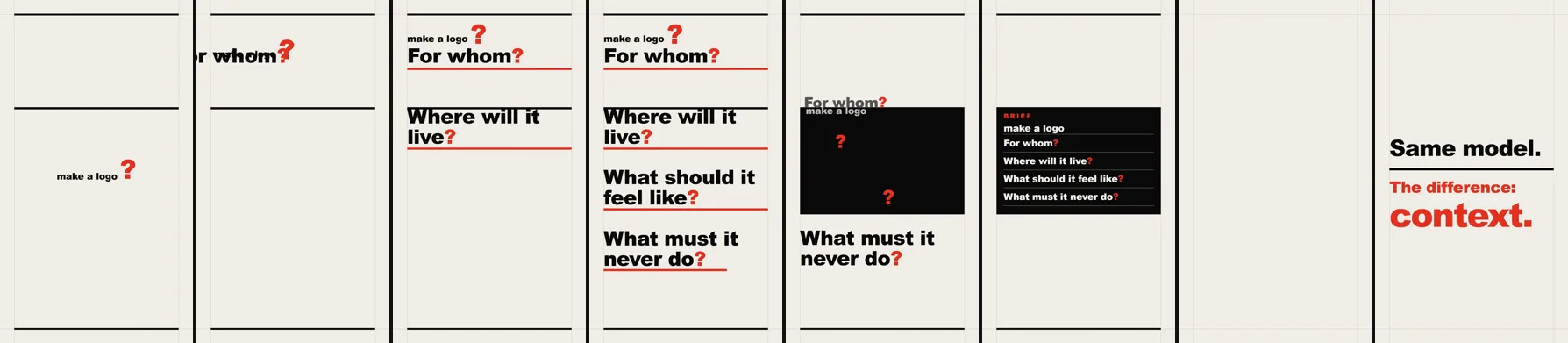
Check strip: 8 evenly spaced frames from the video. These are the frames reviewed in the check.
#### 17. Series opener: personalising a ready-made block
Headline and timing come from the block's variables; colour tint and subline from outside it.
**Guiding skill:** `hyperframes-registry`, the `glass-shard-title` block.
**Technology:** HyperFrames, Three.js (inside the block), WebGL.
**Request (prompt):** Install the glass-shard-title block from the HyperFrames catalog and customise it through its own variables. Make it the 12-second opening card of this experiment series. Glass shards fly in through fog and tile themselves into the headline: ‘10 EXPERIMENTS’. The line below reads ‘Motion design with Claude’. Set the colours to a cold blue-grey fog with white light. Don’t break the block’s own camera and lighting; change only text, colour and timing. Measure and note how far a ready-made block can be personalised.
**What happened:** What I wanted to measure here was how far a ready-made block can be personalised. The answer: about halfway. The block has 19 variables; headline text, fly-in times, shard count and fog distance all change. But there is no variable for a subline or for colour. And while its documentation says 12 seconds, the duration is hard-coded to 9 inside the code: the shards leave at 7–9 seconds and the frame is empty after that. Without touching the block we added a cold colour layer on top, a separate subline and an end card for the last three seconds. The pink-violet glass sheen is the block’s own material; we couldn’t get to plain grey glass. A ready-made block is fast and striking, but you hit its limits as soon as you try to fit it to your brand.
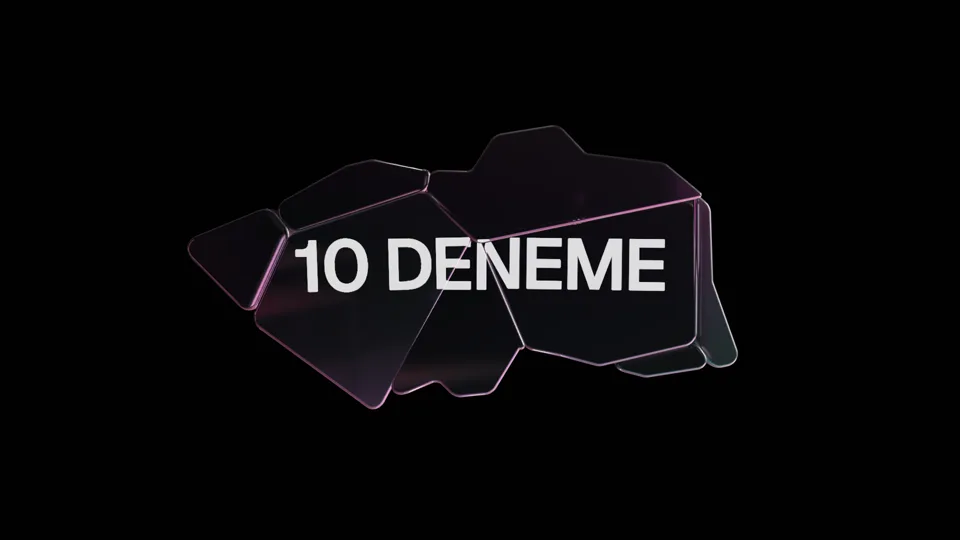
Comparison: the same block with its own variables only (at 4 s, Turkish headline). No cool tint and no subline.
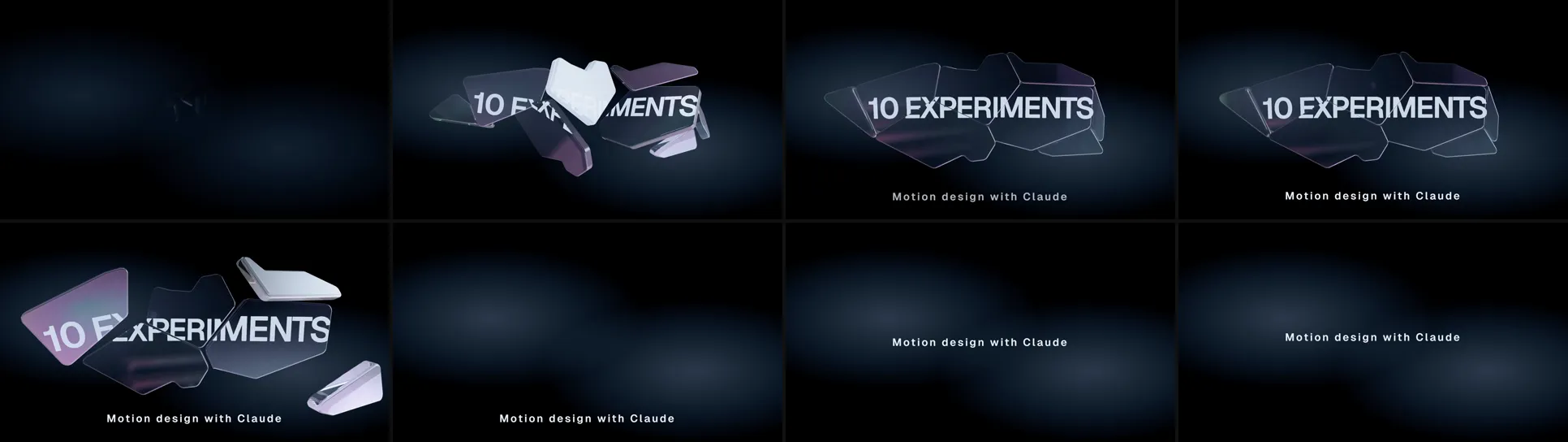
Check strip: 8 evenly spaced frames from the video. These are the frames reviewed in the check.
#### 18. MCP: one socket, many tools
One protocol instead of a separate cable for every tool.
**Guiding skill:** `archify`.
**Technology:** SVG, CSS trace animation, frame capture with browser screenshots.
**Request (prompt):** Use the archify skill to make a 12-second vertical (1080×1920) animated architecture diagram. Topic: the Model Context Protocol (MCP). Visual language: archify’s own technical-drawing theme — thin lines, mono labels, grid background. Story: (0–4 s) a ‘Claude’ node in the centre with three tools around it: GitHub, Calendar, Drive. A separate red dashed cable runs to each, tangling with the others; label: ‘A separate cable for every tool.’ (4–8 s) The cables fade, an ‘MCP’ node appears and the connections collapse into one clean line; a trace signal travels Claude → MCP → Calendar → Claude. Label: ‘One language: MCP.’ (8–12 s) Signals go to all three tools at once and return; a fourth tool (‘New tool’) plugs into an empty slot. Final label: ‘A new tool doesn’t mean a new cable.’
**What happened:** archify is a skill for architecture diagrams: you first write the components and connections into a JSON file, and the skill validates it and turns it into a themed page. Validation caught two errors: a field components aren’t allowed to have, and connections with the wrong direction. Once fixed, it passed the highest quality gate. The real finding: archify’s output is designed for a desktop screen, not video. Text is 11 pixels and the animation plays on its own clock, so it can’t be captured frame by frame. We took the skill’s theme, classes and trace motion and redrew the same layout for vertical video. Here the skill provided the visual language and the correctness check, not the drawing.
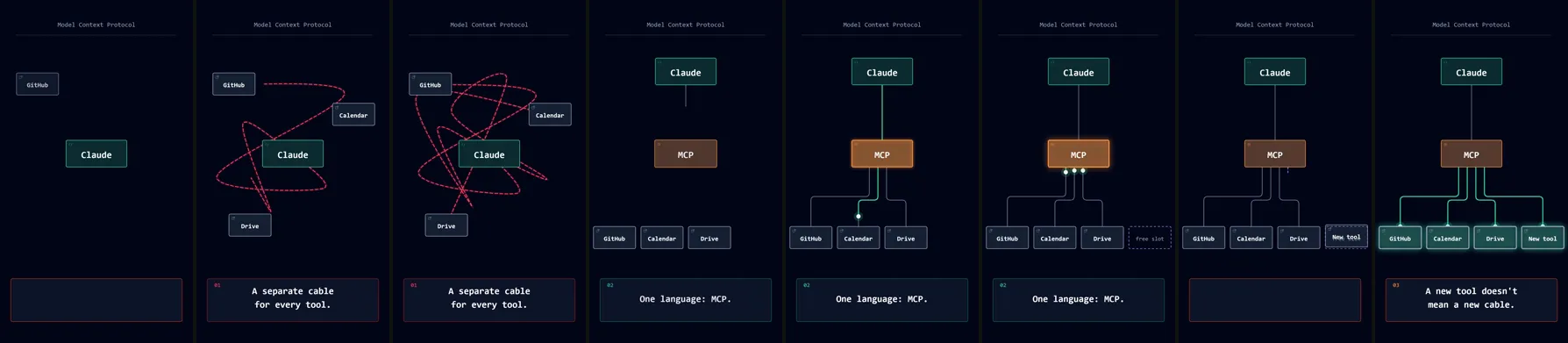
Check strip: 8 evenly spaced frames from the video. These are the frames reviewed in the check.
#### 19. Short memory, long memory
The chat forgets; what's written to a file stays.
**Guiding skill:** `hyperframes-animation` (Anime.js adapter).
**Technology:** HyperFrames, [Anime.js](https://animejs.com/) 4, SVG filters.
**Request (prompt):** Use the Anime.js adapter of the hyperframes-animation skill to make a 13-second vertical (1080×1920) explainer; do not use GSAP. Visual language: risograph print — cream paper texture, only two inks (fluorescent pink #FF48B0 and blue #0078BF), slightly misregistered colours, halftone dots. Story: (0–3 s) speech bubbles fill a small ‘Chat’ box. (3–6 s) The box overflows; the oldest bubbles drop out of the bottom and vanish; text: ‘When the chat ends, it’s forgotten.’ (6–10 s) One bubble (‘Reports in English, please’) gets stamped and slides into a file drawer; text: ‘Long memory: written to a file.’ (10–13 s) A new, empty chat opens; the drawer slides open and the fact flows back into the new chat. Final frame: ‘Remembering = writing it down.’
**What happened:** We used the same HyperFrames, this time without GSAP, with Anime.js. The risograph look is real: only two inks, colours that mix where they overprint, the pink plate shifted by 7.5 pixels, halftone dots at a different angle per ink, paper grain and ink dropouts. The saved bubble flows from the drawer into the new chat along a path using Anime.js motion paths. Where we got stuck: HyperFrames’ check looked for a GSAP timeline and had to be told there wasn’t one; the new Anime.js release dropped stepped easing, so the cursor blink uses short fades. The price of the texture is file size: the source video came out at 33 MB, the web version is 4.5 MB.
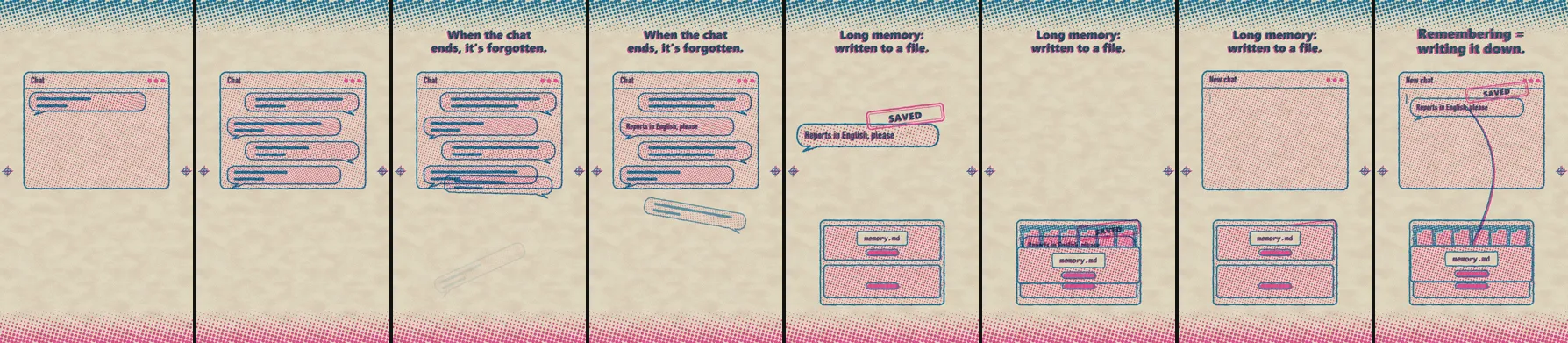
Check strip: 8 evenly spaced frames from the video. These are the frames reviewed in the check.
#### 20. Diffusion: from noise to image
The counter goes from 50 to 1; each step removes a little noise.
**Guiding skill:** none, technology directly.
**Technology:** [p5.js](https://p5js.org/) 1.9.4.
**Request (prompt):** Make a 12-second vertical (1080×1920) generative explainer with p5.js. Drawing must be fully time-based and seeded (every frame computed from t). Visual language: dark film grain, warm amber and cream particles, soft vignette. Story: (0–3 s) the screen is pure noise made of thousands of random particles; a prompt line types out on top: ‘prompt: a sailboat at sea’. Text: ‘Everything starts as noise.’ (3–9 s) A corner counter counts down from ‘step 50’ to ‘step 1’; with each step the particles settle a little more and a sailboat, a horizon and a sun emerge. (9–12 s) The image sharpens. Final text: ‘The model doesn’t draw the picture; it removes the noise step by step.’
**What happened:** Here I didn’t want particles flying to targets but a real reverse-diffusion step. The targets of 17,000 particles are sampled from the brightness of a drawn sailboat image. At each step the position is recomputed as “target + noise × σ”; σ shrinks step by step and the noise is redrawn at every step. What you see is a simplified but honest version of what a diffusion model does. The film grain made the video nearly incompressible: the first output was 240 MB for 12 seconds; encoder settings brought it down to 11 MB.
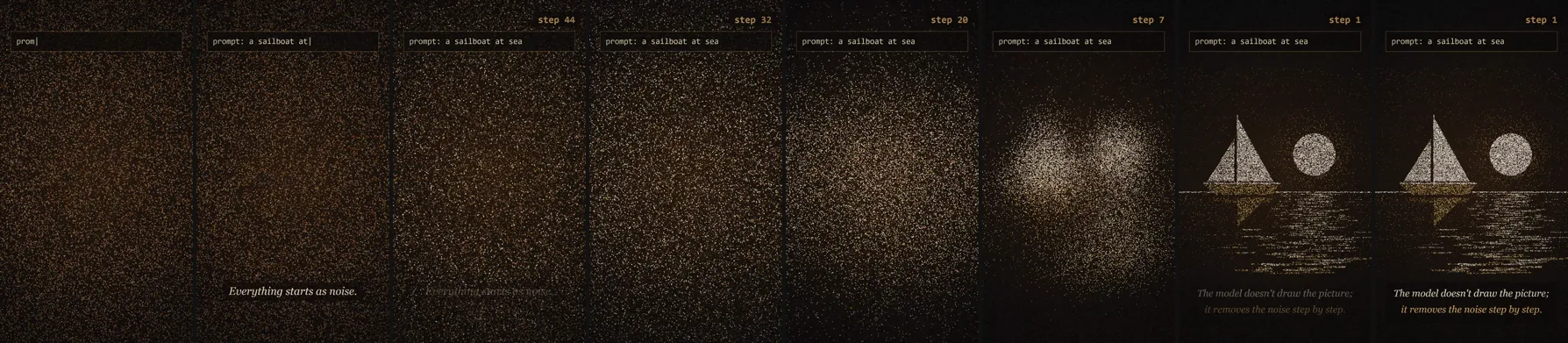
Check strip: 8 evenly spaced frames from the video. These are the frames reviewed in the check.
#### 21. Tool calling
The model learns what it doesn't know through tools.
**Guiding skill:** none, technology directly.
**Technology:** [lottie-web](https://github.com/airbnb/lottie-web) 5.12.2, Lottie JSON written in code (Python).
**Request (prompt):** Make a 12-second vertical (1080×1920) explainer with lottie-web. Produce the animation not in a design app but by writing the Lottie (Bodymovin) JSON in code: shape layers, keyframes, springy easing. Text lives in an HTML layer synced to Lottie time. Visual language: white background, bright flat icons (blue, yellow, green, red), rounded corners, classic Lottie bounce. Story: (0–3 s) a chat bubble: ‘Will it rain in Izmir tomorrow?’. The model icon thinks (three dots); bubble: ‘I don’t know… but I can check.’ (3–7 s) A tool-call card ({ city: Izmir }) flies to a weather tool with a cloud icon; the tool spins. (7–10 s) A result card flies back: ‘80% rain’. (10–12 s) The model answers: ‘Take your umbrella.’ Final text: ‘The model learns what it doesn’t know through tools.’
**What happened:** Lottie animations are normally drawn in a design app and exported to JSON with a plugin. Here no design app was opened: a Python script wrote the JSON for the 11-layer animation (34 KB), and the bounce comes from bezier handles that go past 1. It’s possible but full of traps: the first layer in the list draws on top, so the thinking dots ended up under their bubble; the rain drops were invisible on the blue background; a reversed path direction made the robot frown instead of smile. Lottie is weak at text, so the text lives in a page layer kept in sync by reading the same keyframes. The weak point: the bottom half of the screen stayed empty.
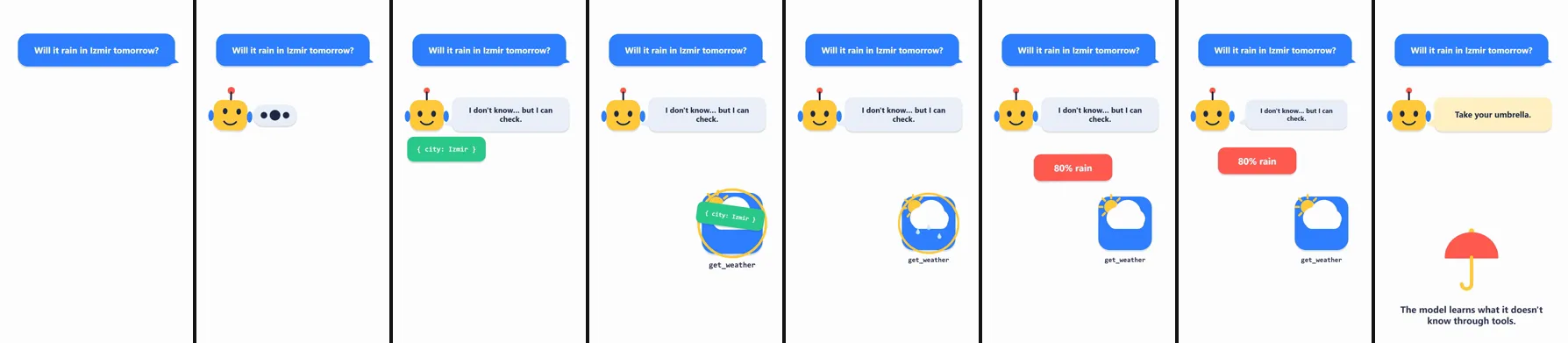
Check strip: 8 evenly spaced frames from the video. These are the frames reviewed in the check.
#### 22. Fitting into 16 GB: quantization
14 billion parameters: 28 GB at 16-bit, 14 GB at 8-bit, 7 GB at 4-bit.
**Guiding skill:** `remotion-best-practices`.
**Technology:** [Remotion](https://www.remotion.dev/) 4, React, @remotion/paths, @remotion/noise.
**Request (prompt):** Following the remotion-best-practices skill, make a 13-second vertical (1080×1920) explainer in Remotion; draw lines with @remotion/paths and add jitter with @remotion/noise. Visual language: green oscilloscope/HUD on graphite, mono type, thin grid, scanlines. Story: (0–3 s) a large block: ‘14 billion parameters · 16-bit ≈ 28 GB’. Next to it a GPU frame: ‘16 GB’. The block doesn’t fit; a red warning lights up. (3–9 s) One parameter is magnified: ‘0.73821947’ loses digits → ‘0.738’ → ‘0.74’. The block shrinks step by step: ‘8-bit ≈ 14 GB’, ‘4-bit ≈ 7 GB’. (9–13 s) The block fits into the card; the remaining space is marked ‘room for context’. Final text: ‘Give up a little precision and it fits.’ Numbers must be correct (parameters × bytes).
**What happened:** We used Remotion, the engine of our video pipeline, this time in an oscilloscope style. Lines are drawn with @remotion/paths and the jitter comes from @remotion/noise; everything is computed from the frame number. The numbers are parameters × bytes as the prompt asked: 14 billion × 2 = 28 GB, × 1 = 14 GB, × 0.5 = 7 GB, leaving 9 GB free on the card (in practice there’s some overhead too). The model added its own logic: 8-bit already fits into 16 GB, so the red warning clears there. The render took 9 seconds. Remotion delivered full-range colour and a silent audio track, so we re-encoded.
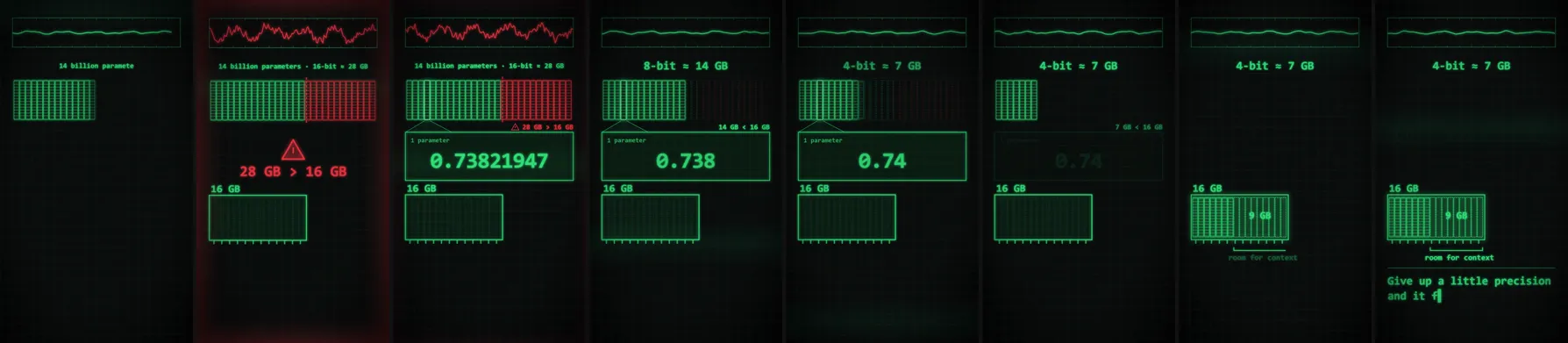
Check strip: 8 evenly spaced frames from the video. These are the frames reviewed in the check.
#### 23. Hallucination
Fluent ≠ true. Both the book and the author are made up.
**Guiding skill:** none, technology directly.
**Technology:** [Rough.js](https://roughjs.com/) 4.6.6, Canvas.
**Request (prompt):** Make a 12-second vertical (1080×1920) hand-drawn explainer with Rough.js. Seed the strokes so they don’t jitter between frames; reveal the drawing with a mask that opens over time. Visual language: dark green chalkboard, chalk white and yellow, faint chalk-dust smudges, handwritten font. Story: (0–3 s) a question is chalked on the board: ‘Who wrote The Law of the Blue Moon?’ (the book is made up). (3–6 s) A chalk robot answers confidently: ‘Elif Demir, 1987.’ and draws an arrow to a book. (6–9 s) We zoom into the book: the pages are blank; a big chalk X slashes across it. (9–12 s) The robot erases and rewrites: ‘I’m not sure — I couldn’t find a source.’ Final text: ‘Fluent ≠ true.’
**What happened:** Rough.js makes lines wobble like hand drawing, but if you redraw every frame the wobble changes too and the image boils. Giving each shape a fixed seed kept the lines identical from frame to frame. The “being chalked” effect uses a soft-edged mask and erasing uses the same mask in reverse, with chalk dust falling at the mask’s edge. Since the font might not carry the ”≠” sign, Rough.js draws that too. The English answer didn’t fit its bubble and was split over three lines; in the last frame one line sat on the bubble’s edge, which we spotted on the check frame and fixed.
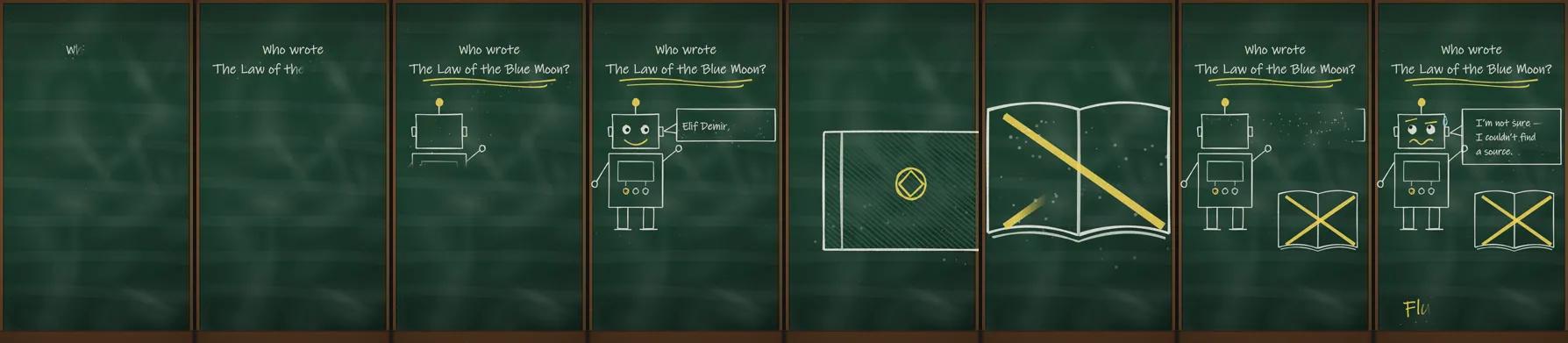
Check strip: 8 evenly spaced frames from the video. These are the frames reviewed in the check.
#### 24. What is a skill?
With the cartridge plugged in, the robot learns to make films.
**Guiding skill:** none, technology directly.
**Technology:** [Zdog](https://zzz.dog/) 1.1.3 (pseudo-3D), Canvas.
**Request (prompt):** Make a 12-second vertical (1080×1920) pseudo-3D explainer with Zdog. Visual language: soft pastels, rounded toy-like objects, flat shading, a slowly rotating camera. Story: (0–3 s) a small round robot spins and tries to make a film; smoke puffs from its head. Text: ‘Knows everything, does nothing the proper way.’ (3–7 s) A cartridge labelled ‘SKILL: motion’ drops from above and plugs into the robot’s back; its eyes light up. (7–10 s) The robot now produces a small clapperboard and a spinning film strip. (10–12 s) The camera pulls back: other cartridges on a shelf (‘GSAP’, ‘Remotion’, ‘Lottie’). Final text: ‘A skill = packaged know-how.’
**What happened:** Zdog is a small pseudo-3D library for round, toy-like objects. It can’t draw text, so the cartridge labels are computed from each object’s projected screen position and written on a separate 2D layer, scaling as the cartridge turns toward the camera. The prompt asked for a rotating camera; so that the cartridge visibly plugs into the robot’s back, the model swayed the camera gently and spun the robot instead. The requested version wasn’t on one CDN and was loaded from another. This example is really the round’s summary: a skill is a cartridge that plugs into a job the model knows about but can’t do the proper way.
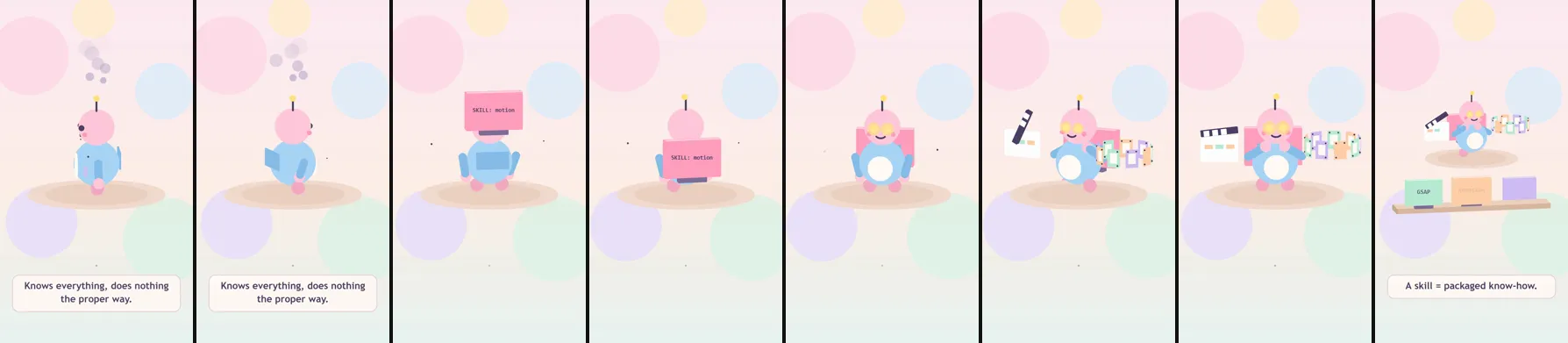
Check strip: 8 evenly spaced frames from the video. These are the frames reviewed in the check.
### Round 6: Eight different kinds in one session
I did this round in a single chat, with requests that came one after another, and we drew all of it with HyperFrames. The first request was to explain a topic from an earlier round (a multi-agent orchestra) again, this time with HyperFrames and in 15 seconds. Next I asked for a showreel in English, then gave the link to a Three.js prompt I’d seen on YouMind. Finally I asked: “Have you made every kind of video you can?” Claude picked five kinds it hadn’t made yet in this chat: kinetic typography, an interface demo, a shader loop, a maths visualisation and a transparent overlay. It wrote the prompt for each and handed the work to five parallel sub-agents (Sonnet). Each sub-agent also read the same shared brief: the rules, the mandatory check steps and a list of traps measured earlier in this chat. The main session then reopened and measured the results itself: loop similarity, the alpha channel and the prime count. The shared rules are the same as in earlier rounds: a frame depends only on time, text is at least 32 pixels, no paid services and no sound. The videos in this round have one language each; every example says which.
#### 25. Opus splits the work across sub-agents
A big job doesn't fit in one context: the conductor splits it, the team works at once, the conductor verifies. On-screen text is in Turkish.
**Guiding skill:** `hyperframes-animation`, `motion-graphics` (HyperFrames).
**Technology:** [HyperFrames](https://github.com/heygen-com/hyperframes), [GSAP](https://gsap.com/) 3.14 with MotionPathPlugin, HTML and CSS.
**Request (prompt):** /hyperframes-animation Explain, in a 15-second motion graphic that shows off your best abilities, how Opus splits work across sub-agents and orchestrates them. (Translated from Turkish.)
**What happened:** It was a short request; the model built the scene itself and used the channel’s colours (navy, blue, amber). The ‘BIG JOB’ block doesn’t fit inside a ‘single context’ frame, and the frame shakes. A beam from the Opus node cuts the block into four with three slices. The pieces drop onto Research, Code, Render and Measure cards, get sonnet and haiku labels, and their rings fill at different speeds. Each finished card sends its result back to the conductor as a packet along the line. The model-to-task pairing comes from our real rule: code and research go to sonnet, mechanical work to haiku. HyperFrames’ check caught two things. It rejected a letter-spacing animation because it jitters. It also flagged keeping the ‘BIG JOB’ text sliced inside four strips as ‘occluded text’, so the text was moved onto a single layer above the strips. The render took 26 seconds.
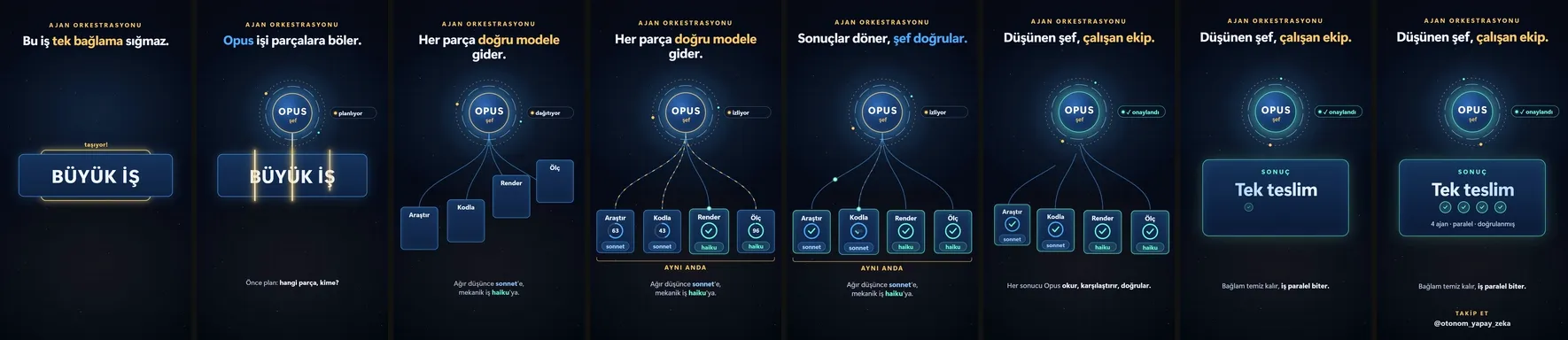
Check strip: 8 frames from the video. These are the frames reviewed in the check.
#### 26. A motion designer’s showreel
Eight techniques with fast transitions; scene name and timecode in the corner.
**Guiding skill:** `hyperframes-animation`.
**Technology:** HyperFrames, GSAP 3.14, Canvas 2D (particles), CSS 3D transforms, an SVG filter (fluid merging), Bahnschrift.
**Request (prompt):** Make a dynamic 15-second motion graphics video that shows what an incredible motion designer you are, like it’s your showreel for a resume. Go all out.
**What happened:** It’s cut like a showreel you’d put on a CV: each scene is a separate skill, and the corner display (timecode, scene number and name) says so outright. In order: kinetic type, a 105-tile grid wave, the word ‘PRECISION’ gathered from thousands of particles, a cube spinning in true perspective with a tunnel of flying rings, a data chart with a counter, fluid blobs that stick together, a rhythmic edit and a logo close. Slanted colour panels sweep the screen between scenes. In the first version we reviewed 22 frames and found five defects. On the way out, letters caught on their masks and were clipped. The grid ran over the corner labels. The colour ramp passed through green and left the palette. The word ‘FLUID’ turned a muddy tone in the blend. The closing subtitles collided with the circle. All five were fixed. The render took 22 seconds; the video is 12 MB.
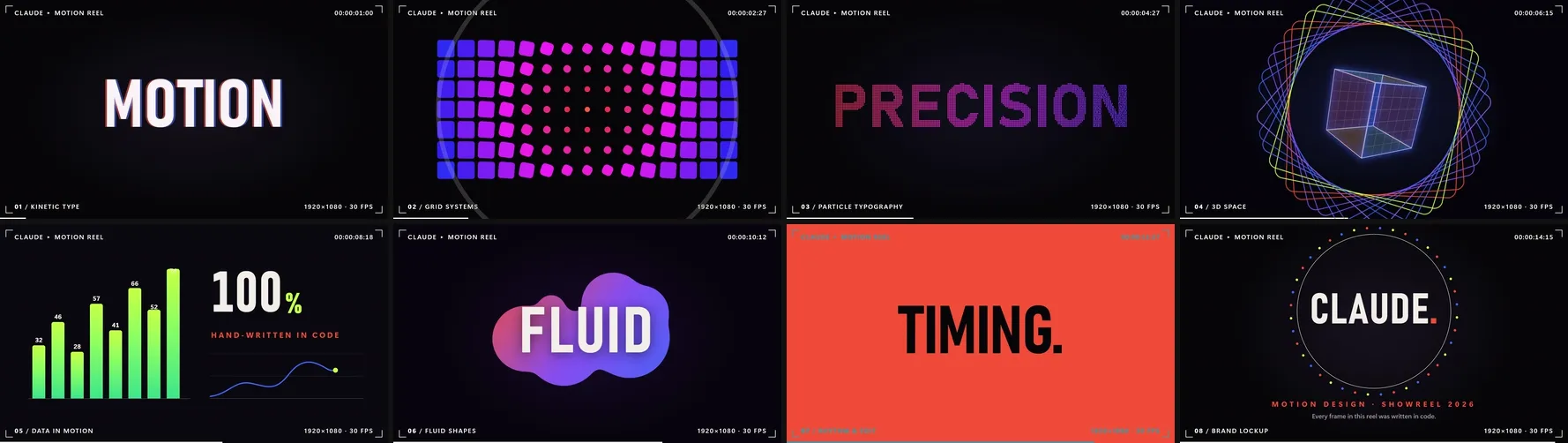
Check strip: 8 frames from the video. These are the frames reviewed in the check.
#### 27. From a pencil sketch to a house
Four stages: first lines, massing, detail, finished home.
**Guiding skill:** `hyperframes-animation` (Three.js adapter).
**Technology:** HyperFrames, [Three.js](https://threejs.org/) r181 WebGPURenderer (on its WebGL2 backend), TSL node materials, GSAP (text layer).
**Request (prompt):** A prompt from YouMind ([source](https://youmind.com/video-prompts/house-growth-3d-animation-12224), @wluha): a 3D animation of a house growing out of a pencil sketch line by line, going through first lines, massing, detail and finished home, built with Three.js and TSL. I gave the model the link; it built the rest.
**What happened:** The house is built in code from boxes and roof prisms; there are no image or model files. The lines grow directly on the GPU with TSL: each line’s tip moves from its start to its end based on its own start time. As in an architect’s sketch, every line is drawn twice and overshoots its ends, and a 3D pencil lifts and moves from line to line. In the massing stage the house is ‘printed’ up from the ground by clipping it by height, with an orange glow band riding the cut. In the last stage colour spreads from the door like watercolour with a wavy edge; the paper background turns into a sunset sky and the windows light up. Where we got stuck: the frames came out right in the preview, but the video renderer never saw the scene as ready. The cause was Three.js’ shader-compile step (compileAsync), which waits for a screen refresh. Replacing it with a single warm-up draw let the video render in 31 seconds.
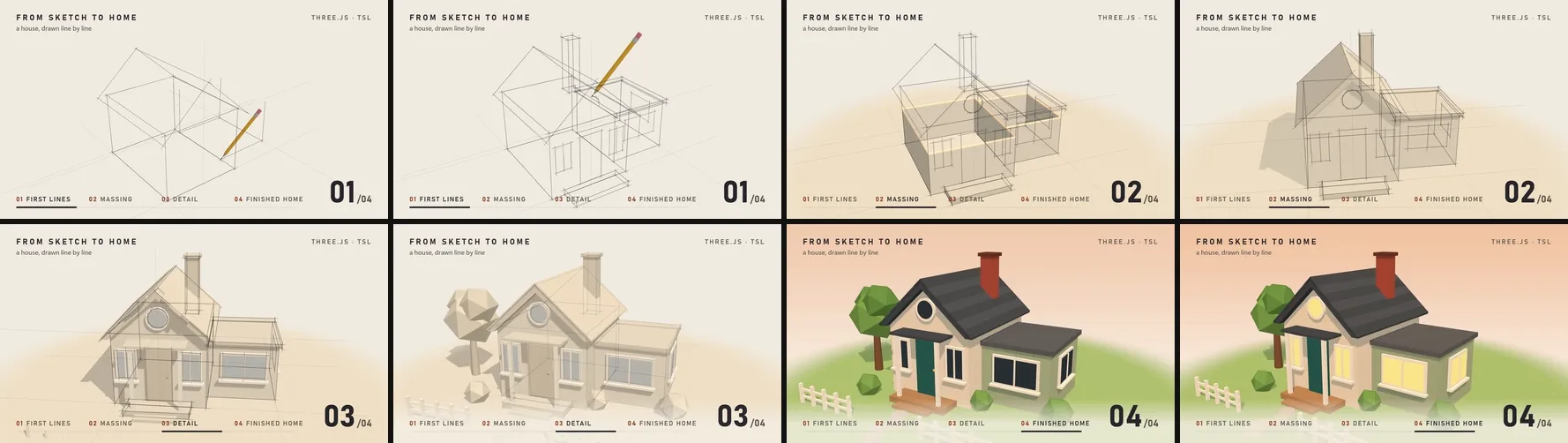
Check strip: 8 frames from the video. These are the frames reviewed in the check.
#### 28. A kinetic typography poster
A model answers, an agent finishes the job: six beats, each with its own entrance. On-screen text is in Turkish.
**Guiding skill:** `hyperframes-animation` (the `kinetic-beat-slam` rule).
**Technology:** HyperFrames, GSAP 3.14, Bahnschrift and Segoe UI Variable.
**Request (prompt):** 1080×1920, 15 seconds, silent. Typography and flat colour blocks only; no images, icons or photos, the motion is the message. Flow (in Turkish): ‘A model / answers.’ · ‘An agent / finishes the job.’ · ‘It plans.’ · ‘It uses tools.’ · ‘It checks the result.’ · ‘It retries if needed.’ · a large close with the channel name (‘Autonomous AI’), a ‘Follow’ line and ‘@otonom_yapay_zeka’ underneath, held for the last 2.5 seconds. Style: Swiss and brutalist poster, huge condensed Bahnschrift against light Segoe UI, the channel palette, hard cuts to full-screen amber and blue blocks; when the colour changes the text colour inverts. Use a different entrance for every beat, no repeats: letters rising through a mask, sliding into place, a scale slam, a line splitting open from the middle, scattered letters gathering, a line wiping the text and revealing the new one. The rhythm shouldn’t be even; make it musical. Text at least 32 pixels, 140 pixels clear on the right and 300 at the bottom.
**What happened:** This and the next four examples were produced at the same time by five separate sub-agents. Every beat comes in its own way: letters rising through a mask, two words arriving from either side, a slam from 3.6× scale with a short shake, a line opening from the middle with two shutters, letters gathering from scattered positions, the word for ‘retries’ being struck through and swept away for a new one. The durations are deliberately uneven: 2.1 / 2.0 / 1.2 / 1.2 / 1.8 / 2.9 / 3.8 seconds. The blue square in the close is the blinking cursor from the first scene coming back. In its frame review the sub-agent caught the accent on the closing title’s last letter running into the blue block and the closing band showing too early, and fixed both. The render took 18 seconds; the video is 4.6 MB.
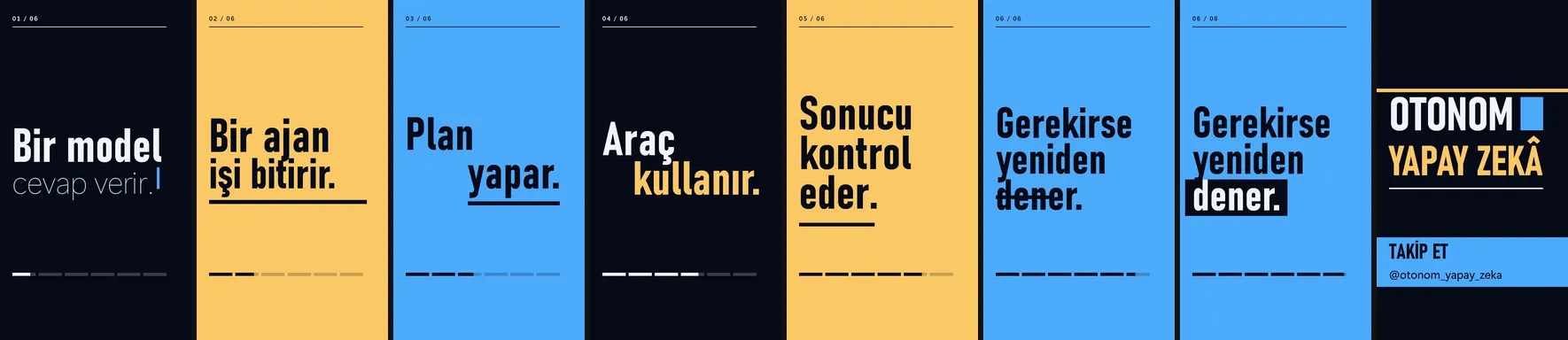
Check strip: 8 frames from the video. These are the frames reviewed in the check.
#### 29. An agent fixes a failing test
Failure, reading, fix, verification: the camera shows each step up close. The interface is in English, the section titles in Turkish.
**Guiding skill:** `hyperframes-animation` (the `viewport-change` and `multi-phase-camera` rules).
**Technology:** HyperFrames, GSAP 3.14, an editor interface drawn in HTML and CSS, Consolas.
**Request (prompt):** 1920×1080, 15 seconds, silent. A realistic but brand-free dark IDE and terminal; the agent is called ‘agent’. The story is told with the camera, zooming and panning over the window group. (0–2.5 s) `npm test` is typed character by character and red output appears: a discount is applied twice, 1 failed, 11 passed; the camera zooms into the failure. (2.5–5.5 s) The agent panel reads the files, each line gets a tick and is highlighted in the file tree. (5.5–9 s) The code opens in the editor; the deleted red line slides out and the green line is typed. (9–12 s) The tests run again, 12 tests turn green one by one and the counter reaches ‘12 passed’. (12–15 s) The camera pulls back; the headline reads ‘The agent found, fixed and verified the bug.’ (in Turkish). Section titles in Turkish: 01 Failure · 02 Reading · 03 Fix · 04 Verification. Micro-details decide the quality: cursor, syntax colours, smooth camera. Every piece of text, code included, is at least 32 pixels on the canvas, so show few lines in the editor.
**What happened:** The whole interface is drawn in HTML and CSS; there’s no screen recording. The camera works by panning and scaling a single wrapper and depends only on time. So do the typing effect and the blinking cursor, which means any frame can be reproduced. The bug is a real one: the discount is subtracted twice (`return base - off - off;`), and after the fix the line becomes `return base - off;`. The sub-agent caught and fixed seven defects on its own. One was the terminal’s green ring showing from the very first frame. Another was the deleted red line overlapping the green line being typed. And at one point the camera clipped the word ‘twice’ on the agent card. In the check, all 438 pieces of text passed the contrast threshold. This one took the longest, about 20 minutes. The render took 26 seconds.
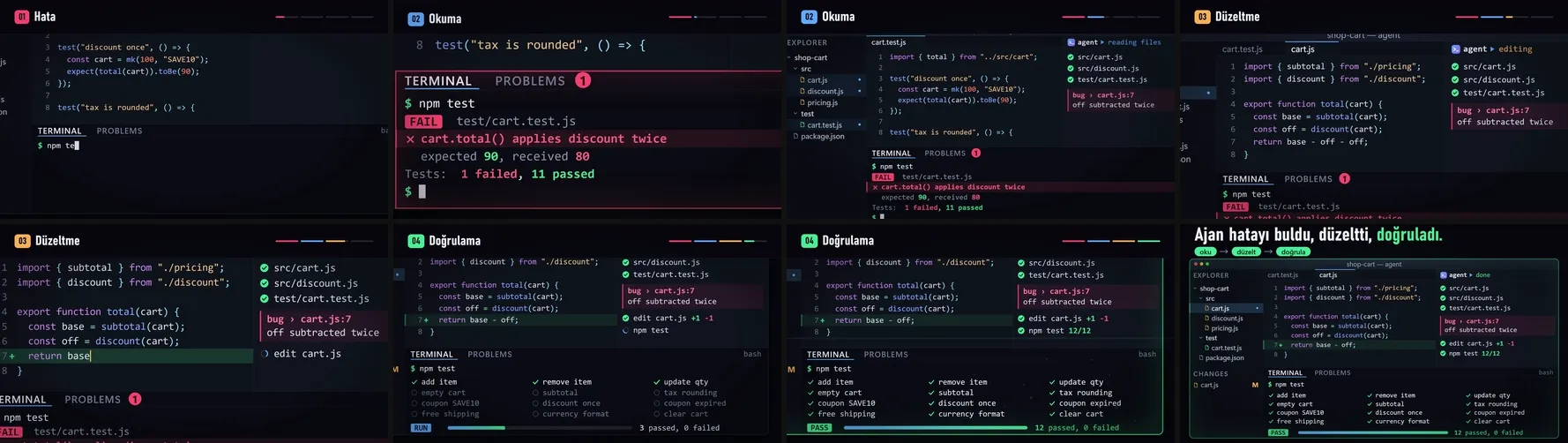
Check strip: 8 frames from the video. These are the frames reviewed in the check.
#### 30. An endless loop: an ink shader
Fluid ink drawn directly on the GPU that returns to its start after 12 seconds.
**Guiding skill:** `hyperframes-animation`.
**Technology:** HyperFrames, a raw WebGL2 fragment shader (GLSL), GSAP (only for time).
**Request (prompt):** 1080×1080, 12 seconds, silent. A seamless loop: the first frame and second 12 must be identical; use time periodically (angle = 2π·t/12, enter the noise with an offset on a circle). A full-screen WebGL2 fragment shader, drawing depends only on time. Look: ink spreading in water or liquid marble; noise inside noise (domain warping), fine silky lines, a sense of depth. Palette coral #ff5a36, violet #8b5cf6, blue #3d6bff, dark ground #07070a, near-white highlights. A light, seeded film grain per frame and a vignette. Prove the loop: extract the first and last frames, compare them and report the result.
**What happened:** The whole image is one fragment shader. Noise is nested inside noise three levels deep, with fine contour lines, surface slope for lighting and a per-frame film grain on top. Time isn’t used directly for the loop: the shader traces a circle through noise space, so at second 12 everything is back where it started. We measured it. We blurred two frames slightly and compared their similarity in decibels (PSNR); the higher the value, the more alike the frames. The last frame against the first came out at 27.6 dB, the same level as two consecutive frames (27.8 dB). A frame from the middle of the video is very different (14.6 dB). So the seam is no different from an ordinary frame-to-frame step. The first version looked more like lava than ink; the warping and noise were toned down. The grain made compression hard: the source video came out at 72 MB, and a second encode brought it to 14.6 MB.
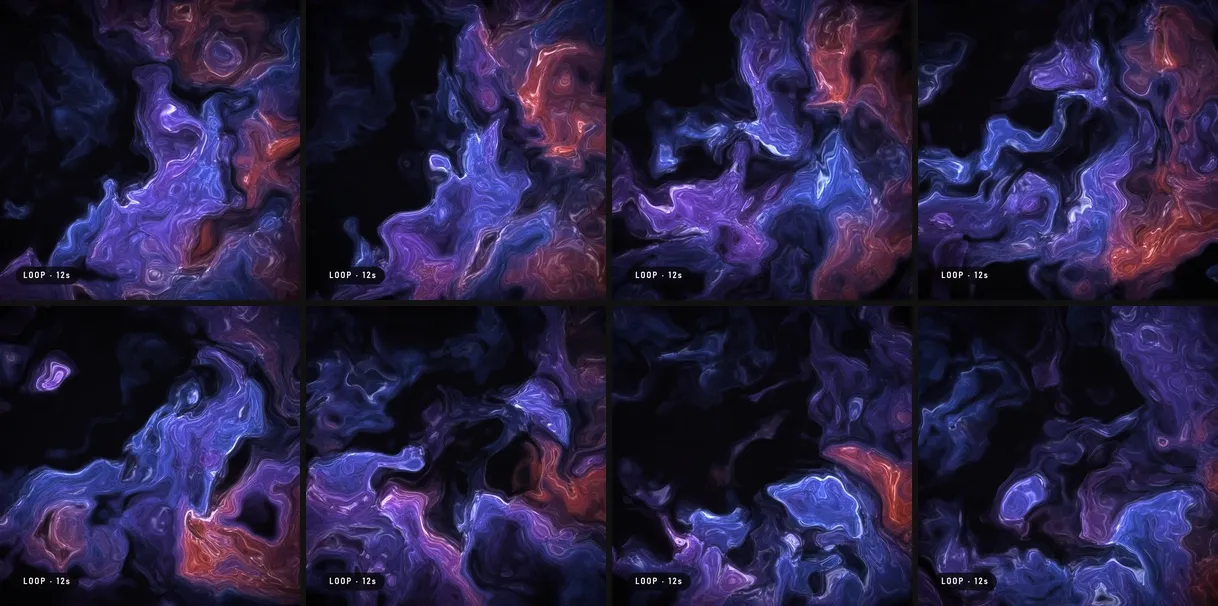
Check strip: 8 frames from the video. These are the frames reviewed in the check.
#### 31. The Ulam spiral: primes on the diagonals
Lay the numbers out in a spiral and the primes gather on diagonals; every number on screen was computed in code. On-screen text is in Turkish.
**Guiding skill:** `hyperframes-animation` (the `viewport-change` rule).
**Technology:** HyperFrames, GSAP 3.14, Canvas 2D, a sieve of Eratosthenes (JavaScript).
**Request (prompt):** 1080×1920, 15 seconds, silent, Turkish on-screen text. Accuracy rule: every number on screen is computed in code (sieve of Eratosthenes), never typed by hand. (0–3 s) 1 in the centre, numbers placed along a square spiral, 1–49 readable, primes glow amber: ‘Lay the numbers in a spiral… colour the primes.’ (3–7 s) The camera pulls back, the digits fade, cells become dots and the spiral grows to 10,000. (7–11 s) Diagonal patterns emerge and some diagonals are highlighted (for example Euler’s n²+n+41 polynomial); ‘The primes gather on diagonals.’ with a counter computed in code: ‘1–10,000: 1,229 primes’. (11–15 s) The spiral glows as if breathing: ‘Nobody knows exactly why.’ Scientific accuracy: part of the pattern is explained by some polynomials, but the pattern as a whole hasn’t been fully explained; don’t make a stronger claim.
**What happened:** None of the numbers on screen was typed by hand. The sieve counted 1,229 primes between 1 and 10,000, which matches the known value. The camera pulls back on a logarithmic scale from 49 numbers to 10,000; the digits fade and the cells turn into dots. The prompt had suggested Euler’s n²+n+41 polynomial as an example. The sub-agent measured in code that its primes don’t form a straight diagonal when the spiral starts at 1, and didn’t use it; showing scattered dots as a ‘diagonal’ would have been wrong. Instead it picked the densest diagonals from the data: the densest has 40 primes in 83 cells, 48.2%. The closing line is deliberately cautious: some of these concentrations are explained by certain polynomials, but the overall pattern isn’t proven (the Hardy–Littlewood conjecture is still open). In the first check, headlines rising through masks were flagged as ‘occluded text’; the entrances were rebuilt with opacity and a slide.
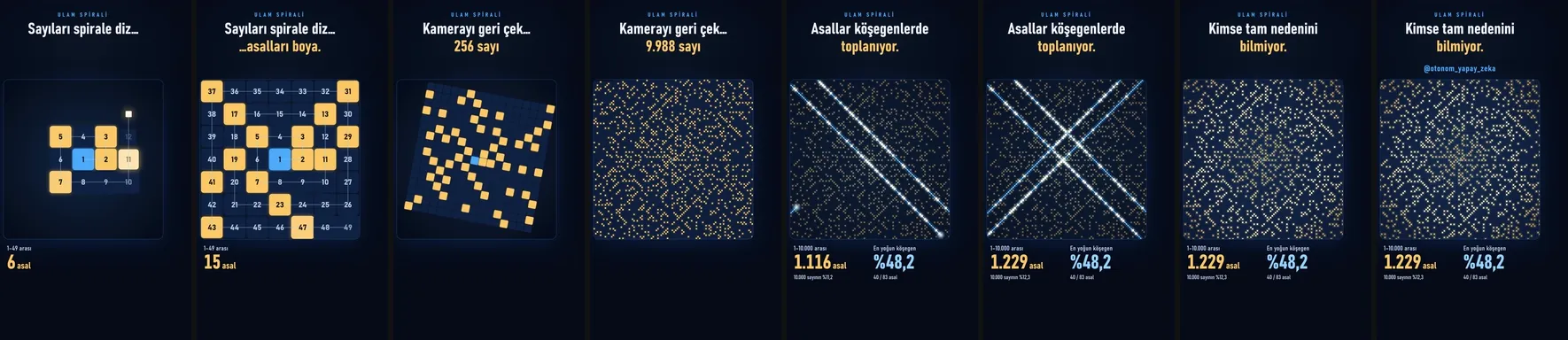
Check strip: 8 frames from the video. These are the frames reviewed in the check.
#### 32. A lower third on a transparent background
A layer to put on top of videos. Shown here on a grey background so it can be watched. On-screen text is in Turkish.
**Guiding skill:** `hyperframes-cli` (transparent render).
**Technology:** HyperFrames, GSAP 3.14, ProRes 4444 (.mov) and VP9 with an alpha channel (.webm), FFmpeg.
**Request (prompt):** 1920×1080, 8 seconds. The background must be fully transparent; this is a layer to go over a video. Read the transparent-render section first and prove the alpha channel really comes out. Bottom-left lower third: enters at 0.3 s, holds about 5 s, exits at 7.2 s. Top line ‘@otonom_yapay_zeka’, bottom line ‘AI agents · comparative explainers’ (in Turkish). Entrance: an amber vertical bar grows, a dark semi-transparent panel opens through a mask, the text rises out of a mask; the exit is the reverse and fast. Top right, a ‘Follow’ badge (in Turkish) springs in at 2.0 s, a glint passes over it, and it shrinks away at 6.8 s. At least 80 pixels in from the edges. For viewing, composite the transparent file onto a dark grey background as a separate copy.
**What happened:** This isn’t a video but a layer to go on top of one; the background is fully transparent. HyperFrames delivered the same scene in two forms, ProRes 4444 .mov (62 MB) and VP9 .webm (1.4 MB), both with an alpha channel. We measured the transparency at pixel level. The first and last frames are fully transparent. The panel’s alpha is 0.82 and the rest of the screen is zero. The same measurement let the sub-agent catch the badge ring showing from the very first frame in the first render (2,648 filled pixels on frame one), and it fixed it. One trap: FFmpeg only sees the .webm file’s transparency when it opens it with the libvpx decoder; the default decoder ignores the channel. The video on this page is the viewing copy, the transparent file composited onto grey.
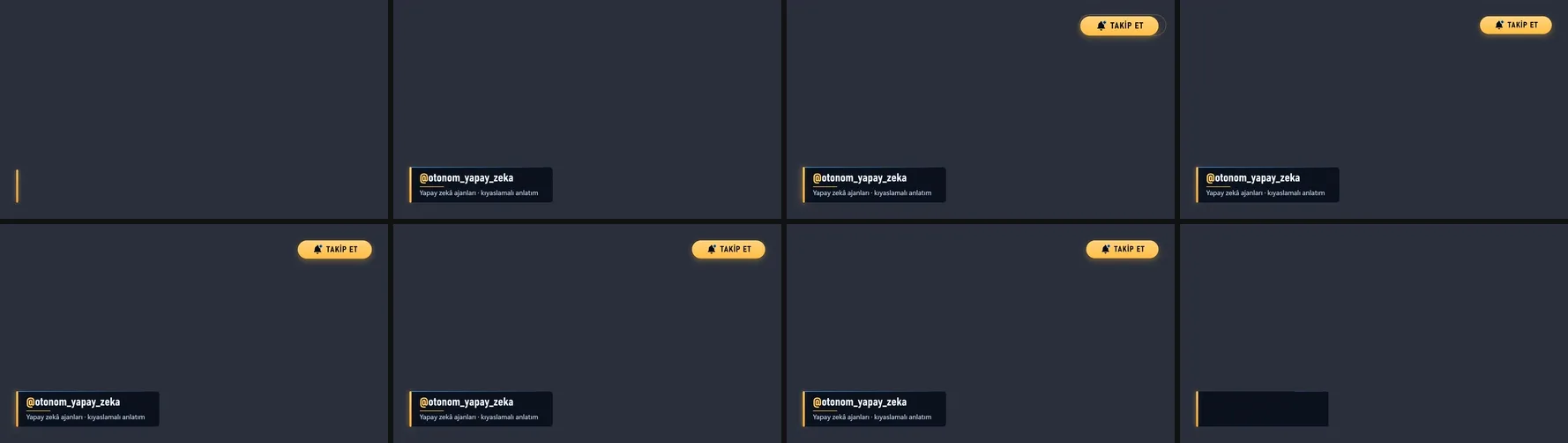
Check strip: 8 frames from the video. These are the frames reviewed in the check.
### What I took away
- **Rules and checks do more work than the prompt.** When a frame depends only on time, any mistake can be found and fixed on a single frame.
- **Zero counters still need eyes.** Contrast, an icon covering text, an invisible obstacle in the physics: the counters saw none of these.
- **Repetition is sneaky.** Each scene looked fine on its own, but watched back to back the same template showed through. Now for every new scene I check whether its color, layout, elements and technology differ from the previous ones.
- **Free libraries are enough.** All 32 examples on this page were made with code and free libraries; we never needed a paid service.
- **The cheaper-model question is still open.** Once the recipe and the check are in place, I think a cheaper model could produce similar scenes, but I haven’t tested that yet.
- **A skill provides the method, not the drawing.** The check commands of the HyperFrames and Remotion skills caught errors up front; archify’s output didn’t fit video, but its theme and correctness check were useful. In the examples without a skill (p5.js, Rough.js, Zdog, Lottie), I wrote the same method into the prompt myself.
- **A ready-made block is fast but narrow.** A catalog block installed with one command and gave a cinematic opener, but colour, subline and duration weren’t among its variables and had to be completed from outside the block.
- **A shared brief makes parallel sub-agents work.** Five sub-agents produced five videos at the same time. I gave each the traps measured in this chat in a single file, and they found their own defects by reviewing frames. I still reopened and measured every result in the main session.
- **The proof depends on the kind.** For a loop it’s the similarity of the first and last frames, for an overlay the alpha channel, for maths the count in code, for a 3D scene a frame taken from the actual video. Every kind has its own thing to measure before saying “done”.
## If you want to try it yourself
- **Draw the last frame first.** Approve what stays on screen when the animation ends, then add the motion. Fixing a still is far cheaper than fixing a video.
- **Tie each frame to time.** Every frame is computed from the second alone, so the same second always gives the same frame.
- **Write the counter, then look anyway.** An overflow and small-text counter catches half the problems; your eye catches the rest on a control frame.
## Other people’s collections: examples with their prompts
There is far more ambitious work out there than my experiments. I collect these as I find them; most show the prompt that produced the video.
**Archives of examples with prompts**
- [Skillry — Opus 5.5 videos](https://skillry.dev/ai-videos/opus-5-5): hundreds of videos, each with its prompt and a remake, filterable by type such as motion graphics, explainer and 3D.
- [revid.ai — Claude Opus 5.5 motion graphics](https://www.revid.ai/claude-motion-graphics): videos and their prompts together.
- [YouMind — Opus 5.5 motion graphics prompts](https://youmind.com/opus-5-5-prompts): a list of prompts you can copy and adapt.
- [Jason Zhu — Claude 5.5 prompt library](https://jasonzhu.ai/en/prompts/claude-opus-5-5): video, motion, 3D and game prompts on separate pages.
- [awesome-opus-5.5-video (GitHub, zhuyansen)](https://github.com/zhuyansen/awesome-opus-5.5-video): a large collection sorted by type, some with prompts.
- [awesome-opus5-5-videos (GitHub, yihui-dev)](https://github.com/yihui-dev/awesome-opus5-5-videos): prompt files and links to the original posts.
- [opus-video-prompts (GitHub, joeseesun)](https://github.com/joeseesun/opus-video-prompts): a ready-to-paste prompt collection.
**Write-ups on how they’re made**
- [iArt.ai — Claude motion graphics: 5 Opus 5.5 prompts](https://www.iart.ai/blog/claude-motion-graphics): full prompts for five types (showreel, logo, kinetic type, 3D loop, data story) and what each produced.
- [AI Blew My Mind — make videos with Claude Opus 5.5: 10+ examples](https://aiblewmymind.substack.com/p/claude-opus-5-5-video-animations): examples with every prompt.
- [Ciyo — how the one-prompt motion graphics are made](https://ciyo.ai/blog/opus-5-5-video-motion-graphics-guide): a breakdown of the “one-line showreel” prompt.
- [OmniaKey — Opus 5.5 video](https://omniakey.com/blog/claude-opus-5-5-video): a workflow and sample prompts.
- [Medium — Opus 5.5 prompt library for creators](https://medium.com/@nr7670/opus-5-5-prompt-library-for-creators-motion-graphics-ai-video-ca43a6d562ad): reusable prompt patterns; the post also promotes a prompt app.
**Made with HyperFrames**
- [HyperFrames showcases](https://hyperframes.app/showcases): ready-made compositions such as app promos, charts and maps.
I’ll update this list as I come across new and good examples.
## Frequently Asked Questions
### Does Claude Opus produce videos?
No. The model doesn’t hand you a video file; it writes text. That text can be a program that draws how a frame looks, and running it for every frame and joining the frames gives you the video.
### Does a frame come out the same every time?
Yes, because a frame depends only on time. There is no clock, timer or per-run randomness, so the frame at the same second is always identical.
### How do you find the mistakes?
For each experiment I run a check that counts text overflowing a panel, overlapping other text or being too small to read. The counters weren’t enough, though; things like an unreadable number I only caught by looking at check frames by eye.
### Are these good examples?
I don’t claim that. I share them with the prompts and where we got stuck, so they can give you ideas.
[Back to top ↑](https://oguzerol.com/en/agentic_ai_skills/motion_design_with_just_claude_opus/#icerik)
## Follow for content about AI
- [YouTube@agentic_ai_skills(opens in a new tab)](https://www.youtube.com/@agentic_ai_skills)
- [Instagram@agentic_ai_skills(opens in a new tab)](https://www.instagram.com/agentic_ai_skills/)
- [Facebook@agentic.AI.skills(opens in a new tab)](https://www.facebook.com/agentic.AI.skills/)
- [X@agenticAIskills(opens in a new tab)](https://x.com/agenticAIskills)
- [TikTok@agentic_ai_skills(opens in a new tab)](https://www.tiktok.com/@agentic_ai_skills)
- [WhatsApp+90 549 654 64 89(opens in a new tab)](https://wa.me/905496546489)
## More videos
- [Can You Run AI Locally on a 16 GB Graphics Card?8 October 20262:39](https://oguzerol.com/en/agentic_ai_skills/can_you_run_ai_locally_on_a_16gb_graphics_card/)
- [Customer Wrote at Night, Request Ready by Morning26 September 20262:51](https://oguzerol.com/en/agentic_ai_skills/customer_wrote_at_night_request_ready_by_morning/)
- [Give AI the Address, Not the Route: Which Job Goes to Which Model26 September 20262:51](https://oguzerol.com/en/agentic_ai_skills/give_ai_the_address_not_the_route/)
- [Stop Using Excel and Google Sheets as a Database: To a Web App22 September 20262:47](https://oguzerol.com/en/agentic_ai_skills/stop_using_excel_and_sheets_as_a_database/)
- [ADHD Didn't Change. The Tools Did: A Scattered Brain and Agents22 September 20262:52](https://oguzerol.com/en/agentic_ai_skills/adhd_the_tools_caught_up/)
- [Can AI Fix Its Own Mistakes? I Checked It Is Not I Fixed It20 September 20262:51](https://oguzerol.com/en/agentic_ai_skills/can_ai_fix_its_own_mistakes/)
- [OpenRouter and Hugging Face Aren't Models: Three Ways In18 September 20262:53](https://oguzerol.com/en/agentic_ai_skills/openrouter_hugging_face_three_ways/)
- [How Do AI Agents Work? Same Model, Different Results13 September 20262:52](https://oguzerol.com/en/agentic_ai_skills/how_ai_agents_work/)
- [AI Agents for AEC Firms: How the Five-Layer Setup Works6 September 20262:42](https://oguzerol.com/en/agentic_ai_skills/ai_agents_for_aec_firms/)